
docker中ubuntu源更新慢加速 换为国内源 Debian10源
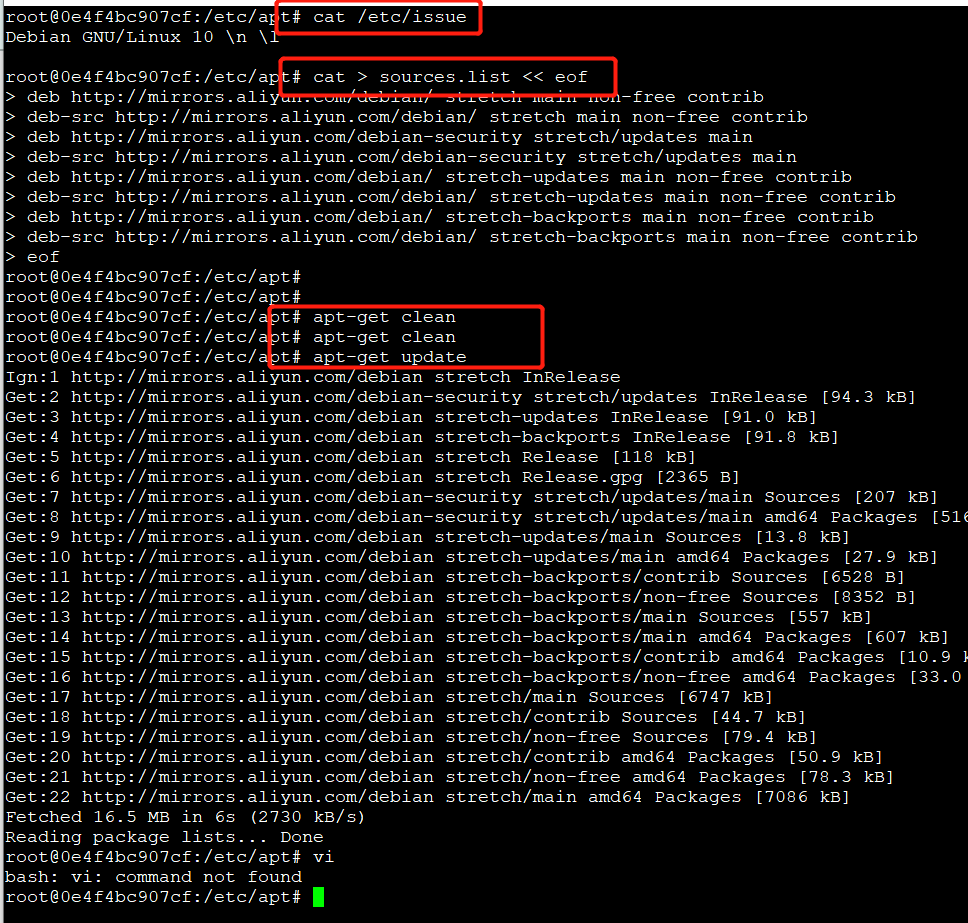
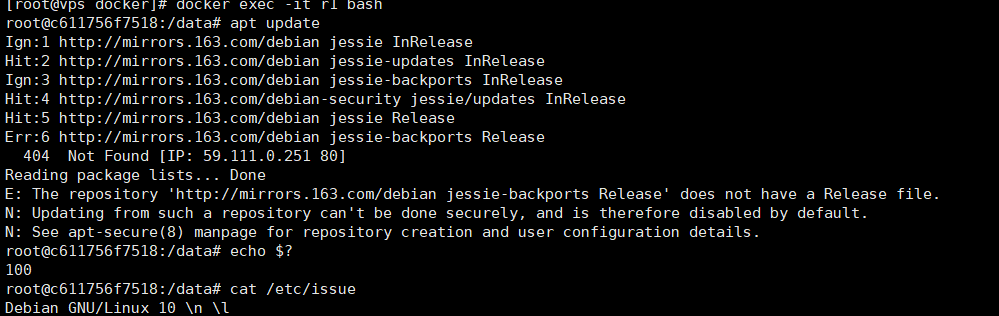
本来以为是Ubuntu打包的镜像,换了阿里源老是报错100公钥不可用,结果发现是Debian的操作系统,换位Debian的操作系统打包的,换位Debian的源即可
#源如果使用错误也会报错,没有Debian10的源,使用9.x的阿里源也能解决解决
cat /etc/issue  #查看版本

cat /etc/os-release

cat > /etc/apt/sources.list <<eof

deb http://mirrors.aliyun.com/debian/ stretch main non-free contrib

deb-src http://mirrors.aliyun.com/debian/ stretch main non-free contrib

deb http://mirrors.aliyun.com/debian-security stretch/updates main

deb-src http://mirrors.aliyun.com/debian-security stretch/updates main

deb http://mirrors.aliyun.com/debian/ stretch-updates main non-free contrib

deb-src http://mirrors.aliyun.com/debian/ stretch-updates main non-free contrib

deb http://mirrors.aliyun.com/debian/ stretch-backports main non-free contrib

deb-src http://mirrors.aliyun.com/debian/ stretch-backports main non-free contrib

eof

########################################################

cat > /etc/apt/sources.list <<eof

deb http://mirrors.163.com/debian/ stretch main non-free contrib

deb http://mirrors.163.com/debian/ stretch-updates main non-free contrib

deb http://mirrors.163.com/debian/ stretch-backports main non-free contrib

deb-src http://mirrors.163.com/debian/ stretch main non-free contrib

deb-src http://mirrors.163.com/debian/ stretch-updates main non-free contrib

deb-src http://mirrors.163.com/debian/ stretch-backports main non-free contrib

deb http://mirrors.163.com/debian-security/ stretch/updates main non-free contrib

deb-src http://mirrors.163.com/debian-security/ stretch/updates main non-free contrib

eof
docker中ubuntu源更新慢加速 换为国内源 Debian10源的更多相关文章
- ubuntu18.04 apt-get换国内源 阿里源 163源 清华源 中科大源
服务器上安装了最新的Ubuntu Server 18.04,代号为bionic.使用apt-get命令安装软件时,有时候速度比较慢,有时候会失败.因此考虑用国内的镜像源更换下apt-get的默认源. ...
- docker/kubernetes国内源/镜像源解决方式
最近在使用kubeadm时,被各种连接不上搞到崩溃.费了很多力气,基本都解决了.这里统一整理了国内的一些镜像源,apt源,kubeadm源等,以便查阅. 国内镜像源 Azure China提供了目前用 ...
- FreeBSD更换国内源(pkg源使用台湾源,中科大源备用)
安装后第一件事就是更换国内源,不然后面安装桌面等,不用国内源下载太慢. 修改 pkg 源 创建用户级 pkg 源目录:mkdir -p /usr/local/etc/pkg/repos ee /usr ...
- docker中Ubuntu安装jdk1.8
1.在宿主系统下载所需要的jdk版本的gz文件 https://www.oracle.com/technetwork/java/javase/downloads/jdk8-downloads-2133 ...
- Docker镜像加速,设置国内源
源地址设置 在 /etc/docker/daemon.json 中写入如下内容(如果文件不存在请新建该文件) { "registry-mirrors": [ "https ...
- Ubuntu 14.04 apt源更新
# 14.04 下进 my /etc/apt/sources.list /etc/apt/sources.bak vi /etc/apt/sources.list 从以下源中选择一个 源列表 Trus ...
- ubuntu 源更新(sources.list)
首先备份源列表: sudo cp /etc/apt/sources.list /etc/apt/sources.list_backup 而后用gedit或其他编辑器打开(也可以复制到Windows下打 ...
- 关于docker中容器可以Ping通外网,真机无法Ping通容器的问题
首先我们要知道整体的框架结构,docker是我们安装在centos7上的,而centos7是安装在vmware上.其中docker中还有若干容器运行. 整体框架图如下: 我们将它分为两部分,一部分是d ...
- .condarc(conda 配置文件)、换国内源
原文地址 https://blog.csdn.net/lanchunhui/article/details/71379555 Configuration — Conda documentation . ...
随机推荐
- 【笔记】《Redis设计与实现》chapter13 客户端
服务器为每个客户端建立相应的redis.h/redisClient结构,这个结构保存了客户端当前的状态信息 客户端的套接字描述符 客户端的名字 客户端的标志值 只想客户端正在使用的数据库的指针,以及该 ...
- JAVAEE_Servlet_23_路径编写总结和url_pattern的编写方式
路径编写总结和url_pattern的编写方式 路径的编写 超链接 form表单的action属性 重定向 response.sendRedirect("/项目名/资源路径"): ...
- N 皇后-力扣解题
n 皇后问题 研究的是如何将 n 个皇后放置在 n*n 的棋盘上,并且使皇后彼此之间不能相互攻击. 给你一个整数 n ,返回所有不同的 n 皇后问题 的解决方案. 每一种解法包含一个不同的 n 皇后问 ...
- 关于Spring Boot 多数据源的事务管理
自己的一些理解:自从用了Spring Boot 以来,这近乎零配置和"约定大于配置"的设计范式用着确实爽,其实对零配置的理解是:应该说可以是零配置可以跑一个简单的项目,因为Spri ...
- 【golang】golang中结构体的初始化方法(new方法)
准备工作: 定义结构体:Student import ( "fmt" "reflect") type Student struct { StudentId st ...
- hdu4499 搜索
题意: 给你一个棋盘,最大是5*5的,问你最多可以放多少个炮,炮和炮之间不可以相互攻击,这块只的是只能走一步,不存在两个炮中间三个棋子的情况.. 思路: 刚开始想的是把所有的空位置都 ...
- hdu1316 大数
题意: 给你一个区间,问这个区间有多少个斐波那契数. 思路: 水的大数,可以直接模拟,要是懒可以用JAVA,我模拟的,打表打到1000个就足够用了... #include<s ...
- 基于C++简单Windows API的socket编程(阻塞模式)
1. 概述:简单的基于Windows API的socket点对点聊天程序,为了方便初学者,本文代码均采用阻塞原理编写. 2. 代码样例 Server.cpp(服务端) #include <cst ...
- DVWA之File Upload (文件上传漏洞)
目录 Low: Medium: 方法一:抓包修改文件的type 方法二:00截断 High: Impossible : Low: 源代码: <?php if( isset( $_POST[ 'U ...
- C++ 三消游戏基本实现
最近在研究三消算法,我想试试在完全不借助网络资源的情况下搞定这个东西,所以有些地方可能不是最优的. 代码留此备忘. 1. 3x_desk_event.h 1 #pragma once 2 3 #ifn ...