效果:
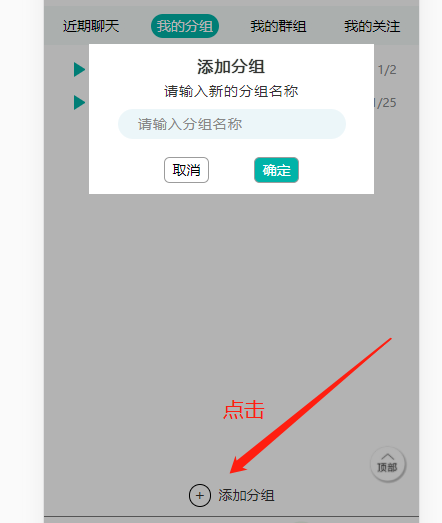
HTML:
<!-- 添加分组按钮 -->
<div class="group_add" onclick = "document.getElementById('light').style.display='block';document.getElementById('fade').style.display='block'">
<div class="group_add_icon">+</div>
<div class="group_add_title">添加分组</div>
</div>
<!-- 遮罩层 -->
<div id="light" class="content_box">
<div class="content_box_one">添加分组</div>
<div class="content_box_two">请输入新的分组名称</div>
<div class="content_box_three">
<input type="text" placeholder="请输入分组名称" type="text" class="content_box_three_input">
</div>
<div class="content_box_four">
<div class="content_box_four_btn1" onclick = "document.getElementById('light').style.display='none';document.getElementById('fade').style.display='none'">取消</div>
<div class="content_box_four_btn2">确定</div>
</div>
</div>
<div id="fade" class="black_overlay" onclick = "document.getElementById('light').style.display='none';document.getElementById('fade').style.display='none'"></div>
CSS(弹出内容、遮罩层样式)
/* 遮罩层 */
.black_overlay{
display: none;
position: absolute;
top: 0%;
left: 0%;
width: 100%;
height: 100%;
background-color: black;
z-index: 98;
-moz-opacity: 0.8;
opacity:.30;
filter: alpha(opacity=88);
}
.content_box {
display: none;
position: absolute;
overflow: auto;
width: 76vw;
height: 40vw;
background-color: #fff;
top: 34%;
left: 12vw;
z-index: 99;
}
.content_box_one {
display: flex;
flex-direction: row;
align-items: center;
justify-content: center;
font-size: 16px;
/* font-weight: bold; */
letter-spacing: 1px;
margin-top: 3vw;
text-shadow: 0 0 1px #000;
}
.content_box_two {
font-size: 14px;
letter-spacing: 1px;
display: flex;
flex-direction: row;
align-items: center;
justify-content: center;
margin-top: 1vw;
}
.content_box_three {
width: 80%;
height: 8vw;
margin-left: 10%;
background-color: #ecf6f9;
border-radius: 20vw;
display: flex;
flex-direction: row;
align-items: center;
justify-content: center;
margin-top: 2vw;
}
.content_box_three_input {
background-color: #ecf6f9;
outline: none;
border: none;
width: 84%;
/* height: 26px; */
/* margin-top: 3px; */
/* margin-left: 5%; */
font-size: 14px;
letter-spacing: 1px;
}
.content_box_three_input::-webkit-input-placeholder {
color: rgb(136, 136, 136);
font-size: 14px;
}
.content_box_three_input:focus {
color: #000;
font-size: 14px;
}
.content_box_three_input:focus{
border:none;
font-size: 14px;
}
.content_box_four {
width: 60vw;
display: flex;
flex-direction: row;
margin-top: 5vw;
margin-left: 8vw;
}
.content_box_four_btn1 {
width: 12vw;
background-color: #fff;
border: 1px solid rgb(156, 156, 156);
color: #000;
margin-left: 12vw;
display: flex;
flex-direction: row;
align-items: center;
justify-content: center;
padding: 0.5vw 0;
border-radius: 1.5vw;
}
.content_box_four_btn2 {
width: 12vw;
background-color: #00b3a8;
border: 1px solid rgb(156, 156, 156);
color: #fff;
margin-left: 12vw;
display: flex;
flex-direction: row;
align-items: center;
justify-content: center;
padding: 0.5vw 0;
border-radius: 1.5vw;
}
参考来源:https://www.jb51.net/article/112380.htm
- js点击弹出div层
<!DOCTYPE html PUBLIC "-//W3C//DTD XHTML 1.0 Transitional//EN" "http://www.w3.org/ ...
- 工作当中实际运用(3)——js原生实现鼠标点击弹出div层 在点击隐藏
function onmou(){ var divs=document.getElementById('kefuDV');//获取到你要操作的div if (divs.style.display==& ...
- 使用js弹出div刷新时闪烁解决方法
<div style="visibility: hidden"> //弹出div内容 </div>
- js弹出div层内容(按回退键关闭div层及遮罩)
<!--弹出的div列表对应的详情--> <div id="newhtml" class="white_content"> <di ...
- jQuery实现打开网页自动弹出遮罩层或点击弹出遮罩层功能示例
本文实例讲述了jQuery实现打开网页自动弹出遮罩层或点击弹出遮罩层功能.分享给大家供大家参考,具体如下: 弹出层:两种方式 一是打开网页就自动弹出层二是点击弹出 <!DOCTYPE html ...
- 创建一个弹出DIV窗口
创建一个弹出DIV窗口 摘自: http://www.cnblogs.com/TivonStone/archive/2012/03/20/2407919.html 创建一个弹出DIV窗口可能是现在 ...
- 点击弹出 +1放大效果 -- jQuery插件
20140110更新: <!doctype html> <html> <head> <meta charset="UTF-8"> & ...
- jquery---点击弹出层
<!DOCTYPE html PUBLIC "-//W3C//DTD XHTML 1.0 Transitional//EN" "http://www.w3.org/ ...
- js弹窗 js弹出DIV,并使整个页面背景变暗
1.首先写一个遮罩层div,然后再写一个弹窗的div <!-- 遮罩层 --> <div id="cover" style="background: # ...
随机推荐
- golang中的tcp编程
1. tcp server package main import ( "bufio" "fmt" "net" ) func main() ...
- 带你十天轻松搞定 Go 微服务系列(六)
序言 我们通过一个系列文章跟大家详细展示一个 go-zero 微服务示例,整个系列分十篇文章,目录结构如下: 环境搭建 服务拆分 用户服务 产品服务 订单服务 支付服务(本文) RPC 服务 Auth ...
- python26day
内容回顾 多态: 一个类表现出的多种形态,实际上是通过继承来完成的 今日内容 super,调用父类的同名方法 按照mro顺序来寻找当前类的下一个类 封装 广义上的封装 方法属性名字前加了__,就变 ...
- 学习Java第17天
今天差不多搞清了Javaweb的基本学习路线及网站开发的基本流程,以前好像走了不少弯路,不过还好,明天开始学习Javaweb sql 总结了许多 新的学习方法,记笔记很重要,学多少忘多少. 练习也很重 ...
- java中的泛型,简单介绍。 修饰方法的用法
一.<R> ( R r ) 默认object 可以存所有类型. R 这个是随便定义的大写字母,前后要保持一致性! package com.aaa.test; /* * 演示 泛型 ...
- Codeforces Round #742 (Div. 2)
A. Domino Disaster 思路 按照题意模拟即可 如果是 对应关系为R --> R L --> L U --> D D --> U AC_CODE inline v ...
- ARC084F - XorShift
有两种解法,这里都放一下. 解法一 首先易知异或运算可以视作是 \(\mathbb{F}_2\) 意义下的每一位独立的加法. 因此我们可以考虑对于每个二进制数 \(s\) 构造一个多项式 \(F(x) ...
- CF1408G Clusterization Counting
首先,我们需要给一个连通块找到一个直观的合法判定解. 那么我们必须以一种直观的方式将边按照权值分开,这样才能直观地判定一个合法的组. 一个常见的方式是将边从小到大依次加入进来,那么在任意时刻图上存在的 ...
- Java多线程基础-ThreadLocal
感谢原文作者:Yuicon 原文链接:https://segmentfault.com/a/1190000016705955 序 在多线程环境下,访问非线程安全的变量时必须进行线程同步,例如使用 sy ...
- Java 中的锁原理、锁优化、CAS、AQS 详解!(转)
1.为什么要用锁? 锁-是为了解决并发操作引起的脏读.数据不一致的问题. 2.锁实现的基本原理 2.1.volatile Java编程语言允许线程访问共享变量, 为了确保共享变量能被准确和一致地更新, ...
