
MVC之实现基于token的认证
安装Nuget包
项目中添加包:dotnet add package Microsoft.AspNetCore.Authentication.JwtBearer
添加认证配置
Startup类中添加如下配置:
public void ConfigureServices(IServiceCollection services)

{

    ...

    services.AddAuthentication(defaultScheme: JwtBearerDefaults.AuthenticationScheme);

}

public void Configure(IApplicationBuilder app, IWebHostEnvironment env)

{

    ...

    app.UseAuthentication();

    app.UseAuthorization();

    app.UseEndpoints(endpoints =>

    {

        endpoints.MapControllers();

    });

}
AddAuthentication方法会向依赖注入容器添加认证服务和它所使用的其他服务,其参数defaultScheme用于指定当未指定具体的认证方案时将会使用的默认方案,上例为Bearer认证。
AddAuthentication方法的另一重载能够使用AuthenticationOptions类为认证过程中的每一个动作指明所使用的认证方案,如DefaultAuthenticateScheme、
DefaultChallengeScheme、
DefaultSignInScheme、
DefaultSignOutScheme、
DefaultForbidScheme。
如果没有为这些属性设置认证方案,则将使用DefaultScheme属性所指定的值。
当添加JwtBearer认证方式时,JwtBearerOptions对象能够配置该认证的选项,它的TokenValidationParameters属性用于指定验证Token时的规则:
var tokenSection = Configuration.GetSection("Security:Token");

services.AddAuthentication(options => {

    options.DefaultAuthenticateScheme = JwtBearerDefaults.AuthenticationScheme;

    options.DefaultChallengeScheme = JwtBearerDefaults.AuthenticationScheme;

}).AddJwtBearer(options => {

    options.TokenValidationParameters = new TokenValidationParameters{

        ValidateAudience = true,

        ValidateLifetime = true,

        ValidateIssuer = true,

        ValidateIssuerSigningKey = true,

        ValidIssuer = tokenSection["Issuer"],

        ValidAudience = tokenSection["Audience"],

        IssuerSigningKey = new SymmetricSecurityKey(

            Encoding.UTF8.GetBytes(tokenSection["Key"])

        ),

        ClockSkew = TimeSpan.Zero

    };

});
TokenValidationParameters类作为Token验证参数类,它包含了一些属性,这些属性如ValidateAudience、ValidateIssuer、ValidateLifetime和ValidateIssuerSigningKey,它们都是布尔类型,用于指明是否验证相应的项;而ValidIssuer和ValidAudience属性则用于指明合法的签发者(Issuer)与接受方(Audience)。在上例中,它们的值都从配置文件中获取;IssuerSigningKey属性的值用于指定进行签名验证的安全密钥,它的值为SymmetricSecurityKey对象,即对称加密密钥;ClockSkew属性的值表示验证时间的时间偏移值。
上述代码会从配置文件中读取关于Token的信息,因此还需在appsettings.json中添加如下内容。
"Security": {

  "Token": {

    "Issuer": "demo_issuer",

    "Audience": "demo_audience",

    "Key": "<your_secret_key>"

  }

}
为Controller添加认证
接下来,为了使用ASP.NET Core的认证功能来保护资源,应为Controller或Action添加[Authorize]特性,该特性能够实现在访问相应的Controller或Action时,要求请求方提供指定的认证方式,它位于Microsoft.AspNetCore.Authorization命名空间中。需要为AuthorController和BookController添加该特性。
[Authorize]

public class AuthorController : ControllerBase

{

}

[Authorize(AuthenticationSchemes = JwtBearerDefaults.AuthenticationScheme)]

public class BookController : ControllerBase

{

}
如果使用了多个认证方式,则可以使用[Authorize]特性的AuthenticationSchemes属性指明当前Controller或Action要使用哪一种认证方式(如上例中的BookController);如果不设置,则会使用所添加认证时设置的默认方案;如果没有设置默认方案,则会出现InvalidOperationException异常,并提示未指定默认方案;此外,如果为AuthenticationSchemes属性指定了不存在的方案名称,也会出现InvalidOperationException异常。
此时再访问Book和Author资源,会出现401 Unauthorized异常:
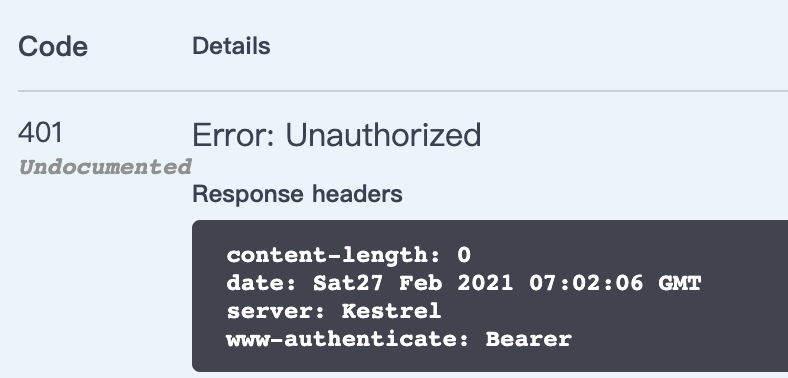
如果要允许某个Action可以被匿名访问,可以在Action方法上添加属性标记 [AllowAnonymous]:
[AllowAnonymous]

public async Task<ActionResult<IEnumerable<AuthorDto>>> GetAuthorsAsync([FromQuery] AuthorResourceParameters parameters)
添加认证信息生成接口
JwtBearer中间件提供了对JWT的验证功能,然而并未提供生成Token的功能。要生成Token,可以使用JwtSecurityTokenHandler类,它位于System.IdentityModel.Tokens.Jwt命名空间,它不仅能够生成JWT,由于它实现了ISecurityTokenValidator接口,因此对JWT的验证也是由它完成的。接下来,我们将创建一个Controller,它将会根据用户的认证信息生成JWT,并返回给客户端。
在Controllers文件夹中创建一个Controller,名为AuthenticateController,内容如下:
using System;

using System.Collections.Generic;

using System.IdentityModel.Tokens.Jwt;

using System.Security.Claims;

using System.Text;

using Microsoft.AspNetCore.Mvc;

using Microsoft.Extensions.Configuration;

using Microsoft.IdentityModel.Tokens;

namespace Library.Api.Controllers

{

    [ApiController, Route("api/auth")]

    public class AuthenticateController : ControllerBase

    {

        public IConfiguration Configuration { get; }

        public AuthenticateController(IConfiguration configuration)

        {

            Configuration = configuration;

        }

        [HttpPost("token", Name = nameof(GenerateToken))]

        public IActionResult GenerateToken(string username, string password)

        {

            if (username != "demouser" || password != "demopassword")

            {

                return Unauthorized();

            }

            var claims = new List<Claim>{

                new Claim(JwtRegisteredClaimNames.Sub, username)

            };

            var tokenConfigSection = Configuration.GetSection("Security:Token");

            var key = new SymmetricSecurityKey(

                Encoding.UTF8.GetBytes(tokenConfigSection["Key"])

            );

            var signCredential = new SigningCredentials(key, SecurityAlgorithms.HmacSha256);

            var jwtToken = new JwtSecurityToken(

                issuer: tokenConfigSection["Issuer"],

                audience: tokenConfigSection["Audience"],

                claims: claims,

                expires: DateTime.Now.AddMinutes(3),

                signingCredentials: signCredential

            );

            return Ok(new {

                token = new JwtSecurityTokenHandler().WriteToken(jwtToken),

                expiration = TimeZoneInfo.ConvertTimeFromUtc(jwtToken.ValidTo, TimeZoneInfo.Local)

            });

        }

    }

}
在AuthenticateController中的GenerateToken方法中,通过创建JwtSecurityToken对象,并使用JwtSecurityTokenHandler对象的WriteToken方法最终得到生成的JWT。当创建JwtSecurityToken对象时,我们可以指定issuer、audience以及当前用户的Claim信息,此外,还可以指定该Token的有效时间。这里需要注意,由于JWT不支持销毁以及撤回功能,因此在设置它的有效时间时,应设置一个较短的时间(如上例中的3分钟),这样可以有效避免Token在意外被窃取后所带来的风险。
现在就可以请求认证接口获取 token:
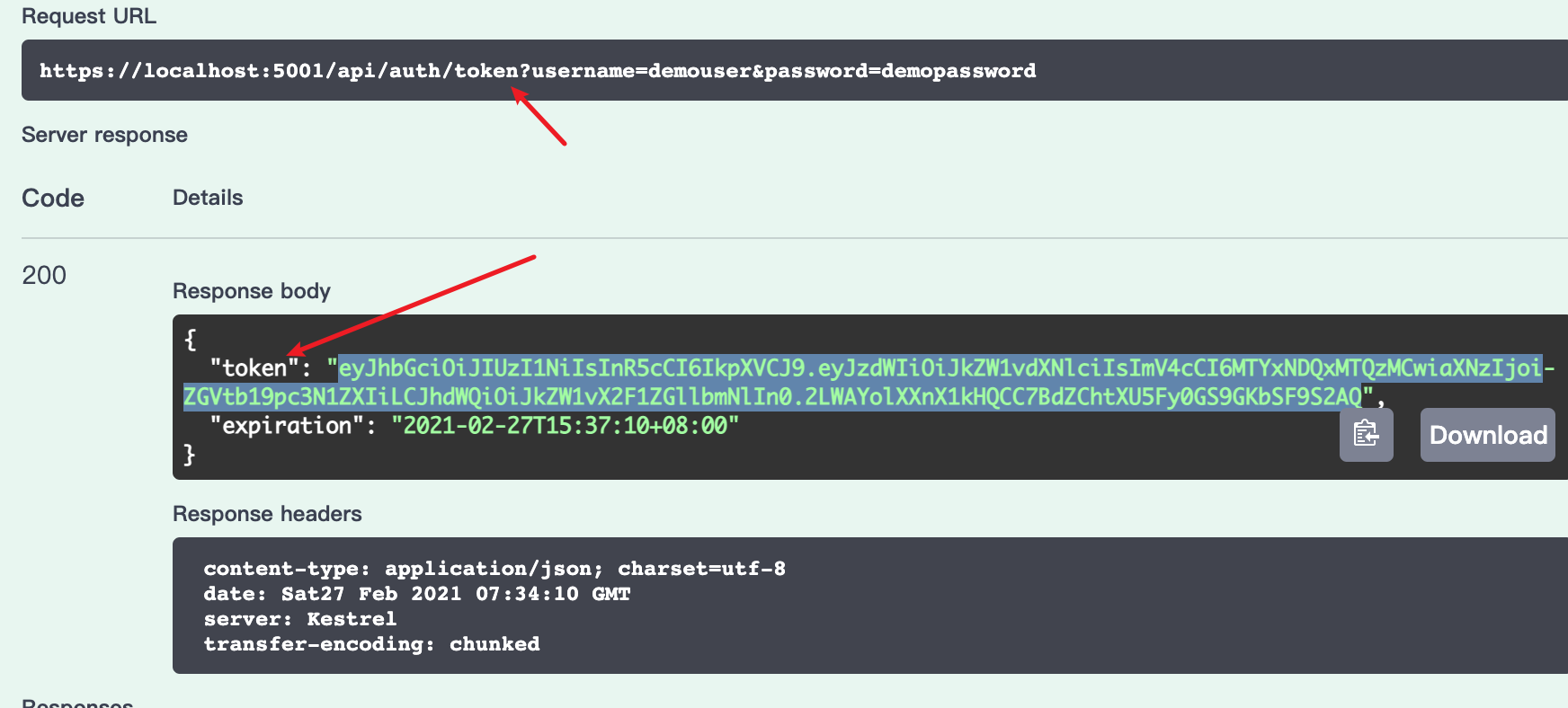
这时重新请求资源接口,在请求头中添加Authorization项,值为Bearer ,就可以得到结果了:
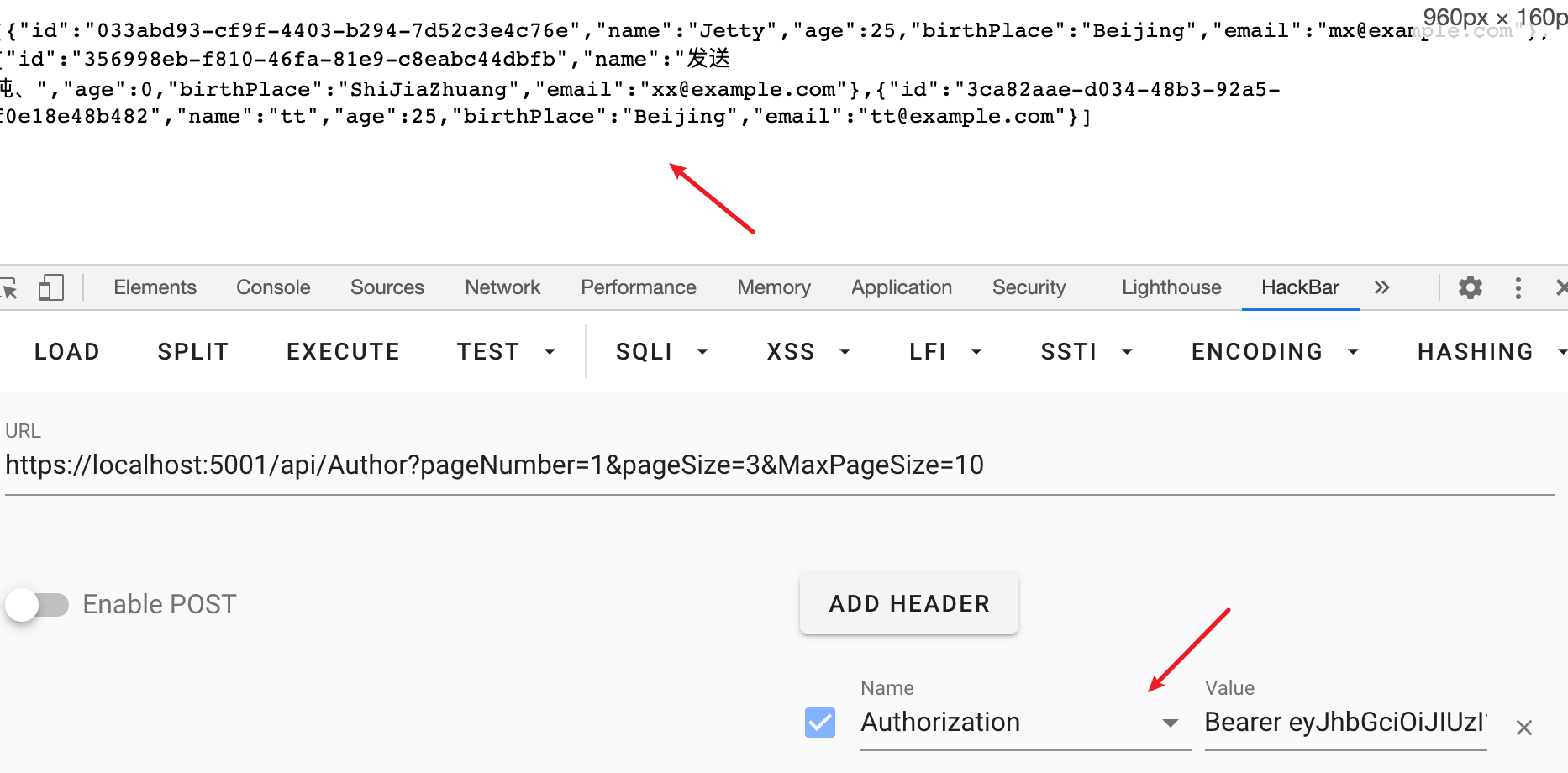
这次示例中,使用了固定的用户名和密码,实际情况中,用户名和密码通常是存在数据库中的,可以使用ASP.NET Core Identity来实现这一功能。
MVC之实现基于token的认证的更多相关文章
- 使用 AngularJS & NodeJS 实现基于token 的认证应用(转)
认证是任何 web 应用中不可或缺的一部分.在这个教程中,我们会讨论基于 token 的认证系统以及它和传统的登录系统的不同.这篇教程的末尾,你会看到一个使用 AngularJS 和 NodeJS 构 ...
- 使用 AngularJS & NodeJS 实现基于 token 的认证应用
认证是任何Web应用中不可或缺的一部分.在这个教程中,我们会讨论基于token的认证系统以及它和传统的登录系统的不同.这篇教程的末尾,你会看到一个使用 AngularJS 和 NodeJS 构建的 ...
- NodeJS 实现基于 token 的认证应用
此段摘自 http://zhuanlan.zhihu.com/FrontendMagazine/19920223 英文原文 http://code.tutsplus.com/tutorials/tok ...
- 基于Token的WEB后台认证机制
几种常用的认证机制 HTTP Basic Auth HTTP Basic Auth简单点说明就是每次请求API时都提供用户的username和password,简言之,Basic Auth是配合RES ...
- Java实现基于token认证
随着互联网的不断发展,技术的迭代也非常之快.我们的用户认证也从刚开始的用户名密码转变到基于cookie的session认证,然而到了今天,这种认证已经不能满足与我们的业务需求了(分布式,微服务).我们 ...
- 【转】基于Token的WEB后台认证机制
原谅地址:http://www.cnblogs.com/xiekeli/p/5607107.html 几种常用的认证机制 HTTP Basic Auth HTTP Basic Auth简单点说明就是每 ...
- JWT(Json web token)认证详解
JWT(Json web token)认证详解 什么是JWT Json web token (JWT), 是为了在网络应用环境间传递声明而执行的一种基于JSON的开放标准((RFC 7519).该to ...
- 基于token的后台身份验证(转载)
几种常用的认证机制 HTTP Basic Auth HTTP Basic Auth简单点说明就是每次请求API时都提供用户的username和password,简言之,Basic Auth是配合RES ...
- 基于token的验证
认证.权限和限制 身份验证是将传入请求与一组标识凭据(例如请求来自的用户或其签名的令牌)相关联的机制.然后 权限 和 限制 组件决定是否拒绝这个请求. 简单来说就是: 认证确定了你是谁 权限确定你能不 ...
随机推荐
- eureka server 配置
启动类 import org.springframework.boot.SpringApplication;import org.springframework.boot.autoconfigure. ...
- CCF(引水入城:60分):最大流+ISAP算法
引水入城 201703-5 这从题目分析来看很像最大流的问题,只需要增加一个超级源点和一个超级汇点就可以按照题意连边再跑最大流算法. 因为数据量太大了,肯定会超时.但是没有想到可行的解决方法. #in ...
- HDOJ-3038(带权并查集)
How many answers wrong HDOJ-3038 一个很好的博客:https://www.cnblogs.com/liyinggang/p/5327055.html #include& ...
- 大牛带你学会java类加载机制,不要错过,值得收藏!
很多人对java类加载机制都是非常抗拒的,因为这个太难理解了,但是我们作为一名优秀的java工程师,还是要把java类加载机制研究和学习明白的,因为这对于我们在以后的工作中有很大的帮助,因为它在jav ...
- FreeBSD 如何安装软件
1:概括FreeBSD捆绑了丰富的系统工具集合作为基础系统的一部分.此外,FreeBSD提供了两种用于安装第三方软件的补充技术:FreeBSD Ports Collection,用于从源代码安装,以及 ...
- Azure AD, Endpoint Manger(Intune), SharePoint access token 的获取
本章全是干货,干货,干货,重要的事情说三遍. 最近在研究Azure, Cloud相关的东西,项目中用的是Graph API(这个在下一章会相信介绍),可能是Graph API推出的时间比较晚,部分AP ...
- k8s 日志收集之 EFK
如今越来越多的应用部署在容器之中,如何收集日志也是一个很重要的问题.服务出问题了,排查问题需要给开发看日志.服务一般会在多个不同的 pod 中,一个一个的登进去看也的确不方便.业务数据统计也需要日志. ...
- PTA 线性表元素的区间删除
6-8 线性表元素的区间删除 (20 分) 给定一个顺序存储的线性表,请设计一个函数删除所有值大于min而且小于max的元素.删除后表中剩余元素保持顺序存储,并且相对位置不能改变. 函数接口定义: ...
- 1 [main] DEBUG Sigar - no sigar-amd64-winnt.dll in java.library.path org.hyperic.sigar.SigarException: no sigar-amd64-winnt.dll in java.library.path
github上一个java项目,在myeclipse中运行正常,生成jar后,运行报错: 1 [main] DEBUG Sigar - no sigar-amd64-winnt.dll in java ...
- TypeError: 'list' object cannot be interpreted as an integer Python常见错误
想要通过索引来迭代一个list或者string的元素, 这需要调用 range() 函数.要记得返回len 值而不是返回这个列表.