
Shiro 集成Spring 使用 redis时 使用redisTemplate替代jedisPool(五)
1、添加依赖架包:
 <dependency>

                 <groupId>org.springframework.data</groupId>

                 <artifactId>spring-data-redis</artifactId>

                 <version>${spring-data-redis.version}</version>

             </dependency>

             <!-- 用于jedis-spring-data redisTemplate -->

             <dependency>

                 <groupId>org.apache.commons</groupId>

                 <artifactId>commons-pool2</artifactId>

                 <version>${apache-commons-pool2}</version>

             </dependency>
2、使用的 jedis 必须是2.9.0以后的版本
 <properties>

 <!-- 使用redisTamplate结合jedisPoolConifg 必须使用jedis版本2.9.0 -->

         <jedis.version>2.9.0</jedis.version>

 </properties>

 <!-- Redis客户端 -->

             <dependency>

                 <groupId>redis.clients</groupId>

                 <artifactId>jedis</artifactId>

                 <version>${jedis.version}</version>

             </dependency>
3、在resource下新建立redis的属性properties文件 redis.properties
 #single redis

 redis.single.client.host=192.168.180.42

 redis.single.client.port=6379

 redis.password=1qaz@WSX

 #最大分配的对象数

 redis.pool.maxActive=1024

 #最大能够保持idel状态的对象数

 redis.pool.maxIdle=200

 #当池内没有返回对象时,最大等待时间

 redis.pool.maxWait=1000

 #当调用borrow Object方法时,是否进行有效性检查

 redis.pool.testOnBorrow=true

 #当调用return Object方法时,是否进行有效性检查

 redis.pool.testOnReturn=true
4、增加redis的配置xml文件 applicationContext-redis.xml
<?xml version="1.0" encoding="UTF-8"?>
<beans xmlns="http://www.springframework.org/schema/beans"
xmlns:xsi="http://www.w3.org/2001/XMLSchema-instance"
xmlns:p="http://www.springframework.org/schema/p"
xmlns:c="http://www.springframework.org/schema/c"
xmlns:cache="http://www.springframework.org/schema/cache"
xsi:schemaLocation="http://www.springframework.org/schema/beans
http://www.springframework.org/schema/beans/spring-beans.xsd
http://www.springframework.org/schema/cache
http://www.springframework.org/schema/cache/spring-cache.xsd"> <!-- 以前项目中的配置,注意需要添加Spring Data Redis等jar包 -->
<description>redis配置</description> <bean id="jedisPoolConfig" class="redis.clients.jedis.JedisPoolConfig">
<property name="maxIdle" value="${redis.pool.maxIdle}"/>
<property name="maxTotal" value="${redis.pool.maxActive}"/>
<property name="maxWaitMillis" value="${redis.pool.maxWait}"/>
<property name="testOnBorrow" value="${redis.pool.testOnBorrow}"/>
<property name="testOnReturn" value="${redis.pool.testOnReturn}"/>
</bean> <!-- JedisConnectionFactory -->
<bean id="jedisConnectionFactory" class="org.springframework.data.redis.connection.jedis.JedisConnectionFactory">
<property name="hostName" value="${redis.single.client.host}"/>
<property name="port" value="${redis.single.client.port}"/>
<property name="password" value="${redis.password}"></property>
<property name="poolConfig" ref="jedisPoolConfig"/>
</bean> <bean id="redisTemplate" class="org.springframework.data.redis.core.RedisTemplate"
p:connectionFactory-ref="jedisConnectionFactory">
<!-- 若使用redis作为shiro的缓存,则开放此处,需要使用jdk序列化 -->
<!--<property name="keySerializer">-->
<!--<bean class="org.springframework.data.redis.serializer.JdkSerializationRedisSerializer"></bean>-->
<!--</property>-->
<!--<property name="valueSerializer">-->
<!--<bean class="org.springframework.data.redis.serializer.JdkSerializationRedisSerializer"/>-->
<!--</property>-->
<!--<property name="hashKeySerializer">-->
<!--<bean class="org.springframework.data.redis.serializer.JdkSerializationRedisSerializer"/>-->
<!--</property>-->
<!--<property name="hashValueSerializer">-->
<!--<bean class="org.springframework.data.redis.serializer.JdkSerializationRedisSerializer"/>-->
<!--</property>--> <!-- 若不使用redis作为shiro的缓存,则开放此处,使用string序列化即可,jdk序列化在redis中的key值 不好看 -->
<property name="keySerializer">
<bean class="org.springframework.data.redis.serializer.StringRedisSerializer"/>
</property>
<property name="valueSerializer">
<bean class="org.springframework.data.redis.serializer.StringRedisSerializer"/>
</property>
<property name="hashKeySerializer">
<bean class="org.springframework.data.redis.serializer.StringRedisSerializer"/>
</property>
<property name="hashValueSerializer">
<bean class="org.springframework.data.redis.serializer.StringRedisSerializer"/>
</property>
</bean> <!--spring cache-->
<!--<bean id="cacheManager" class="org.springframework.data.redis.cache.RedisCacheManager"-->
<!--c:redisOperations-ref="redisTemplate">-->
<!--<!– 默认缓存10分钟 –>-->
<!--<property name="defaultExpiration" value="10"/>-->
<!--<!– key:prefix –>-->
<!--<property name="usePrefix" value="true"/>-->
<!--<!– cacheName 缓存超时配置,半小时,一小时,一天 –>-->
<!--<property name="expires">-->
<!--<map key-type="java.lang.String" value-type="java.lang.Long">-->
<!--<entry key="halfHour" value="1800"/>-->
<!--<entry key="hour" value="3600"/>-->
<!--<entry key="oneDay" value="86400"/>-->
<!--<entry key="itzixiCaptcha" value="500"/>-->
<!--<!– shiro cache keys –>-->
<!--<entry key="authenticationCache" value="1800"/><!– 用户每次操作后会要等缓存过期后会重新再取 –>-->
<!--<entry key="authorizationCache" value="1800"/><!– 用户每次操作后会要等缓存过期后会重新再取 –>-->
<!--<entry key="activeSessionCache" value="1800"/><!– 用户session每次操作后会重置时间 –>-->
<!--</map>-->
<!--</property>-->
<!--</bean>--> <!-- cache注解,项目中如果还存在shiro的ehcache的话,那么本文件和spring-ehcache.xml中的只能使用一个 -->
<!--<cache:annotation-driven cache-manager="cacheManager" proxy-target-class="true"/>--> </beans>
5、使用redisTemplate的操作实现类 编写
RedisOperator
 import java.util.Map;

 import java.util.Set;

 import java.util.concurrent.TimeUnit;

 import org.springframework.beans.factory.annotation.Autowired;

 import org.springframework.data.redis.core.RedisTemplate;

 import org.springframework.stereotype.Component;

 @Component

 public class RedisOperator {

     @Autowired

     private RedisTemplate<String, Object> redisTemplate;

     // Key(键),简单的key-value操作

     /**

      * 实现命令:TTL key,以秒为单位,返回给定 key的剩余生存时间(TTL, time to live)。

      *

      * @param key

      * @return

      */

     public long ttl(String key) {

         return redisTemplate.getExpire(key);

     }

     /**

      * 实现命令:expire 设置过期时间,单位秒

      *

      * @param key

      * @return

      */

     public void expire(String key, long timeout) {

         redisTemplate.expire(key, timeout, TimeUnit.SECONDS);

     }

     /**

      * 实现命令:INCR key,增加key一次

      *

      * @param key

      * @return

      */

     public long incr(String key, long delta) {

         return redisTemplate.opsForValue().increment(key, delta);

     }

     /**

      * 实现命令:KEYS pattern,查找所有符合给定模式 pattern的 key

      */

     public Set<String> keys(String pattern) {

         return redisTemplate.keys(pattern);

     }

     /**

      * 实现命令:DEL key,删除一个key

      *

      * @param key

      */

     public void del(String key) {

         redisTemplate.delete(key);

     }

     // String(字符串)

     /**

      * 实现命令:SET key value,设置一个key-value(将字符串值 value关联到 key)

      *

      * @param key

      * @param value

      */

     public void set(String key, String value) {

         redisTemplate.opsForValue().set(key, value);

     }

     /**

      * 实现命令:SET key value EX seconds,设置key-value和超时时间(秒)

      *

      * @param key

      * @param value

      * @param timeout

      *            (以秒为单位)

      */

     public void set(String key, String value, long timeout) {

         redisTemplate.opsForValue().set(key, value, timeout, TimeUnit.SECONDS);

     }

     /**

      * 实现命令:GET key,返回 key所关联的字符串值。

      *

      * @param key

      * @return value

      */

     public String get(String key) {

         return (String)redisTemplate.opsForValue().get(key);

     }

     // Hash(哈希表)

     /**

      * 实现命令:HSET key field value,将哈希表 key中的域 field的值设为 value

      *

      * @param key

      * @param field

      * @param value

      */

     public void hset(String key, String field, Object value) {

         redisTemplate.opsForHash().put(key, field, value);

     }

     /**

      * 实现命令:HGET key field,返回哈希表 key中给定域 field的值

      *

      * @param key

      * @param field

      * @return

      */

     public String hget(String key, String field) {

         return (String) redisTemplate.opsForHash().get(key, field);

     }

     /**

      * 实现命令:HDEL key field [field ...],删除哈希表 key 中的一个或多个指定域,不存在的域将被忽略。

      *

      * @param key

      * @param fields

      */

     public void hdel(String key, Object... fields) {

         redisTemplate.opsForHash().delete(key, fields);

     }

     /**

      * 实现命令:HGETALL key,返回哈希表 key中,所有的域和值。

      *

      * @param key

      * @return

      */

     public Map<Object, Object> hgetall(String key) {

         return redisTemplate.opsForHash().entries(key);

     }

     // List(列表)

     /**

      * 实现命令:LPUSH key value,将一个值 value插入到列表 key的表头

      *

      * @param key

      * @param value

      * @return 执行 LPUSH命令后,列表的长度。

      */

     public long lpush(String key, String value) {

         return redisTemplate.opsForList().leftPush(key, value);

     }

     /**

      * 实现命令:LPOP key,移除并返回列表 key的头元素。

      *

      * @param key

      * @return 列表key的头元素。

      */

     public String lpop(String key) {

         return (String)redisTemplate.opsForList().leftPop(key);

     }

     /**

      * 实现命令:RPUSH key value,将一个值 value插入到列表 key的表尾(最右边)。

      *

      * @param key

      * @param value

      * @return 执行 LPUSH命令后,列表的长度。

      */

     public long rpush(String key, String value) {

         return redisTemplate.opsForList().rightPush(key, value);

     }

 }
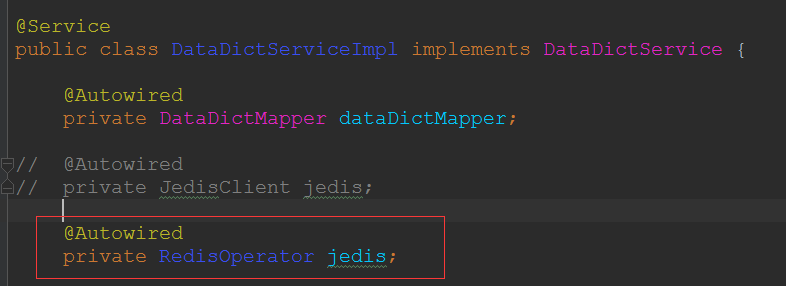
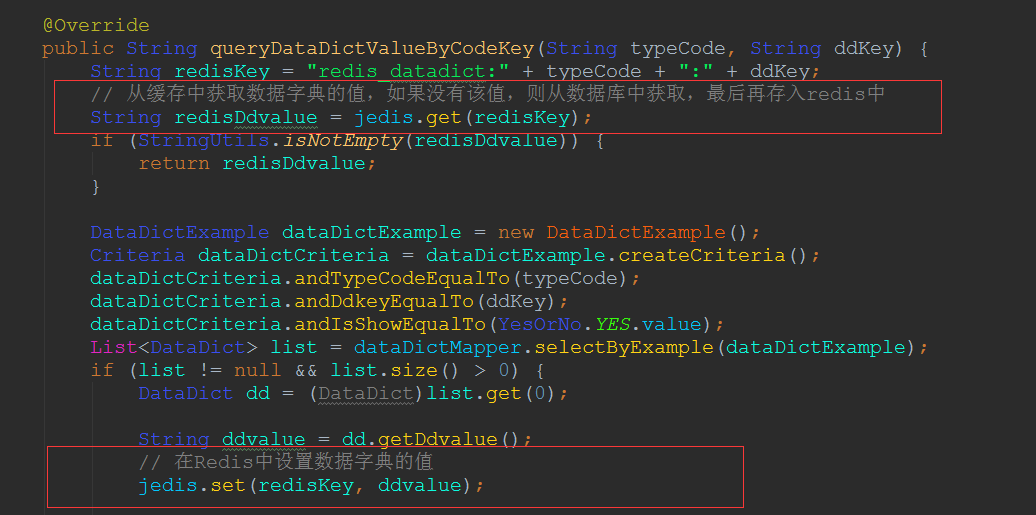
6、申明为@Component 的组件 那么需要在 spring mvc配置文件、spring service文件中增加扫描这个包的 配置
那么在需要使用redis的地方 可以注入使用
7、如:
Shiro 集成Spring 使用 redis时 使用redisTemplate替代jedisPool(五)的更多相关文章
- shiro 集成spring 使用 redis作为缓存 学习记录(六)
1.在applicationContext-redis.xml配置文件中增加如下: 申明一个cacheManager对象 用来注入到 shiro的 securityManager 属性 cac ...
- 使用Spring Data Redis时,遇到的几个问题
需求: 1,保存一个key-value形式的结构到redis 2,把一个对象保存成hash形式的结构到redis 代码如下: // 保存key-value值 pushFrequency ...
- shiro集成spring&工作流程&DelegatingFilterProxy
1.集成Spring 参考文献: 新建web工程: ehcache-core来自Hibernate wen.xml <?xml version="1.0" encoding= ...
- Redis的安装以及spring整合Redis时出现Could not get a resource from the pool
Redis的下载与安装 在Linux上使用wget http://download.redis.io/releases/redis-5.0.0.tar.gz下载源码到指定位置 解压:tar -xvf ...
- Shiro集成Spring
本篇博客主要讲述的是两者的集成.不涉及到各自的详细细节和功能. 因为官方给出的文档不够具体,对新手而言通过官方文档还不可以非常快的搭建出SpringShiro的webproject.本博客将通过实际的 ...
- shiro 集成spring 配置 学习记录(一)
首先当然是项目中需要增加shiro的架包依赖: <!-- shiro --> <dependency> <groupId>org.apache.shiro</ ...
- spring 的redis操作类RedisTemplate
spring 集成的redis操作几乎都在RedisTemplate内了. 已spring boot为例, 再properties属性文件内配置好 redis的参数 spring.redis.host ...
- springboot集成shiro集成mybatis-plus、redis、quartz定时任务
完整项目代码位于码云上,点击获取:Git地址 主要介绍一下重点配置地方: 一.application.yml文件 server: port: 8084 servlet: context-path: / ...
- shiro学习(四、shiro集成spring+springmvc)
依赖:spring-context,spring-MVC,shiro-core,shiro-spring,shiro-web 实话实说:web.xml,spring,springmvc配置文件好难 大 ...
随机推荐
- 12.Python使用requests发送post请求
1.我们使用postman进行接口测试的时候,发现POST请求方式的编码有3种,具体的编码方式如下: A:application/x-www-form-urlencoded ==最常见的post提交数 ...
- Linux 利用busybox制作根文件系统
busybox版本:1.17.3 官网下载路径:https://busybox.net/downloads/ 网盘下载路径:https://pan.baidu.com/s/1nvrEa73 密码:7y ...
- 在64位的UBUBTU 服务器 ***
前言: 安装/重装系统,U盘启动盘不稳定,建议使用USB-CDROM启动 如果是重装系统,要记录好硬盘的信息和职能: fdisk -l lsblk blkid /etc/fstab mkfs.ext3 ...
- C#操作PowerDesigner代码
首先,程序的界面如下:
- struts2学习(15)struts2防重复提交
一.重复提交的例子: 模拟一种情况,存在延时啊,系统比较繁忙啊啥的. 模拟延迟5s钟,用户点了一次提交,又点了一次提交,例子中模拟这种情况: 这样会造成重复提交: com.cy.action.St ...
- Paramiko,数据库
Paramiko 该模块基于SSH用于连接远程服务器并执行相关操作 SSHClient 用于连接远程服务器并执行基本命令 import paramiko # 创建SSH对象 ssh = paramik ...
- 简单的PL/SQl链接远程ORACLE数据库方法
简单的PL/SQl链接远程ORACLE数据库方法 PLSQL Developer新手使用教程 pasting
- 安装配置solr
1.由于用户是普通用户,没有root一些权限,所以修改hadoop用户权限 用root权限,修改sudoers文件 nano /etc/sudoers 打开文件,修改hadoop用户权限,如 ...
- 第三章 k8s cluster环境创建
1 用如下方法安装指定版本的docker,但是我的环境会报错 # 安装rpm apt install rpm # 下载 RPM 包, docker 版本 wget https://download. ...
- oracle 存储过程 建表插值等
建表.插值的procedure create or replace procedure CREATE_EMP is v_createsql ); v_insertsql ); begin v_crea ...