
Angular 4 组件间的通信
一、输入属性(父组件与子组件通信)
1. 创建工程
ng new demo1
2.创建order组件
ng g component order
3. 在order组件里定义输入属性
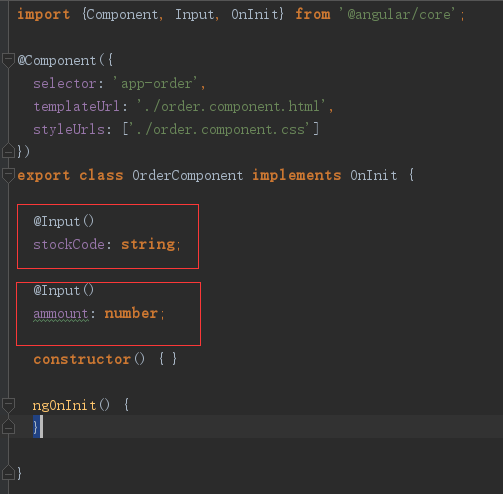
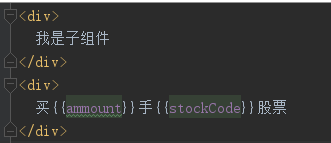
order组件的html
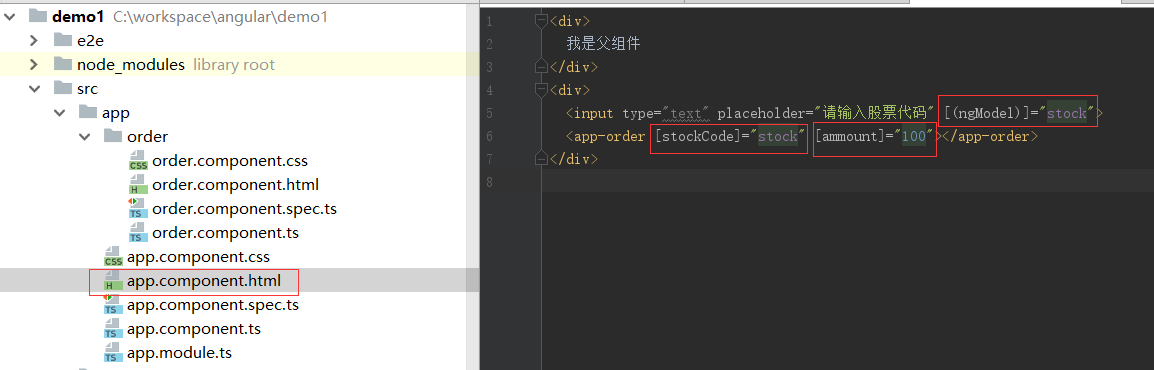
4. 父组件
app.component.ts中定义stock

app.component.html, 采用双向绑定
效果图
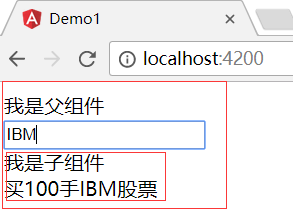
最终父组件IBM的值,通过输入属性,把值传递给了子组件
二、输出属性(子组件与父组件通信)
1. ng g component priceQutoe 创建报价组件
2. 定义报价组件控制器
import {Component, EventEmitter, OnInit, Output} from '@angular/core';

@Component({

  selector: 'app-price-quote',

  templateUrl: './price-quote.component.html',

  styleUrls: ['./price-quote.component.css']

})

export class PriceQuoteComponent implements OnInit {

  stockCode: string = 'IBM';

  price: number;

  @Output('priceChange')

  lastPrice: EventEmitter<PriceQuote> = new EventEmitter();

  constructor() {

    setInterval(() => {

      let priceQuote: PriceQuote = new PriceQuote(this.stockCode, 100 * Math.random());

      this.price = priceQuote.lastPrice;

      this.lastPrice.emit(priceQuote);

    }, 1000);

  }

  ngOnInit() {

  }

}

export class PriceQuote {

  constructor(public  stockCode: string,

              public  lastPrice: number) {

  }

}
3. 定义报价组件html
<p>

  这里是报价组件

</p>

<div>

  股票代码是{{stockCode}}, 股票价格是{{price | number:'2.2-2'}}

</div>
4. 父组件控制器
import { Component } from '@angular/core';

import {PriceQuote} from './price-quote/price-quote.component';

@Component({

  selector: 'app-root',

  templateUrl: './app.component.html',

  styleUrls: ['./app.component.css']

})

export class AppComponent {

  stock = '';

  title = 'app';

  priceQuote: PriceQuote = new PriceQuote('', 0);

  priceQutoehandler(event: PriceQuote){

    this.priceQuote = event;

  }

}
5. 父组件html
<div>

  我是父组件

</div>

<app-price-quote (priceChange)="priceQutoehandler($event)"></app-price-quote>

<div>

  这是在报价组件外部,股票代码是{{priceQuote.stockCode}},

  股票价格是{{priceQuote.lastPrice | number:'2.2-2'}}

</div>
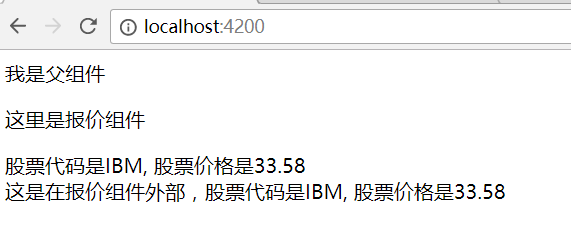
6.效果图
三、中间人模式
当另个组件不是父子组件关系时,需要两个共同的父组件,这个父组件就是中间人模式
中间人模式同时使用了输入属性和输出属性
1. 报价组件定义
import {Component, EventEmitter, OnInit, Output} from '@angular/core';

@Component({

  selector: 'app-price-quote',

  templateUrl: './price-quote.component.html',

  styleUrls: ['./price-quote.component.css']

})

export class PriceQuoteComponent implements OnInit {

  stockCode: string = 'IBM';

  price: number;

  //@Output('priceChange')

  //lastPrice: EventEmitter<PriceQuote> = new EventEmitter()

  @Output()

  buy: EventEmitter<PriceQuote> = new EventEmitter();

  constructor() {

    setInterval(() => {

      const priceQuote: PriceQuote = new PriceQuote(this.stockCode, 100 * Math.random());

      this.price = priceQuote.lastPrice;

      //this.lastPrice.emit(priceQuote);

    }, 1000);

  }

  buyStock(event) {

      this.buy.emit(new PriceQuote(this.stockCode, this.price));

  }

  ngOnInit() {

  }

}

export class PriceQuote {

  constructor(public  stockCode: string,

              public  lastPrice: number) {

  }

}
2. 报价组件html
<p>

  这里是报价组件

</p>

<div>

  股票代码是{{stockCode}}, 股票价格是{{price | number:'2.2-2'}}

</div>

<div>

  <input type='button' value='立即购买' (click)="buyStock($event)">

</div>
3.订单组件控制器
import {Component, Input, OnInit} from '@angular/core';

import {PriceQuote} from "../price-quote/price-quote.component";

@Component({

  selector: 'app-order',

  templateUrl: './order.component.html',

  styleUrls: ['./order.component.css']

})

export class OrderComponent implements OnInit {

  @Input()

  priceQutoe: PriceQuote;

  constructor() { }

  ngOnInit() {

  }

}
4. 订单组件html
<div>

  我下单组件

</div>

<div>

  买100手{{priceQutoe.stockCode}}股票,买入价为{{priceQutoe.lastPrice | number:'2.2-2'}}

</div>
5. 父组件的控制器
import { Component } from '@angular/core';

import {PriceQuote} from './price-quote/price-quote.component';

@Component({

  selector: 'app-root',

  templateUrl: './app.component.html',

  styleUrls: ['./app.component.css']

})

export class AppComponent {

  stock = '';

  priceQuote: PriceQuote = new PriceQuote('', 0);

  priceQutoehandler(event: PriceQuote){

    this.priceQuote = event;

  }

  buyHandler(event: PriceQuote) {

    this.priceQuote = event;

  }

}
6.父组件的html
<div>

  我是父组件

</div>

<app-price-quote (buy)="buyHandler($event)"></app-price-quote>

<app-order [priceQutoe]="priceQuote"></app-order>
7.效果图
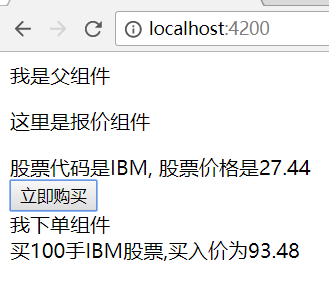
当点击“立即购买”时,显示当时的显示价格。
Angular 4 组件间的通信的更多相关文章
- angular组件间的通信(父子、不同组件的数据、方法的传递和调用)
angular组件间的通信(父子.不同组件的数据.方法的传递和调用) 一.不同组件的传值(使用服务解决) 1.创建服务组件 不同组件相互传递,使用服务组件,比较方便,简单,容易.先将公共组件写在服务的 ...
- 第四节:Vue表单标签和组件的基本用法,父子组件间的通信
vue表单标签和组件的基本用法,父子组件间的通信,直接看例子吧. <!DOCTYPE html> <html> <head> <meta charset=&q ...
- ZeroMQ(java)之I/O线程的实现与组件间的通信
算是开始读ZeroMQ(java)的代码实现了吧,现在有了一个大体的了解,看起来实现是比较的干净的,抽象什么的不算复杂... 这里先来看看它的I/O线程的实现吧,顺带看看是如何实现组件的通信的.... ...
- vuejs单一事件管理组件间的通信
<!DOCTYPE html> <html lang="en"> <head> <meta charset="UTF-8&quo ...
- React中父子组件间的通信问题
1.https://blog.csdn.net/sinat_17775997/article/details/59103173 (React中父子组件间的通信问题)
- Vue2不使用Vuex如何实现兄弟组件间的通信
在一些正规的大型项目的企业级开发过程中我们一般会引入Vuex来对Vue所有组件进行状态管理,可以轻松实现各组件间的通信.但是有时候做做自己的小项目,没有必要使用Vuex时,如何简单的实现组件间的通信? ...
- (尚033)Vue_案例_slot(组件间的通信4:slot)
1.组件间的通信4:slot(slot:插槽,就是一个占位) slot用于标签反复使用很多次 1.1理解 此方式用于父组件向子组件传递标签数据, 其他为数据通信 外面组件向里面组件传递标签进去,直接拿 ...
- 后端学 Angular 2 —— 组件间通信
1. 父组件向子组件传递信息 使用@Input 子组件的属性用 @Input 进行修饰,在父组件的模板中绑定变量 例子: import { Component, OnInit, Input } fro ...
- vue组件间的通信
组件的定义: 组件(Component)是 Vue.js 最强大的功能之一.组件可以扩展 HTML 元素,封装可重用的代码.在较高层面上,组件是自定义元素, Vue.js 的编译器为它添加特殊功能.v ...
随机推荐
- mappingDirectoryLocations
aaarticlea/png;base64,iVBORw0KGgoAAAANSUhEUgAAA+kAAAG8CAIAAAAtg3NFAAAgAElEQVR4nO3dO28bTYLv/z4v4MTnPR
- Centos7上部署openstack mitaka配置详解(将疑难点都进行划分)
在配置openstack项目时很多人认为到处是坑,特别是新手,一旦进坑没有人指导,身体将会感觉一次次被掏空,作为菜鸟的我也感同身受,因为已经被掏空n次了. 以下也是我将整个openstack配置过程进 ...
- httpclient cookie保持会话
COOKIE保持回话 httpclient4.x自带维护回话的功能,只要使用同一个httpclient且未关闭连接,就可以使用相同的回话来访问其他要求登陆验证的服务. 如果需要使用HttpClient ...
- DevExpress v18.1新版亮点——WinForms篇(七)
用户界面套包DevExpress v18.1日前终于正式发布,本站将以连载的形式为大家介绍各版本新增内容.本文将介绍了DevExpress WinForms v18.1 的新功能,快来下载试用新版本! ...
- 量身打造自己的MyEclipse(多图)
迎新年 贺元旦MyEclipse推新版 在线订购低至 7.5 折!截止1月31号(活动期间在线下单的客户才可享受此优惠,过期恢复原价) 立即抢购 1.量身打造你自己的MyEclipse MyEclip ...
- <NET CLR via c# 第4版>笔记 第18章 定制特性
18.1 使用定制特性 FCL 中的几个常用定制特性. DllImport 特性应用于方法,告诉 CLR 该方法的实现位于指定 DLL 的非托管代码中. Serializable 特性应用于类型,告诉 ...
- 百视通与微软共同宣布9月在华发布Xbox One
4月30日消息,百视通今日与微软共同宣布,于今年9月在华发布Xbox One.这是继百视通与微软2013年9月成立合资公司后,双方合作的又一进展. 微软副总裁,硬件及设计工作室部门主管尤瑟夫 •梅赫迪 ...
- Python 水果统计
f = open("水果.txt", mode="r", encoding="utf-8") lst = [] for line in f: ...
- 不使用ref
为什么 尽量避免ref? 使用ref原因:react功能来访问DOM元素,这种功能的需求往往来自于提交表单的操作,再提交表单的时候,需要读取当前表单中input元素的值 而react的产生就是为了避免 ...
- django会话跟踪技术
目录 django中的会话跟踪技术 什么是会话跟踪技术 HTTP无状态协议 Cookie概述 什么是cookie cookie源码 cookie超长时间 cookie超长时间 cookie生效路径 删 ...