
小峰servlet/jsp(7)jstl国际化标签库、sql标签库等
一、jstl国际化标签库:
fmt:setLocale 设定用户所在的区域;
fmt:formatDate 对日期进行格式化
fmt:requestEncoding 设置所有的请求编码;
fmt:bundle fmt:message 读取国际化资源;
fmt:formatNumber 格式化数字;
fmt:timeZone 设置临时时区
fmt:setLocale:
 <body>

 <%

     pageContext.setAttribute("date",new Date());

 %>

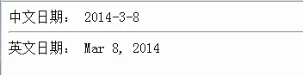
 中文日期:

 <fmt:setLocale value="zh_CN"/>

 <fmt:formatDate value="${date }"/>

 <hr/>

 英文日期:

 <fmt:setLocale value="en_US"/>

 <fmt:formatDate value="${date }"/>

 </body>
fmt:requestEncoding:
 <body>

 <fmt:requestEncoding value="UTF-8"/>

 </body>
fmt:bundle; fmt:message:
资源文件:
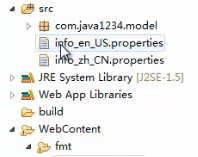
info_en_US.properties:
 name=xiaofeng

 info=Current user{0}:Welcome to use our system
info_zh_CN.properties:
 name=\u5c0f\u950b

 info=\u5f53\u524d\u7528\u6237{0}:\u6b22\u8fce\u4f7f\u7528\u672c\u7cfb\u7edf
 <body>

 <fmt:setLocale value="zh_CN"/>

 <fmt:bundle basename="info">

     <fmt:message key="name" var="userName"/>

 </fmt:bundle>

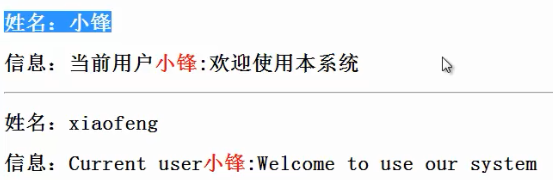
 <h2>姓名:${userName }</h2>

 <fmt:bundle basename="info">

     <fmt:message key="info" var="infomation">

         <fmt:param value="<font color='red'>小锋</font>"/>

     </fmt:message>

 </fmt:bundle>

 <h2>信息:${infomation }</h2>

 <hr/>

 <fmt:setLocale value="en_US"/>

 <fmt:bundle basename="info">

     <fmt:message key="name" var="userName"/>

 </fmt:bundle>

 <h2>姓名:${userName }</h2>

 <fmt:bundle basename="info">

     <fmt:message key="info" var="infomation">

         <fmt:param value="<font color='red'>小锋</font>"/>

     </fmt:message>

 </fmt:bundle>

 <h2>信息:${infomation }</h2>

 </body>
//<fmt:param value="<font color='red'>小锋</font>"/>是为properties中的占位符动态塞数据;
fmt:formatNumber:
 <body>

 <!-- value:数值 ;  type:数值类型;  pattern:格式 -->

 <fmt:formatNumber value="12" type="currency" pattern="$.00"/>

 <fmt:formatNumber value="12" type="currency" pattern="$.0#"/>

 <fmt:formatNumber value="1234567890" type="currency"/>

 <fmt:formatNumber value="123456.7891" pattern="#,#00.0#"/>

 </body>

fmt:formatDate:
 <body>

 <!-- value:数值 ;  type:数值类型;  pattern:格式 -->

 <%

     Date date=new Date();

     pageContext.setAttribute("date",date);

 %>

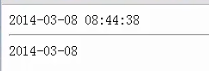
 <fmt:formatDate value="${date }" pattern="yyyy-MM-dd HH:mm:ss"/>

 <hr/>

 <fmt:formatDate value="${date }" pattern="yyyy-MM-dd"/>

 </body>
fmt:timeZone:
 <body>

 <!-- value:数值 ;  type:数值类型;  pattern:格式 -->

 <%

     Date date=new Date();

     pageContext.setAttribute("date",date);

 %>

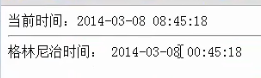
 当前时间:<fmt:formatDate value="${date }" pattern="yyyy-MM-dd HH:mm:ss"/>

 <hr/>

 格林尼治时间:

 <fmt:timeZone value="GMT">

    <fmt:formatDate value="${date }" pattern="yyyy-MM-dd HH:mm:ss"/>

 </fmt:timeZone>

 </body>
二、jstl SQL标签库:
sql:setDataSource 设置JDBC连接;
sql:query 数据库查询操作
sql:update 数据库添加、修改、删除操作;
sql:transaction 数据库事务
sql:setDataSource/sql:query:
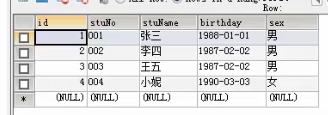
数据库中存在这样的表:t_student:
jsp页面要引入:<%@ taglib uri="http://java.sun.com/jsp/jstl/sql" prefix="sql" %>
 <%@ page language="java" contentType="text/html; charset=UTF-8" pageEncoding="UTF-8"%>

 <%@ taglib uri="http://java.sun.com/jsp/jstl/sql" prefix="sql" %>

 <%@ taglib uri="http://java.sun.com/jsp/jstl/core" prefix="c"%>

 <!DOCTYPE html PUBLIC "-//W3C//DTD HTML 4.01 Transitional//EN" "http://www.w3.org/TR/html4/loose.dtd">

 <html>

 <head>

 <meta http-equiv="Content-Type" content="text/html; charset=UTF-8">

 <title>Insert title here</title>

 </head>

 <body>

 <h1>设置JDBC连接</h1>

 <sql:setDataSource driver="com.mysql.jdbc.Driver" url="jdbc:mysql://localhost:3306/db_jstl" user="root" password="123456" />

 <sql:query var="result">

     select * from t_student;

 </sql:query>

 <h2>总记录数:${result.rowCount }</h2>

 <table>

     <tr>

         <th>编号</th>

         <th>学号</th>

         <th>姓名</th>

         <th>出生日期</th>

         <th>性别</th>

     </tr>

     <c:forEach var="student"  items="${result.rows }">

     <tr>

         <td>${student.id }</td>

         <td>${student.stuNo }</td>

         <td>${student.stuName }</td>

         <td>${student.birthday }</td>

         <td>${student.sex }</td>

     </tr>

     </c:forEach>

 </table>

 </body>

 </html>
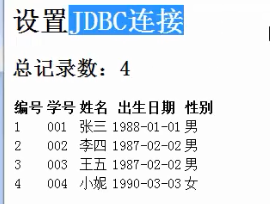
访问展示:
sql:update:
增:
 <body>

 <h1>设置JDBC连接</h1>

 <sql:setDataSource driver="com.mysql.jdbc.Driver" url="jdbc:mysql://localhost:3306/db_jstl" user="root" password="123456"/>

 <h1>添加数据</h1>

 <sql:update var="result" >

     insert into t_student values(null,"008","草泥马","1991-1-1","男");

 </sql:update>

 </body>
改:
 <body>

 <h1>设置JDBC连接</h1>

 <sql:setDataSource driver="com.mysql.jdbc.Driver" url="jdbc:mysql://localhost:3306/db_jstl" user="root" password="123456"/>

 <h1>修改数据</h1>

 <sql:update var="result" >

     update t_student set stuNo="010",sex="未知" where id=6

 </sql:update>

 </body>
删:
 <body>

 <h1>设置JDBC连接</h1>

 <sql:setDataSource driver="com.mysql.jdbc.Driver" url="jdbc:mysql://localhost:3306/db_jstl" user="root" password="123456"/>

 <h1>删除数据</h1>

 <sql:update var="result" >

     delete from t_student where id=6

 </sql:update>

 </body>
sql:transcation:
 <body>

 <h1>设置JDBC连接</h1>

 <sql:setDataSource driver="com.mysql.jdbc.Driver" url="jdbc:mysql://localhost:3306/db_jstl" user="root" password="123456"/>

 <h1>事务</h1>

 <sql:transaction>

     <sql:update var="result" >

         insert into t_student values(null,"008","草泥马","1991-1-1","男");

     </sql:update>

 </sql:transaction>

 </body>
三、jstl xml标签库:
x:parse 解析xml;
x:out 输出xml文件的内容
x:set 把xml读取的内容保存到指定的属性范围
x:if 判断指定路径的内容是否符合判断的条件;
x:choose/x:when/x:otherwise 多条件判断
x:forEach 遍历
需要引入xalan.jar;
jsp文件需要引入:<%@ taglib uri="http://java.sun.com/jsp/jstl/xml" prefix="x"%>
有这样两个xml文件,usersInfo.xml; usersInfo2.xml:
usersInfo.xml:
 <?xml version="1.0" encoding="UTF-8"?>

 <users>

     <user>

         <name id="n1">张三</name>

         <birthday>2011-1-1</birthday>

     </user>

 </users>
usersInfo2.xml:
 <?xml version="1.0" encoding="UTF-8"?>

 <users>

     <user>

         <name id="n1">张三</name>

         <birthday>2011-1-1</birthday>

     </user>

     <user>

         <name id="n2">王五</name>

         <birthday>2011-1-2</birthday>

     </user>

     <user>

         <name id="n3">赵六</name>

         <birthday>2011-1-3</birthday>

     </user>

 </users>
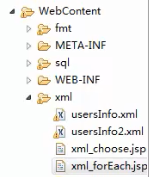
文件存放路径:
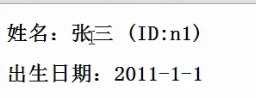
1)x:parse x:out
 <%@ page language="java" contentType="text/html; charset=UTF-8" pageEncoding="UTF-8"%>

 <%@ taglib uri="http://java.sun.com/jsp/jstl/core" prefix="c"%>

 <%@ taglib uri="http://java.sun.com/jsp/jstl/xml" prefix="x"%>

 <!DOCTYPE html PUBLIC "-//W3C//DTD HTML 4.01 Transitional//EN" "http://www.w3.org/TR/html4/loose.dtd">

 <html>

 <head>

 <meta http-equiv="Content-Type" content="text/html; charset=UTF-8">

 <title>Insert title here</title>

 </head>

 <body>

 <c:import var="usersInfo" url="usersInfo.xml" charEncoding="UTF-8"/>

 <x:parse var="usersInfoXml" doc="${usersInfo }"/>

 <h2>姓名:<x:out select="$usersInfoXml/users/user/name"/>

 (ID:<x:out select="$usersInfoXml/users/user/name/@id"/>)</h2>

 <h2>出生日期:<x:out select="$usersInfoXml/users/user/birthday"/></h2>

 </body>

 </html>
2) x:set
 <body>

 <c:import var="usersInfo" url="usersInfo.xml" charEncoding="UTF-8"/>

 <x:parse var="usersInfoXml" doc="${usersInfo }"/>

 <x:set var="userInfoXml" select="$usersInfoXml/users/user"/>

 <h2>姓名:<x:out select="$userInfoXml/name"/></h2>

 </body>
3) x:if
 <body>

 <c:import var="usersInfo" url="usersInfo.xml" charEncoding="UTF-8"/>

 <x:parse var="usersInfoXml" doc="${usersInfo }"/>

 <x:if select="$usersInfoXml/users/user/name/@id='n1'">

     <h2>有编号是n1的user信息</h2>

 </x:if>

 </body>
4) x:choose/x:when/x:otherwise
 <body>

 <c:import var="usersInfo" url="usersInfo.xml" charEncoding="UTF-8"/>

 <x:parse var="usersInfoXml" doc="${usersInfo }"/>

 <x:choose>

     <x:when select="$usersInfoXml/users/user/name/@id='n2'">

         <h2>有编号是n2的user信息</h2>

     </x:when>

     <x:otherwise>

         <h2>没有编号是n2的user信息</h2>

     </x:otherwise>

 </x:choose>

 </body>
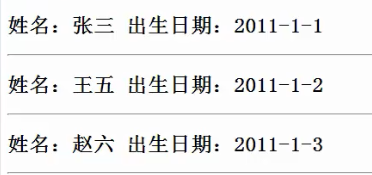
5) x:forEach:
<body>
<c:import var="usersInfo" url="usersInfo2.xml" charEncoding="UTF-8"/>
<x:parse var="usersInfoXml" doc="${usersInfo }"/>
<x:forEach select="$usersInfoXml/users/user" var="userInfoXml">
<h2>姓名:<x:out select="$userInfoXml/name"/> 出生日期:<x:out select="$userInfoXml/birthday"/></h2>
<hr/>
</x:forEach>
</body>
四、jstl函数标签库:
jsp页面需要引入:
<%@ taglib uri="http://java.sun.com/jsp/jstl/functions" prefix="fn"%>
 <%@ page language="java" contentType="text/html; charset=UTF-8" pageEncoding="UTF-8"%>

 <%@ taglib uri="http://java.sun.com/jsp/jstl/functions" prefix="fn"%>

 <!DOCTYPE html PUBLIC "-//W3C//DTD HTML 4.01 Transitional//EN" "http://www.w3.org/TR/html4/loose.dtd">

 <html>

 <head>

 <meta http-equiv="Content-Type" content="text/html; charset=UTF-8">

 <title>Insert title here</title>

 </head>

 <body>

 <%

     pageContext.setAttribute("info","www.java1234.com");

 %>

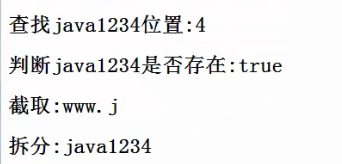
 <h2>查找java1234位置:${fn:indexOf(info,"java1234")}</h2>

 <h2>判断java1234是否存在:${fn:contains(info,"java1234")}</h2>

 <h2>截取:${fn:substring(info,0,5)}</h2>

 <h2>拆分:${fn:split(info,".")[1]}</h2>

 </body>

 </html>
页面展示:
函数标签一些:
<c:if test="${fun:length(operation.rangeList) > 0}">
小峰servlet/jsp(7)jstl国际化标签库、sql标签库等的更多相关文章
- 小峰servlet/jsp(5)jsp自定义标签
一.自定义标签helloworld: 二.自定义有属性的标签: HelloWorldTag.java:继承TagSupport: package com.java1234.tag; import ja ...
- 小峰servlet/jsp(1)
一.scriptlet标签: 通过scriptlet标签我们可以可以在jsp理嵌入java代码: 第一种:<%! %> 可以在里面定义全局变量.方法.类: 第二种:<% %> ...
- 小峰servlet/jsp(6)jstl核心标签库
一.引入jstl 需要jstl.jar;standard.jar; 二.jstl核心标签库: c:out 内容输出标签; c:set 用来设置4种属性范围值的标签: c:re ...
- 小峰servlet/jsp(3)登陆功能实现
一.User模型: User.java: package com.java1234.model; public class User { private int id; private String ...
- 小峰servlet/jsp(4)EL表达式
一.EL表达式内置对象: 二.EL表达式访问4种范围属性: 寻找值的顺序: page-->request-->session-->application; 三.EL表达式接收请求参数 ...
- 小峰servlet/jsp(2)
一.jsp javaBean组件引入 <jsp:useBean id="实例化对象名称" scope="保存范围" class="类完整名称&q ...
- JSP中 JSTL和EL标签的使用
使用JSTL前的准备 想要使用JSTL,首先需要给工程导入JSTL的包(JSTL.jar和standard.jar). JSTL简介 JSP标准标签库(JSTL)是一个JSP标签集合,它封装了JSP应 ...
- Java Servlet(十):JSTL核心标签库
JSTL全名称:JaveServer Pages Standard Tag Library.JSTL是由JCP(Java Community Process)所定制的标准规范,它主要提供给Java W ...
- servlet&jsp高级:第三部分
声明:原创作品,转载时请注明文章来自SAP师太技术博客( 博/客/园www.cnblogs.com):www.cnblogs.com/jiangzhengjun,并以超链接形式标明文章原始出处,否则将 ...
随机推荐
- OPENWRT常用设置
常用设置: 计划任务,定时重启 系统--计划任务,每行一个计划任务. 然后是计划任务列表的格式: [minute] [hour] [day of month] [month] [day of week ...
- 莪的拽、像省田各号①样没尽頭队——需求改进&原型设计
需求改进&原型设计 1. 需求&原型改进 经过老师的指导以及组内成员的讨论后,我们认为之前的需求分析已经比较准确完备. 根据电子宠物的形象结构特点,以及模拟屏幕的空间限制,我们设计出了 ...
- <转>字符编码
转: 字符编码笔记:ASCII,Unicode和UTF-8 作者: 阮一峰 日期: 2007年10月28日 今天中午,我突然想搞清楚Unicode和UTF-8之间的关系,于是就开始在网上查资料. ...
- SaltStack一键部署负载均衡和高可用
一.负载均衡的部署 server1 haproxy (调度器) server2 apache server3 nginx 1)在server1上首先安装salt-minion服务.并 ...
- JSP--TOMCAT-MYSQL web页面删除
deleteStudentjsp.jsp页面代码 <%@ page language="java" contentType="text/html; charset= ...
- Java IO流经典练习题
一.练习的题目 (一) 在电脑D盘下创建一个文件为HelloWorld.txt文件,判断他是文件还是目录,在创建一个目录IOTest,之后将HelloWorld.txt移动到IOTest目录下去:之后 ...
- ubuntu18.04 server配置静态ip (转载)
原文地址: https://blog.csdn.net/mossan/article/details/80381679 最新发布的ubuntu18.04 server,启用了新的网络工具netplan ...
- BZOJ2460,LG4570 [BJWC2011]元素
题意 相传,在远古时期,位于西方大陆的 Magic Land 上,人们已经掌握了用魔法矿石炼制法杖的技术.那时人们就认识到,一个法杖的法力取决于使用的矿石. 一般地,矿石越多则法力越强,但物极必反:有 ...
- java基本数据类型和引用类型
这些基本的数据类型是点不出东西来的 3种引用类型 类class 接口interface 数组array 第一个 : 类 Integer Long Boolean Byte Characte ...
- stenciljs 学习三 组件生命周期
stenciljs 组件包含好多生命周期方法, will did load update unload 实现生命周期的方法比价简单类似 componentWillLoad ....,使用typescr ...