
安卓手机上微信无法打开Https网址的完美解决方案
1,第三方网站检测网站的SSL证书是否正确的安装
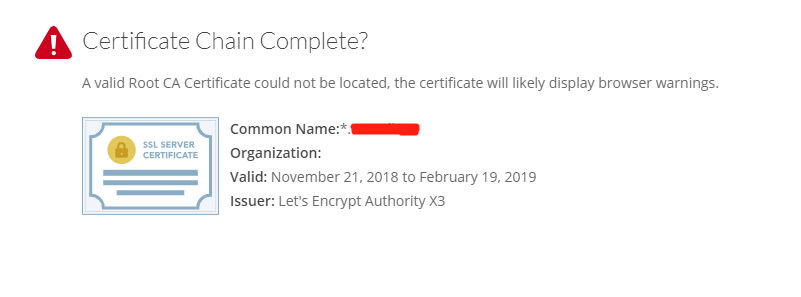
https://www.geocerts.com/ssl-checker,大概率你会看到下边的场景,一个证书链完整的警告,如果想知道我的基础配置是什么,请看 申请 Let’s Encrypt 泛域名证书 及 Nginx/Apache 证书配置
2,我的网站是Apache提供服务的,就要考虑增加配置
我的配置文件是httpd-ssl.conf。其他平台均正常,安卓微信无法打开的配置如下:
#   Server Certificate:

SSLCertificateFile "/etc/letsencrypt/live/abc.com/fullchain.pem"

#   Server Private Key:

SSLCertificateKeyFile "/etc/letsencrypt/live/abc.com/privkey.pem"
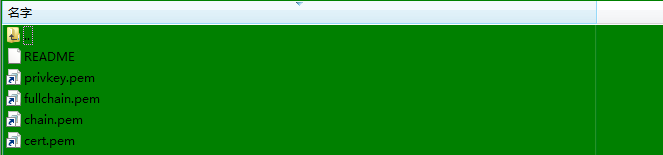
Let`s Encrypt生成证书如下:
完美的解决方案其实不止一种,共八种,如下:
方案一:
============================之前配置==============================

#   Server Certificate:

SSLCertificateFile "/etc/letsencrypt/live/abc.com/fullchain.pem"

#   Server Private Key:

SSLCertificateKeyFile "/etc/letsencrypt/live/abc.com/privkey.pem"

===========================新加配置===============================

#   Server Certificate Chain:

#SSLCertificateChainFile "/etc/letsencrypt/live/abc.com/chain.pem"
方案二:
============================之前配置==============================

#   Server Certificate:

SSLCertificateFile "/etc/letsencrypt/live/abc.com/fullchain.pem"

#   Server Private Key:

SSLCertificateKeyFile "/etc/letsencrypt/live/abc.com/privkey.pem"

===========================新加配置===============================

#   Server Certificate Chain:

#SSLCertificateChainFile "/etc/letsencrypt/live/abc.com/fullchain.pem"
方案三:
============================之前配置==============================

#   Server Certificate:

SSLCertificateFile "/etc/letsencrypt/live/abc.com/fullchain.pem"

#   Server Private Key:

SSLCertificateKeyFile "/etc/letsencrypt/live/abc.com/privkey.pem"

===========================新加配置===============================

#   Certificate Authority (CA):

#SSLCACertificateFile "/etc/letsencrypt/live/abc.com/chain.pem"
方案四:
============================之前配置==============================

#   Server Certificate:

SSLCertificateFile "/etc/letsencrypt/live/abc.com/fullchain.pem"

#   Server Private Key:

SSLCertificateKeyFile "/etc/letsencrypt/live/abc.com/privkey.pem"

===========================新加配置===============================

#   Certificate Authority (CA):

#SSLCACertificateFile "/etc/letsencrypt/live/abc.com/fullchain.pem"
方案五:
============================之前配置==============================

#   Server Certificate:

SSLCertificateFile "/etc/letsencrypt/live/abc.com/fullchain.pem"

#   Server Private Key:

SSLCertificateKeyFile "/etc/letsencrypt/live/abc.com/privkey.pem"

===========================新加配置===============================

#   Server Certificate Chain:

#SSLCertificateChainFile "/etc/letsencrypt/live/abc.com/chain.pem"

#   Certificate Authority (CA):

#SSLCACertificateFile "/etc/letsencrypt/live/abc.com/chain.pem"
方案六:
============================之前配置==============================

#   Server Certificate:

SSLCertificateFile "/etc/letsencrypt/live/abc.com/fullchain.pem"

#   Server Private Key:

SSLCertificateKeyFile "/etc/letsencrypt/live/abc.com/privkey.pem"

===========================新加配置===============================

#   Server Certificate Chain:

#SSLCertificateChainFile "/etc/letsencrypt/live/abc.com/fullchain.pem"

#   Certificate Authority (CA):

#SSLCACertificateFile "/etc/letsencrypt/live/abc.com/fullchain.pem"
方案七:
============================之前配置==============================

#   Server Certificate:

SSLCertificateFile "/etc/letsencrypt/live/abc.com/fullchain.pem"

#   Server Private Key:

SSLCertificateKeyFile "/etc/letsencrypt/live/abc.com/privkey.pem"

===========================新加配置===============================

#   Server Certificate Chain:

#SSLCertificateChainFile "/etc/letsencrypt/live/abc.com/fullchain.pem"

#   Certificate Authority (CA):

#SSLCACertificateFile "/etc/letsencrypt/live/abc.com/chain.pem"
方案八:
============================之前配置==============================

#   Server Certificate:

SSLCertificateFile "/etc/letsencrypt/live/abc.com/fullchain.pem"

#   Server Private Key:

SSLCertificateKeyFile "/etc/letsencrypt/live/abc.com/privkey.pem"

===========================新加配置===============================

#   Server Certificate Chain:

#SSLCertificateChainFile "/etc/letsencrypt/live/abc.com/chain.pem"

#   Certificate Authority (CA):

#SSLCACertificateFile "/etc/letsencrypt/live/abc.com/fullchain.pem"
以上八种方案产生原理是只要增加配置Server Certificate Chain和Certificate Authority (CA)任一均可,同时配置也可;证书可用的是chain.pem和fullchain.pem;
增加配置完成之后,重启Apache服务器,再次检测网站的证书配置,https://www.geocerts.com/ssl-checker,此时你看到如下图所示:

此时证书链完整,安卓手机上的微信也可以打开https的网址啦!觉得有用的,可以关注我,给我点赞。我会努力写出更多有价值的博文的。
安卓手机上微信无法打开Https网址的完美解决方案的更多相关文章
- 安卓手机上运行 PC-E500 程序
目录 第1章安卓手机上运行 PC-E500 程序 1 1 PockEmul 1 2 下载 1 3 打包BASIC程序 2 4 配置PC-E500模拟器 5 5 载入e50 ...
- 在安卓手机上通过虚拟机运行Windows XP
转自:https://www.ithome.com/html/android/302170.htm 细数当年的桌面版Windows,似乎针对ARM架构处理器的版本并不多,小编曾用过一段时间的Windo ...
- input type = file 在部分安卓手机上无法调起摄像头和相册
移动端H5web 用input type = file 在部分安卓手机上无法调起摄像头拍照,有的也无法访问相册而是直接访问了文档,解决办法是: 加上 accept = "image/*&qu ...
- 安卓手机上安装 谷歌 play 商店
安卓手机上安装 谷歌 play 商店 安卓(Android)就是现在流行的智能手机系统,它是由Google公司和开放手机联盟领导及开发.由于安卓系统的底层代码(AOSP)是开源的,以GPL和Apach ...
- 在安卓(手机)上运行 Ubuntu (Linux)
在安卓(手机)上运行 Ubuntu (Linux) 由于x86 和 arm 是跨平台的,所使用的编译器自然也不同.如果要在电脑上编译安卓手机上的程序,则需在电脑端建立ARM交叉编译环境,这个过程是在耗 ...
- libmad和libmpg123解码mp3在安卓手机上的比较
libmad和libmpg123解码mp3在安卓手机上的比较1. libmad 选自 http://sourceforge.net/projects/mad libmad-0.15.1b.tar.g ...
- DroidVim:在安卓手机上使用vim
背景 有时候在邮件,钉钉,微信上收到一份文件,急需打开看一下,但有些文件用普通编辑器打开体验实在不佳,例如 patch,log 甚至 bin 文件.由于日常在电脑上使用的是 vim ,一个朴素的想法就 ...
- 安卓手机添加系统证书方法(HTTPS抓包)
目录 1. 导出证书(以Charles为例) 2. 安卓证书储存格式 3. 将导出的证书计算hash值 4. 生成系统系统预设格式证书文件 5. 上传证书 安卓7.0以后,安卓不信任用户安装的证书,所 ...
- 关于火狐浏览器在ubuntu和安卓手机上的同步
最近在ubuntu使用火狐浏览器,感觉还不错.我想着,如果在我的安卓手机上装一个火狐浏览器,我就可以在手机上查看电脑上所收藏的网站了.然后我就去安卓应用市场下载了最新版的火狐浏览器.令人奇怪的是,我在 ...
随机推荐
- PHP之Composer类库依赖管理神器
Composer中文版说明见:https://github.com/kaka987/Composer-zh Composer 是PHP的类包依赖管理工具,用它可以轻松的引用第三方类包,类似于node的 ...
- Qt封装百度人脸识别+图像识别
AI技术的发展在最近几年如火如荼,工资待遇也是水涨船高,应用的前景也是非常广阔,去年火起来的人脸识别,今年全国遍地开花,之前封装了下face++的人脸识别等接口,今年看了下百度的AI,还免费了,效果也 ...
- Intellij 部署项目java.lang.ClassNotFoundException: org.springframework.web.context.ContextLoaderListener
报错信息: org.apache.catalina.core.StandardContext.listenerStart Error configuring application listener ...
- VLC媒体视频播放器 v3.0.2官方版
https://www.videolan.org/ VLC media player http://www.pc6.com/softview/SoftView_52483.html VLC ...
- OGG遇到相关问题汇总
OGG初始化加载数据时遇到的问题 1.target端拒绝source端访问 2016-12-13 14:31:03 INFO OGG-00963 Oracle GoldenGate Manager f ...
- 把握这两点,抢占下一个电商风口|2016最新中国电商App排名&研究报告
序言 电商,是随着中国互联网经济的持续发展所成长起来的.淘宝.京东这些电商从交易额和影响力上看都位列中国最为成功.最具话题性的互联网企业之中.尽管近几年中国经济有所放缓,但中国消费市场的增长速度仍有望 ...
- 提取ipa里面的资源图片
有时候发现个不错的UI,就想扒出来看看,ipa里的图片你知道的,都不能直接用,所以找到两个方法:一.用python转换1.将ipa文件后缀改为zip,然后解压缩.2.新建一个文件夹,将解压后的包里的p ...
- Ubuntu 16.04系统下apt-get和dpkg区别
两者的区别是dpkg绕过apt包管理数据库对软件包进行操作,所以你用dpkg安装过的软件包用apt可以再安装一遍,系统不知道之前安装过了,将会覆盖之前dpkg的安装.1.dpkg是用来安装.deb文件 ...
- yii---对数组进行分页
很多时候,我们会对多个数据进行分页处理,例如我最近开发的一个功能,系统消息,系统消息的来源是多个表,而且多个表之间的数据没有任何关联,这个时候,需要对多个表进行查询,查询返回的数据进行分页,而且采用的 ...
- CvArr* to cv::Mat 转换
OpenCV中的CvArr*的定义的一个空类型的指针,可以转换为其派生类CvMat和IplImage,那么如何将其转化为cv::Mat呢,其实很简单,只需要一行代码即可: // CvArr *_img ...