
Qt封装百度人脸识别+图像识别
AI技术的发展在最近几年如火如荼,工资待遇也是水涨船高,应用的前景也是非常广阔,去年火起来的人脸识别,今年全国遍地开花,之前封装了下face++的人脸识别等接口,今年看了下百度的AI,还免费了,效果也是越来越好,活体检测这个算法更是做的吊炸天(只需要传一张图片就能判断图片中的人是翻拍的照片非活体),牛逼的一塌糊涂,我反正是跪了。特意花了半天时间将百度人脸识别+图像识别封装了下,以便后期使用。顺便预测下,百度AI在未来的国内AI市场中,不是第一就是第二,而且会持续保持至少十年。
为了兼容qt4,特意采用了qtscript解析收到的数据。
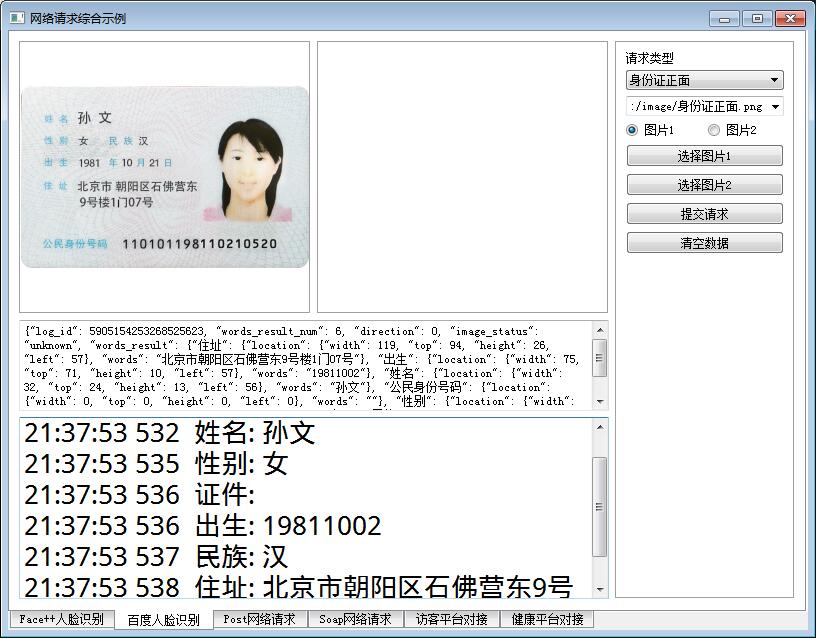
* 1:可识别身份证正面信息+背面信息
* 2:可识别银行卡信息
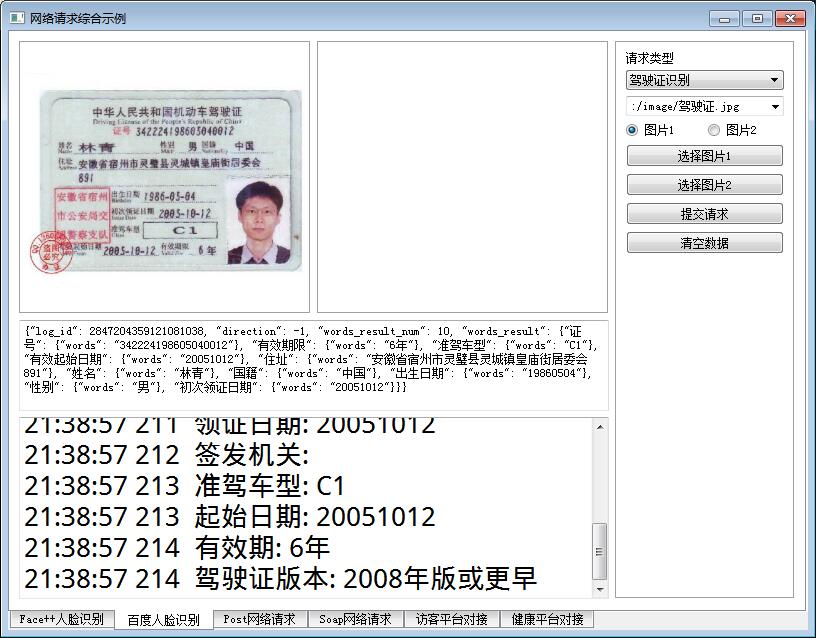
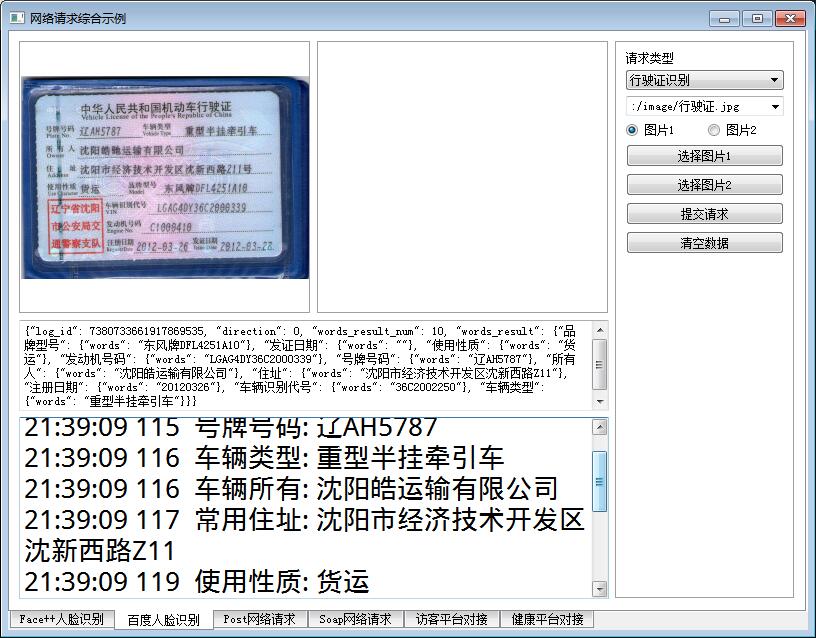
* 3:可识别驾驶证+行驶证信息
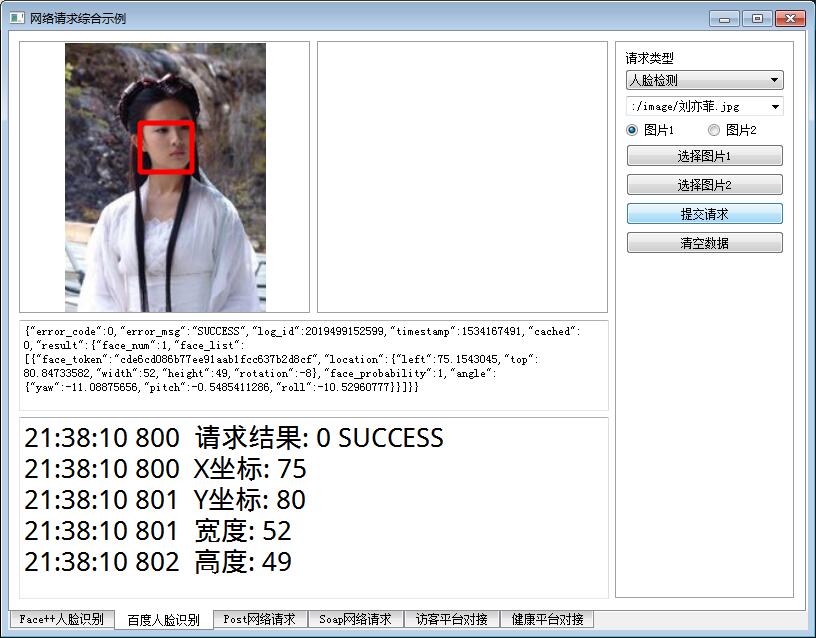
* 4:可进行人脸识别,人脸比对,活体检测
* 5:可设置请求地址+用户密钥+应用密钥
* 6:直接传入图片即可,信号返回,毫秒级极速响应
* 7:通用Qt4-Qt5,windows linux 嵌入式linux
可执行文件下载:https://pan.baidu.com/s/1pzhQL_YMYZyn4hW94e0QsQ
QByteArray FaceBaiDu::getImageData(const QImage &img)

{

    QImage image = img;

    QByteArray imageData;

    QBuffer buffer(&imageData);

    image.save(&buffer, "jpg");

    return imageData.toBase64();

}

QString FaceBaiDu::getImageData2(const QImage &img)

{

    return QString(getImageData(img));

}

QHttpPart FaceBaiDu::dataToHttpPart(const QByteArray &body, const QString &name)

{

    QHttpPart httpPart;

    httpPart.setHeader(QNetworkRequest::ContentDispositionHeader, QVariant(QString("form-data;name=\"%1\"").arg(name)));

    httpPart.setBody(body);

    return httpPart;

}

void FaceBaiDu::sendData(const QString &url, const QList<QHttpPart> &httpParts)

{

    //初始化消息体

    QHttpMultiPart *httpMultiPart = new QHttpMultiPart(QHttpMultiPart::FormDataType);

    //逐个添加消息内容

    foreach (QHttpPart httpPart, httpParts) {

        httpMultiPart->append(httpPart);

    }

    //初始化请求对象

    QNetworkRequest request;

    request.setUrl(QUrl(url));

#ifdef ssl

    //设置openssl签名配置,否则在ARM上会报错

    QSslConfiguration conf = request.sslConfiguration();

    conf.setPeerVerifyMode(QSslSocket::VerifyNone);

#if (QT_VERSION > QT_VERSION_CHECK(5,0,0))

    conf.setProtocol(QSsl::TlsV1_0);

#else

    conf.setProtocol(QSsl::TlsV1);

#endif

    request.setSslConfiguration(conf);

#endif

    //发送请求

    QNetworkReply *reply = manager->post(request, httpMultiPart);

    httpMultiPart->setParent(reply);

}

void FaceBaiDu::finished(QNetworkReply *reply)

{

    QString error = reply->errorString();

    if (!error.isEmpty() && error != "Unknown error") {

        emit receiveError(error);

    }

    if (reply->bytesAvailable() > 0 && reply->error() == QNetworkReply::NoError) {

        QString data = reply->readAll();

        reply->deleteLater();

        //发送接收数据信号

        emit receiveData(data);

        //初始化脚本引擎

        QScriptEngine engine;

        //构建解析对象

        QScriptValue script = engine.evaluate("value=" + data);

        //获取鉴权标识符

        QString token = script.property("access_token").toString();

        if (!token.isEmpty()) {

            tokenFace = token;

            tokenOcr = token;

        }

        //通用返回结果字段

        int code = script.property("error_code").toInt32();

        QString msg = script.property("error_msg").toString();

        emit receiveResult(code, msg);

        //人脸识别部分

        QScriptValue result = script.property("result");

        if (!result.isNull()) {

            //人脸识别

            QScriptValue face_list = result.property("face_list");

            if (face_list.isObject()) {

                checkFaceList(face_list);

            }

            //人脸比对

            QScriptValue score = result.property("score");

            if (!score.isNull()) {

                double value = score.toString().toDouble();

                if (value > 0) {

                    emit receiveFaceCompare(QRect(), QRect(), value);

                } else {

                    emit receiveFaceCompareFail();

                }

            }

            //活体检测

            QScriptValue face_liveness = result.property("face_liveness");

            if (!face_liveness.isNull()) {

                double liveness = face_liveness.toString().toDouble();

                if (liveness > 0) {

                    emit receiveLive(liveness);

                }

            }

            //银行卡

            QScriptValue bank_card_number = result.property("bank_card_number");

            if (!bank_card_number.isNull()) {

                QString card_number = bank_card_number.toString();

                QString bank_name = result.property("bank_name").toString();

                if (!card_number.isEmpty()) {

                    emit receiveBankCardInfo(card_number, bank_name);

                }

            }

        }

        //文字识别部分

        QScriptValue words_result = script.property("words_result");

        if (!words_result.isNull()) {

            //身份证正面

            QScriptValue nation = words_result.property("民族");

            if (nation.isObject()) {

                checkCardFront(words_result);

            }

            //身份证反面

            QScriptValue issuedby = words_result.property("签发机关");

            if (issuedby.isObject()) {

                checkCardBack(words_result);

            }

            //驾驶证

            QScriptValue license_number = words_result.property("证号");

            if (license_number.isObject()) {

                checkDriverLicense(words_result);

            }

            //行驶证

            QScriptValue model = words_result.property("品牌型号");

            if (model.isObject()) {

                checkRVehicleLicense(words_result);

            }

        }

    }

}

void FaceBaiDu::checkFaceList(const QScriptValue &face_list)

{

    QRect face_rectangle;

    //创建迭代器逐个解析具体值

    QScriptValueIterator it(face_list);

    while (it.hasNext()) {

        it.next();

        QString face_token = it.value().property("face_token").toString();

        if (!face_token.isEmpty()) {

            QScriptValue location = it.value().property("location");

            if (location.isObject()) {

                face_rectangle.setX(location.property("left").toInt32());

                face_rectangle.setY(location.property("top").toInt32());

                face_rectangle.setWidth(location.property("width").toInt32());

                face_rectangle.setHeight(location.property("height").toInt32());

            }

        }

        it.next();

        if (face_rectangle.width() > 0) {

            emit receiveFaceRect(face_rectangle);

        } else {

            break;

        }

    }

}

void FaceBaiDu::checkCardFront(const QScriptValue &scriptValue)

{

    QScriptValue name = scriptValue.property("姓名");

    QScriptValue address = scriptValue.property("住址");

    QScriptValue birthday = scriptValue.property("出生");

    QScriptValue number = scriptValue.property("公民身份号码");

    QScriptValue sex = scriptValue.property("性别");

    QScriptValue nation = scriptValue.property("民族");

    QString strName = name.property("words").toString();

    QString strAddress = address.property("words").toString();

    QString strBirthday = birthday.property("words").toString();

    QString strNumber = number.property("words").toString();

    QString strSex = sex.property("words").toString();

    QString strNation = nation.property("words").toString();

    emit receiveIDCardInfoFront(strName, strSex, strNumber, strBirthday, strNation, strAddress);

}

void FaceBaiDu::checkCardBack(const QScriptValue &scriptValue)

{

    QScriptValue issuedby = scriptValue.property("签发机关");

    QScriptValue dateStart = scriptValue.property("签发日期");

    QScriptValue dateEnd = scriptValue.property("失效日期");

    QString strIssuedby = issuedby.property("words").toString();

    QString strDataStart = dateStart.property("words").toString();

    QString strDateEnd = dateEnd.property("words").toString();

    QString strDate = QString("%1.%2.%3-%4.%5.%6")

                      .arg(strDataStart.mid(0, 4)).arg(strDataStart.mid(4, 2)).arg(strDataStart.mid(6, 2))

                      .arg(strDateEnd.mid(0, 4)).arg(strDateEnd.mid(4, 2)).arg(strDateEnd.mid(6, 2));

    emit receiveIDCardInfoBack(strDate, strIssuedby);

}

void FaceBaiDu::checkDriverLicense(const QScriptValue &scriptValue)

{

    QScriptValue licenseNumber = scriptValue.property("证号");

    QScriptValue name = scriptValue.property("姓名");

    QScriptValue gender = scriptValue.property("性别");

    QScriptValue nationality = scriptValue.property("国籍");

    QScriptValue address = scriptValue.property("住址");

    QScriptValue birthday = scriptValue.property("出生日期");

    QScriptValue issueDate = scriptValue.property("初次领证日期");

    QScriptValue classType = scriptValue.property("准驾车型");

    QScriptValue validFrom = scriptValue.property("有效起始日期");

    QScriptValue validFor = scriptValue.property("有效期限");

    QString strLicenseNumber = licenseNumber.property("words").toString();

    QString strName = name.property("words").toString();

    QString strGender = gender.property("words").toString();

    QString strNationality = nationality.property("words").toString();

    QString strAddress = address.property("words").toString();

    QString strBirthday = birthday.property("words").toString();

    QString strIssueDate = issueDate.property("words").toString();

    QString strClassType = classType.property("words").toString();

    QString strValidFrom = validFrom.property("words").toString();

    QString strValidFor = validFor.property("words").toString();

    emit receiveDriverInfo(strValidFrom, strGender, "", strIssueDate, strClassType, strLicenseNumber,

                           strValidFor, strBirthday, "1", strAddress, strNationality, strName);

}

void FaceBaiDu::checkRVehicleLicense(const QScriptValue &scriptValue)

{

    QScriptValue plateNo = scriptValue.property("号牌号码");

    QScriptValue vehicleType = scriptValue.property("车辆类型");

    QScriptValue owner = scriptValue.property("所有人");

    QScriptValue address = scriptValue.property("住址");

    QScriptValue useCharacter = scriptValue.property("使用性质");

    QScriptValue model = scriptValue.property("品牌型号");

    QScriptValue vin = scriptValue.property("车辆识别代号");

    QScriptValue engineNo = scriptValue.property("发动机号码");

    QScriptValue registerDate = scriptValue.property("注册日期");

    QScriptValue issueDate = scriptValue.property("发证日期");

    QString strPlateNo = plateNo.property("words").toString();

    QString strCehicleType = vehicleType.property("words").toString();

    QString strOwner = owner.property("words").toString();

    QString strAddress = address.property("words").toString();

    QString strUseCharacter = useCharacter.property("words").toString();

    QString strModel = model.property("words").toString();

    QString strVin = vin.property("words").toString();

    QString strEngineNo = engineNo.property("words").toString();

    QString strRegisterDate = registerDate.property("words").toString();

    QString strIssueDate = issueDate.property("words").toString();

    emit receiveRvehicleInfo(strIssueDate, strCehicleType, "", strVin, strPlateNo, strUseCharacter,

                             strAddress, strOwner, strModel, strRegisterDate, strEngineNo);

}

void FaceBaiDu::sendData(const QString &url, const QString &data, const QString &header)

{

    QNetworkRequest request;

    request.setHeader(QNetworkRequest::ContentTypeHeader, header);

    request.setUrl(QUrl(url));

#ifdef ssl

    //设置openssl签名配置,否则在ARM上会报错

    QSslConfiguration conf = request.sslConfiguration();

    conf.setPeerVerifyMode(QSslSocket::VerifyNone);

#if (QT_VERSION > QT_VERSION_CHECK(5,0,0))

    conf.setProtocol(QSsl::TlsV1_0);

#else

    conf.setProtocol(QSsl::TlsV1);

#endif

    request.setSslConfiguration(conf);

#endif

    manager->post(request, data.toUtf8());

}

void FaceBaiDu::getToken(const QString &client_id, const QString &client_secret)

{

    QStringList list;

    list.append(QString("grant_type=%1").arg("client_credentials"));

    list.append(QString("client_id=%1").arg(client_id));

    list.append(QString("client_secret=%1").arg(client_secret));

    QString data = list.join("&");

    QString url = "https://aip.baidubce.com/oauth/2.0/token";

    sendData(url, data);

}

void FaceBaiDu::detect(const QImage &img)

{

    QStringList list;

    list.append(QString("{\"image\":\"%1\",\"image_type\":\"BASE64\"}").arg(getImageData2(img)));

    QString data = list.join("");

    QString url = QString("https://aip.baidubce.com/rest/2.0/face/v3/detect?access_token=%1").arg(tokenFace);

    sendData(url, data);

}

void FaceBaiDu::compare(const QImage &img1, const QImage &img2)

{

    QString imgData1 = getImageData2(img1);

    QString imgData2 = getImageData2(img2);

    //如果需要活体检测则NONE改为LOW NORMAL HIGH

    QStringList list;

    list.append("[");

    list.append(QString("{\"image\":\"%1\",\"image_type\":\"BASE64\",\"liveness_control\":\"NONE\"}").arg(imgData1));

    list.append(",");

    list.append(QString("{\"image\":\"%1\",\"image_type\":\"BASE64\",\"liveness_control\":\"NONE\"}").arg(imgData2));

    list.append("]");

    QString data = list.join("");

    QString url = QString("https://aip.baidubce.com/rest/2.0/face/v3/match?access_token=%1").arg(tokenFace);

    sendData(url, data);

}

void FaceBaiDu::live(const QImage &img)

{

    QList<QImage> imgs;

    if (!img.isNull()) {

        imgs << img;

    }

    live(imgs);

}

void FaceBaiDu::live(const QList<QImage> &imgs)

{

    //记住最后一次处理的时间,限制频繁的调用

    QDateTime now = QDateTime::currentDateTime();

    if (lastTime.msecsTo(now) < 500) {

        return;

    }

    lastTime = now;

    QStringList list;

    list.append("[");

    int count = imgs.count();

    for (int i = 0; i < count; i++) {

        QString imgData = getImageData2(imgs.at(i));

        list.append(QString("{\"image\":\"%1\",\"image_type\":\"BASE64\"}").arg(imgData));

        if (i < count - 1) {

            list.append(",");

        }

    }

    list.append("]");

    QString data = list.join("");

    QString url = QString("https://aip.baidubce.com/rest/2.0/face/v3/faceverify?access_token=%1").arg(tokenFace);

    sendData(url, data);

}

void FaceBaiDu::idmatch(const QString &idcard, const QString &name)

{

    QStringList list;

    list.append(QString("{\"id_card_num\":\"%1\",\"name\":\"%2\"}").arg(idcard).arg(name));

    QString data = list.join("");

    QString url = QString("https://aip.baidubce.com/rest/2.0/face/v3/person/idmatch?access_token=%1").arg(tokenFace);

    sendData(url, data);

}

void FaceBaiDu::idcard(const QImage &img, bool front)

{

    QList<QHttpPart> httpParts;

    httpParts << dataToHttpPart(front ? "front" : "back", "id_card_side");

    httpParts << dataToHttpPart(getImageData(img), "image");

    QString url = QString("https://aip.baidubce.com/rest/2.0/ocr/v1/idcard?access_token=%1").arg(tokenOcr);

    sendData(url, httpParts);

}

void FaceBaiDu::bankcard(const QImage &img)

{

    QList<QHttpPart> httpParts;

    httpParts << dataToHttpPart(getImageData(img), "image");

    QString url = QString("https://aip.baidubce.com/rest/2.0/ocr/v1/bankcard?access_token=%1").arg(tokenOcr);

    sendData(url, httpParts);

}

void FaceBaiDu::driverLicense(const QImage &img)

{

    QList<QHttpPart> httpParts;

    httpParts << dataToHttpPart(getImageData(img), "image");

    QString url = QString("https://aip.baidubce.com/rest/2.0/ocr/v1/driving_license?access_token=%1").arg(tokenOcr);

    sendData(url, httpParts);

}

void FaceBaiDu::vehicleLicense(const QImage &img)

{

    QList<QHttpPart> httpParts;

    httpParts << dataToHttpPart(getImageData(img), "image");

    QString url = QString("https://aip.baidubce.com/rest/2.0/ocr/v1/vehicle_license?access_token=%1").arg(tokenOcr);

    sendData(url, httpParts);

}
Qt封装百度人脸识别+图像识别的更多相关文章
- 基于Emgu CV+百度人脸识别,实现视频动态 人脸抓取与识别
背景 目前AI 处于风口浪尖,作为 公司的CTO,也作为自己的技术专研,开始了AI之旅,在朋友圈中也咨询 一些大牛对于AI 机器学习框架的看法,目前自己的研究方向主要开源的 AI 库,如:Emgu C ...
- 百度人脸识别api及face++人脸识别api测试(python)
一.百度人脸识别服务 1.官方网址:http://apistore.baidu.com/apiworks/servicedetail/464.html 2.提供的接口包括: 2.1 多人脸比对:请求多 ...
- C# 30分钟完成百度人脸识别——进阶篇(文末附源码)
距离上次入门篇时隔两个月才出这进阶篇,小编惭愧,对不住关注我的卡哇伊的小伙伴们,为此小编用这篇博来谢罪. 前面的准备工作我就不说了,注册百度账号api,创建web网站项目,引入动态链接库引入. 不了解 ...
- 百度人脸识别AI实践.doc
0, 前言 百度开放了很多AI能力,其中人脸识别就是其中之一. 本文对百度人脸识别AI进行实践检验,看看其使用效果如何. 鉴于是最为基础的实践,基本都是在其接口范例代码修改而来. 百度人脸识别AI网站 ...
- uniapp安卓ios百度人脸识别、活体检测、人脸采集APP原生插件
插件亮点 1 支持安卓平板(横竖屏均可),苹果的iPad.2 颜色图片均可更换. 特别提醒 此插件包含 android 端和 iOS 端,考虑到有些同学只做其中一个端的 app,特意分为 2 个插件, ...
- 日常API之C#百度人脸识别
最近看到一只我家徒儿发来的链接,原来是一堆百度AI的SDK,于是一时兴起就做了一只人脸识别,喵喵喵(●'◡'●) 一.准备工作 首先,当然是下载SDK啦:http://ai.baidu.com/sdk ...
- C# 10分钟完成百度人脸识别——入门篇
嗨咯,小编在此祝大家新年快乐财多多! 今天我们来盘一盘人脸注册.人脸识别等相关操作,这是一个简单入门教程. 话不多说,我们进入主题: 完成人脸识别所需的步骤: 注册百度账号api,创建自己的应用: 创 ...
- 转《trackingjs+websocket+百度人脸识别API,实现人脸签到》流程
先用websocket与后台建立通讯:用trackingjs在页面调用电脑摄像头,监听人脸,发现有人脸进入屏幕了,就把图片转成base64字符串,通过websocket发送到后端:后端拿到图片,调用百 ...
- trackingjs+websocket+百度人脸识别API,实现人脸签到
在公司做了个年会的签到.抽奖系统.用java web做的,用公司的办公app扫二维码码即可签到,扫完码就在大屏幕上显示这个人的照片.之后领导让我改得高大上一点,用人脸识别来签到,就把扫二维码的步骤改成 ...
随机推荐
- 嵌入式开发之hi3519--- pcie dma和dma cache 缓存更新sync memery
http://blog.csdn.net/likeping/article/details/42235111 linux下dma 管理 http://blog.csdn.net/skyflying20 ...
- (转)解决Win7/8硬盘占用高方案汇总
写在前面 在Windows7时代,很少人会抱怨硬盘占用率高的问题.但是到了Windows7/8.1时,硬盘占用率成为一个扰人的问题.硬盘占用率经常100%会导致系统卡.慢,而且也很伤硬 ...
- 由SecureCRT命令行快捷键谈学习思想
由学习linux SecureCRT命令行常用快捷键开始谈起! 1)老男孩说,抓重点(重点非难点) 任何一个领域.学科,任何一个职位.工作,都有学不完的知识,优秀的学生总能抓住重点去学习,如果泛泛的去 ...
- C#页面前台<%%><%#%><%=%>
ASP.net前台绑定用的最多,今天小小总结一下. 1:<%#Eval("")%> 2:<%#Bind("")%> 3:<%=变量 ...
- idea出现插件突然失灵解决方案
File -> Settings -> Plgins 把失效的插件重新去掉打钩并重新打钩即可
- EventBus的思路和一些反思
本文版权归博客园和作者吴双本人共同所有 转载和爬虫请注明原文地址 www.cnblogs.com/tdws C#本地实现的和Redis Set实现的,实际上都是要维护一个Events和Handle ...
- oauth 2.0转
原文:http://www.ruanyifeng.com/blog/2014/05/oauth_2_0.html OAuth是一个关于授权(authorization)的开放网络标准,在全世界得到广泛 ...
- asp.net网页中添加年月日时分秒星期。
html代码如下: 现在是<span id="TimeSpan"></span> <script type="text/javascript ...
- pytest集成Allure Report
https://blog.csdn.net/liuchunming033/article/details/79624474#commentBox https://blog.csdn.net/lihua ...
- 通过expect免自动输入密码登陆远程服务器
通过expect免自动输入密码登陆远程服务器 1.前提必须已经安装expect 2.新建login.sh,文件内容如下 #!/usr/bin/expect -f spawn ssh root@140. ...