
Python读写txt文本文件
一、文件的打开和创建
|
1
2
3
4
5
|
>>> f = open('/tmp/test.txt')>>> f.read()'hello python!\nhello world!\n'>>> f<open file '/tmp/test.txt', mode 'r' at 0x7fb2255efc00> |
二、文件的读取
步骤:打开 -- 读取 -- 关闭
|
1
2
3
4
|
>>> f = open('/tmp/test.txt')>>> f.read()'hello python!\nhello world!\n'>>> f.close() |
读取数据是后期数据处理的必要步骤。.txt是广泛使用的数据文件格式。一些.csv, .xlsx等文件可以转换为.txt 文件进行读取。我常使用的是Python自带的I/O接口,将数据读取进来存放在list中,然后再用numpy科学计算包将list的数据转换为array格式,从而可以像MATLAB一样进行科学计算。
下面是一段常用的读取txt文件代码,可以用在大多数的txt文件读取中
|
1
2
3
4
5
6
7
8
9
10
11
12
13
14
15
16
|
filename = 'array_reflection_2D_TM_vertical_normE_center.txt' # txt文件和当前脚本在同一目录下,所以不用写具体路径pos = []Efield = []with open(filename, 'r') as file_to_read: while True: lines = file_to_read.readline() # 整行读取数据 if not lines: break pass p_tmp, E_tmp = [float(i) for i in lines.split()] # 将整行数据分割处理,如果分割符是空格,括号里就不用传入参数,如果是逗号, 则传入‘,'字符。 pos.append(p_tmp) # 添加新读取的数据 Efield.append(E_tmp) pass pos = np.array(pos) # 将数据从list类型转换为array类型。 Efield = np.array(Efield) pass |
例如下面是将要读入的txt文件
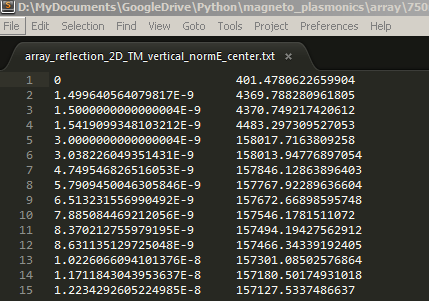
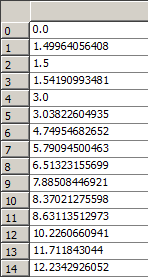
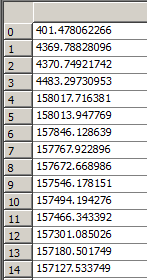
经过读取后,在Enthought Canopy的variable window查看读入的数据, 左侧为pos,右侧为Efield。
三、文件写入(慎重,小心别清空原本的文件)
步骤:打开 -- 写入 -- (保存)关闭
直接的写入数据是不行的,因为默认打开的是'r' 只读模式
|
1
2
3
4
5
6
|
>>> f.write('hello boy')Traceback (most recent call last):File "<stdin>", line 1, in <module>IOError: File not open for writing>>> f<open file '/tmp/test.txt', mode 'r' at 0x7fe550a49d20> |
应该先指定可写的模式
|
1
2
|
>>> f1 = open('/tmp/test.txt','w')>>> f1.write('hello boy!') |
但此时数据只写到了缓存中,并未保存到文件,而且从下面的输出可以看到,原先里面的配置被清空了
|
1
2
|
[root@node1 ~]# cat /tmp/test.txt[root@node1 ~]# |
关闭这个文件即可将缓存中的数据写入到文件中
|
1
2
3
|
>>> f1.close()[root@node1 ~]# cat /tmp/test.txt[root@node1 ~]# hello boy! |
注意:这一步需要相当慎重,因为如果编辑的文件存在的话,这一步操作会先清空这个文件再重新写入。那么如果不要清空文件再写入该如何做呢?
使用r+ 模式不会先清空,但是会替换掉原先的文件,如下面的例子:hello boy! 被替换成hello aay!
|
1
2
3
4
5
|
>>> f2 = open('/tmp/test.txt','r+')>>> f2.write('\nhello aa!')>>> f2.close()[root@node1 python]# cat /tmp/test.txthello aay! |
如何实现不替换?
|
1
2
3
4
5
6
7
8
|
>>> f2 = open('/tmp/test.txt','r+')>>> f2.read()'hello girl!'>>> f2.write('\nhello boy!')>>> f2.close()[root@node1 python]# cat /tmp/test.txthello girl!hello boy! |
可以看到,如果在写之前先读取一下文件,再进行写入,则写入的数据会添加到文件末尾而不会替换掉原先的文件。这是因为指针引起的,r+ 模式的指针默认是在文件的开头,如果直接写入,则会覆盖源文件,通过read() 读取文件后,指针会移到文件的末尾,再写入数据就不会有问题了。这里也可以使用a 模式
|
1
2
3
4
5
6
7
8
|
>>> f = open('/tmp/test.txt','a')>>> f.write('\nhello man!')>>> f.close()>>>[root@node1 python]# cat /tmp/test.txthello girl!hello boy!hello man! |
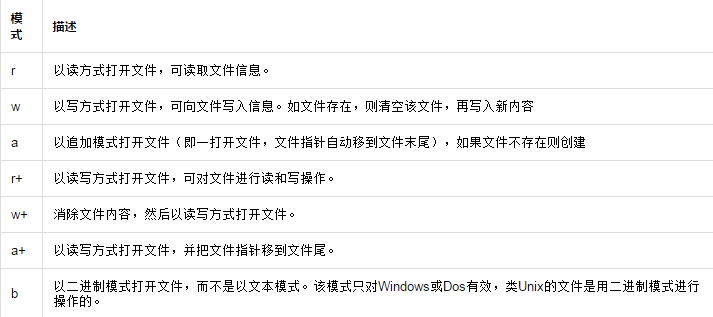
关于其他模式的介绍,见下表:
文件对象的方法:
f.readline() 逐行读取数据
方法一:
|
1
2
3
4
5
6
7
8
9
|
>>> f = open('/tmp/test.txt')>>> f.readline()'hello girl!\n'>>> f.readline()'hello boy!\n'>>> f.readline()'hello man!'>>> f.readline()'' |
方法二:
|
1
2
3
4
5
6
7
8
9
10
11
12
|
>>> for i in open('/tmp/test.txt'):... print i...hello girl!hello boy!hello man!f.readlines() 将文件内容以列表的形式存放>>> f = open('/tmp/test.txt')>>> f.readlines()['hello girl!\n', 'hello boy!\n', 'hello man!']>>> f.close() |
f.next() 逐行读取数据,和f.readline() 相似,唯一不同的是,f.readline() 读取到最后如果没有数据会返回空,而f.next() 没读取到数据则会报错
|
1
2
3
4
5
6
7
8
9
10
11
12
13
14
15
16
|
>>> f = open('/tmp/test.txt')>>> f.readlines()['hello girl!\n', 'hello boy!\n', 'hello man!']>>> f.close()>>>>>> f = open('/tmp/test.txt')>>> f.next()'hello girl!\n'>>> f.next()'hello boy!\n'>>> f.next()'hello man!'>>> f.next()Traceback (most recent call last):File "<stdin>", line 1, in <module>StopIteration |
f.writelines() 多行写入
|
1
2
3
4
5
6
7
8
9
10
11
|
>>> l = ['\nhello dear!','\nhello son!','\nhello baby!\n']>>> f = open('/tmp/test.txt','a')>>> f.writelines(l)>>> f.close()[root@node1 python]# cat /tmp/test.txthello girl!hello boy!hello man!hello dear!hello son!hello baby! |
f.seek(偏移量,选项)
|
1
2
3
4
5
6
7
8
9
10
11
12
13
14
15
16
|
>>> f = open('/tmp/test.txt','r+')>>> f.readline()'hello girl!\n'>>> f.readline()'hello boy!\n'>>> f.readline()'hello man!\n'>>> f.readline()' '>>> f.close()>>> f = open('/tmp/test.txt','r+')>>> f.read()'hello girl!\nhello boy!\nhello man!\n'>>> f.readline()''>>> f.close() |
这个例子可以充分的解释前面使用r+这个模式的时候,为什么需要执行f.read()之后才能正常插入
f.seek(偏移量,选项)
(1)选项=0,表示将文件指针指向从文件头部到“偏移量”字节处
(2)选项=1,表示将文件指针指向从文件的当前位置,向后移动“偏移量”字节
(3)选项=2,表示将文件指针指向从文件的尾部,向前移动“偏移量”字节
偏移量:正数表示向右偏移,负数表示向左偏移
|
1
2
3
4
5
6
7
8
9
10
11
12
13
|
>>> f = open('/tmp/test.txt','r+')>>> f.seek(0,2)>>> f.readline()''>>> f.seek(0,0)>>> f.readline()'hello girl!\n'>>> f.readline()'hello boy!\n'>>> f.readline()'hello man!\n'>>> f.readline()'' |
f.flush() 将修改写入到文件中(无需关闭文件)
|
1
2
|
>>> f.write('hello python!')>>> f.flush() |
|
1
|
[root@node1 python]# cat /tmp/test.txt |
|
1
2
3
4
|
hello girl!hello boy!hello man!hello python! |
f.tell() 获取指针位置
|
1
2
3
4
5
6
7
8
9
|
>>> f = open('/tmp/test.txt')>>> f.readline()'hello girl!\n'>>> f.tell()12>>> f.readline()'hello boy!\n'>>> f.tell()23 |
四、内容查找和替换
1、内容查找
实例:统计文件中hello个数
思路:打开文件,遍历文件内容,通过正则表达式匹配关键字,统计匹配个数。
|
1
|
[root@node1 ~]# cat /tmp/test.txt |
|
1
2
3
4
|
hello girl!hello boy!hello man!hello python! |
脚本如下:
方法一:
|
1
2
3
4
5
6
7
8
9
10
|
#!/usr/bin/pythonimport ref = open('/tmp/test.txt')source = f.read()f.close()r = r'hello's = len(re.findall(r,source))print s[root@node1 python]# python count.py4 |
方法二:
|
1
2
3
4
5
6
7
8
9
10
11
12
|
#!/usr/bin/pythonimport refp = file("/tmp/test.txt",'r')count = 0for s in fp.readlines():li = re.findall("hello",s)if len(li)>0:count = count + len(li)print "Search",count, "hello"fp.close()[root@node1 python]# python count1.pySearch 4 hello |
2、替换
实例:把test.txt 中的hello全部换为"hi",并把结果保存到myhello.txt中。
|
1
2
3
4
5
6
7
8
9
10
11
12
13
14
|
#!/usr/bin/pythonimport ref1 = open('/tmp/test.txt')f2 = open('/tmp/myhello.txt','r+')for s in f1.readlines():f2.write(s.replace('hello','hi'))f1.close()f2.close()[root@node1 python]# touch /tmp/myhello.txt[root@node1 ~]# cat /tmp/myhello.txthi girl!hi boy!hi man!hi python! |
实例:读取文件test.txt内容,去除空行和注释行后,以行为单位进行排序,并将结果输出为result.txt。test.txt 的内容如下所示:
|
1
2
3
4
5
6
7
8
9
10
11
12
13
14
15
16
17
18
19
|
#some wordsSometimes in life,You find a special friend;Someone who changes your life just by being part of it.Someone who makes you laugh until you can't stop;Someone who makes you believe that there really is good in the world.Someone who convinces you that there really is an unlocked door just waiting for you to open it.This is Forever Friendship.when you're down,and the world seems dark and empty,Your forever friend lifts you up in spirits and makes that dark and empty worldsuddenly seem bright and full.Your forever friend gets you through the hard times,the sad times,and the confused times.If you turn and walk away,Your forever friend follows,If you lose you way,Your forever friend guides you and cheers you on.Your forever friend holds your hand and tells you that everything is going to be okay. |
脚本如下:
|
1
2
3
4
5
6
7
8
9
10
|
f = open('cdays-4-test.txt')result = list()for line in f.readlines(): # 逐行读取数据line = line.strip() #去掉每行头尾空白if not len(line) or line.startswith('#'): # 判断是否是空行或注释行continue #是的话,跳过不处理result.append(line) #保存result.sort() #排序结果print resultopen('cdays-4-result.txt','w').write('%s' % '\n'.join(result)) #保存入结果文件 |
Python读写txt文本文件的更多相关文章
- python操作txt文件中数据教程[1]-使用python读写txt文件
python操作txt文件中数据教程[1]-使用python读写txt文件 觉得有用的话,欢迎一起讨论相互学习~Follow Me 原始txt文件 程序实现后结果 程序实现 filename = '. ...
- python 读写TXT,安装pandas模块。
今天需要用python读TXT 文件,发现pandas库好用,所以就去下载,没想pythoncharm中的setting中下载失败,所以去下源文件,安装pandas 是提示得先装numpy库,于是又去 ...
- Python操作txt文本文件
题目: 1.TXT文本文件中的内容为: url:http://119.23.241.154:8080/futureloan/mvc/api/member/login,mobilephone:13760 ...
- python 读写txt文件并用jieba库进行中文分词
python用来批量处理一些数据的第一步吧. 对于我这样的的萌新.这是第一步. #encoding=utf-8 file='test.txt' fn=open(file,"r") ...
- python读写txt文件
整理平常经常用到的文件对象方法: f.readline() 逐行读取数据方法一: >>> f = open('/tmp/test.txt') >>> f.rea ...
- Python读写txt文件时的编码问题
这个问题来自于一个小伙伴,他在处理中文数据时需要先把里面的文本过滤然后分词,因为里面有许多符号,不仅是中文标点符号,还有✳,emoji等奇怪的符号. 正常情况下,中文的str经过encode('utf ...
- python读写txt大文件
直接上代码: import easygui import os path = easygui.fileopenbox()#path是打开的文件的全路径 if path:#如果选择打开文件,没有选择取消 ...
- python操作txt文件中数据教程[4]-python去掉txt文件行尾换行
python操作txt文件中数据教程[4]-python去掉txt文件行尾换行 觉得有用的话,欢迎一起讨论相互学习~Follow Me 参考文章 python操作txt文件中数据教程[1]-使用pyt ...
- python操作txt文件中数据教程[3]-python读取文件夹中所有txt文件并将数据转为csv文件
python操作txt文件中数据教程[3]-python读取文件夹中所有txt文件并将数据转为csv文件 觉得有用的话,欢迎一起讨论相互学习~Follow Me 参考文献 python操作txt文件中 ...
随机推荐
- C#连接SQL数据库代码
感觉很有必要总结一下 一:C# 连接SQL数据库 Data Source=myServerAddress;Initial Catalog=myDataBase;User Id=myUsername; ...
- Xianfeng轻量级Java中间件平台:一期开发计划
关于Xianfeng轻量级Java中间件平台,考虑到需要控制开发周期,通过分期开发的方式来实现一些基础的.常用的功能,这样有利于跟踪开发计划.一期的开发计划,主要实现的目标如下: 系统架构: 1.确定 ...
- Wings 3D
Wings 3D 编辑 Wings 3D 是一个开源的三维计算机图形软件.使用翼边数据库.注重于多边形建模,构思取与 Izware 的 Nendo 和 Mirai.支持多种操作系统,包括 Linux. ...
- CentOS6.8下安装MySQL5.6
一:卸载旧版本 使用下面的命令检查是否安装有MySQL Server rpm -qa | grep mysql 有的话通过下面的命令来卸载掉 rpm -e mysql //普通删除模式 rpm -e ...
- C# 判断两张图片是否一致,极快速
#region 判断图片是否一致 /// <summary> /// 判断图片是否一致 /// </summary> /// <param name="img& ...
- Java对象的序列化与反序列化-Json篇
说到Java对象的序列化与反序列化,我们首先想到的应该是Java的Serializable接口,这玩意在两个系统之间的DTO对象里面可能会用到,用于系统之间的数据传输.或者在RPC(远程方法调用)时可 ...
- java 散列
原文:https://www.cnblogs.com/younghao/p/8333795.html 为什么要设计散列这种数据结构呢?在现实世界中,实体之间可能存在着映射关系(key-value),比 ...
- 备份一篇SVN的文章, 从搭建到主备库
来源: http://h2ofly.blog.51cto.com/6834926/1539141 [svn简介] svn用于版本管理数据,它采用了分支管理系统.在它出现之前存在C ...
- vue学习起步,vue环境安装
vue安装的前提是安装了nodejs 安装淘宝镜像 npm install -g cnpm --registry=https://registry.npm.taobao.org 安装webpack c ...
- qt creator如何实现转到槽功能
ui_mainwindow.h .