
android笔记:Service
服务:在后台运行,没有界面的组件。
服务生命周期如下:
两种启动方式:
1、startService(): onCreate()-->onStartCommand()-->onDestroy().
2、bindService(): onCreate()-->onBind()-->onUnbind()-->onDestroy().
一、定义一个服务,得做到以下:
1.继承Service,重写onBind()、onCreate()、onStartCommand()和 onDestroy();
2.在AndroidManifest里面注册才能生效.
二、启动服务:
Intent startIntent=new Intent(this,MyService.class);
startService(startIntent);
三、停止服务:
Intent stopIntent=new Intent(this,MyService.class);
stopService(stopIntent);
四、绑定服务:
1.onBind()方法返回Binder对象;
2.创建了ServiceConnection 的匿名类,重写onServiceConnected()方法和 onServiceDisconnected()方法;
3.用bindService()方法将 Activity 和 Service 进行绑定。
bindService()方法接收三个参数,第一个参数就是 Intent 对象,第二个参数是ServiceConnection 的实例,第三个
参数则是一个标志位,可以传入 BIND_AUTO_CREATE 表示在活动和服务进行绑定后自动创建服务。
示例如下:
Intent bindIntent = new Intent(this, MyService.class);
bindService(bindIntent, connection, BIND_AUTO_CREATE);
五、解绑服务:
unbindService(connection);
六、使用IntentService
优点:
1.异步,可以在子线程处理耗时操作
2.执行完毕自动停止
代码示例如下:
MainActivity.java
package com.example.servicedemo;

import android.os.Bundle;
import android.os.IBinder;
import android.app.Activity;
import android.content.ComponentName;
import android.content.Intent;
import android.content.ServiceConnection;
import android.util.Log;
import android.view.Menu;
import android.view.View;
import android.view.View.OnClickListener;
import android.widget.Button;

public class MainActivity extends Activity implements OnClickListener {
    private Button startService;
    private Button stopService;
    private Button bindService;
    private Button unbindService;
    private MyService.DownloadBinder downloadBinder;
    private Button startIntentService;
    private boolean mIsBound =false;
    private ServiceConnection connection = new ServiceConnection() {
        @Override
        public void onServiceConnected(ComponentName name, IBinder service) {
            // TODO Auto-generated method stub
            downloadBinder=(MyService.DownloadBinder)service;
            downloadBinder.startDownload();
            downloadBinder.getProgress();
        }

        @Override
        public void onServiceDisconnected(ComponentName name) {
            // TODO Auto-generated method stub
        }
    };
    @Override
    protected void onCreate(Bundle savedInstanceState) {
        super.onCreate(savedInstanceState);
        setContentView(R.layout.activity_main);
        startService=(Button)findViewById(R.id.start);
        stopService=(Button)findViewById(R.id.stop);
        bindService = (Button) findViewById(R.id.bind_service);
        unbindService = (Button) findViewById(R.id.unbind_service);
        startIntentService = (Button) findViewById(R.id.start_intent_service);
        startIntentService.setOnClickListener(this);
        startService.setOnClickListener(this);
        stopService.setOnClickListener(this);
        bindService.setOnClickListener(this);
        unbindService.setOnClickListener(this);
    }

    @Override
    public void onClick(View v) {
        // TODO Auto-generated method stub
        switch(v.getId()) {
          case R.id.start:
              Intent startIntent=new Intent(this,MyService.class);
              startService(startIntent);

             break;
          case R.id.stop:
              Intent stopIntent=new Intent(this,MyService.class);
              stopService(stopIntent);
             break;
          case R.id.bind_service:
              Intent bindIntent = new Intent(this, MyService.class);
              bindService(bindIntent,connection,BIND_AUTO_CREATE);//绑定服务
              mIsBound = true;
              break;
          case R.id.unbind_service:
              if(mIsBound) {
                 unbindService(connection);  //解绑服务
                 Log.d("MainActivity","UnbindService");
                 mIsBound=false;
              }

              break;
          case R.id.start_intent_service:
                Log.d("MainActivity","Thread id is "+Thread.currentThread().getId());
                Intent intentService=new Intent(this,MyIntentService.class);
                startService(intentService);
                break;
          default:
              break;
        }
    }

    @Override
    public boolean onCreateOptionsMenu(Menu menu) {
        // Inflate the menu; this adds items to the action bar if it is present.
        getMenuInflater().inflate(R.menu.main, menu);
        return true;
    }

}
MyService.java:
package com.example.servicedemo;

import android.app.Service;

import android.content.Intent;

import android.os.Binder;

import android.os.IBinder;

import android.util.Log;

public class MyService extends Service{

    private DownloadBinder mBinder = new DownloadBinder();

    //继承Binder的内部类,一个方法开始下载,另一个方法获取进度

    class DownloadBinder extends Binder {

      public void startDownload() {

        Log.d("MyService", "startDownload executed");

      }

      public int getProgress() {

        Log.d("MyService", "getProgress executed");

        return 0;

    }

  }

    @Override

    public IBinder onBind(Intent intent) {

        // TODO Auto-generated method stub

        return mBinder;

    }

    public void onCreate(){

        super.onCreate();

        Log.d("MyService","onCreate executed");

    }

    public int onStartCommand(Intent intent,int flags,int startId){

        Log.d("MyService","onStartCommand executed");

        return super.onStartCommand(intent,flags,startId);

    }

    public void onDestroy(){

        Log.d("MyService","onDestroy executed");

        super.onDestroy();

    }

}
MyIntentService.java:
package com.example.servicedemo;

import android.app.IntentService;

import android.content.Intent;

import android.util.Log;

public class MyIntentService extends IntentService{

    public MyIntentService() {

        super("MyIntentService");

        // TODO Auto-generated constructor stub

    }

    @Override

    protected void onHandleIntent(Intent intent) {

        // TODO Auto-generated method stub

        Log.d("MyIntentService", "Thread id is " + Thread.currentThread().

                getId());

    }

    public void onDestroy() {

        super.onDestroy();

        Log.d("MyIntentService", "onDestroy executed");

        }

}
activity_main.xml
<RelativeLayout xmlns:android="http://schemas.android.com/apk/res/android"

    xmlns:tools="http://schemas.android.com/tools"

    android:layout_width="match_parent"

    android:layout_height="match_parent"

    android:paddingBottom="@dimen/activity_vertical_margin"

    android:paddingLeft="@dimen/activity_horizontal_margin"

    android:paddingRight="@dimen/activity_horizontal_margin"

    android:paddingTop="@dimen/activity_vertical_margin"

    tools:context=".MainActivity" >

   <Button

       android:layout_width="match_parent"

       android:layout_height="wrap_content"

       android:id="@+id/start"

       android:text="start service"

       />

      <Button

       android:layout_width="match_parent"

       android:layout_height="wrap_content"

       android:id="@+id/stop"

       android:text="stop service"

       android:layout_below="@id/start"

       />

      <Button

         android:id="@+id/bind_service"

         android:layout_width="match_parent"

         android:layout_height="wrap_content"

         android:text="Bind Service"

         android:layout_below="@id/stop"  />

      <Button

         android:id="@+id/unbind_service"

         android:layout_width="match_parent"

         android:layout_height="wrap_content"

         android:text="Unbind Service"

         android:layout_below="@id/bind_service" />

      <Button

       android:id="@+id/start_intent_service"

       android:layout_width="match_parent"

       android:layout_height="wrap_content"

       android:text="Start IntentService"

       android:layout_below="@id/unbind_service"  />

</RelativeLayout>
AndroidManifest.xml
<?xml version="1.0" encoding="utf-8"?>

<manifest xmlns:android="http://schemas.android.com/apk/res/android"

    package="com.example.servicedemo"

    android:versionCode="1"

    android:versionName="1.0" >

    <uses-sdk

        android:minSdkVersion="8"

        android:targetSdkVersion="17" />

    <application

        android:allowBackup="true"

        android:icon="@drawable/ic_launcher"

        android:label="@string/app_name"

        android:theme="@style/AppTheme" >

        <activity

            android:name="com.example.servicedemo.MainActivity"

            android:label="@string/app_name" >

            <intent-filter>

                <action android:name="android.intent.action.MAIN" />

                <category android:name="android.intent.category.LAUNCHER" />

            </intent-filter>

        </activity>

        <service

            android:name=".MyService"

            ></service>

       <service android:name=".MyIntentService"></service>

    </application>

</manifest>
运行效果如下所示:
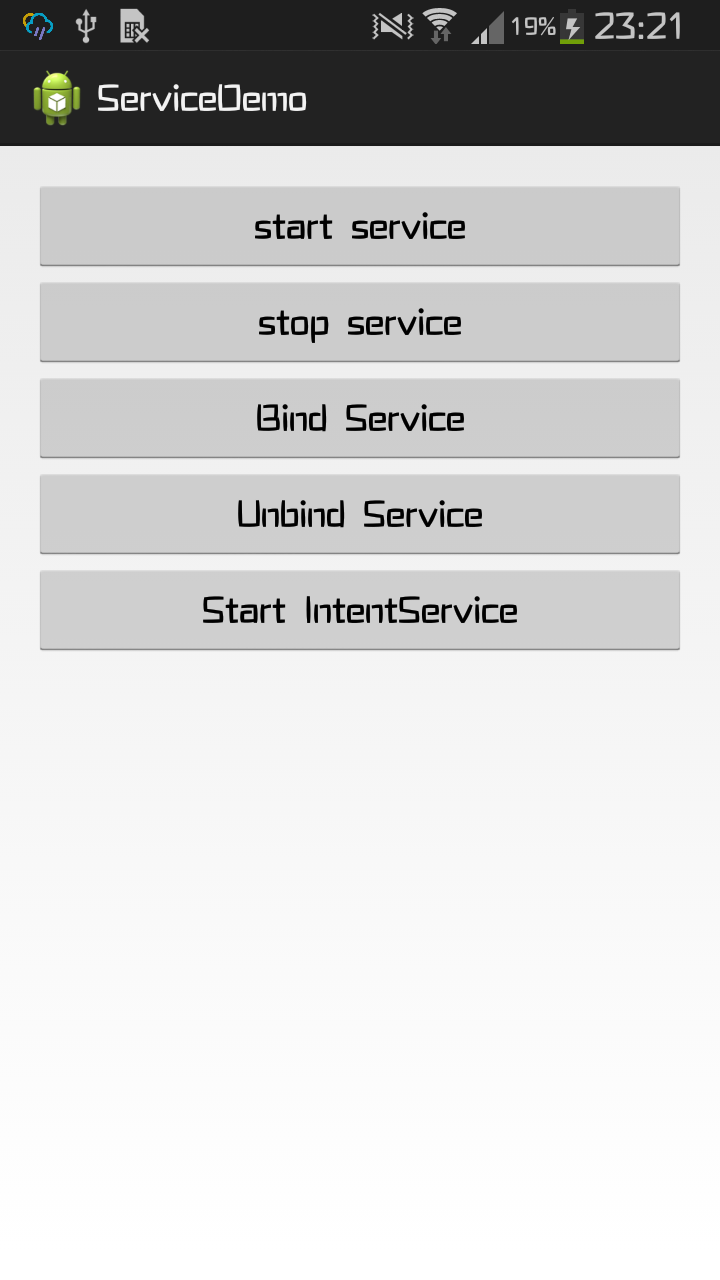
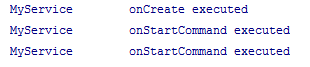
start Service:

多次start Service:
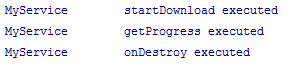
Bind Service:
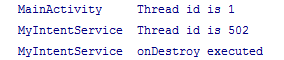
start IntentService:
android笔记:Service的更多相关文章
- Android笔记二十七.Service组件入门(一).什么是Service?
转载请表明出处:http://blog.csdn.net/u012637501(嵌入式_小J的天空) 一.Service 1.Service简单介绍 Service为Android四大组件之中 ...
- Android 学习笔记 Service服务与远程通信...(AIDL)
PS:这一章节看的我有几分迷茫,不是很容易理解...不过还好总算是明白了一大半了...基本的迷惑是解决了... 学习内容: 1.跨应用启动服务... 2.跨应用绑定服务... 3.跨应用实现通信... ...
- Android 学习笔记 Service
PS:前几篇的内容光是上代码了,也没有细细的讲解..感觉这样写很不好..因此还是多一些讲解吧... 学习内容: 1.了解Service... 2.Service的启动与停止.. 3.绑定与取消绑定Se ...
- Android笔记三十四.Service综合实例二
综合实例2:client訪问远程Service服务 实现:通过一个button来获取远程Service的状态,并显示在两个文本框中. 思路:如果A应用须要与B应用进行通信,调用B应用中的getName ...
- Android笔记(五十九)Android总结:四大组件——Service篇
什么是服务? 服务(service)是Android中实现程序后台运行的解决方案,适用于去执行那些不需要和用户交互并且还需要长期运行的任务.服务的运行不依赖于任何用户界面. 服务运行在主线程中,所以在 ...
- Android笔记(十七) Android中的Service
定义和用途 Service是Android的四大组件之一,一直在后台运行,没有用户界面.Service组件通常用于为其他组件提供后台服务或者监控其他组件的运行状态,例如播放音乐.记录地理位置,监听用户 ...
- android服务Service(上)- IntentService
Android学习笔记(五一):服务Service(上)- IntentService 对于需要长期运行,例如播放音乐.长期和服务器的连接,即使已不是屏幕当前的activity仍需要运行的情况,采用服 ...
- Android:Service
Android Service: http://www.apkbus.com/android-15649-1-1.html android service 的各种用法(IPC.AIDL): http: ...
- android 远程Service以及AIDL的跨进程通信
在Android中,Service是运行在主线程中的,如果在Service中处理一些耗时的操作,就会导致程序出现ANR. 但如果将本地的Service转换成一个远程的Service,就不会出现这样的问 ...
随机推荐
- 建造者模式及C++实现
下面是我自己对建造者模式的理解.具体我还没在开发中应用过,这只是对于书本的理解. 建造者模式 建造者模式:将一个复杂对象的构建与它的表示分离,使得同样的构建过程可以创建不同的表示.这是建造者模式的标准 ...
- IIS 配置1
[转]HTTP 错误 401.2 - Unauthorized 由于身份验证头无效,您无权查看此页. IIS7.0解决办法 (2010-11-01 00:58:54) 原网址 http://blog. ...
- CSS3 的calc()方法的使用
calc()简单介绍 calc()对大家来说,或许很陌生,不太会相信calc()是css中的部分.因为看其外表像个函数,既然是函数为何又出现在CSS中呢?这一点也让我百思不得其解,今天有一同事告诉我, ...
- VC字符串转换常用函数
最近在做一些关于VC的ActiveX小插件,经常会遇到字符串处理的问题,狂查CSDN和MSDN,结果并不理想.先说明一下,相关处理函数在VC++6.00测试通过.也许很多人不能理解,现在都什么年代了, ...
- 20180201之Burp Suite Professional V1.7.31 相关英文翻译
Burp Suite Professional V1.7.31 打嗝 套件 专业
- uva-10194-排序
题意: 如果一个队伍的得分比对方高,那么就赢得这场游戏,很明显,如果得分低那就是输了,如果俩个队伍的得分一样,那么就是平局,赢得比较获得3个点的得分,平手1个点的得分,输了0分.排序规则如下1:得分点 ...
- 最小生成树-kruskal
kruskal算法,没有进行算法复杂度分析 判断俩个结点是否在同一个树上使用了dfs,比较low的写法 输入数据 //第一行,结点数,结点数,边数 9 9 14a b 4b c 8c d 7a h 8 ...
- 温故而知新-mysql高级管理
温故而知新-mysql高级管理 1 mysql的一些授权信息都保存在授权表中 授权表是6个 db,user,host,tables_priv,columns_priv,procs_priv 这6个表 ...
- 57. 激活office时出下以下问题的解决方案
我们拿出一段来分析一下(我所知道的不多)SKU ID:1b686580-9fb1-4b88-bfba-eae7c0da31adLICENSE NAME: Office 15, OfficeProP ...
- leetcode237
/** * Definition for singly-linked list. * public class ListNode { * public int val; * public ListNo ...