
CHtmlEditCtrl(1) : Use CHtmlEditCtrl to Create a Simple HTML Editor
I needed a lightweight HTML editor to generate "rich text" emails, so I decided to explore the features and capabilities of the MFC CHtmlEditCtrl control. I had looked into using the DHTML Edit Control (an Active X control) in the past, but this new (MFC 7) class supports that functionality, so I decided to work from that direction.
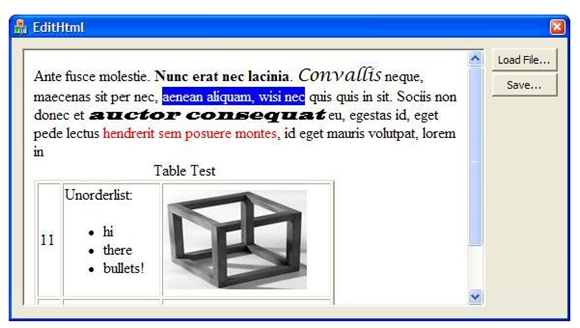
I found a few quirks with the control. There is (at least) one significant bug in the implementation and some "rough edges" that need to be smoothed out. But with a little bit of finesse, it is possible to create a usable HTML editor with very few lines of code.
If you want a full-fledged Document/View system, then the sample code provided by Microsoft and elsewhere (see References) is your best bet. I wanted a simple control that I could plop down into a dialog box so my user can start typing text and make it bold, italics, etc. This turns out to be easy once you get over a few hurdles, and it is also possible to read-in HTML source text from a file or URL.
The Good
The underlying DHTML editing support is powerful and comprehensive. For instance, the control automatically implements nearly all of the important keyboard command functions:
Ctrl+B Bold
Ctrl+I Italics
Ctrl+U Underline
Ctrl+K Create a Hyperlink
Ctrl+spc Remove formatting
Ctrl+bksp Undo (last text edit or format change)
Ctrl+X Cut
Ctrl+C Copy
Ctrl+V Insert from clipboard
Ctrl+F Find (the "new style" that highlights all occurrences!)
Ctrl+A Select All
Ctrl+L Open new local HTML file
Ctrl+N New browser window on current URL
Ctrl+P Print...
It is capable of nearly any desired HTML edit action, including "Convert lines to a bullet list," "Set the font: size, color, face, background, etc.", "Insert a horizontal line", "Insert a button," and so forth.
You have complete access to the browser DOM -- you can get an IHTMLDocument2* and use it to iterate through the elements. So you can programmatically do basically anything you want to do -- either in the HTML DOM or (as we shall see in the continuation of this article) by modifying the HTML text directly.
The Bad
As capable as it is, the DHTML editor seems partially unfinished. For instance, it has no support for creating a <TABLE> element. If a table already exists in the HTML, you can select it and delete it, or manually drag its handles to change the size, but that's about it.
The built-in context menu shows a "Properties" command, but nothing happens when you select it. It appears that Microsoft leaves implementation of this (complex) functionality up to the programmer -- but I think they should have disabled menu items that do nothing.
When you load an existing HTML page in design mode, you may be in for something of a shock... In edit mode, the scripts are not executed, so lots of hidden stuff is shown, and the page layout looks wonky. It is possible to switch to "Browser View" but there are some cases where that fails for no apparent reason.
There are a few other "quirks" that we'll encounter as we explore this subject.
The Ugly
The thing that might prevent many programmers from using this as a simple control is that 1) The Toolbox does not provide a CHtmlEditCtrl tool, and 2) the MCF Class Wizard support does not provide a wizard for deriving from CHtmlEditCtrl -- you must do it manually. (Note: You can derive from CHtmlEditView, though there are some peculiarities about putting a View into a dialog control).
Let's Get Started!
In this article, I'll provide a simple class object that will make it easy to put an HTML editor into a dialog box. And I'll demonstrate how to use it. In future articles, we'll look at some more advanced techniques.
First, we'll derive from CHtmlEditCtrl to (initially) provide just a few functions:
A means to instantiate the control on a dialog box.
Overrides to get rid of "Byte Order Marks" in the source text.
An option to disable (or replace) the built-in context menu.
The latter function is needed to avoid letting the user do things like navigate to a different page, or other things that don't make sense for some situations.
Here's the header file (HtmlEditCtrlEx.h):
|
#pragma once #include <afxhtml.h> // CHtmlEditCtrlEx control class CHtmlEditCtrlEx : public CHtmlEditCtrl { DECLARE_DYNCREATE(CHtmlEditCtrlEx) protected: public: CHtmlEditCtrlEx() { m_fEnableContextMenu=true; }; virtual ~CHtmlEditCtrlEx() {}; BOOL CreateFromStatic( UINT nID, CWnd* pParent ); void EnableContextMenu( BOOL fEnab ) { m_fEnableContextMenu= fEnab; }; HRESULT GetDocumentHTML( CString& sHtml ); // override discards BOM HRESULT SetDocumentHTML( CString& sHtml ); // override discards BOM protected: BOOL m_fEnableContextMenu; DECLARE_MESSAGE_MAP() public: virtual BOOL PreTranslateMessage(MSG* pMsg); // context menu suppression }; |
And here's the source code (HtmlEditCtrlEx.cpp):
|
#include "stdafx.h" #include "HtmlEditCtrlEx.h" // CHtmlEditCtrlEx IMPLEMENT_DYNCREATE(CHtmlEditCtrlEx, CHtmlEditCtrl) BEGIN_MESSAGE_MAP(CHtmlEditCtrlEx, CHtmlEditCtrl) END_MESSAGE_MAP() BOOL CHtmlEditCtrlEx::CreateFromStatic( UINT nID, CWnd* pParent ) { CStatic wndStatic; if ( !wndStatic.SubclassDlgItem(nID, pParent)) { return( FALSE ); } CRect rc; wndStatic.GetWindowRect( &rc ); pParent->ScreenToClient( &rc ); return Create( 0, (WS_CHILD | WS_VISIBLE), rc, pParent, nID, 0 ); }; BOOL CHtmlEditCtrlEx::PreTranslateMessage(MSG* pMsg) { if ( !m_fEnableContextMenu ) { switch (pMsg->message) { case WM_CONTEXTMENU: case WM_RBUTTONUP: case WM_RBUTTONDOWN: case WM_RBUTTONDBLCLK: if (pMsg->message==WM_RBUTTONUP) { // let parent handle context menu GetParent()->SendMessage(WM_CONTEXTMENU, pMsg->wParam, pMsg->lParam); } return TRUE; // eat it } } return CHtmlEditCtrl::PreTranslateMessage(pMsg); } // overide to discard BOM HRESULT CHtmlEditCtrlEx::GetDocumentHTML( CString& sHtml ) { HRESULT hr= CHtmlEditCtrl::GetDocumentHTML( sHtml ); if ( sHtml[0] != '<' ) { sHtml= sHtml.Mid(3); } return hr; } HRESULT CHtmlEditCtrlEx::SetDocumentHTML( CString& sHtml ) { HRESULT hr; int nOffset=0; if ( sHtml[0]==0xef && sHtml[1]==0xbb && sHtml[2]==0xbf ) { // BOM may be there nOffset= 3; } hr= CHtmlEditCtrl::SetDocumentHTML( sHtml.Mid(nOffset) ); return hr; } |
The PreTranslateMessage override allows you to prevent the build-in context menu, while at the same time, process any WM_CONTEXT menu handler that you provide in your parent dialog box.
The key function is CreateFromStatic. This function looks for a STATIC control in the parent window and uses it to determine the size and placement for the HTML editor window. It calls the CHtmlEditCtrl::Create() function, which ends up setting the browser control into design mode and navigating to about:blank -- to provide an empty slate.
Note the code in the SetDocumentHTML override where it checks the first few bytes for a special sequence,
0xef 0xbb 0xbf
The CHtmlEditCtrl's SaveAs function uses a CStream-based technique that stores these at the beginning of the file. It's called the "Byte Order Mark" (BOM). In this case, I don't need the bytes and they look goofy, so I get rid of them. In the continuation of this article, I'm going to add an Edit Source option and I want to show a clean text file.
To use this control:
1) Use the Visual Studio AppWizard to create an MFC dialog-based program.
2) In the Dialog Editor, use the toolbox to add a Static Text box at the location where you want the editor. Set its ID to, for instance, IDST_HtmlBox
3) Add this to your OnInitDialog function:
|
m_ctlEditHtml.CreateFromStatic( IDST_HtmlBox, this ); // m_ctlEditHtml.EnableContextMenu( false ); // -- uncomment later |
and add...
|
#include "HtmlEditCtrlEx.h" |
...at the top of the dialog's header file.
You now have an HTML editor that will handle all of the expected keyboard commands. As you may have noticed in the earlier screenshot, I've added two buttons for Load and Save. Here's the code for those functions:
|
void CEditHtmlDlg::OnBnClickedLoadfile() { wchar_t szFilter[] = L"HTML files (*.htm)|*.htm;*.html|" L"All Files (*.*)|*.*||"; CFileDialog dlg(TRUE,0,0,6,szFilter ); if ( dlg.DoModal()!=IDOK ) { return; } //-------------------------- read the HTML file into memory CString sFile= dlg.GetPathName(); CFile cf( sFile,CFile::modeRead ); int nLen= (int)cf.GetLength(); BYTE *p= new BYTE[nLen+2]; int n= cf.Read( p,nLen ); // read it all p[nLen]=0; // Add null terminator for CString m_sHtml= p; // save the HTML string as dialog member variable delete p; m_ctlEditHtml.SetDocumentHTML( m_sHtml ); // stuff it into the document m_ctHtmlSrcText.SetWindowTextW( m_sHtml );// and the source view } void CEditHtmlDlg::OnBnClickedSavefile() { m_ctlEditHtml.SaveAs(); // this one is easier :-) } |
Summary:
In this article, we created an object derived from CHtmlEditCtrl and placed it onto a dialog box. For now, we can read an HTML file from disk, make changes (using keyboard commands only) and save it back out. It's just a start, but because of the control's built-in functionality, it's a good distance toward a useful little utility for creating and modifying HTML files.
In future articles, we'll add an HTML source editor and explore how to access some editing functionality that is not directly available from the keyboard.
References:
Paul DiLascia's MSDN articles about using CHtmlView provided inspiration and guidance on setting up the control and overriding the context menu:
MSJ aug2003 http://msdn.microsoft.com/en-us/magazine/cc164109.aspx
MSJ sep2001 http://msdn.microsoft.com/en-us/magazine/cc301445.aspx
MSJ jan2000 (apparently, no longer available!)
CHtmlEditCtrl Class
http://msdn.microsoft.com/en-us/library/h14ht0dh.aspx
CHtmlEditCtrlBase Class
http://msdn.microsoft.com/en-us/library/54542c1c.aspx
MSHTML Editing Overviews and Tutorials
http://msdn.microsoft.com/en-us/library/aa770039(VS.85).aspx
Document/View architecture examples:
HTMLEdit Sample: Wraps the Internet Explorer MSHTML Editing Control
http://msdn.microsoft.com/en-us/library/ea8hhwb6.aspx
Using the new HTML Editing classes in MFC7
http://www.codeproject.com/KB/MFC/mfchtmledit.aspx
=-=-=-=-=-=-=-=-=-=-=-=-=-=-=-=-=-=-=-=-=-=-=-=-=-=-=-=-=-=-=-=-=-=-=-=-=-=-=-=-=-=
If you liked this article and want to see more from this author, please click the Yes button near the:
Was this article helpful?
label that is just below and to the right of this text. Thanks!
=-=-=-=-=-=-=-=-=-=-=-=-=-=-=-=-=-=-=-=-=-=-=-=-=-=-=-=-=-=-=-=-=-=-=-=-=-=-=-=-=-=
From: https://www.experts-exchange.com/articles/1396/Use-CHtmlEditCtrl-to-Create-a-Simple-HTML-Editor.html
CHtmlEditCtrl(1) : Use CHtmlEditCtrl to Create a Simple HTML Editor的更多相关文章
- Create a simple REST web service with Python--转载
今日尝试用python建立一个restful服务. 原文地址:http://www.dreamsyssoft.com/python-scripting-tutorial/create-simple-r ...
- CSU1019: Simple Line Editor
1019: Simple Line Editor Submit Page Summary Time Limit: 1 Sec Memory Limit: 128 Mb Subm ...
- [Angular 2] Create a simple search Pipe
This lesson shows you how to create a component and pass its properties as it updates into a Pipe to ...
- create a simple COM object
aaarticlea/png;base64,iVBORw0KGgoAAAANSUhEUgAAArsAAAGYCAIAAADN0b3QAAAgAElEQVR4nO29749c1b2nW/4Lzh8wUr
- Artix-7 50T FPGA试用笔记之Create a simple MicroBlaze System
前言:之前笔者的试用博文提到安富利这块板子非常适合MicroBlaze开发,同时网上关于MicroBlaze的资料非常少(或含糊不清),没有一篇能完整介绍VIVADO SDK的设计流程,所以笔者带来这 ...
- [Tools] Create a Simple CLI Tool in Node.js with CAC
Command-line tools can help you with all sorts of tasks. This lesson covers the very basics of setti ...
- [Angular] Create a simple *ngFor
In this post, we are going to create our own structure directive *ngFor. What it should looks like i ...
- [Angular] Using directive to create a simple Credit card validator
We will use 'HostListener' and 'HostBinding' to accomplish the task. The HTML: <label> Credit ...
- Create a simple js-ctypes example
js-ctypes 为Firefox extension访问由C/C++编写的native code提供了一种通用的方法. 从Firefox 4 开始支持js-ctypes,不同版本的之间有极好的兼容 ...
随机推荐
- LPC-LINK 2 Board IO TABLE
- IBDAP-CMSIS-DAP
IBDAP-CMSIS-DAP Armstart's CMSIS-DAP firmware implementation in gcc and makefile. http://www.armstar ...
- CRC32 of Ether FCS with STM32
Everyone knows that STM32F1xx, STM32F2xx, STM32F4xx have a hardware unit with a polynomial CRC32 0x0 ...
- ubuntu下安装ftp服务器
参考文献: 5.4 FTP 服务器 vsftpd - FTP 服务器安装 vsftpd 是可在 Ubuntu 中使用的 FTP 守护程序之一.它在安装.设置和维护方面十分方便.要安装 vsftpd 您 ...
- Apache Mina Filter
Mina中的过滤器处于IoService与IoHandler之间,用于过滤每一个I/O事件.本文分析Mina中的过滤器是怎么串起来的? 前面提到了IoFilter,FilterChain等接口和类,在 ...
- WinForm通用自动更新器AutoUpdater项目实战
一.项目背景介绍 最近单位开发一个项目,其中需要用到自动升级功能.因为自动升级是一个比较常用的功能,可能会在很多程序中用到,于是,我就想写一个自动升级的组件,在应用程序中,只需要引用这个自动升级组件, ...
- 使用Application.GetResourceStream方法加载资源时得到的总是null
我们可以预先把程序中用到的资源,如图片,音乐等放入项目中,打包进XAP文档,需要的时候从中调用.下面就说说具体实现方法. 第一步,把数据存进项目. 1.右键点击项目名称-添加-新建文件夹(英文版请自行 ...
- UITableView分割线样式与颜色
tv.separatorStyle = UITableViewCellSeparatorStyleSingleLine; //设置样式 tv.separatorColor = [UIColor c ...
- 关于面试总结8-http协议相关面试题
前言 在PC浏览器的地址栏输入一串URL,然后按Enter键这个页面渲染出来,这个过程中都发生了什么事?这个是很多面试官喜欢问的一个问题 如果测试只是停留在表面上点点点,不知道背后的逻辑,是无法发现隐 ...
- spring 深入reading
http://wenku.baidu.com/view/8db141624a7302768e9939b3.html http://docs.spring.io/spring/docs/4.2.1.BU ...