
SpringCloud-声明式Rest调用Feign(四)
前言:一般情况下我们通常使用RestTemplate来实现声明式远程调用,但是当参数过多,那么效率就会变得很低,并且难以维护,所以在微服务当中也有声明式Rest调用的组件Feign
一、Feign简介
Feign是Netflix开发的声明式、模板化的http客户端,Feign可以帮我们更加便捷、优雅地调用HTTP API。在SpringCloud中使用Feign非常简单,创建一个接口,并在接口上加上注解,就完成了声明式调用;
二、Feign与SpringCloud的整合简单使用
注:本次学习记录是基于之前的Eureka介绍和Ribbon介绍之上实践,这里只展示关键代码,其余代码可在代码示例中查看;
1、创建基于Eureka和Ribbon的服务端和两个客户端生产者、消费者:
Server:
<?xml version="1.0" encoding="UTF-8"?>

<project xmlns="http://maven.apache.org/POM/4.0.0"

  xmlns:xsi="http://www.w3.org/2001/XMLSchema-instance"

  xsi:schemaLocation="http://maven.apache.org/POM/4.0.0 http://maven.apache.org/xsd/maven-4.0.0.xsd">

  <modelVersion>4.0.0</modelVersion>

  <groupId>com.cn</groupId>

  <artifactId>eureka-ribbon-server</artifactId>

  <version>1.0-SNAPSHOT</version>

  <properties>

    <project.build.sourceEncoding>UTF-8</project.build.sourceEncoding>

    <java.version>1.8</java.version>

  </properties>

  <parent>

    <groupId>org.springframework.boot</groupId>

    <artifactId>spring-boot-starter-parent</artifactId>

    <version>1.5.13.RELEASE</version>

  </parent>

  <dependencies>

    <dependency>

      <groupId>org.springframework.cloud</groupId>

      <artifactId>spring-cloud-starter-eureka-server</artifactId>

    </dependency>

  </dependencies>

  <dependencyManagement>

    <dependencies>

      <dependency>

        <groupId>org.springframework.cloud</groupId>

        <artifactId>spring-cloud-dependencies</artifactId>

        <version>Edgware.SR3</version>

        <type>pom</type>

        <scope>import</scope>

      </dependency>

    </dependencies>

  </dependencyManagement>

  <!-- 添加spring-boot的maven插件 -->

  <build>

    <plugins>

      <plugin>

        <groupId>org.springframework.boot</groupId>

        <artifactId>spring-boot-maven-plugin</artifactId>

      </plugin>

    </plugins>

  </build>

</project>
pom.xml
server.port=8761

#注意:这两个配置eureka默认为true,要改成false,否则会报错,connot connect server

#表示是否将自己注册在EurekaServer上

eureka.client.register-with-eureka=false

#表示是否从EurekaServer获取注册信息

eureka.client.fetch-registry=false

eureka.client.service-url.defaultZone=http://localhost:8761/eureka/
application.properties
package com.cn;

import org.springframework.boot.SpringApplication;

import org.springframework.boot.autoconfigure.SpringBootApplication;

import org.springframework.cloud.netflix.eureka.server.EnableEurekaServer;

/**

 * @program: springcloud-example

 * @description: 启动类

 * @author:

 * @create: 2018-06-15 15:43

 **/

@SpringBootApplication

@EnableEurekaServer

public class ServerApplication {

    public static void main(String[] args) {

        SpringApplication.run(ServerApplication.class,args);

    }

}
ServerApplication.java
Client生产者:
<?xml version="1.0" encoding="UTF-8"?>

<project xmlns="http://maven.apache.org/POM/4.0.0"

  xmlns:xsi="http://www.w3.org/2001/XMLSchema-instance"

  xsi:schemaLocation="http://maven.apache.org/POM/4.0.0 http://maven.apache.org/xsd/maven-4.0.0.xsd">

  <modelVersion>4.0.0</modelVersion>

  <groupId>com.cn</groupId>

  <artifactId>eureka-ribbon-client2</artifactId>

  <version>1.0-SNAPSHOT</version>

  <properties>

    <project.build.sourceEncoding>UTF-8</project.build.sourceEncoding>

    <java.version>1.8</java.version>

  </properties>

  <parent>

    <groupId>org.springframework.boot</groupId>

    <artifactId>spring-boot-starter-parent</artifactId>

    <version>1.5.13.RELEASE</version>

  </parent>

  <dependencies>

    <dependency>

      <groupId>org.springframework.cloud</groupId>

      <artifactId>spring-cloud-starter-ribbon</artifactId>

    </dependency>

    <dependency>

      <groupId>org.springframework.cloud</groupId>

      <artifactId>spring-cloud-starter-eureka</artifactId>

    </dependency>

  </dependencies>

  <dependencyManagement>

    <dependencies>

      <dependency>

        <groupId>org.springframework.cloud</groupId>

        <artifactId>spring-cloud-dependencies</artifactId>

        <version>Edgware.SR3</version>

        <type>pom</type>

        <scope>import</scope>

      </dependency>

    </dependencies>

  </dependencyManagement>

  <!-- 添加spring-boot的maven插件 -->

  <build>

    <plugins>

      <plugin>

        <groupId>org.springframework.boot</groupId>

        <artifactId>spring-boot-maven-plugin</artifactId>

      </plugin>

    </plugins>

  </build>

</project>
pom.xml
server.port=8763

spring.application.name=client-87

eureka.client.service-url.defaultZone=http://localhost:8761/eureka
application.properties
package com.cn;

import org.springframework.boot.SpringApplication;

import org.springframework.boot.autoconfigure.SpringBootApplication;

import org.springframework.cloud.client.discovery.EnableDiscoveryClient;

/**

 * @program: springcloud-example

 * @description:

 * @author:

 * @create: 2018-06-15 16:05

 **/

@SpringBootApplication

@EnableDiscoveryClient

public class ClientApplication {

    public static void main(String[] args) {

        SpringApplication.run(ClientApplication.class, args);

    }

}
ClientApplication.java
package com.cn.contorller;

import org.springframework.stereotype.Controller;

import org.springframework.web.bind.annotation.GetMapping;

import org.springframework.web.bind.annotation.ResponseBody;

/**

 * @program: springcloud-example

 * @description:

 * @author:

 * @create: 2018-06-15 16:12

 **/

@Controller

public class ClientController {

    @GetMapping("/getUser")

    @ResponseBody

    public String getUser() {

        System.out.println("获取用户成功");

        return "{\"username\":\"张三\",\"age\":\"10\"}";

    }

}
ClientController.java
2、在消费者module中的maven依赖中添加相关依赖库,创建Feign访问接口,并注解,通过识别Eureka提供的应用名称,来找对应的请求路径:
pom.xml:
<?xml version="1.0" encoding="UTF-8"?>
<project xmlns="http://maven.apache.org/POM/4.0.0"
  xmlns:xsi="http://www.w3.org/2001/XMLSchema-instance"
  xsi:schemaLocation="http://maven.apache.org/POM/4.0.0 http://maven.apache.org/xsd/maven-4.0.0.xsd">
  <modelVersion>4.0.0</modelVersion>

  <groupId>com.cn</groupId>
  <artifactId>eureka-feign-client</artifactId>
  <version>1.0-SNAPSHOT</version>

  <properties>
    <project.build.sourceEncoding>UTF-8</project.build.sourceEncoding>
    <java.version>1.8</java.version>
  </properties>

  <parent>
    <groupId>org.springframework.boot</groupId>
    <artifactId>spring-boot-starter-parent</artifactId>
    <version>1.5.13.RELEASE</version>
  </parent>

  <dependencies>
    <dependency>
      <groupId>org.springframework.cloud</groupId>
      <artifactId>spring-cloud-starter-ribbon</artifactId>
    </dependency>
    <dependency>
      <groupId>org.springframework.cloud</groupId>
      <artifactId>spring-cloud-starter-eureka</artifactId>
    </dependency>

    <dependency>
      <groupId>org.springframework.cloud</groupId>
      <artifactId>spring-cloud-starter-feign</artifactId>
    </dependency>

  </dependencies>
  <dependencyManagement>
    <dependencies>
      <dependency>
        <groupId>org.springframework.cloud</groupId>
        <artifactId>spring-cloud-dependencies</artifactId>
        <version>Edgware.SR3</version>
        <type>pom</type>
        <scope>import</scope>
      </dependency>
    </dependencies>
  </dependencyManagement>
  <!-- 添加spring-boot的maven插件 -->
  <build>
    <plugins>
      <plugin>
        <groupId>org.springframework.boot</groupId>
        <artifactId>spring-boot-maven-plugin</artifactId>
      </plugin>
    </plugins>
  </build>
</project>
application.properties:
server.port=8762

spring.application.name=client-8762

eureka.client.service-url.defaultZone=http://localhost:8761/eureka/
Feign接口:
import org.springframework.cloud.netflix.feign.FeignClient;

import org.springframework.web.bind.annotation.RequestMapping;

@FeignClient(name = "CLIENT-87")

public interface UserFeign {

    @RequestMapping("/getUser")

    public String getUser();

}
FeignController:
package com.cn.controller;

import com.cn.feign.UserFeign;
import org.springframework.beans.factory.annotation.Autowired;
import org.springframework.cloud.client.ServiceInstance;
import org.springframework.cloud.client.loadbalancer.LoadBalancerClient;
import org.springframework.web.bind.annotation.GetMapping;
import org.springframework.web.bind.annotation.RequestMapping;
import org.springframework.web.bind.annotation.RestController;
import org.springframework.web.client.RestTemplate;

/**
 * @program: springcloud-example
 * @description:
 * @author:
 * @create: 2018-06-15 15:55
 **/
@RestController
public class FeignController {
    @Autowired
    private LoadBalancerClient loadBalancerClient;

    @Autowired
    private RestTemplate restTemplate;

    @Autowired
    private UserFeign userFeign;

    @RequestMapping("/getUser")
    public String getUser() {
        return userFeign.getUser();
    }

    @GetMapping("/loadInstance")
    public String loadInstance() {
        ServiceInstance choose = this.loadBalancerClient.choose("client-87");
        System.out.println(choose.getServiceId()+":"+choose.getHost()+":"+choose.getPort());
        return choose.getServiceId() + ":" + choose.getHost() + ":" + choose.getPort();
    }

}
在ClientApplication.java启动类中加入@EnableFeignClients注解:
package com.cn;

import org.springframework.boot.SpringApplication;

import org.springframework.boot.autoconfigure.SpringBootApplication;

import org.springframework.cloud.client.discovery.EnableDiscoveryClient;

import org.springframework.cloud.client.loadbalancer.LoadBalanced;

import org.springframework.cloud.netflix.feign.EnableFeignClients;

import org.springframework.context.annotation.Bean;

import org.springframework.web.client.RestTemplate;

/**

 * @program: springcloud-example

 * @description:

 * @author:

 * @create: 2018-06-15 15:51

 **/

@SpringBootApplication

@EnableDiscoveryClient

@EnableFeignClients

public class ClientApplication {

    public static void main(String[] args) {

        SpringApplication.run(ClientApplication.class, args);

    }

    /**

     * @Description:

     * @Param:

     * @return:

     * @Author:

     * @Date: 2018/6/15

     */

    @Bean

    @LoadBalanced

    public RestTemplate getRestTemplate() {

        return new RestTemplate();

    }

}
3、分别启动Server、Client生产者、Client消费者,并调用访问http://localhost:8761、http://localhost:8762/getUser,如图:
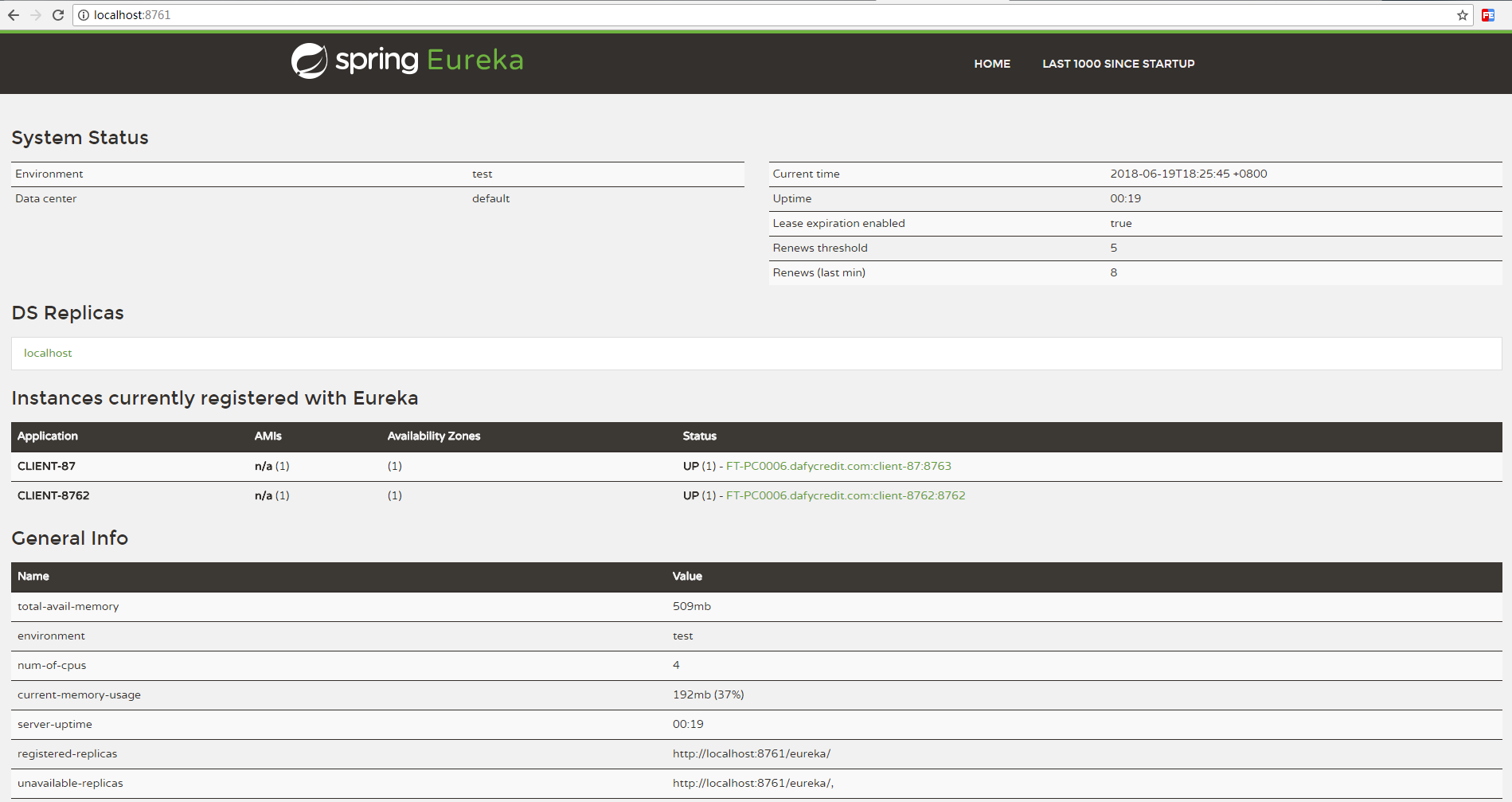
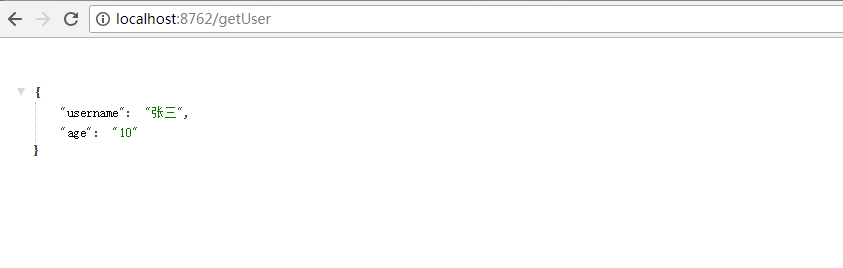
调用成功!
参考书籍:《SpringCloud与Docker微服务架构实战》周力著
代码示例:https://gitee.com/lfalex/springcloud-example( eureka-feign-client、 eureka-ribbon-server、 eureka-ribbon-client2这三个module)
SpringCloud-声明式Rest调用Feign(四)的更多相关文章
- SpringCloud 源码系列(6)—— 声明式服务调用 Feign
SpringCloud 源码系列(1)-- 注册中心 Eureka(上) SpringCloud 源码系列(2)-- 注册中心 Eureka(中) SpringCloud 源码系列(3)-- 注册中心 ...
- SpringCloud之声明式服务调用 Feign(三)
一 Feign简介 Feign是一种声明式.模板化的HTTP客户端,也是netflix公司组件.使用feign可以在远程调用另外服务的API,如果调用本地API一样.我们知道,阿里巴巴的doubbo采 ...
- SpringCloud开发学习总结(七)—— 声明式服务调用Feign(一)
在实践的过程中,我们会发现在微服务架构中实现客户端负载均衡的服务调用技术Spring Cloud Ribbon<SpringCloud开发学习总结(四)—— 客户端负载均衡Ribbon> ...
- 【Dalston】【第三章】声明式服务调用(Feign)
当我们通过RestTemplate调用其它服务的API时,所需要的参数须在请求的URL中进行拼接,如果参数少的话或许我们还可以忍受,一旦有多个参数的话,这时拼接请求字符串就会效率低下,并且显得好傻.那 ...
- 声明式服务调用Feign
什么是 Feign Feign 是种声明式.模板化的 HTTP 客户端(仅在 consumer 中使用). 什么是声明式,有什么作用,解决什么问题? 声明式调用就像调用本地方法一样调用远程方法;无 ...
- Spring Cloud第七篇 | 声明式服务调用Feign
本文是Spring Cloud专栏的第七篇文章,了解前六篇文章内容有助于更好的理解本文: Spring Cloud第一篇 | Spring Cloud前言及其常用组件介绍概览 Spring Cloud ...
- Spring Cloud 声明式服务调用 Feign
一.简介 在上一篇中,我们介绍注册中心Eureka,但是没有服务注册和服务调用,服务注册和服务调用本来应该在上一章就应该给出例子的,但是我觉得还是和Feign一起讲比较好,因为在实际项目中,都是使用声 ...
- Spring Cloud Feign 1(声明式服务调用Feign 简介)
Spring Cloud Feign基于Netflix Feign 同时整合了Spring Cloud Ribbon和Spring Cloud Hytrix,除了提供两者的强大功能外,它还提供了一种声 ...
- 004声明式服务调用Feign & 断路器Hystrix
1.POM配置 和普通Spring Boot工程相比,添加了Eureka Client.Feign.Hystrix依赖和Spring Cloud依赖管理 <dependencies> &l ...
- SpringCloud开发学习总结(七)—— 声明式服务调用Feign(二)
参数绑定 在上一章的示例中,我们使用Spring Cloud Feign实现的是一个不带参数的REST服务绑定.然而现实系统中的各种业务接口要比它复杂得多,我们有时会在HTTP的各个位置传入各种不同类 ...
随机推荐
- RESET MASTER和RESET SLAVE使用场景和说明
[前言]在配置主从的时候经常会用到这两个语句,刚开始的时候还不清楚这两个语句的使用特性和使用场景. 经过测试整理了以下文档,希望能对大家有所帮助: [一]RESET MASTER参数 功能说明:删除所 ...
- asp.net Core 使用过滤器判断请求客户端是否为移动端,并实现PC端和移动端请求映射和自动跳转
很多时候我们做网站时单纯的用bootstrap等前端框架实现的前端自适应带给用户的体验并不太好,所以为了提高用户体验会专门针对PC端网页重新设计一套移动端网页,但是怎么才能做到在移动端访问PC页面的时 ...
- Vue安装以及Vue项目创建以及Vue Devtools安装
这几天一直在学习Vue.js框架. 因为以前没有前端项目的经验,也没学过什么前端框架,所以,对于vue.js的学习有些不知所措. 在vue.js官网看教程,按照教程指点,可以不用脚手架开发,也可以搭建 ...
- CSS学习摘要-语法和选择器
主要摘自网络开发者. 从最基本的层次来看,CSS是由两块内容组合而成的: 属性(Property):一些人类可理解的标识符,这些标识符指出你想修改哪一些样式,例如:字体,宽度,背景颜色等. 属性值(V ...
- 铁乐学python_Day42_锁和队列
铁乐学python_Day42_锁和队列 例:多个线程抢占资源的情况 from threading import Thread import time def work(): global n tem ...
- 【原创】Qt 使用ODBC driver 连接SQL Server
最近在做数据库的课程设计.第一个需要解决的问题是使用什么工具来实现这个系统.经过一番资料查找,决定使用SQL Server Express 2012作为服务器,使用Qt作为编写客户端程序语言.问题是c ...
- October 04th 2017 Week 40th Wednesday
We teach people how to remember, we never teach them how to grow. 我们教会人们如何记忆,却从来不教他们如何成长. Without pr ...
- September 10th 2017 Week 37th Sunday
Dream most deep place, only then the smile is not tired. 梦的最深处,只有微笑不累. Everyday I expect I can go to ...
- THE CUP OF LIFE即生命之杯。
生命之杯 编辑 THE CUP OF LIFE即生命之杯. <生命之杯>(西班牙语:La copa de la vida,英语:The Cup of Life)是一首由波多黎各裔歌手瑞奇· ...
- Mysql 安装服务无法启动解决方案与使用的一般使用指令
问题描述: 在安装mysql 时,如果第一次没安装成功,第二次重装可能出现莫名奇妙的情况.通过一番尝试,发现,安装往上的教程还是无法成功安装的主要原因是第一次安装虽然未成功,但是mysql 默认的33 ...