
iOS:UIToolBar控件的使用
UIToolBar控件:是经常使用的一个工具条控件,虽然在上面可以添加子控件,但是toolbar中只能添加UIBarButtonItem类型的子控件,其他子控件会被包装成这种类型的,例如UIButton。通过工具栏可以用来对视图View中内容进行操作。
原理:
可以在toolBar上添加任何子控件。其实它的原理是把你要添加的子控件先加到toolbarItems数组里面,最后再把toolbarItems数组一次性放到toolbar工具栏里面。
虽然可以在toolbar中添加其他任何的视图控件如UILabel、UITextField、UIImageView等等,但是在xib/storyboard图形界面设计时,不能它们直接放置到UIToolBar中。若强行将它们拖曳到UIToolBar,会使它们放置在上层容器中,而不是UIToolBar中。所以前提是先必须添加一个视图UIView控件到toolbar中,它会被包装成UIBarButtonItem类型,然后再在UIView中添加需要的子视图控件。
举例如下:将UILabel加入到toolbar工具栏中,步骤如下:
1. 将UIView拖曳到UIToolBar(UIToolBar中自动增加了一个UIBarButtonItem,其中便是刚才插入的UIView);
2. 将UILabel(或其他控件)拖曳到刚才的UIView中;
3. 将刚才的UIView的Background设为某种颜色(如蓝色);
4. 将刚才的UIView的Background设为Default。
对toolbar进行初始化:
-initWithTitle(添加button用这个)
-initWithImage
-initWithBarButtonSystemItem(添加系统自定义的button,形状跟大小都已经固定了)下面链接里面有按钮图片样式
-initWithCustomView(添加除了button以外的View)
一、采用系统默认.xib文件中的UIToolBar,制作的工具栏(删除和添加图片)
(1)默认的View视图布局

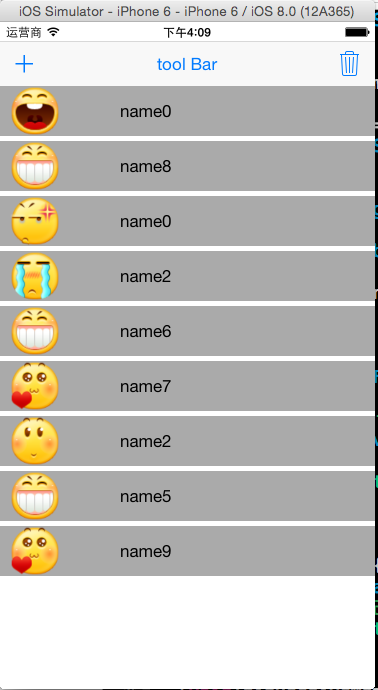
代码如下:需要在代码中为添加的控件人为设置frame具体坐标x,y、大小width,height
 #import "ViewController.h"

 #define CONTACE_VIEW_HEIGHT 50

 @interface ViewController ()

 @property (weak, nonatomic) IBOutlet UIToolbar *toolBar;

 @property (weak, nonatomic) IBOutlet UIBarButtonItem *barButtonitemDelete;

 @end

 @implementation ViewController

 - (IBAction)addContact:(UIBarButtonItem *)sender

 {

     //让删除按钮有效

     [self.barButtonitemDelete setEnabled:YES];

     //在subView中已经有了3个控件

     NSInteger count = self.view.subviews.count - ;

     CGRect lastFrame = self.toolBar.frame;

     UIView *contactView = [[UIView alloc]init];

     CGFloat gapY = ;

     CGFloat x = ;

     CGFloat y = lastFrame.origin.y + lastFrame.size.height + (CONTACE_VIEW_HEIGHT+gapY) * count;

     CGFloat w = self.view.frame.size.width;

     contactView.frame = CGRectMake(x,y,w,CONTACE_VIEW_HEIGHT);

     //添加头像

     UIImage *image = [UIImage imageNamed:[NSString stringWithFormat:@"%d.png",arc4random_uniform()]];

     UIImageView *face = [[UIImageView alloc]initWithImage:image];

     face.frame = CGRectMake(, ,,);

     [contactView addSubview:face];

     //添加姓名

     UILabel *labelName = [[UILabel alloc]init];

     labelName.text = [NSString stringWithFormat:@"name%d",arc4random_uniform()];

     labelName.frame = CGRectMake(+image.size.width+, , , );

     [contactView addSubview:labelName];

     contactView.backgroundColor = [UIColor lightGrayColor];

     [self.view addSubview:contactView];

 }

 - (IBAction)deleteContact:(UIBarButtonItem *)sender

 {

     //删除视图

     UIView *lastView = [self.view.subviews lastObject];

     [lastView removeFromSuperview];

     //如果没有了contactView,设置删除按钮无效

     if(self.view.subviews.count == )

     {

         [self.barButtonitemDelete setEnabled:NO];

     }

 }

 - (void)viewDidLoad {

     [super viewDidLoad];

     //开始时删除设置为无效

     [self.barButtonitemDelete setEnabled:NO];

 }

 - (void)didReceiveMemoryWarning {

     [super didReceiveMemoryWarning];

     // Dispose of any resources that can be recreated.

 }
二、采用提前自定义布局的.xib文件中的UIToolBar,制作的工具栏(删除和添加图片)
(2)自定义的View视图布局,添加UIImage、UILabel控件


代码如下:不需要在代码中再去设置添加控件的frame,在.xib文件中已经布局好了。
 import "ViewController.h"

 #define CONTACE_VIEW_HEIGHT 50

 @interface ViewController ()

 @property (weak, nonatomic) IBOutlet UIToolbar *toolBar;

 @property (weak, nonatomic) IBOutlet UIBarButtonItem *barButtonitemDelete;

 @end

 @implementation ViewController

 - (IBAction)addContact:(UIBarButtonItem *)sender

 {

     //让删除按钮有效

     [self.barButtonitemDelete setEnabled:YES];

     //在subView中已经有了3个控件

     NSInteger count = self.view.subviews.count - ;

     CGRect lastFrame = self.toolBar.frame;

     //加载xib文件

     NSArray *views = [[NSBundle mainBundle]loadNibNamed:@"contactView" owner:nil options:nil];

     //添加contactView

     UIView *contactView = [views lastObject];

     CGFloat gapY = ;

     CGFloat x = ;

     CGFloat y = lastFrame.origin.y + lastFrame.size.height + (CONTACE_VIEW_HEIGHT+gapY) * count;

     CGFloat w = self.view.frame.size.width;

     contactView.frame = CGRectMake(x,y,w,CONTACE_VIEW_HEIGHT);

     //添加头像

     UIImageView *face = (UIImageView *)[contactView viewWithTag:];

     UIImage *image = [UIImage imageNamed:[NSString stringWithFormat:@"%d.png",arc4random_uniform()]];

     [face setImage:image];

     //添加姓名

     UILabel *labelName = (UILabel *)[contactView viewWithTag:];

     labelName.text = [NSString stringWithFormat:@"name%d",arc4random_uniform()];

     [self.view addSubview:contactView];

 }

 - (IBAction)deleteContact:(UIBarButtonItem *)sender

 {

     //删除视图

     UIView *lastView = [self.view.subviews lastObject];

     [lastView removeFromSuperview];

     //如果没有了contactView,设置删除按钮无效

     if(self.view.subviews.count == )

     {

         [self.barButtonitemDelete setEnabled:NO];

     }

 }

 - (void)viewDidLoad {

     [super viewDidLoad];

     //开始时删除设置为无效

     [self.barButtonitemDelete setEnabled:NO];

 }

 - (void)didReceiveMemoryWarning {

     [super didReceiveMemoryWarning];

     // Dispose of any resources that can be recreated.

 }

 @end
iOS:UIToolBar控件的使用的更多相关文章
- JS调用Android、Ios原生控件
在上一篇博客中已经和大家聊了,关于JS与Android.Ios原生控件之间相互通信的详细代码实现,今天我们一起聊一下JS调用Android.Ios通信的相同点和不同点,以便帮助我们在进行混合式开发时, ...
- 初识IOS,Label控件的应用。
初识IOS,Label控件的应用. // // ViewController.m // Gua.test // // Created by 郭美男 on 16/5/31. // Copyright © ...
- IOS—UITextFiled控件详解
IOS—UITextFiled控件详解 //初始化textfield并设置位置及大小 UITextField *text = [[UITextField alloc]initWithFrame:CGR ...
- [iOS基础控件 - 5.5] 代理设计模式 (基于”APP列表"练习)
A.概述 在"[iOS基础控件 - 4.4] APP列表 进一步封装,初见MVC模式”上进一步改进,给“下载”按钮加上效果.功能 1.按钮点击后,显示为“已下载”,并且不 ...
- android 仿ios开关控件
ios一些控件还是挺美丽的,可是对android程序猿来说可能比較苦逼,由于ios一些看起来简单的效果对android来说可能就没那么简单了,可是没办法非常多产品都是拿ios的一些控件叫android ...
- 79.iOS 设备的UI规范和iOS各控件默认高度
iOS设备的UI 规范 iPhone界面尺寸 iPhone图标尺寸 iPad的设计尺寸 iPad图标尺寸 iPhone设备尺寸分辨率比例 iPhone各设备 launch image iOS 各种控件 ...
- iOS: 工具栏控件UIToolBar和工具栏按钮控件UIBarButtonItem的使用
一.工具栏控件:UIToolBar:UIView 介绍: ToolBar工具栏是视图View的属性,可以在工具栏上添加工具栏按钮Bar Button Item(可以是自定义的Custom.也可以是系统 ...
- iOS:UIResponser控件的介绍(响应者)
UIResponser响应者控件 知识: 在iOS中不是任何对象都能处理事件,只有继承了UIResponser的对象才能接收并处理事件.我们称之为“响应者对象” UIApplication,UIV ...
- ios UI控件的简单整理
把该文件拷贝到.m文件中就能够方便的查找 /** 匿名类目:能够声明方法和变量,属性为private(不同意在外部调用,且不能被继承 */ /** 发送数据的托付方,接收数据的时代理发(即代理的反向传 ...
随机推荐
- CSS实现带阴影效果的三角形
具体实现 <!DOCTYPE html> <html> <head> <meta charset="utf-8"> <meta ...
- Ionic实战五:ionic图表源码基于highcharts
ionic图表demo基于Highcharts,highcharts 是一个用纯JavaScript编写的一个图表库, 能够很简单便捷的在web网站或是web应用程序添加有交互性的图表.HighCha ...
- php读取文件内容的4钟常用方法函数
这四种方法根据不同情况使用,可以实现对文件的任何操作,下面有详细介绍. 1.把整个文件读入一个字符串中 file_get_contents(); 2.把整个文件读入一个数组中,一行就是一个数组元素 f ...
- Scala入门4(_的用法)
从网上找了一篇博客,详细讲解了Scala下划线的用法,这里做保留 博客链接
- Unity:控制粒子特效的移动方向
前几天在项目中遇到一个问题,需求是界面中先展示一段闪光特效,停顿一段时间后特效飞往一个固定的位置然后消失,类似于跑酷游戏吃到金币后金币飞往固定的金币数值显示框那种效果(具体是通过特效来实现还是直接通过 ...
- RMQ_第一弹_Sparse Table
title: RMQ_第一弹_Sparse Table date: 2018-09-21 21:33:45 tags: acm RMQ ST dp 数据结构 算法 categories: ACM 概述 ...
- android view的 绘制流程
韩梦飞沙 韩亚飞 313134555@qq.com yue31313 han_meng_fei_sha 首先是 从 视图根 这个类的 进行遍历 performTraversals 方法 开 ...
- AtCoder Grand Contest 019 F-yes or no
AtCoder Grand Contest 019 F-yes or no 解题思路: 考虑一个贪心策略,假设当前还有 \(x\) 道 \(\text{yes}\) 和 \(y\) 道 \(\text ...
- luoguP5024 保卫王国 动态dp
题目大意: emmmmm 题解: QAQ #include <cstdio> #include <cstring> #include <iostream> usin ...
- python开发_tkinter_小球完全弹性碰撞游戏_源码下载
完成这个小球的完全弹性碰撞游戏灵感来自于: 下面是我花了一周下班时间所编写的一个小球完全弹性碰撞游戏: 游戏初始化状态: 最下面的游标和修改小球的移动速度 ====================== ...