
iOS:UIToolBar控件的使用
UIToolBar控件:是经常使用的一个工具条控件,虽然在上面可以添加子控件,但是toolbar中只能添加UIBarButtonItem类型的子控件,其他子控件会被包装成这种类型的,例如UIButton。通过工具栏可以用来对视图View中内容进行操作。
原理:
可以在toolBar上添加任何子控件。其实它的原理是把你要添加的子控件先加到toolbarItems数组里面,最后再把toolbarItems数组一次性放到toolbar工具栏里面。
虽然可以在toolbar中添加其他任何的视图控件如UILabel、UITextField、UIImageView等等,但是在xib/storyboard图形界面设计时,不能它们直接放置到UIToolBar中。若强行将它们拖曳到UIToolBar,会使它们放置在上层容器中,而不是UIToolBar中。所以前提是先必须添加一个视图UIView控件到toolbar中,它会被包装成UIBarButtonItem类型,然后再在UIView中添加需要的子视图控件。
举例如下:将UILabel加入到toolbar工具栏中,步骤如下:
1. 将UIView拖曳到UIToolBar(UIToolBar中自动增加了一个UIBarButtonItem,其中便是刚才插入的UIView);
2. 将UILabel(或其他控件)拖曳到刚才的UIView中;
3. 将刚才的UIView的Background设为某种颜色(如蓝色);
4. 将刚才的UIView的Background设为Default。
对toolbar进行初始化:
-initWithTitle(添加button用这个)
-initWithImage
-initWithBarButtonSystemItem(添加系统自定义的button,形状跟大小都已经固定了)下面链接里面有按钮图片样式
-initWithCustomView(添加除了button以外的View)
一、采用系统默认.xib文件中的UIToolBar,制作的工具栏(删除和添加图片)
(1)默认的View视图布局

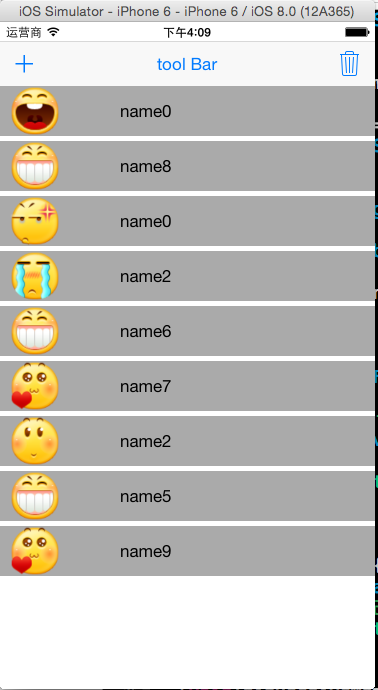
代码如下:需要在代码中为添加的控件人为设置frame具体坐标x,y、大小width,height
 #import "ViewController.h"

 #define CONTACE_VIEW_HEIGHT 50

 @interface ViewController ()

 @property (weak, nonatomic) IBOutlet UIToolbar *toolBar;

 @property (weak, nonatomic) IBOutlet UIBarButtonItem *barButtonitemDelete;

 @end

 @implementation ViewController

 - (IBAction)addContact:(UIBarButtonItem *)sender

 {

     //让删除按钮有效

     [self.barButtonitemDelete setEnabled:YES];

     //在subView中已经有了3个控件

     NSInteger count = self.view.subviews.count - ;

     CGRect lastFrame = self.toolBar.frame;

     UIView *contactView = [[UIView alloc]init];

     CGFloat gapY = ;

     CGFloat x = ;

     CGFloat y = lastFrame.origin.y + lastFrame.size.height + (CONTACE_VIEW_HEIGHT+gapY) * count;

     CGFloat w = self.view.frame.size.width;

     contactView.frame = CGRectMake(x,y,w,CONTACE_VIEW_HEIGHT);

     //添加头像

     UIImage *image = [UIImage imageNamed:[NSString stringWithFormat:@"%d.png",arc4random_uniform()]];

     UIImageView *face = [[UIImageView alloc]initWithImage:image];

     face.frame = CGRectMake(, ,,);

     [contactView addSubview:face];

     //添加姓名

     UILabel *labelName = [[UILabel alloc]init];

     labelName.text = [NSString stringWithFormat:@"name%d",arc4random_uniform()];

     labelName.frame = CGRectMake(+image.size.width+, , , );

     [contactView addSubview:labelName];

     contactView.backgroundColor = [UIColor lightGrayColor];

     [self.view addSubview:contactView];

 }

 - (IBAction)deleteContact:(UIBarButtonItem *)sender

 {

     //删除视图

     UIView *lastView = [self.view.subviews lastObject];

     [lastView removeFromSuperview];

     //如果没有了contactView,设置删除按钮无效

     if(self.view.subviews.count == )

     {

         [self.barButtonitemDelete setEnabled:NO];

     }

 }

 - (void)viewDidLoad {

     [super viewDidLoad];

     //开始时删除设置为无效

     [self.barButtonitemDelete setEnabled:NO];

 }

 - (void)didReceiveMemoryWarning {

     [super didReceiveMemoryWarning];

     // Dispose of any resources that can be recreated.

 }
二、采用提前自定义布局的.xib文件中的UIToolBar,制作的工具栏(删除和添加图片)
(2)自定义的View视图布局,添加UIImage、UILabel控件


代码如下:不需要在代码中再去设置添加控件的frame,在.xib文件中已经布局好了。
 import "ViewController.h"

 #define CONTACE_VIEW_HEIGHT 50

 @interface ViewController ()

 @property (weak, nonatomic) IBOutlet UIToolbar *toolBar;

 @property (weak, nonatomic) IBOutlet UIBarButtonItem *barButtonitemDelete;

 @end

 @implementation ViewController

 - (IBAction)addContact:(UIBarButtonItem *)sender

 {

     //让删除按钮有效

     [self.barButtonitemDelete setEnabled:YES];

     //在subView中已经有了3个控件

     NSInteger count = self.view.subviews.count - ;

     CGRect lastFrame = self.toolBar.frame;

     //加载xib文件

     NSArray *views = [[NSBundle mainBundle]loadNibNamed:@"contactView" owner:nil options:nil];

     //添加contactView

     UIView *contactView = [views lastObject];

     CGFloat gapY = ;

     CGFloat x = ;

     CGFloat y = lastFrame.origin.y + lastFrame.size.height + (CONTACE_VIEW_HEIGHT+gapY) * count;

     CGFloat w = self.view.frame.size.width;

     contactView.frame = CGRectMake(x,y,w,CONTACE_VIEW_HEIGHT);

     //添加头像

     UIImageView *face = (UIImageView *)[contactView viewWithTag:];

     UIImage *image = [UIImage imageNamed:[NSString stringWithFormat:@"%d.png",arc4random_uniform()]];

     [face setImage:image];

     //添加姓名

     UILabel *labelName = (UILabel *)[contactView viewWithTag:];

     labelName.text = [NSString stringWithFormat:@"name%d",arc4random_uniform()];

     [self.view addSubview:contactView];

 }

 - (IBAction)deleteContact:(UIBarButtonItem *)sender

 {

     //删除视图

     UIView *lastView = [self.view.subviews lastObject];

     [lastView removeFromSuperview];

     //如果没有了contactView,设置删除按钮无效

     if(self.view.subviews.count == )

     {

         [self.barButtonitemDelete setEnabled:NO];

     }

 }

 - (void)viewDidLoad {

     [super viewDidLoad];

     //开始时删除设置为无效

     [self.barButtonitemDelete setEnabled:NO];

 }

 - (void)didReceiveMemoryWarning {

     [super didReceiveMemoryWarning];

     // Dispose of any resources that can be recreated.

 }

 @end
iOS:UIToolBar控件的使用的更多相关文章
- JS调用Android、Ios原生控件
在上一篇博客中已经和大家聊了,关于JS与Android.Ios原生控件之间相互通信的详细代码实现,今天我们一起聊一下JS调用Android.Ios通信的相同点和不同点,以便帮助我们在进行混合式开发时, ...
- 初识IOS,Label控件的应用。
初识IOS,Label控件的应用. // // ViewController.m // Gua.test // // Created by 郭美男 on 16/5/31. // Copyright © ...
- IOS—UITextFiled控件详解
IOS—UITextFiled控件详解 //初始化textfield并设置位置及大小 UITextField *text = [[UITextField alloc]initWithFrame:CGR ...
- [iOS基础控件 - 5.5] 代理设计模式 (基于”APP列表"练习)
A.概述 在"[iOS基础控件 - 4.4] APP列表 进一步封装,初见MVC模式”上进一步改进,给“下载”按钮加上效果.功能 1.按钮点击后,显示为“已下载”,并且不 ...
- android 仿ios开关控件
ios一些控件还是挺美丽的,可是对android程序猿来说可能比較苦逼,由于ios一些看起来简单的效果对android来说可能就没那么简单了,可是没办法非常多产品都是拿ios的一些控件叫android ...
- 79.iOS 设备的UI规范和iOS各控件默认高度
iOS设备的UI 规范 iPhone界面尺寸 iPhone图标尺寸 iPad的设计尺寸 iPad图标尺寸 iPhone设备尺寸分辨率比例 iPhone各设备 launch image iOS 各种控件 ...
- iOS: 工具栏控件UIToolBar和工具栏按钮控件UIBarButtonItem的使用
一.工具栏控件:UIToolBar:UIView 介绍: ToolBar工具栏是视图View的属性,可以在工具栏上添加工具栏按钮Bar Button Item(可以是自定义的Custom.也可以是系统 ...
- iOS:UIResponser控件的介绍(响应者)
UIResponser响应者控件 知识: 在iOS中不是任何对象都能处理事件,只有继承了UIResponser的对象才能接收并处理事件.我们称之为“响应者对象” UIApplication,UIV ...
- ios UI控件的简单整理
把该文件拷贝到.m文件中就能够方便的查找 /** 匿名类目:能够声明方法和变量,属性为private(不同意在外部调用,且不能被继承 */ /** 发送数据的托付方,接收数据的时代理发(即代理的反向传 ...
随机推荐
- C语言可变参数个数
#include <stdio.h>#include <stdarg.h> void test(const char * format, ...); int main(void ...
- 分享实用的JavaScript代码库
1 var keyCodeMap = { 2 8: 'Backspace', 3 9: 'Tab', 4 13: 'Enter', 5 16: 'Shift', 6 17: 'Ctrl', 7 18: ...
- 7-13 Power Calculus 快速幂计算 uva1374
想到快速幂 但是这题用不上 用迭代加深搜索 注意启发函数为 当前最大数<<(maxx-d) 如果大于n则剪枝 注意跳出语句的两种写法 一种170ms 一种390ms !!! d ...
- 【Java】返回长度为零的数组或者集合,而不是null
今天在牛客网上做一个编程题时,在提交代码后老是抛出NullPointerException异常,大概的代码如下: public ArrayList<Integer> foo(TreeNod ...
- Ubuntu 17.04 搭建 NodeJS
可以在云主机上执行以下的命令: apt-get update apt-get install -y python-software-properties software-properties-com ...
- m3u8转mp4
先进行一波操作 新建一个文件夹,里面床两个txt文件 如图 里面随意写一些内容 之后新建一个demo.bat文件.里面输入 copy /b 1.txt+2.txt new.txt 之后双击会有一个ne ...
- 第4天:Django的cookie和session
Cookie Session Cookie 浏览器请求服务器是无状态的,它的每一次请求对于服务器来说都是新的,服务器默认不会保存用户的状态数据.但很多时候,服务器需要保存用户的一些状态数据,比如用户是 ...
- 最短网络Agri-Net
[问题描述] 农民约翰被选为他们镇的镇长!他其中一个竞选承诺就是在镇上建立起互联网,并连接到所有的农场.当然,他需要你的帮助.约翰已经给他的农场安排了一条高速的网络线路,他想把这条线路共享给其他农场. ...
- 推荐C#网站、书籍、资源
推荐博客: 极简的随笔 http://www.cnblogs.com/guwei4037/p/3499135.html 见证大牛成长之路的专栏 http://blog.csdn.net/shanyon ...
- jquery 图片预加载
/图片无序预加载 (function($){ function Preload(imgs,fns){ this.imgs=(typeof imgs==="string")?[img ...