
ActiveMQ安全机制设置
一、设置后台管理密码
a、ActiveMQ使用的是jetty服务器,找到D:\div\apache-activemq-5.11.1\conf\jetty.xml文件:
<bean id="adminSecurityConstraint" class="org.eclipse.jetty.util.security.Constraint">

    <property name="name" value="BASIC" />

    <property name="roles" value="admin" />

    <!-- set authenticate=false to disable login -->

    <property name="authenticate" value="true" />

</bean>
注意:低版本的authenticate的属性默认为"false",需要改为"true",高版本的已经默认为true
b、修改控制台的登录用户名密码conf/jetty-realm.properties文件中
## ---------------------------------------------------------------------------

## Licensed to the Apache Software Foundation (ASF) under one or more

## contributor license agreements.  See the NOTICE file distributed with

## this work for additional information regarding copyright ownership.

## The ASF licenses this file to You under the Apache License, Version 2.0

## (the "License"); you may not use this file except in compliance with

## the License.  You may obtain a copy of the License at

##

## http://www.apache.org/licenses/LICENSE-2.0

##

## Unless required by applicable law or agreed to in writing, software

## distributed under the License is distributed on an "AS IS" BASIS,

## WITHOUT WARRANTIES OR CONDITIONS OF ANY KIND, either express or implied.

## See the License for the specific language governing permissions and

## limitations under the License.

## ---------------------------------------------------------------------------

# Defines users that can access the web (console, demo, etc.)

# username: password [,rolename ...]

#admin: admin, admin

#user: user, user

ljq: ljq, admin
二、消息生产者和消费者密码认证
a、D:\div\apache-activemq-5.11.1\conf\activemq.xml添加生产者和消费者密码认证信息: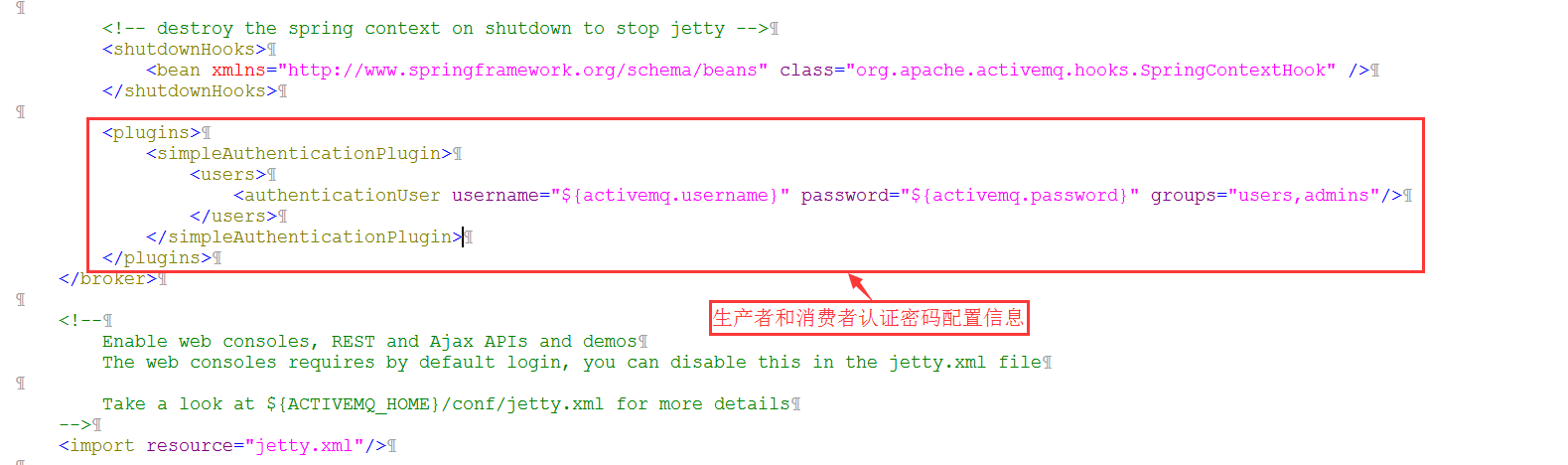
b、设置用户名密码,文件在D:\div\apache-activemq-5.11.1\conf\credentials.properties
## ---------------------------------------------------------------------------

## Licensed to the Apache Software Foundation (ASF) under one or more

## contributor license agreements.  See the NOTICE file distributed with

## this work for additional information regarding copyright ownership.

## The ASF licenses this file to You under the Apache License, Version 2.0

## (the "License"); you may not use this file except in compliance with

## the License.  You may obtain a copy of the License at

##

## http://www.apache.org/licenses/LICENSE-2.0

##

## Unless required by applicable law or agreed to in writing, software

## distributed under the License is distributed on an "AS IS" BASIS,

## WITHOUT WARRANTIES OR CONDITIONS OF ANY KIND, either express or implied.

## See the License for the specific language governing permissions and

## limitations under the License.

## ---------------------------------------------------------------------------

# Defines credentials that will be used by components (like web console) to access the broker

activemq.username=ljq

activemq.password=ljq

guest.password=password
三、在Java生产者和消费者端设置用户名密码才能连接
ConnectionFactory connectionFactory = new ActiveMQConnectionFactory("ljq", "ljq", "failover:(tcp://localhost:61616)?Randomize=false");
ActiveMQ安全机制设置的更多相关文章
- 深入浅出 JMS(三) - ActiveMQ 安全机制
深入浅出 JMS(三) - ActiveMQ 安全机制 一.认证 认证(Authentication):验证某个实体或者用户是否有权限访问受保护资源. MQ 提供两种插件用于权限认证: (一).Sim ...
- 消息中间件-activemq消息机制和持久化介绍(三)
前面一节简单学习了activemq的使用,我们知道activemq的使用方式非常简单有如下几个步骤: 创建连接工厂 创建连接 创建会话 创建目的地 创建生产者或消费者 生产或消费消息 关闭生产或消费者 ...
- ActiveMQ持久化机制和JMS可靠消息
1.ActiveMQ持久化机制 1.1 JDBC将数据持久化到数据库 1.2 AMQ生成日志文件 1.3 KahaDB:本次磁盘生成数据文件(默认) 1.4 LevelDB:谷歌K/V数据库 1.5 ...
- 消息中间件-activemq安全机制
activemq作为消息中间件这样一个独立的个体存在,连通用户和服务器.如果没有一套完备的安全机制去设置用户权限设置消息分发机制可想后果是非常严重.ActiveMQ如果不加入安全机制的话,任何人只要知 ...
- tomcat,zookeeper,activeMQ,Kafka设置jvm参数
1,tomcat设置jvm参数 设置方法: 在tomcat bin 目录增加配置:setenv.sh #add tomcat pid CATALINA_PID="$CATALINA_ ...
- ActiveMQ中Session设置的相关理解
名词解释: P:生产者 C:消费者 服务端:P 或者 ActiveMQ服务 客户端:ActiveMQ服务 或者 C 客户端成功接收一条消息的标志是这条消息被签收.成功接收一条消息一般包括如下三个阶段: ...
- ActiveMQ可靠性机制
消息的签收(Acknowledgment): 客户端成功接收一条消息的标志是这条消息被签收. 成功接收一条消息一般包括如下三个阶段: (1) 客户端接收消息 (2) 客户端处理消息 (3) 消息 ...
- ActiveMQ 用户名密码设置
用户名密码信息保存在conf/jetty-realm.properties文件中 按顺序分别是:用户名.密码.角色名 另:ActiveMQ使用的是jetty服务器, 可以通过设置conf/jetty. ...
- ActiveMQ持久化机制
用户注册成功后发短信提醒 同步http 异步mq JMS中两种通讯模式: 发布订阅 一对多 topic 去过消费者集群的话 都会消费 消息队列 点对点 queue 去过消费者集群的话 ...
随机推荐
- OpenGL ES 光照模型之——环境光照(RenderMonkey测试)
概述及目录(版权所有,请勿转载 www.cnblogs.com/feng-sc/) 本文总结如何在RenderMonkey下做简单的OpenGL ES环境光光照模型测试. 主要包括如下内容: 1.使用 ...
- 如何利用Visio设计一个系统的结构图
首先建立一个空的vison列表 添加图形和连接线 托选一个矩形块到操作台上,并进行底色填充 选择有向线段1拖到矩形模块上,此时有向线段1会自动吸附到矩形的中点处. 此时按下图操作即可取消,自动吸附 托 ...
- springmvc 开涛 数据验证
两种方式:编程和声明. 编程需要:验证器,控制器,servlet.xml,错误码设置 声明需要:加jar包,控制器,跟孔浩讲得类似 错误消息设置的两种方式:硬编码:从资源文件中读取(默认,自定义).
- [leetcode] 15. Plus One
这道题其实让我意识到了我的英文水平还有待加强.... 题目如下: Given a non-negative number represented as an array of digits, plus ...
- SQL笔记---多表左联
这是实际场景当中的一个例子,拿出来分析总结思路. -- SQL 查询 --SELECT orderQuery.Rk_SkuCode , orderQuery.SkuName, ...
- .net core 读取本地指定目录下的文件
项目需求 asp.net core 读取log目录下的.log文件,.log文件的内容如下: xxx.log ------------------------------------------beg ...
- windows下redis安装及应用
一.下载安装Redis(windows版本) 1.下载地址:https://github.com/MicrosoftArchive/redis/releases 2.安装: 1)打开运行窗口,输出cm ...
- DateTimeField如何自动设置为当前时间并且能被修改 ——django日期时间字段的使用
参考于:https://www.cnblogs.com/huchong/p/7895263.html 创建django的model时,有DateTimeField.DateField和TimeFiel ...
- jqury的ajax
前端代码: <%@ page language="java" contentType="text/html; charset=UTF-8" pageEnc ...
- java入门——面向对象
简介 对象具有自己的状态和行为: 描述一个对象具有什么状态和行为的过程叫做建模,不同的意图下我们对同一个事物的描述会产生不同的模型. 类 类描述一类对象的状态和行为的模板.可以把类想象成一个汽车设计图 ...