
使用C#创建windows服务续之使用Topshelf优化Windows服务
前言:
之前写了一篇“使用C#创建windows服务”,https://www.cnblogs.com/huangwei1992/p/9693167.html,然后有博友给我推荐了一个开源框架Topshelf。
写了一点测试代码,发现Topshelf框架确实在创建windows服务上非常好用,于是就对我之前的代码进行了改造。
开发流程:
1.在不使用Topshelf框架的情况下,我们需要创建Windows服务程序,在这里我们只需要创建一个控制台程序就行了
2.添加引用
使用程序安装命令:
- Install-Package Topshelf
直接在NuGet包管理器中搜索 Topshelf,点击安装即可:

3.新建核心类CloudImageManager
主要方法有三个:LoadCloudImage、Start、Stop,直接贴代码
/// <summary>

    /// 功能描述    :卫星云图下载管理器

    /// 创 建 者    :Administrator

    /// 创建日期    :2018/9/25 14:29:03

    /// 最后修改者  :Administrator

    /// 最后修改日期:2018/9/25 14:29:03

    /// </summary>

    public class CloudImageManager

    {

        private string _ImagePath = System.Configuration.ConfigurationManager.AppSettings["Path"];

        private Timer _Timer = null;

        private double Interval = double.Parse(System.Configuration.ConfigurationManager.AppSettings["Minutes"]);

        public CloudImageManager()

        {

            _Timer = new Timer();

            _Timer.Interval = Interval * 60 * 1000;

            _Timer.Elapsed += _Timer_Elapsed;

        }

        void _Timer_Elapsed(object sender, ElapsedEventArgs e)

        {

            StartLoad();

        }

        /// <summary>

        /// 开始下载云图

        /// </summary>

        private void StartLoad()

        {

            LoadCloudImage();

        }

        public void Start()

        {

            StartLoad();

            _Timer.Start();

        }

        public void Stop()

        {

            _Timer.Stop();

        }

        /// <summary>

        /// 下载当天所有卫星云图

        /// </summary>

        private void LoadCloudImage()

        {

            CreateFilePath();//判断文件夹是否存在,不存在则创建

            //获取前一天日期

            string lastYear = DateTime.Now.AddDays(-1).Year.ToString();

            string lastMonth = DateTime.Now.AddDays(-1).Month.ToString();

            if (lastMonth.Length < 2) lastMonth = "0" + lastMonth;

            string lastDay = DateTime.Now.AddDays(-1).Day.ToString();

            if (lastDay.Length < 2) lastDay = "0" + lastDay;

            //获取当天日期

            string year = DateTime.Now.Year.ToString();

            string month = DateTime.Now.Month.ToString();

            if (month.Length < 2) month = "0" + month;

            string day = DateTime.Now.Day.ToString();

            if (day.Length < 2) day = "0" + day;

            //设置所有文件名

            string[] dates0 = { lastYear + "/" + lastMonth + "/" + lastDay, year + "/" + month + "/" + day };

            string[] dates = { lastYear + lastMonth + lastDay, year + month + day };

            string[] hours = { "00", "01", "02", "03", "04", "05", "06", "07", "08", "09", "10", "11", "12", "13", "14", "15", "16", "17", "18", "19", "20", "21", "22", "23" };

            string[] minutes = { "15", "45" };

            int hLength = hours.Count();

            //遍历下载当天所有在线云图

            for (int i = 0; i < 2; i++)

            {

                string date = dates[i];

                string date0 = dates0[i];

                for (int j = 0; j < hLength; j++)

                {

                    string hour = hours[j];

                    for (int k = 0; k < 2; k++)

                    {

                        string minute = minutes[k];

                        string imageUrl = @"http://image.nmc.cn/product/" + date0 + @"/WXCL/SEVP_NSMC_WXCL_ASC_E99_ACHN_LNO_PY_" + date + hour + minute + "00000.JPG";

                        string[] s = imageUrl.Split('/');

                        string imageName = s[s.Count() - 1];

                        HttpWebRequest request = HttpWebRequest.Create(imageUrl) as HttpWebRequest;

                        HttpWebResponse response = null;

                        try

                        {

                            response = request.GetResponse() as HttpWebResponse;

                        }

                        catch (Exception)

                        {

                            continue;

                        }

                        if (response.StatusCode != HttpStatusCode.OK) continue;

                        Stream reader = response.GetResponseStream();

                        FileStream writer = new FileStream(_ImagePath + imageName, FileMode.OpenOrCreate, FileAccess.Write);

                        byte[] buff = new byte[512];

                        int c = 0; //实际读取的字节数

                        while ((c = reader.Read(buff, 0, buff.Length)) > 0)

                        {

                            writer.Write(buff, 0, c);

                        }

                        writer.Close();

                        writer.Dispose();

                        reader.Close();

                        reader.Dispose();

                        response.Close();

                    }

                }

            }

        }

        /// <summary>

        /// 判断文件夹是否存在,不存在则创建

        /// </summary>

        private void CreateFilePath()

        {

            if (Directory.Exists(_ImagePath))

            {

                ClearImages();

                return;

            }

            else

            {

                Directory.CreateDirectory(_ImagePath);

            }

        }

        /// <summary>

        /// 清空文件夹下所有文件

        /// </summary>

        private void ClearImages()

        {

            try

            {

                DirectoryInfo dir = new DirectoryInfo(_ImagePath);

                FileSystemInfo[] fileinfo = dir.GetFileSystemInfos();  //返回目录中所有文件和子目录

                foreach (FileSystemInfo i in fileinfo)

                {

                    if (i is DirectoryInfo)            //判断是否文件夹

                    {

                        DirectoryInfo subdir = new DirectoryInfo(i.FullName);

                        subdir.Delete(true);          //删除子目录和文件

                    }

                    else

                    {

                        File.Delete(i.FullName);      //删除指定文件

                    }

                }

            }

            catch (Exception e)

            {

                Console.WriteLine(e.Message);

            }

        }

    }
然后在Program.cs中调用:
static void Main(string[] args)

        {

            HostFactory.Run(x =>                                 //1

            {

                x.Service<CloudImageManager>(s =>                        //2

                {

                    s.ConstructUsing(name => new CloudImageManager());     //3

                    s.WhenStarted(tc => tc.Start());              //4

                    s.WhenStopped(tc => tc.Stop());               //5

                });

                x.RunAsLocalSystem();                            //6

                x.SetDescription("卫星云图实时下载工具");        //7

                x.SetDisplayName("CloudImageLoad");                       //8

                x.SetServiceName("CloudImageLoad");                       //9

            });

        }
可以看到调用的时候主要涉及到CloudImageManager类中的构造函数、Start方法以及Stop方法
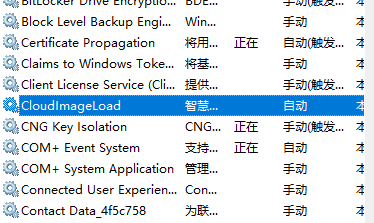
安装、运行和卸载:
在Topshelf框架下进行服务的这些操作相对而言就简单多了

使用C#创建windows服务续之使用Topshelf优化Windows服务的更多相关文章
- Quartz+TopShelf实现Windows服务作业调度
Quartz:首先我贴出来了两段代码(下方),可以看出,首先会根据配置文件(quartz.config),包装出一个Quartz.Core.QuartzScheduler instance,这是一个调 ...
- Windows Azure HandBook (2) Azure China提供的服务
<Windows Azure Platform 系列文章目录> 对于传统的自建数据中心,从底层的Network,Storage,Servers,Virtualization,中间层的OS, ...
- 使用Topshelf 开发windows服务
在业务系统中,我们为了调度一些自动执行的任务或从队列中消费一些消息,所以基本上都会涉及到后台服务的开发.如果用windows service开发,非常不爽的一件事就是:调试相对麻烦,而且你还需要了解 ...
- Windows Azure案例分析: 选择虚拟机或云服务?
作者 王枫 发布于2013年6月27日 随着云计算技术和市场的日渐成熟,企业在考虑IT管理和运维时的选择也更加多样化,应用也从传统部署方式,发展为私有云.公有云.和混合云等部署方式.作为微软核心的公有 ...
- rsync (windows 服务端,linux客户端)将windows上的数据同步到linux服务器,反之也可
一:总体概述. 1.windows上面首先装CW_rsync_Server.4.1.0_installer,安装时要输入的用户名密码要记住哦!接下来就是找到rsyncd.conf进入配置细节 2.li ...
- Windows Server 2016-命令行方式管理Windows服务
Microsoft Windows 服务(过去称为 NT 服务)允许用户创建可在其自身的 Windows 会话中长时间运行的可执行应用程序. 这些服务可在计算机启动时自动启动,可以暂停和重启,并且不显 ...
- topshelf 开发windows 服务资料
官方配置 http://docs.topshelf-project.com/en/latest/configuration/config_api.html#service-start-modes to ...
- Windows Azure中WebSite 网站, Cloud Service 云服务,Virtual Machine 虚拟机的比较
在Windows Azure服务平台里,Web Site特点是: 在Windows Azure上构建高度可扩展的Web站点. 快速.轻松部署一个高度可扩展的云环境,并且可以从很小的规模开始. 使用您所 ...
- quartz.net结合Topshelf实现windows service服务托管的作业调度框架
topshelf可以很简单方便的实现windows service服务,详见我的一篇博客的介绍 http://www.cnblogs.com/xiaopotian/articles/5428361.h ...
随机推荐
- [leetcode]199. Binary Tree Right Side View二叉树右侧视角
Given a binary tree, imagine yourself standing on the right side of it, return the values of the nod ...
- Aactivity和Service之间的通信
一.在activity中定义三个按钮 一个开启服务 一个关闭服务,还有一个是向服务发送广播 当创建出Serevice时先执行Service的onCreate()创建服务后只执行一次 以后每次点击开启 ...
- js variable 变量
局部作用域 由于JavaScript的变量作用域实际上是函数内部,我们在for循环等语句块中是无法定义具有局部作用域的变量的: 'use strict'; function foo() { for ( ...
- js strict 关键字
strict strict模式,JavaScript在设计之初,为了方便初学者学习,并不强制要求用var申明变量.这个设计错误带来了严重的后果:如果一个变量没有通过var申明就被使用,那么该变量就自动 ...
- ubuntu查找命令比较
1. find find是最常见和最强大的查找命令,你可以用它找到任何你想找的文件. find的使用格式如下: $ find <指定目录> <指定条件> < ...
- 5 个关键点!优化你的 UI 原型设计
当你和你的团队着手开始一个产品开发的时候,最开始的一步一般是绘制线框图,这是大部分产品项目的第一步,它不复杂但是却对整个产品的完成形态和质量有着至关重要的作用. 很多刚开始工作设计师或者产品经理都会提 ...
- 协议 protocol
协议声明类需要实现的的方法,为不同的类提供公用方法,一个类可以有多个协议,但只能有一个父类,即单继承.它类似java中的接口. 正式协议(formal protocol)--------------- ...
- div和span元素的区别
2个都是用来划分区间但是没有实际语义的标签,差别就在于div是块级元素,不会其他元素在同一行;span是内联元素,可以与其他元素位于同一行. DIV 和 SPAN 元素最大的特点是默认都没有对元素内的 ...
- 使用JPA保存对象时报nested exception is javax.persistence.RollbackException: Transaction marked as rollbackOnly错误
使用JPA保存对象时报nested exception is javax.persistence.RollbackException: Transaction marked as rollbackOn ...
- java实现网站paypal支付功能并且异步修改订单的状态
java实现网站paypal支付功能并且异步修改订单的状态:步骤如下 第一步:去paypal的官网https://www.paypal.com注册一个个人账号,在创建沙箱测试账号时需要用到 第二步:p ...