
iOS 封装跑马灯和轮播效果
功能概述和预览

功能描述:WSL_RollView 是基于UICollectionView实现的支持水平和垂直两个方向上的的分页和渐进循环轮播效果,可以设置时间间隔、渐进速率、是否循环、分页宽度和间隔,还支持高度自定义分页视图的控件。
一、实现方法
1.1、 首先用UICollectionView和计时器实现一个基本的水平滚动效果,如下图,这个太简单就不在此详述。

1.2、对比上面的效果图,我们还需要解决分页的宽度和循环滚动的问题。
- 自定义分页宽度:默认的分页宽度是UICollectionView的宽度,所以当分页宽度的不等于UICollectionView的宽度或分页间隔不等于0时会出现错误,这时就需要我们通过自定义UICollectionViewFlowLayout来实现效果。
/** 返回值决定了collectionView停止滚动时的偏移量 手指松开后执行

 * proposedContentOffset:原本情况下,collectionView停止滚动时最终的偏移量

 * velocity 滚动速率,通过这个参数可以了解滚动的方向

 */

- (CGPoint)targetContentOffsetForProposedContentOffset:(CGPoint)proposedContentOffset withScrollingVelocity:(CGPoint)velocity{

    if (_scrollStyle == WSLRollViewScrollStylePage) {

        CGSize size = self.collectionView.frame.size;

        // 计算可见区域的面积

        CGRect rect = CGRectMake(proposedContentOffset.x, proposedContentOffset.y, size.width, size.height);

        NSArray *array = [super layoutAttributesForElementsInRect:rect];

        // 标记 cell 的中点与 UICollectionView 中点最小的间距

        CGFloat minDetal = MAXFLOAT;

        if (self.scrollDirection == UICollectionViewScrollDirectionHorizontal){

            // 计算 CollectionView 中点值

            CGFloat centerX = proposedContentOffset.x + self.collectionView.frame.size.width * 0.5;

            for (UICollectionViewLayoutAttributes *attrs in array){

                if (ABS(minDetal) > ABS(centerX - attrs.center.x)){

                    minDetal = attrs.center.x - centerX;

                }

            }

            return CGPointMake(proposedContentOffset.x + minDetal, proposedContentOffset.y);

        }else{

            // 计算 CollectionView 中点值

            CGFloat centerY = proposedContentOffset.y + self.collectionView.frame.size.height * 0.5;

            for (UICollectionViewLayoutAttributes *attrs in array){

                if (ABS(minDetal) > ABS(centerY - attrs.center.y)){

                    minDetal = attrs.center.y - centerY;

                }

            }

            return CGPointMake(proposedContentOffset.x, proposedContentOffset.y + minDetal);

        }

    }

    return proposedContentOffset;

}
- 循环滚动:思想当然还是3 >4 >0 >1 >2 >3 >4 >0 >1,关键就在于怎么确定弥补两端轮播首尾相连需要增加的cell,前边尾首相连需要UICollectionView可见范围内的数据源后边的元素cell,后边首尾相连需要UICollectionView可见范围内的数据源前边的元素cell
//获取首尾相连循环滚动时需要用到的元素,并重组数据源

- (void)resetDataSourceForLoop{

    if(_loopEnabled == NO){

        return;

    }

    if(_scrollDirection == UICollectionViewScrollDirectionHorizontal && _collectionView.contentSize.width >= self.frame.size.width){

        //用于右侧连接元素数量

        _addRightCount = [_collectionView  indexPathForItemAtPoint:CGPointMake(self.frame.size.width - 1, 0)].row + 1 ;

        if (_scrollStyle == WSLRollViewScrollStylePage){

            //如果是分页,还需要用于左侧连接元素数量

            _addLeftCount = _sourceArray.count - [_collectionView  indexPathForItemAtPoint:CGPointMake(_collectionView.contentSize.width - self.frame.size.width + 1, 0)].row;

        }

    }else if(_scrollDirection == UICollectionViewScrollDirectionVertical && _collectionView.contentSize.height >= self.frame.size.height){

        //用于右侧连接元素数量

        _addRightCount = [_collectionView  indexPathForItemAtPoint:CGPointMake(0, self.frame.size.height - 1)].row + 1 ;

        if (_scrollStyle == WSLRollViewScrollStylePage){

            //用于左侧连接元素数量

            _addLeftCount = _sourceArray.count - [_collectionView  indexPathForItemAtPoint:CGPointMake(0, _collectionView.contentSize.height - self.frame.size.height + 1)].row;

        }

    }

    NSArray * rightSubArray = [_sourceArray subarrayWithRange:NSMakeRange(0, _addRightCount)];

    //增加右侧连接元素

    [_dataSource addObjectsFromArray:rightSubArray];

    if (_scrollStyle == WSLRollViewScrollStylePage){

        NSArray * leftSubArray = [_sourceArray subarrayWithRange:NSMakeRange(_sourceArray.count - _addLeftCount, _addLeftCount)];

        //增加左侧连接元素

        [_dataSource insertObjects:leftSubArray atIndexes: [NSIndexSet indexSetWithIndexesInRange:NSMakeRange(0,_addLeftCount)]];

    }

}
二、WSL_RollView用法
请看WSLRollView.h文件中的注释,属性和用法很明朗,详情和效果可以看代码。
//

//  WSLRollView.h

//  WSL_RollView

//

//  Created by 王双龙 on 2018/9/8.

//  Copyright © 2018年 https://www.jianshu.com/u/e15d1f644bea. All rights reserved.

//

#import <UIKit/UIKit.h>

/**

 默认cell样式 WSLItemID

 */

@interface WSLRollViewCell : UICollectionViewCell

@end

@class WSLRollView;

//代理协议

@protocol WSLRollViewDelegate <NSObject>

@optional

/**

 返回itemSize 默认值是CGSizeMake(self.frame.size.width, self.frame.size.height);

 */

- (CGSize)rollView:(WSLRollView *)rollView sizeForItemAtIndex:(NSInteger)index;

/**

 item的间隔 默认值0

 */

- (CGFloat)spaceOfItemInRollView:(WSLRollView *)rollView;

/**

 内边距 上 左 下 右 默认值UIEdgeInsetsMake(0, 0, 0, 0)

 */

- (UIEdgeInsets)paddingOfRollView:(WSLRollView *)rollView;

/**

 点击事件

 */

- (void)rollView:(WSLRollView *)rollView didSelectItemAtIndex:(NSInteger)index;

/**

 自定义item样式

 */

- (WSLRollViewCell *)rollView:(WSLRollView *)rollView cellForItemAtIndex:(NSInteger )index;

@end

/**

 滚动样式

 */

typedef NS_ENUM(NSInteger, WSLRollViewScrollStyle) {

    WSLRollViewScrollStylePage = 0, /** 分页 必须等宽或高*/

    WSLRollViewScrollStyleStep   /** 渐进 可以不等宽或高*/

};

@interface WSLRollView : UIView

/**

 原始数据源

 */

@property (nonatomic, strong) NSMutableArray * sourceArray;

/**

 是否循环轮播 默认YES

 */

@property (nonatomic, assign) BOOL loopEnabled;

/**

 轮播方向 默认是 UICollectionViewScrollDirectionHorizontal 水平

 */

@property (nonatomic, assign) UICollectionViewScrollDirection scrollDirection;

/**

 轮播样式 默认是 WSLRollViewScrollStylePage 分页

 */

@property (nonatomic, assign) WSLRollViewScrollStyle scrollStyle;

/**

 渐进轮播速率 单位是Point/s,以坐标系单位为准 默认60/s 如果为0 表示禁止计时器

 */

@property (nonatomic, assign) CGFloat speed;

/**

 分页轮播间隔时长 单位是s  默认3s 如果为0 表示禁止计时器

 */

@property (nonatomic, assign) CGFloat interval;

/**

 item的间隔 默认值0

 */

@property (nonatomic, assign) CGFloat spaceOfItem;

/**

 内边距 上 左 下 右 默认值UIEdgeInsetsMake(0, 0, 0, 0)

 */

@property (nonatomic, assign) UIEdgeInsets padding;

/** delegate*/

@property (nonatomic, weak) id<WSLRollViewDelegate> delegate;

/**

  初始化方法 direction 滚动方向

 */

- (instancetype)initWithFrame:(CGRect)frame scrollDirection:(UICollectionViewScrollDirection)direction;

/**

 注册item样式 用法和UICollectionView相似

 */

- (void)registerClass:(nullable Class)cellClass forCellWithReuseIdentifier:(NSString *)identifier;

/**

 注册item样式 用法和UICollectionView相似

 */

- (void)registerNib:(nullable UINib *)nib forCellWithReuseIdentifier:(NSString *)identifier;

/**

 用于初始化和获取WSLRollViewCell,自定义cell样式 用法和UICollectionView相似

 */

- (WSLRollViewCell *)dequeueReusableCellWithReuseIdentifier:(NSString *)identifier forIndex:(NSInteger)index;

/**

 刷新数据源

 */

- (void)reloadData;

/**

 暂停自动轮播

 */

- (void)pause;

/**

 继续自动轮播

 */

- (void)play;

/**

 释放计时器 必须执行,防止内存暴涨

 */

- (void)close;

@end
三、项目结构
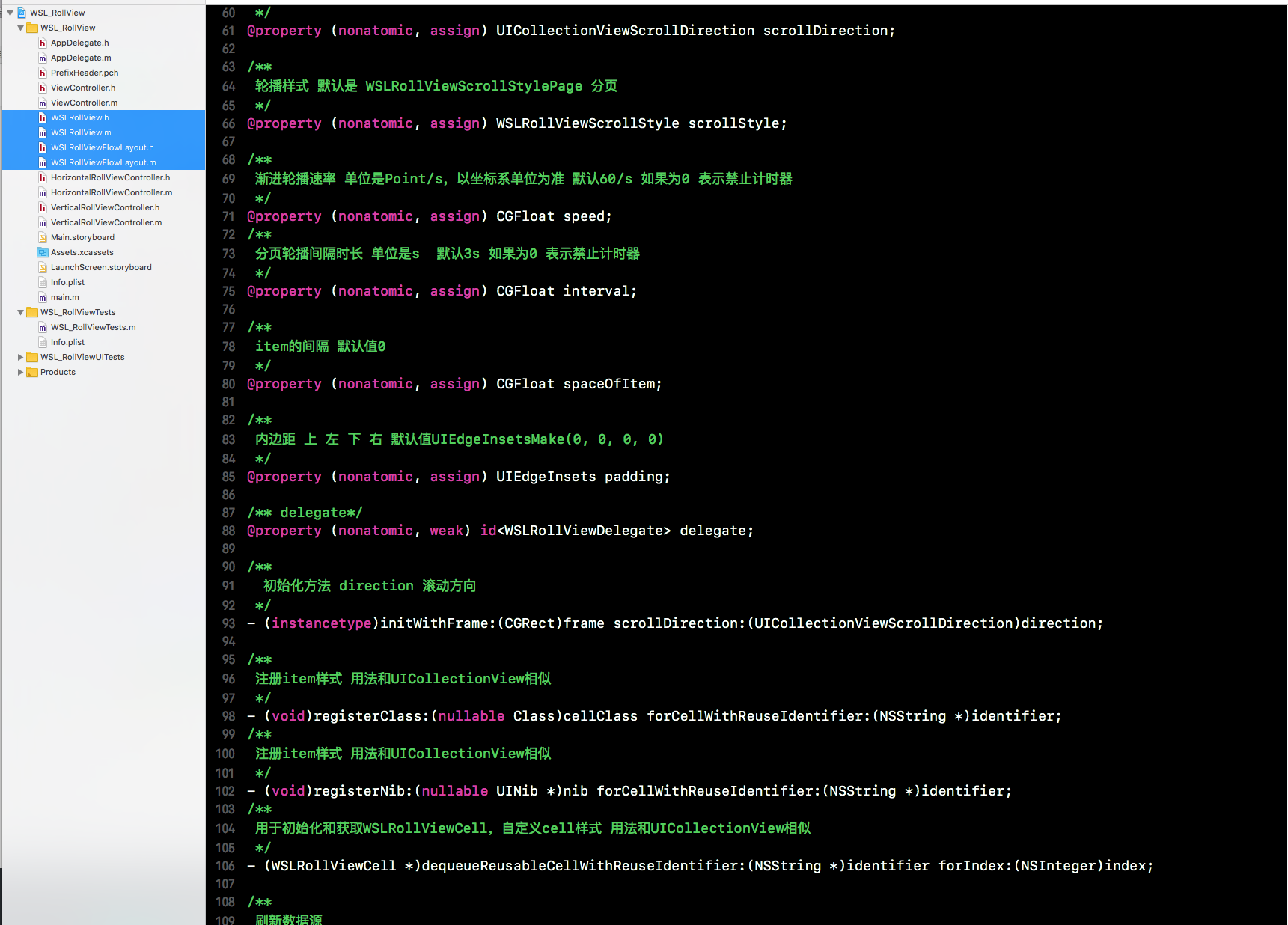
以上就是我实现这个效果的过程;如果小伙伴们有其他的实现方法,欢迎再此留言交流
iOS 封装跑马灯和轮播效果的更多相关文章
- ios图片轮播效果
代码地址如下:http://www.demodashi.com/demo/11959.html ImageCarousel 简单封装的图片轮播器 内存过大由于我加载的图片分辨率较高(4k) 文件目录 ...
- 用JQ去实现一个轮播效果
前提:用JQ去实现轮播效果一步步的做一个梳理. 首先肯定是轮播的HTML和CSS样式了: <body> <div class="pic"> <div ...
- iOS开发UI篇—无限轮播(新闻数据展示)
iOS开发UI篇—无限轮播(新闻数据展示) 一.实现效果 二.实现步骤 1.前期准备 (1)导入数据转模型的第三方框架MJExtension (2)向项目中添加保存有“新闻”数据的pli ...
- iOS开发UI篇—无限轮播(功能完善)
iOS开发UI篇—无限轮播(功能完善) 一.自动滚动 添加并设置一个定时器,每个2.0秒,就跳转到下一条. 获取当前正在展示的位置. [self addNSTimer]; } -(void)addNS ...
- IOS第六天(3:scrollView 图片轮播器)
IOS第六天(3:scrollView 图片轮播器) #import "HMViewController.h" #define kImageCount 5 @interface H ...
- jQuery个性化图片轮播效果
jQuery个性化图片轮播效果 购物产品展示:图片轮播器<效果如下所示> 思路说明: 每隔一段时间,实现图片的自动切换及选项卡选中效果,鼠标划入图片动画停止,划出或离开动画开始 两个区域: ...
- Android使用ViewPager实现左右循环滑动及轮播效果
边界的时候会看到一个不能翻页的动画,可能影响用户体验.此外,某些区域性的ViewPager(例如展示广告或者公告之类的ViewPager),可能需要自动轮播的效果,即用户在不用滑动的情况下就能够看到其 ...
- JQuery实现图片轮播效果源码
======================整体结构======================== <div class="banner"> <ul class ...
- 基于css3的轮播效果
花了一上午来调整页面在ie10上的显示问题,sass编译生成的css文件在ie内核下一直不能正确加载,果然兼容性的问题还需要好好研究.转入正题,用css3实现轮播效果主要是基于css3的framewo ...
随机推荐
- CentOS7部署Nginx
CentOS7部署Nginx 1.准备工作 Nginx的安装依赖于以下三个包,意思就是在安装Nginx之前首先必须安装一下的三个包,注意安装顺序如下: 1 SSL功能需要openssl库,直接通过yu ...
- 【docker】docker启动、重启、关闭命令,附带:docker启动容器报错:docker: Error response from daemon: driver failed programming external connectivity on endpoint es2-node
在关闭并放置centos 的防火墙重启之后[操作:https://www.cnblogs.com/sxdcgaq8080/p/10032829.html] 启动docker容器就发现开始报错: [ro ...
- vc中nmake.exe cl.exe 的使用
首先简单介绍一下程序是如何编译链接的.程序写好之后,我们进行编译和链接来产生可执行程序.这时候,编译器为了完成编译和链接,需要知道很多信 息.比如要编译的文件是哪一个,使用哪些编译选项进行编译,编译好 ...
- Spring3数据库事务管理机制
Spring对事务的解决办法其实分为2种:编程式实现事务,AOP配置声明式解决方案. http://jinnianshilongnian.iteye.com/blog/1496953 Spring提供 ...
- python 查看模块的存放位置
执行 dlib.__file__ 输出 '/anaconda2/lib/python2.7/site-packages/dlib/__init__.pyc'
- 混沌数学之Henon模型
相关DEMO参见:混沌数学之离散点集图形DEMO 相关代码: // http://wenku.baidu.com/view/d51372a60029bd64783e2cc0.html?re=view ...
- 给定任意字符串,计算一共能组合成多少个单词bing
CSDN编程挑战里的题目 例如有一个字符串"iinbinbing",截取不同位置的字符‘b’.‘i’.‘n’.‘g’组合成单词"bing".若从1开始计数的话, ...
- jQuery中开发插件的两种方式(附Demo)
做web开发的基本上都会用到jQuery,jQuery插件开发两种方式:一种是类扩展的方式开发插件,jQuery添加新的全局函数(jQuery的全局函数是属于jQuery命名空间的函数),如果将jQu ...
- [Web前端]由cookies安全说开去
在Web应用中,Cookie很容易成为安全问题的一部分.从以往的经验来看,对Cookie在开发过程中的使用,很多开发团队并没有形成共识或者一定的 规范,这也使得很多应用中的Cookie成为潜在的易受攻 ...
- IOS UITableView多选删除功能
UITbableView作为列表展示信息,除了展示的功能,有时还会用到删除,比如购物车.收藏列表等. 单行删除功能可以直接使用系统自带的删除功能,当横向轻扫cell时,右侧出现红色的删除按钮,点击删除 ...