
IOS UITableView多选删除功能
UITbableView作为列表展示信息,除了展示的功能,有时还会用到删除,比如购物车、收藏列表等。
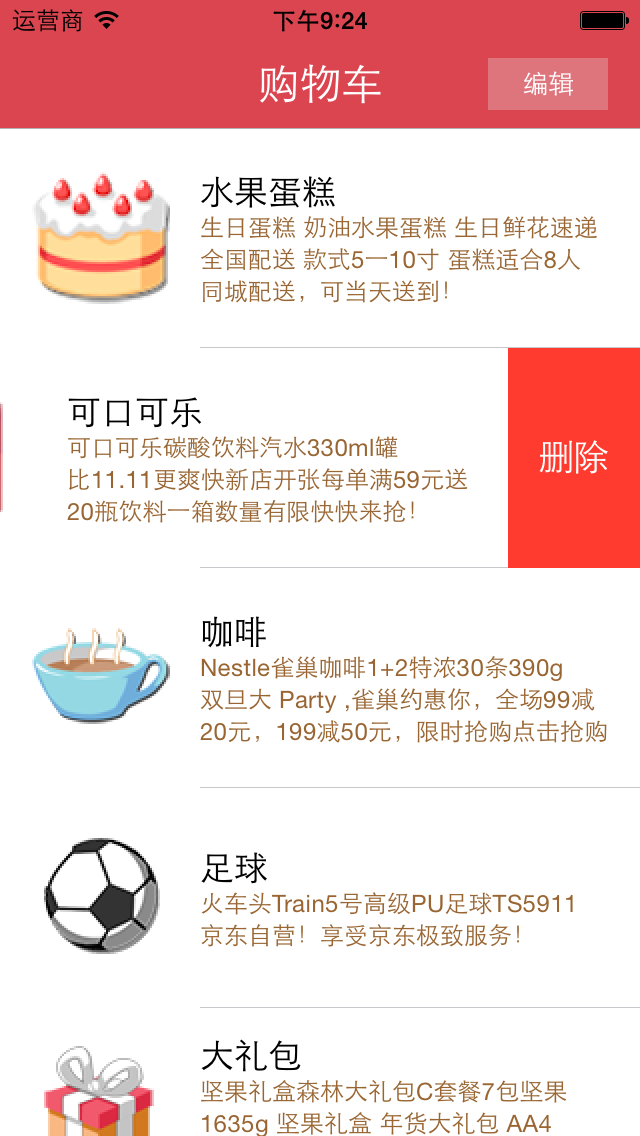
单行删除功能可以直接使用系统自带的删除功能,当横向轻扫cell时,右侧出现红色的删除按钮,点击删除当前cell。或者让表格进入编辑状态后,点击左侧的红色按钮,右侧出现删除按钮,删除,如下图所示。单行自带删除已经在前面文章中进行过讲解,需要的可以去查阅。

多选删除是点击编辑按钮,让表格进入编辑状态后,每行的左侧出现一个小圆圈,当点击行的时候,可以选中该行或者取消选中该行,当点击按钮确定删除的时候才会把选中的行全部删除掉,如图所示。
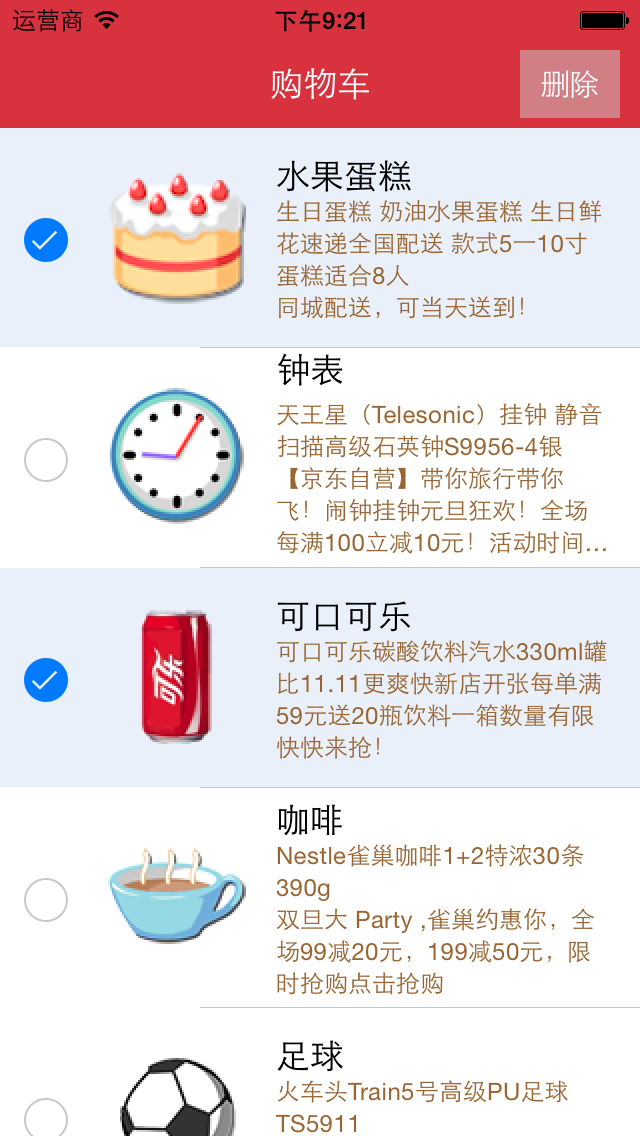
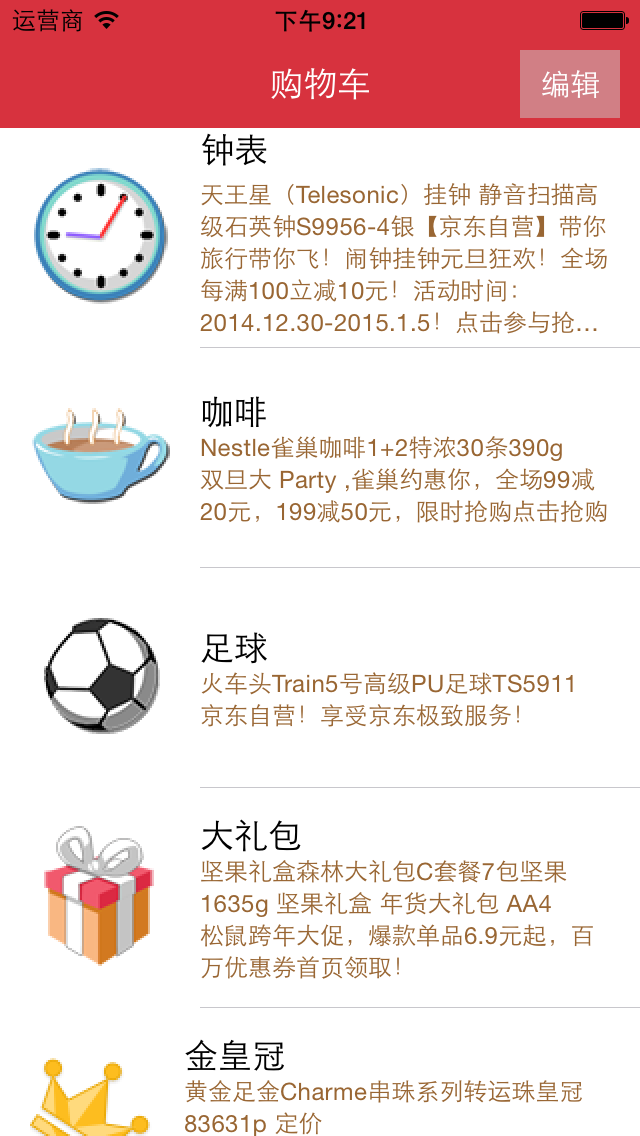
使用系统多选删除功能的步骤:
1、让tableView进入编辑状态,也就是设置它的editing为YES
2、返回编辑模式,也就是实现UITableViewDelegate中的tableview:editingStyleForRowAtIndexPath:方法,在里面返回UITableViewCellEditingStyleDelete | UITableViewCellEditingStyleInsert。如果不实现,默认返回的就是删除模式
3、实现UITableViewDelegate中的tableView: didSelectRowAtIndexPath: 和tableView: didDeselectRowAtIndexPath:方法。在里面对选中的商品集合中的数据进行修改
4、点击删除时,将选中商品数据从列表对应总商品集合中删除掉,并刷新界面。
代码:
//  Goods.h

//  购物车表格删除

//

//  Created by jerei on 15-1-7.

//  Copyright (c) 2015年 jerei. All rights reserved.

//

#import <Foundation/Foundation.h>

@interface Goods : NSObject

@property (nonatomic, copy) NSString *icon;

@property (nonatomic, copy) NSString *name;

@property (nonatomic, copy) NSString *details;

-(id)initWithDic:(NSDictionary*)dic;

+(id)goodsWithDic:(NSDictionary*)dic;

@end

//

//  Goods.m

//  购物车表格删除

//

//  Created by jerei on 15-1-7.

//  Copyright (c) 2015年 jerei. All rights reserved.

//

#import "Goods.h"

@implementation Goods

-(id)initWithDic:(NSDictionary *)dic

{

    if (self = [super init]) {

        self.icon = [dic objectForKey:@"icon"];

        self.name = [dic objectForKey:@"name"];

        self.details = [dic objectForKey:@"details"];

    }

    return self;

}

+(id)goodsWithDic:(NSDictionary *)dic

{

    Goods *good = [[Goods alloc] initWithDic:dic];

    return good;

}

@end

//

//  ViewController.m

//  JRTableView多选删除

//

//  Created by jerehedu on 15/6/11.

//  Copyright (c) 2015年 jerehedu. All rights reserved.

//

#import "ViewController.h"

#import "Goods.h"

@interface ViewController ()<UITableViewDataSource, UITableViewDelegate>

{

    UITableView *_tableView; //列表

    NSMutableArray *_goodsAry; //商品数组

    NSMutableArray *_selectArray; //选中的数组

    UIButton *_editBtn; //编辑按钮

}

@end

@implementation ViewController

- (void)viewDidLoad {

    [super viewDidLoad];

    //初始化选中数组

    _selectArray = [NSMutableArray array];

    //设置界面

    [self setTheInterface];

    //取数据

    [self getGoodsInfoFromFile];

}

#pragma mark - 取数据

-(void)getGoodsInfoFromFile{

    NSArray *ary = [NSArray arrayWithContentsOfFile:[[NSBundle mainBundle] pathForResource:@"ShoppingGoodsList" ofType:@"plist"]];

    //把数据存到模型对象中,然后把对象存到数组中

    _goodsAry = [NSMutableArray array];

    for (int i=; i<ary.count; i++) {

        Goods *good = [Goods goodsWithDic:ary[i]];

        [_goodsAry addObject:good];

    }

}

#pragma mark - 初始化界面

-(void)setTheInterface{

    //bg

    UIImageView *imgView = [[UIImageView alloc] initWithFrame:CGRectMake(, , self.view.frame.size.width, self.view.frame.size.height)];

    imgView.image = [UIImage imageNamed:@"redup.png"];

    [self.view addSubview:imgView];

    //添加标题

    UILabel *titleLabel = [[UILabel alloc] initWithFrame:CGRectMake(, , self.view.frame.size.width, )];

    titleLabel.text = @"购物车";

    titleLabel.textAlignment = NSTextAlignmentCenter;

    titleLabel.textColor = [UIColor whiteColor];

    [self.view addSubview:titleLabel];

    //添加编辑按钮

    _editBtn = [UIButton buttonWithType:UIButtonTypeCustom];

    _editBtn.frame = CGRectMake(self.view.frame.size.width-, , , );

    [_editBtn setTitle:@"编辑" forState:UIControlStateNormal];

    [_editBtn setTitle:@"删除" forState:UIControlStateSelected];

    _editBtn.titleLabel.font = [UIFont systemFontOfSize:];

    _editBtn.backgroundColor = [UIColor colorWithRed:0.8 green:0.8 blue:0.8 alpha:0.5];

    [self.view addSubview:_editBtn];

    [_editBtn addTarget:self action:@selector(clickEditBtn:) forControlEvents:UIControlEventTouchUpInside];

    //添加tableview

    _tableView = [[UITableView alloc] initWithFrame:CGRectMake(, , self.view.frame.size.width, self.view.frame.size.height-)];

    _tableView.dataSource = self;

    _tableView.delegate = self;

    [self.view addSubview:_tableView];

    _tableView.rowHeight = ;

}

#pragma mark 数据源  返回有几行

-(NSInteger)tableView:(UITableView *)tableView numberOfRowsInSection:(NSInteger)section

{

    return _goodsAry.count;

}

#pragma mark 每行显示内容

-(UITableViewCell*)tableView:(UITableView *)tableView cellForRowAtIndexPath:(NSIndexPath *)indexPath

{

    static NSString *idGood = @"goods";

    UITableViewCell *cell = [tableView dequeueReusableCellWithIdentifier:idGood];

    if (cell==nil) {

        cell = [[UITableViewCell alloc] initWithStyle:UITableViewCellStyleSubtitle reuseIdentifier:idGood];

        cell.detailTextLabel.numberOfLines = ;

        cell.detailTextLabel.textColor = [UIColor brownColor];

    }

    Goods *good = _goodsAry[indexPath.row];

    cell.imageView.image = [UIImage imageNamed:good.icon];

    cell.textLabel.text = good.name;

    cell.detailTextLabel.text = good.details;

    return cell;

}

#pragma mark 选中行

-(void)tableView:(UITableView *)tableView didSelectRowAtIndexPath:(NSIndexPath *)indexPath

{

    if (!_tableView.editing)

        return;

    Goods *good = [_goodsAry objectAtIndex:indexPath.row];

    if (![_selectArray containsObject:good]) {

        [_selectArray addObject:good];

    }

}

#pragma mark 取消选中行

-(void)tableView:(UITableView *)tableView didDeselectRowAtIndexPath:(NSIndexPath *)indexPath

{

    if (!_tableView.editing)

        return;

    Goods *good = [_goodsAry objectAtIndex:indexPath.row];

    if ([_selectArray containsObject:good]) {

        [_selectArray removeObject:good];

    }

}

#pragma mark 点击编辑按钮

- (IBAction)clickEditBtn:(UIButton *)sender {

    BOOL flag = _tableView.editing;

    if (flag) {

        //删除的操作

        //得到删除的商品索引

        NSMutableArray *indexArray = [NSMutableArray array];

        for (Goods *good in _selectArray) {

            NSInteger num = [_goodsAry indexOfObject:good];

            NSIndexPath *path = [NSIndexPath indexPathForRow:num inSection:];

            [indexArray addObject:path];

        }

        //修改数据模型

        [_goodsAry removeObjectsInArray:_selectArray];

        [_selectArray removeAllObjects];

        //刷新

        [_tableView deleteRowsAtIndexPaths:indexArray withRowAnimation:UITableViewRowAnimationFade];

        _tableView.editing = NO;

        _editBtn.selected = NO;

    }else

    {

        //开始选择行

        [_selectArray removeAllObjects];

        _tableView.editing = YES;

        _editBtn.selected = YES;

    }

}

#pragma mark 返回编辑模式,默认为删除模式

-(UITableViewCellEditingStyle)tableView:(UITableView *)tableView editingStyleForRowAtIndexPath:(NSIndexPath *)indexPath

{

    return UITableViewCellEditingStyleDelete | UITableViewCellEditingStyleInsert;

}

@end
出处:http://www.cnblogs.com/jerehedu/
版权声明:本文版权归烟台杰瑞教育科技有限公司和博客园共有,欢迎转载,但未经作者同意必须保留此段声明,且在文章页面明显位置给出原文连接,否则保留追究法律责任的权利。
技术咨询:

IOS UITableView多选删除功能的更多相关文章
- ios UITableView多选删除
第一步, - (UITableViewCellEditingStyle)tableView:(UITableView *)tableView editingStyleForRowAtIndexPath ...
- iOS UITableView划动删除的实现
标签:划动删除 iphone 滑动删除 ios UITableView 原创作品,允许转载,转载时请务必以超链接形式标明文章 原始出处 .作者信息和本声明.否则将追究法律责任.http://rainb ...
- 【凯子哥带你夯实应用层】使用ActionMode实现有删除动画的多选删除功能
转载请注明出处:http://blog.csdn.net/zhaokaiqiang1992 ActionMode是3.0之后.官方推荐的一种上下文菜单的实现方式,在之前一直用的是Co ...
- iOS - UITableView 多选功能实现
:自定义Cell中的代码 #import <UIKit/UIKit.h> @interface TestCell : UITableViewCell @property(nonatomic ...
- UITableView多选删除
设置一个在编辑状态下点击可改变图片的cell FileItemTableCell.h #import <UIKit/UIKit.h> @interface FileItemTableCel ...
- iOS UITableView左滑操作功能的实现(iOS8-11)
WeTest 导读 本文主要是介绍下iOS 11系统及iOS 11之前的系统在实现左滑操作功能上的区别,及如何自定义左滑的标题颜色.字体大小. 一.左滑操作功能实现 1.如果左滑的时候只有一个操作按钮 ...
- vue实战记录(五)- vue实现购物车功能之商品总金额计算和单选全选删除功能
vue实战,一步步实现vue购物车功能的过程记录,课程与素材来自慕课网,自己搭建了express本地服务器来请求数据 作者:狐狸家的鱼 本文链接:vue实战-实现购物车功能(五) GitHub:sue ...
- 当你的layui表格要做全选+删除功能【兼容ie8】
<!-- 全选 --> <div class="choose"> <input type="checkbox" id=" ...
- UITableView划动删除的实现
对于app应用来说,使用列表的形式展现数据非UITableView莫属.在熟练掌握了用UITableView展示数据以后,是不是也遇到了需要删除数据的需求?是不是觉得在一行数据上划动一下,然后出现一个 ...
随机推荐
- python3.6 利用requests和正则表达式爬取猫眼电影TOP100
import requests from requests.exceptions import RequestException from multiprocessing import Pool im ...
- Python内存管理方式和垃圾回收算法解析
在列表,元组,实例,类,字典和函数中存在循环引用问题.有 __del__ 方法的实例会以健全的方式被处理.给新类型添加GC支持是很容易的.支持GC的Python与常规的Python是二进制兼容的. 分 ...
- [ 转载 ] Mysql 数据库常用命令
完整的创建数据库例子: >create database db_test default character set utf8 collate utf8_general_ci; >use ...
- CodeForces 1070J Streets and Avenues in Berhattan 性质+动态规划
题目大意: 你有$k$个数,分为$26$种 对于每个数,你可以选择选进$A$集合或者$B$集合或者不选 要求$A$集合中必须有$n$个数,$B$集合中必须有$m$个数 记第$i$种数在$A$集合中的个 ...
- 【20181103T1】地球发动机【dp优化】
题面 一眼dp 设\(f_i\)表示前\(i\)个且\(i\)必须选的最大功率 有 \(f _i= max_{1 \leq j < i,A_i - A_j > X_j} \{f_j \}+ ...
- tomcat ssi配置及升级导致ssi include错误问题解决
最近tomcat升级版本时,遇到了ssi解析的问题,记录下解决的过程,还有tomcat ssi配置的要点. tomcat 配置SSI的两种方式 Tomcat有两种方式支持SSI:Servlet和Fil ...
- mysql 审计插件编写
http://bbs.chinaunix.net/forum.php?mod=viewthread&tid=1864367&page=1#pid13527550 http://blog ...
- VS2010下配置Winpcap 开发环境
http://blog.csdn.net/taotaoyouarebaby/article/details/27326829
- PL/SQL的下载与安装
注意,为了更好的通用性,最好安装32位的. 下载地址为:https://www.allroundautomations.com/bodyplsqldevreg.html 当前最新正式版本为PL/SQL ...
- Extjs gridPanel 动态指定表头
var colMArray = new Array(); colMArray = [{header : "产品代码", dataIndex : "cpdm", ...