
Spring Cloud构建微服务架构(四)分布式配置中心(续)
先来回顾一下,在前文中我们完成了什么:
- 构建了config-server,连接到Git仓库
- 在Git上创建了一个config-repo目录,用来存储配置信息
- 构建了config-client,来获取Git中的配置信息
在本文中,我们继续来看看Spring Cloud Config的一些其他能力。
高可用问题
传统作法
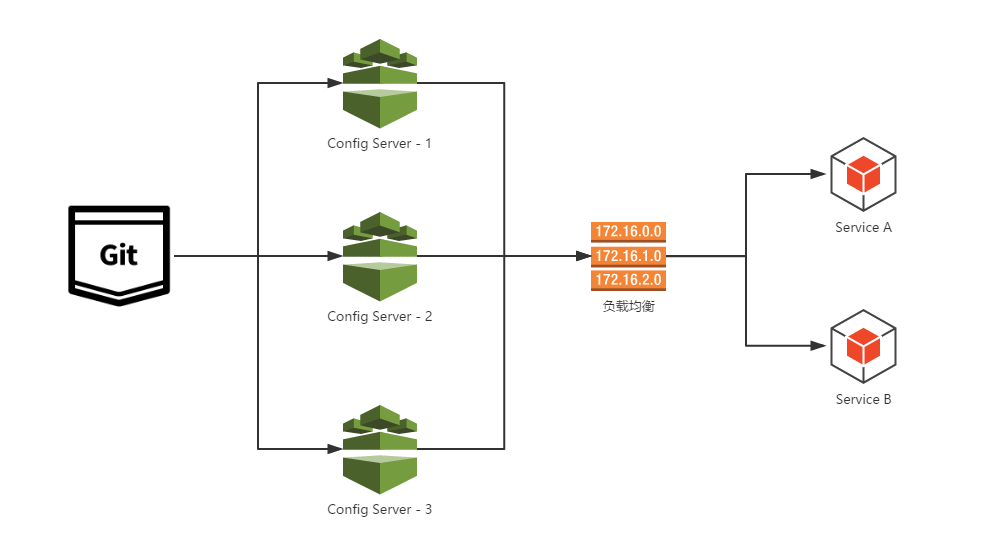
通常在生产环境,Config Server与服务注册中心一样,我们也需要将其扩展为高可用的集群。在之前实现的config-server基础上来实现高可用非常简单,不需要我们为这些服务端做任何额外的配置,只需要遵守一个配置规则:将所有的Config Server都指向同一个Git仓库,这样所有的配置内容就通过统一的共享文件系统来维护,而客户端在指定Config Server位置时,只要配置Config Server外的均衡负载即可,就像如下图所示的结构:
注册为服务
虽然通过服务端负载均衡已经能够实现,但是作为架构内的配置管理,本身其实也是可以看作架构中的一个微服务。所以,另外一种方式更为简单的方法就是把config-server也注册为服务,这样所有客户端就能以服务的方式进行访问。通过这种方法,只需要启动多个指向同一Git仓库位置的config-server就能实现高可用了。
配置过程也非常简单,具体如下:
config-server配置
- 在
pom.xml的dependencies节点中引入如下依赖,相比之前的config-server就,加入了spring-cloud-starter-eureka,用来注册服务
<dependencies>

<dependency>

<groupId>org.springframework.cloud</groupId>

<artifactId>spring-cloud-config-server</artifactId>

</dependency>

<dependency>

<groupId>org.springframework.cloud</groupId>

<artifactId>spring-cloud-starter-eureka</artifactId>

</dependency>

</dependencies>
- 在
application.properties中配置参数eureka.client.serviceUrl.defaultZone以指定服务注册中心的位置,详细内容如下:
spring.application.name=config-server

server.port=7001

# 配置服务注册中心

eureka.client.serviceUrl.defaultZone=http://localhost:1111/eureka/

# git仓库配置

spring.cloud.config.server.git.uri=http://git.oschina.net/

spring.cloud.config.server.git.searchPaths=

spring.cloud.config.server.git.username=username

spring.cloud.config.server.git.password=password
- 在应用主类中,新增
@EnableDiscoveryClient注解,用来将config-server注册到上面配置的服务注册中心上去。
@EnableDiscoveryClient

@EnableConfigServer

@SpringBootApplication

public class Application {

public static void main(String[] args) {

new SpringApplicationBuilder(Application.class).web(true).run(args);

}

}
- 启动该应用,并访问
http://localhost:1111/,可以在Eureka Server的信息面板中看到config-server已经被注册了。

config-client配置
- 同config-server一样,在
pom.xml的dependencies节点中新增spring-cloud-starter-eureka依赖,用来注册服务:
<dependencies>

<dependency>

<groupId>org.springframework.boot</groupId>

<artifactId>spring-boot-starter-web</artifactId>

</dependency>

<dependency>

<groupId>org.springframework.cloud</groupId>

<artifactId>spring-cloud-starter-config</artifactId>

</dependency>

<dependency>

<groupId>org.springframework.cloud</groupId>

<artifactId>spring-cloud-starter-eureka</artifactId>

</dependency>

</dependencies>
- 在
bootstrap.properties中,按如下配置:
spring.application.name=ddddd

server.port=7002

eureka.client.serviceUrl.defaultZone=http://localhost:1111/eureka/

spring.cloud.config.discovery.enabled=true

spring.cloud.config.discovery.serviceId=config-server

spring.cloud.config.profile=dev
其中,通过eureka.client.serviceUrl.defaultZone参数指定服务注册中心,用于服务的注册与发现,再将spring.cloud.config.discovery.enabled参数设置为true,开启通过服务来访问Config Server的功能,最后利用spring.cloud.config.discovery.serviceId参数来指定Config Server注册的服务名。这里的spring.application.name和spring.cloud.config.profile如之前通过URI的方式访问时候一样,用来定位Git中的资源。
- 在应用主类中,增加
@EnableDiscoveryClient注解,用来发现config-server服务,利用其来加载应用配置
@EnableDiscoveryClient

@SpringBootApplication

public class Application {

public static void main(String[] args) {

new SpringApplicationBuilder(Application.class).web(true).run(args);

}

}
- 沿用之前我们创建的Controller来加载Git中的配置信息
@RefreshScope

@RestController

public class TestController {

@Value("${from}")

private String from;

@RequestMapping("/from")

public String from() {

return this.from;

}

}
- 完成了上述配置之后,我们启动该客户端应用。若启动成功,访问
http://localhost:1111/,可以在Eureka Server的信息面板中看到该应用已经被注册成功了。

- 访问客户端应用提供的服务:
http://localhost:7002/from,此时,我们会返回在Git仓库中didispace-dev.properties文件配置的from属性内容:”git-dev-1.0”。
配置刷新
有时候,我们需要对配置内容做一些实时更新的场景,那么Spring Cloud Config是否可以实现呢?答案显然是可以的。下面,我们看看如何进行改造来实现配置内容的实时更新。
在改造程序之前,我们先将config-server和config-client都启动起来,并访问客户端提供的REST APIhttp://localhost:7002/from来获取配置信息,可以获得返回内容为:git-dev-1.0。接着,我们可以尝试使用Git工具修改当前配置的内容,比如,将config-repo/didispace-dev.properties中的from的值从from=git-dev-1.0修改为from=git-dev-2.0,再访问http://localhost:7002/from,可以看到其返回内容还是git-dev-1.0。
下面,我们将在config-client端增加一些内容和操作以实现配置的刷新:
- 在config-clinet的
pom.xml中新增spring-boot-starter-actuator监控模块,其中包含了/refresh刷新API。
<dependency>

<groupId>org.springframework.boot</groupId>

<artifactId>spring-boot-starter-actuator</artifactId>

</dependency>
- 重新启动config-clinet,访问一次
http://localhost:7002/from,可以看到当前的配置值 - 修改Git仓库
config-repo/didispace-dev.properties文件中from的值 - 再次访问一次
http://localhost:7002/from,可以看到配置值没有改变 - 通过POST请求发送到
http://localhost:7002/refresh,我们可以看到返回内容如下,代表from参数的配置内容被更新了
[

"from"

]
- 再次访问一次
http://localhost:7002/from,可以看到配置值已经是更新后的值了
通过上面的介绍,大家不难想到,该功能还可以同Git仓库的Web Hook功能进行关联,当有Git提交变化时,就给对应的配置主机发送/refresh请求来实现配置信息的实时更新。但是,当我们的系统发展壮大之后,维护这样的刷新清单也将成为一个非常大的负担,而且很容易犯错,那么有什么办法可以解决这个复杂度呢?后续我们将继续介绍如何通过Spring Cloud Bus来实现以消息总线的方式进行通知配置信息的变化,完成集群上的自动化更新。
Spring Cloud构建微服务架构(四)分布式配置中心(续)的更多相关文章
- Spring Cloud构建微服务架构
Dalston版本 由于Brixton和Camden版本的教程已经停止更新,所以笔者计划在2017年上半年完成Dalston版本的教程编写(原计划完成Camden版本教程,但由于写了两篇Dalston ...
- 《Spring Cloud构建微服务架构》系列博文示例
SpringCloud-Learning 源码下载地址:http://download.csdn.net/detail/k21325/9650968 本项目内容为Spring Cloud教 ...
- Spring Cloud构建微服务架构(五)服务网关
通过之前几篇Spring Cloud中几个核心组件的介绍,我们已经可以构建一个简略的(不够完善)微服务架构了.比如下图所示: 我们使用Spring Cloud Netflix中的Eureka实现了服务 ...
- Spring Cloud构建微服务架构 - 服务网关
通过之前几篇Spring Cloud中几个核心组件的介绍,我们已经可以构建一个简略的(不够完善)微服务架构了.比如下图所示: alt 我们使用Spring Cloud Netflix中的Eureka实 ...
- Spring Cloud构建微服务架构(三)消息总线
注:此文不适合0基础学习者直接阅读,请先完整的将作者关于微服务的博文全部阅读一遍,如果还有疑问,可以再来阅读此文,地址:http://blog.csdn.net/sosfnima/article/d ...
- Spring Cloud构建微服务架构(二)服务消费者
Netflix Ribbon is an Inter Process Communication (IPC) cloud library. Ribbon primarily provides clie ...
- Spring Cloud构建微服务架构:服务网关(路由配置)【Dalston版】
转载:http://blog.didispace.com/spring-cloud-starter-dalston-6-2/ 原创 2017-08-26 翟永超 Spring Cloud 被围观 ...
- Cola Cloud 基于 Spring Boot, Spring Cloud 构建微服务架构企业级开发平台
Cola Cloud 基于 Spring Boot, Spring Cloud 构建微服务架构企业级开发平台: https://gitee.com/leecho/cola-cloud
- Spring Cloud构建微服务架构(一)服务注册与发现
Spring Cloud简介 Spring Cloud是一个基于Spring Boot实现的云应用开发工具,它为基于JVM的云应用开发中的配置管理.服务发现.断路器.智能路由.微代理.控制总线.全局锁 ...
- 第1章 Spring Cloud 构建微服务架构(一)服务注册与发现
一.Spring Cloud 简介 Spring Cloud是一个基于Spring Boot实现的云应用开发工具,它为基于JVM的云应用开发中的配置管理.服务发现.断路器.智能路由.微代理.控制总 ...
随机推荐
- 一次真实的蓝屏分析 ntkrnlmp.exe
故事背景: 话说我一直都是远程公司的电脑,在我晚上11点敲代码敲得正爽的时候,被远程的主机挂掉了,毫无征兆的挂掉了,我特么还好有闲着没事就ctrl + s保存代码的习惯,要不然白敲了那么久,我以为是公 ...
- boost::tie()和boost::variant()解说
#include<iostream> #include<boost/tuple/tuple.hpp> #include<boost/variant.hpp> #in ...
- CSS 杂记
1. z-index: img{ position:absolute; left:0px; top:0px; z-index:-1;} 所有主流浏览器都支持 z-index 属性. 注释:任何的版本的 ...
- core dump相关
linux下生成core dump文件方法及设置 http://www.2cto.com/os/201310/253450.html 在linux平台下,设置core dump文件生成的方法: 1 ...
- Java AES 加密工具类
package com.microwisdom.utils; import java.security.NoSuchAlgorithmException; import java.security.S ...
- 把Linux目录挂载到开发板、设置开发板从NFS启动、取消开发板从NFS启动
声明:文中"PC虚拟机Linux"是指在PC上安装了虚拟机,然后在虚拟机中装的Linux. 关于NFS的详细介绍可参考:http://www.cnblogs.com/nufangr ...
- Java面试处理高并发
经过查资料,方案如下所示. 1 从最基础的地方做起,优化我们写的代码,减少必要的资源浪费. a.避免频繁的使用new对象,对于整个应用只需要存在一个实例的类,我们可以使用单例模 ...
- PHP MySQL 连接数据库
PHP连接MySQL的小实例 <?php /*时间:2014-09-14 *作者:葛崇 *功能:PHP连接MySQL小实例 * */ /* SQL 脚本.直接贴到命令行运行. DROP ...
- python中in在list和dict中查找效率比较
转载自:http://blog.csdn.net/wzgbm/article/details/54691615 首先给一个简单的例子,测测list和dict查找的时间: ,-,-,-,-,,,,,,] ...
- SAP SQ01怎样从开发机传输到生产机
确认你的Query是本地的还是全局的(跨Client).假设是后者,会自己主动生成传输请求,用标准传输方式就可以. 假设是本地的Query,有两种方式: 方式1:复制成全局的,让后生成传输请求 方式2 ...