
Linux文本处理三剑客之——grep
一Linux文本处理三剑客之——grep
Linux文本处理三剑客都支持正则表达式
grep :文本过滤( 模式:pattern) 工具,包括grep, egrep, fgrep (不支持正则表达式),其中后面两种是变种
sed :stream editor ,文本编辑工具
awk :Linux 上的实现gawk
(一)grep介绍
grep: Global search REgular expression and Print out the line
作用:文本搜索工具,根据用户指定的“模式”对目标文本逐行进行匹配检查,打印匹配到的行
模式:由正则表达式字符及文本字符所编写的过滤条件
grep [OPTIONS] PATTERN [FILE...]
在7上是外部命令,并且是别名
[root@centos72 ~]# type  grep

grep is aliased to `grep --color=auto'

[root@centos72 ~]# which  grep

alias grep='grep --color=auto'

    /usr/bin/grep

[root@centos72 ~]# rpm  -qf  /user/bin/grep

error: file /user/bin/grep: No such file or directory

[root@centos72 ~]# rpm  -qf  /usr/bin/grep

grep-2.20-3.el7.x86_64
对命令加颜色
[root@centos72 ~]# alias

alias cp='cp -i'

alias egrep='egrep --color=auto'

alias fgrep='fgrep --color=auto'

alias grep='grep --color=auto'

alias l.='ls -d .* --color=auto'

alias ll='ls -l --color=auto'

alias ls='ls --color=auto'

alias mv='mv -i'

alias rm='rm -i'

alias which='alias | /usr/bin/which --tty-only --read-alias --show-dot --show-tilde'
对别名添加颜色,搜索到的关键字就会显示颜色了

在6上grep没有别名,不显示颜色
[root@centos65 ~]# alias

alias cp='cp -i'

alias l.='ls -d .* --color=auto'

alias ll='ls -l --color=auto'

alias ls='ls --color=auto'

alias mv='mv -i'

alias rm='rm -i'

alias which='alias | /usr/bin/which --tty-only --read-alias --show-dot --show-tilde'

[root@centos65 ~]# which  grep

/bin/grep

[root@centos65 ~]# type  grep

grep is /bin/grep

在6上设置别名添加颜色
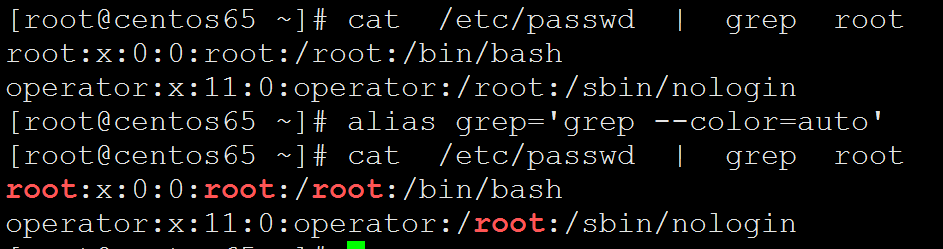
在文件里面添加别名,并且使其生效
[root@centos65 ~]# . .bashrc

[root@centos65 ~]# cat  .bashrc

# .bashrc

# User specific aliases and functions

alias rm='rm -i'

alias cp='cp -i'

alias mv='mv -i'

alias grep='grep --color=auto'

# Source global definitions

if [ -f /etc/bashrc ]; then

    . /etc/bashrc

fi
(二)grep的使用格式
查看帮助文档
重定向管道也使用到了-,表示文件输出的内容
 grep  searches  the named input FILEs (or standard input if no files are named, or if a single

       hyphen-minus (-) is given as file name) for lines containing a match to the given PATTERN.  By

       default, grep prints the matching lines.
搜索指定的输入文件(如果没有指定文件,或者只有一个文件,则搜索标准输入)
对于包含与给定模式匹配的行,使用连字符- -(-)作为文件名。通过
默认情况下,grep打印匹配的行。
模式可以是字符串,也可以是正则表达式
[root@centos72 ~]# grep

Usage: grep [OPTION]... PATTERN [FILE]...

Try 'grep --help' for more information.
如果包含关键字就会整行显示
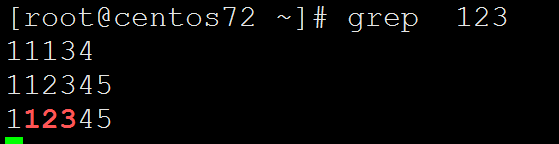
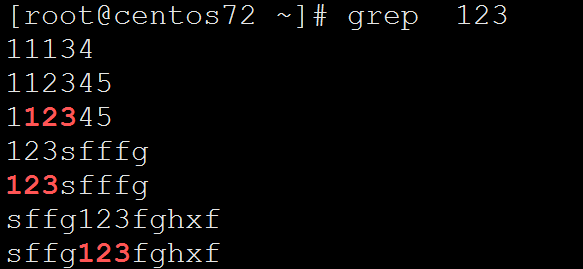
如果后面是文件,那么每次读入一行会在行里面搜索字符串
[root@centos72 ~]# cat  /etc/fstab   |  grep UUID

UUID=5998ead0-b370-4859-9153-ecf4e2b9dd84 /                       xfs     defaults        0 0

UUID=ac6bb7e3-fa78-4eb2-b00d-e85c421c1bb0 /app                    xfs     defaults        0 0

UUID=92886c3f-42a3-40f4-8cf7-c6890ca3a52e /boot                   xfs     defaults        0 0

UUID=104520e1-0e97-4248-8fd0-a21e7d88a881 swap                    swap    defaults        0
[root@centos72 ~]# cat  /etc/fstab   |  grep  swap

UUID=104520e1-0e97-4248-8fd0-a21e7d88a881 swap                    swap    defaults        0
因为支持键盘输入可以使用重定向,把含有关键字的行显示出来
[root@centos72 ~]# ifconfig   ens33  | grep  inet

        inet 192.168.137.72  netmask 255.255.255.0  broadcast 192.168.137.255

        inet6 fe80::b029:2522:876f:5456  prefixlen 64  scopeid 0x20<link>

[root@centos72 ~]# ifconfig   ens33  | grep  netmask

        inet 192.168.137.72  netmask 255.255.255.0  broadcast 192.168.137.255
对分区利用率过滤,加不加引号都可以
[root@centos72 ~]# df

Filesystem     1K-blocks    Used Available Use% Mounted on

/dev/sda2       52403200 1148564  51254636   3% /

devtmpfs          487952       0    487952   0% /dev

tmpfs             498976       0    498976   0% /dev/shm

tmpfs             498976    7764    491212   2% /run

tmpfs             498976       0    498976   0% /sys/fs/cgroup

/dev/sda3       20961280   32980  20928300   1% /app

/dev/sda1        1038336  126596    911740  13% /boot

tmpfs              99796       0     99796   0% /run/user/0

[root@centos72 ~]# df  | grep  '/dev/sd'

/dev/sda2       52403200 1148564  51254636   3% /

/dev/sda3       20961280   32980  20928300   1% /app

/dev/sda1        1038336  126596    911740  13% /boot

[root@centos72 ~]# df  | grep  /dev/sd

/dev/sda2       52403200 1148564  51254636   3% /

/dev/sda3       20961280   32980  20928300   1% /app

/dev/sda1        1038336  126596    911740  13% /boot

[root@centos72 ~]# df  | grep  "/dev/sd"

/dev/sda2       52403200 1148564  51254636   3% /

/dev/sda3       20961280   32980  20928300   1% /app

/dev/sda1        1038336  126596    911740  13% /boot
注意命令的结果作为关键字要使用反引号把命令引起来
[root@centos72 ~]# grep  whoami  /etc/passwd

[root@centos72 ~]# grep  'whoami'  /etc/passwd

[root@centos72 ~]# grep  "whoami"  /etc/passwd

[root@centos72 ~]# grep  `whoami`  /etc/passwd

root:x:0:0:root:/root:/bin/bash

operator:x:11:0:operator:/root:/sbin/nologin

[root@centos72 ~]# whoami

root
调用变量
[root@centos72 ~]# echo $USER

root

[root@centos72 ~]# grep  `$USER`  /etc/passwd

-bash: root: command not found

^C

[root@centos72 ~]# grep  $USER  /etc/passwd

root:x:0:0:root:/root:/bin/bash

operator:x:11:0:operator:/root:/sbin/nologin

[root@centos72 ~]# grep `echo $USER`  /etc/passwd

root:x:0:0:root:/root:/bin/bash

operator:x:11:0:operator:/root:/sbin/nologin
注意变量不能使用单引号,被当做普通的字符串,单引号最傻,六亲不认
最聪明是反引号,命令变量都可以识别出来,双引号只能识别变量,不能识别命令
[root@centos72 ~]# grep  '$USER'  /etc/passwd

[root@centos72 ~]# echo  '$USER'

$USER
(三)grep命令选项
--color=auto: 对匹配到的文本着色显示
-v: 显示不被pattern 匹配到的行
-v, --invert-match
Invert the sense of matching, to select non-matching lines. (-v is specified by POSIX.)
-i: 忽略字符大小写
-i, --ignore-case
Ignore case distinctions in both the PATTERN and the input files. (-i is specified by
POSIX.)
-n:显示匹配的行号
-n, --line-number
Prefix each line of output with the 1-based line number within its input file. (-n is
specified by POSIX.)
-c: 统计匹配的行数
-C NUM, -NUM, --context=NUM
Print NUM lines of output context. Places a line containing a group separator
(described under --group-separator) between contiguous groups of matches. With the -o
or --only-matching option, this has no effect and a warning is given.
-o: 仅显示匹配到的字符串
-o, --only-matching
Print only the matched (non-empty) parts of a matching line, with each such part on a
separate output line.
-q: 静默模式,不输出任何信息
-q, --quiet, --silent
Quiet; do not write anything to standard output. Exit immediately with zero status if
any match is found, even if an error was detected. Also see the -s or --no-messages
option. (-q is specified by POSIX.)
-A #: after, 后#行
-A NUM, --after-context=NUM
Print NUM lines of trailing context after matching lines. Places a line containing a
group separator (described under --group-separator) between contiguous groups of
matches. With the -o or --only-matching option, this has no effect and a warning is
given.
-B #: before, 前#行
-B NUM, --before-context=NUM
Print NUM lines of leading context before matching lines. Places a line containing a
group separator (described under --group-separator) between contiguous groups of
matches. With the -o or --only-matching option, this has no effect and a warning is
given.
-C # :context, 前后各#行
-C NUM, -NUM, --context=NUM
Print NUM lines of output context. Places a line containing a group separator
(described under --group-separator) between contiguous groups of matches. With the -o
or --only-matching option, this has no effect and a warning is given.
-e :实现多个选项间的逻辑or 关系
-e PATTERN, --regexp=PATTERN
Use PATTERN as the pattern. This can be used to specify multiple search patterns, or
to protect a pattern beginning with a hyphen (-). (-e is specified by POSIX.)
-w :匹配 整个单词
-E :使用ERE
-F :相当于fgrep
(1)-v: 显示不被pattern 匹配到的行
[root@centos72 ~]# grep  UUID  /etc/fstab

UUID=5998ead0-b370-4859-9153-ecf4e2b9dd84 /                       xfs     defaults        0 0

UUID=ac6bb7e3-fa78-4eb2-b00d-e85c421c1bb0 /app                    xfs     defaults        0 0

UUID=92886c3f-42a3-40f4-8cf7-c6890ca3a52e /boot                   xfs     defaults        0 0

UUID=104520e1-0e97-4248-8fd0-a21e7d88a881 swap                    swap    defaults        0
[root@centos72 ~]# grep -v   UUID  /etc/fstab

#

# /etc/fstab

# Created by anaconda on Sun Jan 13 00:14:21 2019

#

# Accessible filesystems, by reference, are maintained under '/dev/disk'

# See man pages fstab(5), findfs(8), mount(8) and/or blkid(8) for more info

#
[root@centos72 ~]# grep  UUID  /etc/fstab  -v

#

# /etc/fstab

# Created by anaconda on Sun Jan 13 00:14:21 2019

#

# Accessible filesystems, by reference, are maintained under '/dev/disk'

# See man pages fstab(5), findfs(8), mount(8) and/or blkid(8) for more info

#
(2)-i: 忽略字符大小写
注意很多命令的相同选项作用其实是一样的
[root@centos72 ~]# grep     uuid  /etc/fstab

[root@centos72 ~]# grep   -i  uuid  /etc/fstab

UUID=5998ead0-b370-4859-9153-ecf4e2b9dd84 /                       xfs     defaults        0 0

UUID=ac6bb7e3-fa78-4eb2-b00d-e85c421c1bb0 /app                    xfs     defaults        0 0

UUID=92886c3f-42a3-40f4-8cf7-c6890ca3a52e /boot                   xfs     defaults        0 0

UUID=104520e1-0e97-4248-8fd0-a21e7d88a881 swap                    swap    defaults        0
忽略大小写表示大小写混用也可以的
[root@centos72 ~]# grep   -i  Uuid  /etc/fstab

UUID=5998ead0-b370-4859-9153-ecf4e2b9dd84 /                       xfs     defaults        0 0

UUID=ac6bb7e3-fa78-4eb2-b00d-e85c421c1bb0 /app                    xfs     defaults        0 0

UUID=92886c3f-42a3-40f4-8cf7-c6890ca3a52e /boot                   xfs     defaults        0 0

UUID=104520e1-0e97-4248-8fd0-a21e7d88a881 swap                    swap    defaults        0 0

[root@centos72 ~]# grep     Uuid  /etc/fstab
(3)-n:显示匹配的行号
[root@centos72 ~]# grep  UUID  /etc/fstab  -n

9:UUID=5998ead0-b370-4859-9153-ecf4e2b9dd84 /                       xfs     defaults        0 0

10:UUID=ac6bb7e3-fa78-4eb2-b00d-e85c421c1bb0 /app                    xfs     defaults        0 0

11:UUID=92886c3f-42a3-40f4-8cf7-c6890ca3a52e /boot                   xfs     defaults        0 0

12:UUID=104520e1-0e97-4248-8fd0-a21e7d88a881 swap                    swap    defaults        0 0

[root@centos72 ~]# cat  /etc/fstab  -n

     1

     2    #

     3    # /etc/fstab

     4    # Created by anaconda on Sun Jan 13 00:14:21 2019

     5    #

     6    # Accessible filesystems, by reference, are maintained under '/dev/disk'

     7    # See man pages fstab(5), findfs(8), mount(8) and/or blkid(8) for more info

     8    #

     9    UUID=5998ead0-b370-4859-9153-ecf4e2b9dd84 /                       xfs     defaults        0 0

    10    UUID=ac6bb7e3-fa78-4eb2-b00d-e85c421c1bb0 /app                    xfs     defaults        0 0

    11    UUID=92886c3f-42a3-40f4-8cf7-c6890ca3a52e /boot                   xfs     defaults        0 0

    12    UUID=104520e1-0e97-4248-8fd0-a21e7d88a881 swap                    swap    defaults        0
[root@centos72 ~]# grep  -n  root  /etc/passwd

1:root:x:0:0:root:/root:/bin/bash

10:operator:x:11:0:operator:/root:/sbin/nologin
结合cat显示行号,但是使用管道的效率不比一条命令的效率高
[root@centos72 ~]# cat  -n  /etc/passwd  | grep  root

     1    root:x:0:0:root:/root:/bin/bash

    10    operator:x:11:0:operator:/root:/sbin/nologin

[root@centos72 ~]# cat   /etc/passwd  | grep  root  -n

1:root:x:0:0:root:/root:/bin/bash

10:operator:x:11:0:operator:/root:/sbin/nologin
(4)-c: 统计匹配的行数
[root@centos72 ~]# cat   /etc/passwd  | grep  root  -n -c

2

[root@centos72 ~]# grep  -n  root  /etc/passwd -c

2

[root@centos72 ~]# grep  -cn  root  /etc/passwd
[root@centos72 ~]# grep  UUID  /etc/fstab  -n

9:UUID=5998ead0-b370-4859-9153-ecf4e2b9dd84 /                       xfs     defaults        0 0

10:UUID=ac6bb7e3-fa78-4eb2-b00d-e85c421c1bb0 /app                    xfs     defaults        0 0

11:UUID=92886c3f-42a3-40f4-8cf7-c6890ca3a52e /boot                   xfs     defaults        0 0

12:UUID=104520e1-0e97-4248-8fd0-a21e7d88a881 swap                    swap    defaults        0 0

[root@centos72 ~]# grep  UUID  /etc/fstab  -nc
(5)-q: 静默模式,不输出任何信息
找到找不到都不显示也可以放到垃圾桶里面
[root@centos72 ~]# grep  UUID  /etc/fstab  -nq

[root@centos72 ~]# grep  UUID  /etc/fstab

UUID=5998ead0-b370-4859-9153-ecf4e2b9dd84 /                       xfs     defaults        0 0

UUID=ac6bb7e3-fa78-4eb2-b00d-e85c421c1bb0 /app                    xfs     defaults        0 0

UUID=92886c3f-42a3-40f4-8cf7-c6890ca3a52e /boot                   xfs     defaults        0 0

UUID=104520e1-0e97-4248-8fd0-a21e7d88a881 swap                    swap    defaults        0 0

[root@centos72 ~]# grep  UUID  /etc/fstab  >&  /dev/null

[root@centos72 ~]# grep  UUID  /etc/fstab  &>  /dev/null
(6)-o: 仅显示匹配到的字符串
[root@centos72 ~]# grep  UUID  /etc/fstab  -o

UUID

UUID

UUID

UUID

[root@centos72 ~]# grep -o  UUID  /etc/fstab

UUID

UUID

UUID

UUID
[root@centos72 ~]# grep -o  o  /etc/fstab

o

o

o

o

o

o

o

o

o
(7) -A #: after, 后#行
也就是包含关键字的后面几行
[root@centos72 ~]# grep   -A3  root  /etc/passwd

root:x:0:0:root:/root:/bin/bash

bin:x:1:1:bin:/bin:/sbin/nologin

daemon:x:2:2:daemon:/sbin:/sbin/nologin

adm:x:3:4:adm:/var/adm:/sbin/nologin

--

operator:x:11:0:operator:/root:/sbin/nologin

games:x:12:100:games:/usr/games:/sbin/nologin

ftp:x:14:50:FTP User:/var/ftp:/sbin/nologin

nobody:x:99:99:Nobody:/:/sbin/nologin
[root@centos72 ~]# grep   -An3  root  /etc/passwd

grep: n3: invalid context length argument

[root@centos72 ~]# grep   -nA3  root  /etc/passwd

1:root:x:0:0:root:/root:/bin/bash

2-bin:x:1:1:bin:/bin:/sbin/nologin

3-daemon:x:2:2:daemon:/sbin:/sbin/nologin

4-adm:x:3:4:adm:/var/adm:/sbin/nologin

--

10:operator:x:11:0:operator:/root:/sbin/nologin

11-games:x:12:100:games:/usr/games:/sbin/nologin

12-ftp:x:14:50:FTP User:/var/ftp:/sbin/nologin

13-nobody:x:99:99:Nobody:/:/sbin/nologin
[root@centos72 ~]# grep -A 3  UUID  /etc/fstab

UUID=5998ead0-b370-4859-9153-ecf4e2b9dd84 /                       xfs     defaults        0 0

UUID=ac6bb7e3-fa78-4eb2-b00d-e85c421c1bb0 /app                    xfs     defaults        0 0

UUID=92886c3f-42a3-40f4-8cf7-c6890ca3a52e /boot                   xfs     defaults        0 0

UUID=104520e1-0e97-4248-8fd0-a21e7d88a881 swap                    swap    defaults        0
(8)-B #: before, 前#行
也就是包含关键字的前面几行
[root@centos72 ~]# grep   -nB3  root  /etc/passwd

1:root:x:0:0:root:/root:/bin/bash

--

7-shutdown:x:6:0:shutdown:/sbin:/sbin/shutdown

8-halt:x:7:0:halt:/sbin:/sbin/halt

9-mail:x:8:12:mail:/var/spool/mail:/sbin/nologin

10:operator:x:11:0:operator:/root:/sbin/nologin
[root@centos72 ~]# grep -B3  UUID  /etc/fstab

# Accessible filesystems, by reference, are maintained under '/dev/disk'

# See man pages fstab(5), findfs(8), mount(8) and/or blkid(8) for more info

#

UUID=5998ead0-b370-4859-9153-ecf4e2b9dd84 /                       xfs     defaults        0 0

UUID=ac6bb7e3-fa78-4eb2-b00d-e85c421c1bb0 /app                    xfs     defaults        0 0

UUID=92886c3f-42a3-40f4-8cf7-c6890ca3a52e /boot                   xfs     defaults        0 0

UUID=104520e1-0e97-4248-8fd0-a21e7d88a881 swap                    swap    defaults        0 0

[root@centos72 ~]#
(9)-C # :context, 前后各#行
[root@centos72 ~]# grep -C3  UUID  /etc/fstab

# Accessible filesystems, by reference, are maintained under '/dev/disk'

# See man pages fstab(5), findfs(8), mount(8) and/or blkid(8) for more info

#

UUID=5998ead0-b370-4859-9153-ecf4e2b9dd84 /                       xfs     defaults        0 0

UUID=ac6bb7e3-fa78-4eb2-b00d-e85c421c1bb0 /app                    xfs     defaults        0 0

UUID=92886c3f-42a3-40f4-8cf7-c6890ca3a52e /boot                   xfs     defaults        0 0

UUID=104520e1-0e97-4248-8fd0-a21e7d88a881 swap                    swap    defaults        0
[root@centos72 ~]# grep   -nC3  root  /etc/passwd

1:root:x:0:0:root:/root:/bin/bash

2-bin:x:1:1:bin:/bin:/sbin/nologin

3-daemon:x:2:2:daemon:/sbin:/sbin/nologin

4-adm:x:3:4:adm:/var/adm:/sbin/nologin

--

7-shutdown:x:6:0:shutdown:/sbin:/sbin/shutdown

8-halt:x:7:0:halt:/sbin:/sbin/halt

9-mail:x:8:12:mail:/var/spool/mail:/sbin/nologin

10:operator:x:11:0:operator:/root:/sbin/nologin

11-games:x:12:100:games:/usr/games:/sbin/nologin

12-ftp:x:14:50:FTP User:/var/ftp:/sbin/nologin

13-nobody:x:99:99:Nobody:/:/sbin/nologin
(10)-e :实现多个选项间的逻辑or
[root@centos72 ~]#  grep  -e    root  -e  wang /etc/passwd

root:x:0:0:root:/root:/bin/bash

operator:x:11:0:operator:/root:/sbin/nologin

wang:x:1000:1000:wang:/home/wang:/bin/bash

[root@centos72 ~]#  grep  -e    root  -e  wang /etc/passwd  -n

1:root:x:0:0:root:/root:/bin/bash

10:operator:x:11:0:operator:/root:/sbin/nologin

19:wang:x:1000:1000:wang:/home/wang:/bin/bash
注意要写两个e
[root@centos72 ~]#  grep   root  -e  wang /etc/passwd

grep: root: No such file or directory

/etc/passwd:wang:x:1000:1000:wang:/home/wang:/bin/bash
(11)过滤出包含两个关键字或者多个关键字的行
[root@centos72 ~]#  grep  root   /etc/passwd

root:x:0:0:root:/root:/bin/bash

operator:x:11:0:operator:/root:/sbin/nologin

[root@centos72 ~]#  grep  root   /etc/passwd  |  grep  bash

root:x:0:0:root:/root:/bin/bash
两个关键字在前在后没关系
[root@centos72 ~]#  grep  bash   /etc/passwd  |  grep  root

root:x:0:0:root:/root:/bin/bash
(12) -w :匹配
[root@centos72 ~]#  grep  bash   /etc/passwd  -w

root:x:0:0:root:/root:/bin/bash

wang:x:1000:1000:wang:/home/wang:/bin/bash

[root@centos72 ~]#  grep  -w   bash   /etc/passwd

root:x:0:0:root:/root:/bin/bash

wang:x:1000:1000:wang:/home/wang:/bin/bash
[root@centos72 ~]#  grep  bash   /etc/passwd

root:x:0:0:root:/root:/bin/bash

wang:x:1000:1000:wang:/home/wang:/bin/bash
创建一个用户
[root@centos72 ~]# useradd   basher

[root@centos72 ~]# id  basher

uid=1001(basher) gid=1001(basher) groups=1001(basher)

[root@centos72 ~]# getent  passwd  basher

basher:x:1001:1001::/home/basher:/bin/bash

[root@centos72 ~]# chsh  -s  /sbin/nologin   basher

Changing shell for basher.

Shell changed.

[root@centos72 ~]# getent  passwd  basher

basher:x:1001:1001::/home/basher:/sbin/nologin
w表示安全匹配
[root@centos72 ~]#  grep    bash   /etc/passwd   -n

1:root:x:0:0:root:/root:/bin/bash

19:wang:x:1000:1000:wang:/home/wang:/bin/bash

21:basher:x:1001:1001::/home/basher:/sbin/nologin

[root@centos72 ~]#  grep    bash   /etc/passwd   -wn

1:root:x:0:0:root:/root:/bin/bash

19:wang:x:1000:1000:wang:/home/wang:/bin/bash
[root@centos72 ~]# userdel  -r basher

[root@centos72 ~]# getent  passwd  basher
[root@centos72 ~]# echo  abc  |  grep  -w  abc

abc

[root@centos72 ~]# echo  abcd  |  grep  -w  abc

[root@centos72 ~]# echo  abcde  |  grep  -w  abc

[root@centos72 ~]# echo  abcdeabc  |  grep  -w  abc

[root@centos72 ~]# echo  abcdeabc  |  grep    abc

abcdeabc
如果有空格就可以搜索到单词
空格可以作为单词的分隔符
[root@centos72 ~]# echo  abc deabc  |  grep   -w  abc

abc deabc

[root@centos72 ~]# echo  "abc deabc"  |  grep   -w  abc

abc deabc

[root@centos72 ~]# echo  'abc deabc'  |  grep   -w  abc

abc deabc
字母数字下划线都是单词的一部分,除此之外都可以作为单词的分隔符
[root@centos72 ~]# echo  '12abc deabc'  |  grep   -w  abc

[root@centos72 ~]# echo  '12-abc deabc'  |  grep   -w  abc

12-abc deabc

[root@centos72 ~]# echo  '12+abc deabc'  |  grep   -w  abc

12+abc deabc

[root@centos72 ~]# echo  '12=abc deabc'  |  grep   -w  abc

12=abc deabc

[root@centos72 ~]# echo  '12_abc deabc'  |  grep   -w  abc
[root@centos72 ~]# echo  '12,abc deabc'  |  grep   -w  abc

12,abc deabc

[root@centos72 ~]# echo  '12^abc deabc'  |  grep   -w  abc

12^abc deabc

[root@centos72 ~]# echo  '12!abc deabc'  |  grep   -w  abc

12!abc deabc

[root@centos72 ~]# echo  '12~abc deabc'  |  grep   -w  abc

12~abc deabc

[root@centos72 ~]# echo  '12%abc deabc'  |  grep   -w  abc

12%abc deabc
(13)-E :使用ERE
grep默认支持标准的正则表达式,加上选项-e支持扩展的正则表达式
(14)-F :相当于fgrep,不支持正则表达式
[root@centos72 ~]# echo  '12%abc deabc'  |  fgrep   -w  abc

12%abc deabc

[root@centos72 ~]# echo  '12~abc deabc'  |  fgrep   -w  abc

12~abc deabc
Linux文本处理三剑客之——grep的更多相关文章
- Linux文本处理三剑客之grep及正则表达式详解
Linux文本处理三剑客之grep及正则表达式详解 作者:尹正杰 版权声明:原创作品,谢绝转载!否则将追究法律责任. 一.Linux文本处理三剑客概述 grep: 全称:"Global se ...
- Linux 文本处理三剑客之grep
文本处理都要使用正则表达式,正则表达式有: 基本正则表达式:grep或者egrep -G 扩展正则表达式:egreo或者grep -E Linux 文本处理三剑客: sed:stream editor ...
- linux文本处理三剑客之 grep
文本处理无非是对文本内容做查看.修改等操作.Linux三剑客: grep.sed 和 awk 命令. 处理文本内容,用 Vim 编辑器不是很好吗?Vim 允许我们使用键盘.鼠标来对文本内容进行交互性地 ...
- Linux文本处理三剑客之grep
简介 grep命令,用于在一个文本文件中或者从STDIN中,根据用户给出的模式(pattern)过滤出所需要的信息. grep以及三剑客中的另外两个工具sed和awk都是基于行处理的,它们会一行行读入 ...
- 二、LINUX文本处理三剑客之grep
1. grep一般格式:grep [选项] 基本正则表达式 [文件],其中基本正则表达式需要用引号引起来 引号引起来的作用:a.防止被误解为shell命令,b.可以用来查找多个单词组成的字符串 gre ...
- Linux文本处理三剑客之sed
推荐新手阅读[酷壳]或[骏马金龙]开篇的教程作为入门.骏马兄后面的文章以及官方英文文档较难. [酷壳]:https://coolshell.cn/articles/9104.html [骏马金龙-博客 ...
- 关于Linux文本处理“三剑客”的一些小操作。
Linux文本处理“三剑客”,即grep.sed.awk,这是Linux中最核心 的3个命令. 一.首先做个简单的介绍: 1.awk:linux三剑客老大,过滤,输出内容,一门语言.NR代表行号. 2 ...
- 文本处理三剑客之 grep
grep简介 grep(Global search REgular expression and Print out the line)是Linux上的文本处理三剑客之一,另外两个是sed和awk. ...
- shell 文本处理三剑客之 grep 和 egrep
shell 三剑客之 grep 命令语法格式 grep 参数 案例 显示file中有python的行 grep python file 显示没有python的行,不忽略大小写 grep -v pyth ...
随机推荐
- linux根据进程名获取PID
经常需要Kill多个进程,这些进程包含共同的关键字,可以用一条命令Kill掉它们. ps aux | grep "common" |grep -v grep| cut -c 9-1 ...
- MYSQL索引优化之单表示例
1. 创建表 CREATE TABLE IF NOT EXISTS `article` ( `id` BIGINT(10) NOT NULL AUTO_INCREMENT, `author_id` I ...
- 抽象abstract
1):一个类如果有抽象方法,这个类一定是抽象类.抽象类不一定有抽象方法.抽象方法是以分号结束.不是以{}. 抽象方法也不提供实现代码. 2):任何拓展抽象类的类都必须实现超类的所有抽象方法.除非子类也 ...
- [CSP-S模拟测试]:water(BFS)
题目描述 有一块矩形土地被划分成$n\times m$个正方形小块.这些小块高低不平,每一小块都有自己的高度.水流可以由任意一块地流向周围四个方向的四块地中,但是不能直接流入对角相连的小块中.一场大雨 ...
- 杂项-Map:高德地图
ylbtech-杂项-Map:高德地图 1.返回顶部 1. 开放分类:地图手机软件高德地图(Amap) 是国内一流的免费地图导航产品,也是基于位置的生活服务功能最全面.信息最丰富的手机地图,由国内最大 ...
- Bootstrap Date Range Picker
var optionSet1 = { startDate: moment().subtract(29, 'days'), endDate: moment(), minDate: '12/21/2012 ...
- g++ 之 -m64选项
今天编译之前的项目,竟然报了下面的错误 usr/bin/ld: i386 architecture of input file `./proxycpp/soapRemoteDiscoveryBindi ...
- linux to extract contents between patterns
参考:http://stackoverflow.com/questions/19177721/extract-lines-between-two-patterns-from-a-lfile awk ' ...
- 笔记大神推荐的个人知识文档管理工具mybase
铛铛铛,今天我要给大家推荐一款个人知识笔记管理神器,不出你们所料,它就是mybase. 那mybase究竟能干啥呢?借用mybase中文官网的一句话来说,mybase软件可以将电脑上的文档.知识.笔记 ...
- git提交时,仓库是空的,本地有源码。
应该打开cmd 归到项目路径 然后输入git push -u origin master -f 是把本地的项目强制推送到空的仓库 git init (在当前文件夹下初始化一个git仓库) git ...