
scrapy入门实战-爬取代理网站
入门scrapy。
学习了有这几点
1.如何使用scrapy框架对网站进行爬虫;
2.如何对网页源代码使用xpath进行解析;
3.如何书写spider爬虫文件,对源代码进行解析;
4.学会使用scrapy的基础命令,创建项目,使用模板生成一个爬虫文件spider;
5,通过配置settings.py反爬虫。如设置user-agent;
设定目标:爬取网络代理www.xicidaili.com网站。
使用scrapy startproject 项目名称
scrapy startproject xicidailiSpider
项目名称应该如何命名呢:建议是需要爬虫的域名+Spider.举个例子:比如要爬取www.zhihu.com,那么项目名称可以写成zhihuSpider。
会在目录中出现该文件目录:
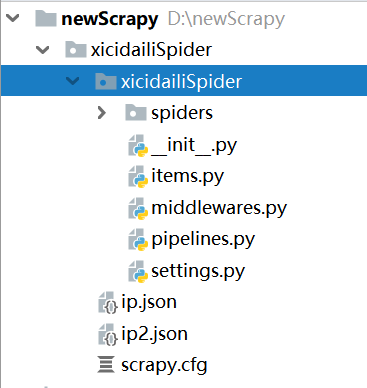
2. 目录中spiders放置的是爬虫文件,然后middlewares.py是中间件,有下载器的中间件,有爬虫文件的中间件。pipelines.py是管道文件,是对spider爬虫文件解析数据的处理。settings.py是设置相关属性,是否遵守爬虫的robotstxt协议,设置User-Agent等。
3.可以使用scrapy提供的模板,命令如下:
scrapy genspider 爬虫名字 需要爬虫的网络域名
举例子:
我们需要爬取的www.xicidaili.com
那么可以使用
scarpy genspider xicidaili xicidaili.com
命令完成后,最终的目录如下:
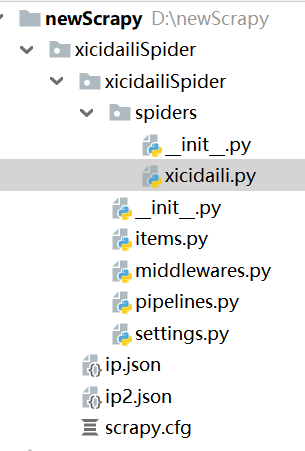
建立后项目后,需要对提取的网页进行分析
经常使用的有三种解析模式:
1.正则表达式
2 xpath response.xpath("表达式")
3 css response.css("表达式")
XPath的语法是w3c的教程。http://www.w3school.com.cn/xpath/xpath_syntax.asp
需要安装一个xpath helper插件在浏览器中,可以帮助验证书写的xpath是否正确。
xpath语法需要多实践,看确实不容易记住。
xicidaili.py
# -*- coding: utf-8 -*-

import scrapy

# 继承scrapy,Spider类

class XicidailiSpider(scrapy.Spider):

    name = 'xicidaili'

    allowed_domains = ['xicidaili.com']

    start_urls = ['https://www.xicidaili.com/nn/',

                  "https://www.xicidaili.com/nt/",

                  "https://www.xicidaili.com/wn/,"

                  "https://www.xicidaili.com/wt/"]

    # 解析响应数据,提取数据和网址等。

    def parse(self, response):

        selectors = response.xpath('//tr')

        for selector in selectors:

            ip = selector.xpath("./td[2]/text()").get()

            port = selector.xpath("./td[3]/text()").get()     #.代表当前节点下

            country = selector.xpath("./td[4]/a/text()").get()   # get()和extract_first() 功能相同,getall()获取多个

            # print(ip,port,country)

            Items={

                "ip":ip,

                "port":port,

                "country":country

            }

            yield  Items

        """

        # 翻页操作

        # 获取下一页的标签

        next_page = response.xpath("//a[@class='next_page']/@href").get()

        # 判断next_page是否有值,也就是是否到了最后一页

        if next_page:

            # 拼接网页url---response.urljoin

            next_url = response.urljoin(next_page)

            # 判断最后一页是否

            yield  scrapy.Request(next_url,callback=self.parse)   # 回调函数不要加括号

    """
# -*- coding: utf-8 -*-

# settings.py设置

# Scrapy settings for xicidailiSpider project

#

# For simplicity, this file contains only settings considered important or

# commonly used. You can find more settings consulting the documentation:

#

#     https://doc.scrapy.org/en/latest/topics/settings.html

#     https://doc.scrapy.org/en/latest/topics/downloader-middleware.html

#     https://doc.scrapy.org/en/latest/topics/spider-middleware.html

BOT_NAME = 'xicidailiSpider'

SPIDER_MODULES = ['xicidailiSpider.spiders']

NEWSPIDER_MODULE = 'xicidailiSpider.spiders'

# 设置到处文件的字符编码

FEED_EXPORT_ENCODING ="UTF8"

# Crawl responsibly by identifying yourself (and your website) on the user-agent

#USER_AGENT = 'xicidailiSpider (+http://www.yourdomain.com)'

# Obey robots.txt rules

# 是否准售robots.txt协议,不遵守

ROBOTSTXT_OBEY = False

# Configure maximum concurrent requests performed by Scrapy (default: 16)

#CONCURRENT_REQUESTS = 32

# Configure a delay for requests for the same website (default: 0)

# See https://doc.scrapy.org/en/latest/topics/settings.html#download-delay

# See also autothrottle settings and docs

#DOWNLOAD_DELAY = 3

# The download delay setting will honor only one of:

#CONCURRENT_REQUESTS_PER_DOMAIN = 16

#CONCURRENT_REQUESTS_PER_IP = 16

# Disable cookies (enabled by default)

#COOKIES_ENABLED = False

# Disable Telnet Console (enabled by default)

#TELNETCONSOLE_ENABLED = False

# Override the default request headers:

DEFAULT_REQUEST_HEADERS = {

   'Accept': 'text/html,application/xhtml+xml,application/xml;q=0.9,*/*;q=0.8',

   'Accept-Language': 'en',

    'User-Agent': 'Mozilla/5.0 (Windows NT 10.0; Win64; x64) \

    AppleWebKit/537.36 (KHTML, like Gecko) Chrome/75.0.3770.100 Safari/537.36'

}

# Enable or disable spider middlewares

# See https://doc.scrapy.org/en/latest/topics/spider-middleware.html

#SPIDER_MIDDLEWARES = {

#    'xicidailiSpider.middlewares.XicidailispiderSpiderMiddleware': 543,

#}

# Enable or disable downloader middlewares

# See https://doc.scrapy.org/en/latest/topics/downloader-middleware.html

#DOWNLOADER_MIDDLEWARES = {

#    'xicidailiSpider.middlewares.XicidailispiderDownloaderMiddleware': 543,

#}

# Enable or disable extensions

# See https://doc.scrapy.org/en/latest/topics/extensions.html

#EXTENSIONS = {

#    'scrapy.extensions.telnet.TelnetConsole': None,

#}

# Configure item pipelines

# See https://doc.scrapy.org/en/latest/topics/item-pipeline.html

#ITEM_PIPELINES = {

#    'xicidailiSpider.pipelines.XicidailispiderPipeline': 300,

#}

# Enable and configure the AutoThrottle extension (disabled by default)

# See https://doc.scrapy.org/en/latest/topics/autothrottle.html

#AUTOTHROTTLE_ENABLED = True

# The initial download delay

#AUTOTHROTTLE_START_DELAY = 5

# The maximum download delay to be set in case of high latencies

#AUTOTHROTTLE_MAX_DELAY = 60

# The average number of requests Scrapy should be sending in parallel to

# each remote server

#AUTOTHROTTLE_TARGET_CONCURRENCY = 1.0

# Enable showing throttling stats for every response received:

#AUTOTHROTTLE_DEBUG = False

# Enable and configure HTTP caching (disabled by default)

# See https://doc.scrapy.org/en/latest/topics/downloader-middleware.html#httpcache-middleware-settings

#HTTPCACHE_ENABLED = True

#HTTPCACHE_EXPIRATION_SECS = 0

#HTTPCACHE_DIR = 'httpcache'

#HTTPCACHE_IGNORE_HTTP_CODES = []

#HTTPCACHE_STORAGE = 'scrapy.extensions.httpcache.FilesystemCacheStorage'
运行
scrapy crawl xicidai 项目名,这个必须唯一。
如果需要输出文件,
scarpy crawl xicidaili --output ip.json 或者ip.csv
scrapy入门实战-爬取代理网站的更多相关文章
- scrapy框架来爬取壁纸网站并将图片下载到本地文件中
首先需要确定要爬取的内容,所以第一步就应该是要确定要爬的字段: 首先去items中确定要爬的内容 class MeizhuoItem(scrapy.Item): # define the fields ...
- Scrapy爬虫实战-爬取体彩排列5历史数据
网站地址:http://www.17500.cn/p5/all.php 1.新建爬虫项目 scrapy startproject pfive 2.在spiders目录下新建爬虫 scrapy gens ...
- scrapy爬虫框架爬取招聘网站
目录结构 BossFace.py文件中代码: # -*- coding: utf-8 -*-import scrapyfrom ..items import BossfaceItemimport js ...
- 实战爬取某网站图片-Python
直接上代码 1 #!/usr/bin/python 2 # -*- coding: UTF-8 -*- 3 from bs4 import BeautifulSoup 4 import request ...
- 简单的scrapy实战:爬取腾讯招聘北京地区的相关招聘信息
简单的scrapy实战:爬取腾讯招聘北京地区的相关招聘信息 简单的scrapy实战:爬取腾讯招聘北京地区的相关招聘信息 系统环境:Fedora22(昨天已安装scrapy环境) 爬取的开始URL:ht ...
- python爬虫-基础入门-爬取整个网站《3》
python爬虫-基础入门-爬取整个网站<3> 描述: 前两章粗略的讲述了python2.python3爬取整个网站,这章节简单的记录一下python2.python3的区别 python ...
- python爬虫-基础入门-爬取整个网站《2》
python爬虫-基础入门-爬取整个网站<2> 描述: 开场白已在<python爬虫-基础入门-爬取整个网站<1>>中描述过了,这里不在描述,只附上 python3 ...
- python爬虫-基础入门-爬取整个网站《1》
python爬虫-基础入门-爬取整个网站<1> 描述: 使用环境:python2.7.15 ,开发工具:pycharm,现爬取一个网站页面(http://www.baidu.com)所有数 ...
- Python 网络爬虫 002 (入门) 爬取一个网站之前,要了解的知识
网站站点的背景调研 1. 检查 robots.txt 网站都会定义robots.txt 文件,这个文件就是给 网络爬虫 来了解爬取该网站时存在哪些限制.当然了,这个限制仅仅只是一个建议,你可以遵守,也 ...
随机推荐
- 听说你懂个J?——前端发展闲聊
刚好周末和朋友聊起"前端从受鄙视到变得重要"这个话题,感慨前端这四年来的发展,遂有本文. 1. 前情提要 毋庸讳言,在我刚工作的时候,前端是还是一个不受重视的岗位.切图狗,写网页的 ...
- JS继承 实现方式
JS中继承方式的实现有多种方法,下面是比较推荐的方法,其它继承方式可做了解: function object(o) { function F() {} F.prototype = o; return ...
- 简单数学算法demo和窗口跳转,关闭,弹框
简单数学算法demo和窗口跳转,关闭,弹框demo <!DOCTYPE html PUBLIC "-//W3C//DTD XHTML 1.0 Transitional//EN&quo ...
- Python游戏
要想实现键盘控制作用,就需要给游戏键盘监听事件利用pygame模块的key.get_pressed()方法,来检测按键是否按下 key_press =pygame.key.get_pressed() ...
- QT中用QStettings生成INI文件来记录QFileDialog::getOpenFileName上次的打开路径
QSettings setting("./Setting.ini", QSettings::IniFormat); //QSettings能记录一些程序中的信息,下次再打开时可以读 ...
- error C2065: “CString”: 未声明的标识符 ;fatal error C1189: #error : afxstr.h can only be used in MFC proje
转自VC错误:http://www.vcerror.com/?p=1388 问题描述: error C2065: "CString": 未声明的标识符 fatal error C1 ...
- 公司-IT-SanSan:SanSan
ylbtech-公司-IT-SanSan:SanSan 毫不费力的组织.无缝简单.基于名片的联系人管理 SanSan是一个名片管理应用,为企业提供内部联系人管理和分享服务,此外该公司也是日本最大的.基 ...
- nginx 配置代理 session 丢失
最开始一直用的ip访问的项目是没问题的 , 后来改成用了域名访问就发现一直获取不了session ,最开始以为是跨域问题 , 但项目中已经配置了跨域 , 因为第一次用 nginx ,果断入坑了 , ...
- Reciting(second)
It is subtly revealed in the caricature that a son is expressing his concern about disposing of nu ...
- sysenter内核入口点代码分析
参考:http://www.mouseos.com/windows/kernel/KiFastCallEntry.html http://www.mouseos.com/windows/kernel/ ...