
django用户投票系统详解
投票系统之详解
1、创建项目(mysite)与应用(polls)
django-admin.py startproject mysite

python manage.py startapp polls
添加到setting.py
INSTALLED_APPS = (

    'django.contrib.admin',

    'django.contrib.auth',

    'django.contrib.contenttypes',

    'django.contrib.sessions',

    'django.contrib.messages',

    'django.contrib.staticfiles',

    'polls',

)
2、创建模型(即数据库)
一般web开发先设计数据库,数据库设计好了,项目就完了大半了,可见数据库的重要性。打开polls/models.py编写如下:
 coding=utf-8

from django.db import models

# Create your models here.

# 问题

class Question(models.Model):

    question_text = models.CharField(max_length=200)

    pub_date = models.DateTimeField('date published')

    def __unicode__(self):

        return self.question_text

# 选择

class Choice(models.Model):

    question = models.ForeignKey(Question)

    choice_text = models.CharField(max_length=200)

    votes = models.IntegerField(default=0)

    def __unicode__(self):

        return self.choice_text
执行数据库表生成与同步。
python manage.py makemigrations polls

python manage.py syncdb
3、admin管理
django提供了强大的后台管理,对于web应用来说,后台必不可少,例如,当前投票系统,如何添加问题与问题选项?直接操作数据库添加,显然麻烦,不方便,也不安全。所以,管理后台就可以完成这样的工作。
打开polls/admin.py文件,编写如下内容:
from django.contrib import admin

from .models import Question, Choice

# Register your models here.

class ChoiceInline(admin.TabularInline):

    model = Choice

    extra = 3

class QuestionAdmin(admin.ModelAdmin):

    fieldsets = [

        (None,               {'fields': ['question_text']}),

        ('Date information', {'fields': ['pub_date'], 'classes': ['collapse']}),

    ]

    inlines = [ChoiceInline]

    list_display = ('question_text', 'pub_date')

admin.site.register(Choice)

admin.site.register(Question, QuestionAdmin)
当前脚本的作用就是将模型(数据库表)交由admin后台管理。
运行web容器:
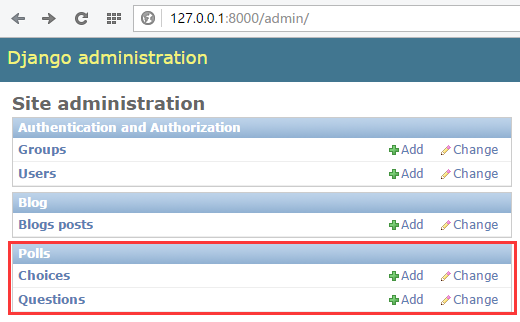
登录后台:http://127.0.0.1:8000/admin
登录密码就是在执行数据库同步时设置的用户名和密码。
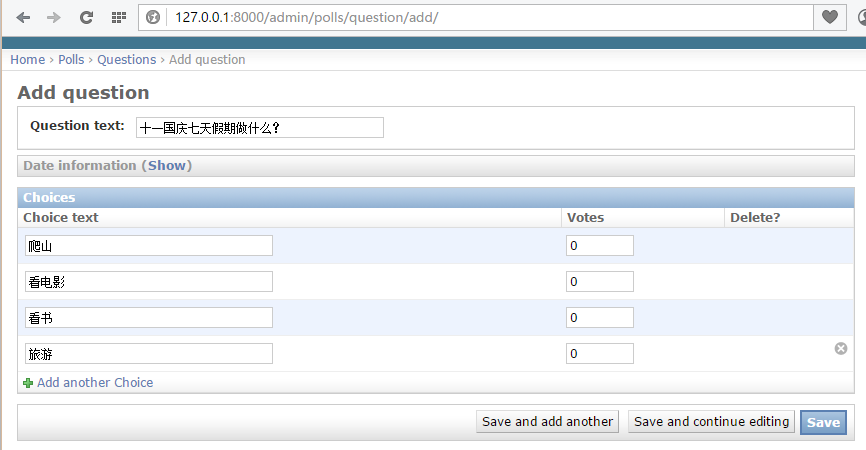
点击“add”添加问题。
4、编写视图
视图起着承前启后的作用,前是指前端页面,后是指后台数据库。将数据库表中的内容查询出来显示到页面上。
编写polls/views.py文件:
# coding=utf-8

from django.shortcuts import render, get_object_or_404

from django.http import HttpResponseRedirect, HttpResponse

from django.core.urlresolvers import reverse

from .models import Question, Choice

# Create your views here.

# 首页展示所有问题

def index(request):

    # latest_question_list2 = Question.objects.order_by('-pub_data')[:2]

    latest_question_list = Question.objects.all()

    context = {'latest_question_list': latest_question_list}

    return render(request, 'polls/index.html', context)

# 查看所有问题

def detail(request, question_id):

    question = get_object_or_404(Question, pk=question_id)

    return render(request, 'polls/detail.html', {'question': question})

# 查看投票结果

def results(request, question_id):

    question = get_object_or_404(Question, pk=question_id)

    return render(request, 'polls/results.html', {'question': question})

# 选择投票

def vote(request, question_id):

    p = get_object_or_404(Question, pk=question_id)

    try:

        selected_choice = p.choice_set.get(pk=request.POST['choice'])

    except (KeyError, Choice.DoesNotExist):

        # Redisplay the question voting form.

        return render(request, 'polls/detail.html', {

            'question': p,

            'error_message': "You didn't select a choice.",

        })

    else:

        selected_choice.votes += 1

        selected_choice.save()

        # Always return an HttpResponseRedirect after successfully dealing

        # with POST data. This prevents data from being posted twice if a

        # user hits the Back button.

        return HttpResponseRedirect(reverse('polls:results', args=(p.id,)))
5、配置url
url是一个请求配置文件,页面中的请求转交给由哪个函数处理,由该文件决定。
首先配置polls/urls.py(该文件需要创建)
from django.conf.urls import url

from . import views

urlpatterns = [

    # ex : /polls/

    url(r'^$', views.index, name='index'),

    # ex : /polls/5/

    url(r'^(?P<question_id>[0-9]+)/$', views.detail, name='detail'),

    # ex : /polls/5/results/

    url(r'^(?P<question_id>[0-9]+)/results/$', views.results, name='results'),

    # ex : /polls/5/vote

    url(r'^(?P<question_id>[0-9]+)/vote/$', views.vote, name='vote'),

]
接着,编辑mysite/urls.py文件。
from django.conf.urls import include, url

from django.contrib import admin

urlpatterns = [

    url(r'^polls/', include('polls.urls', namespace="polls")),

    url(r'^admin/', include(admin.site.urls)),

]
6、创建模板
模板就是前端页面,用来将数据显示到web页面上。
首先创建polls/templates/polls/目录,分别在该目录下创建index.html、detail.html和results.html文件。
index.html
{% if latest_question_list %}

    <ul>

    {% for question in latest_question_list %}

        <li><a href="{% url 'polls:detail' question.id %}">{{ question.question_text }}</a></li>

    {% endfor %}

    </ul>

{% else %}

    <p>No polls are available.</p>

{% endif %}
detail.html
<h1>{{ question.question_text }}</h1>

{% if error_message %}<p><strong>{{ error_message }}</strong></p>{% endif %}

<form action="{% url 'polls:vote' question.id %}" method="post">

{% csrf_token %}

{% for choice in question.choice_set.all %}

    <input type="radio" name="choice" id="choice{{ forloop.counter }}" value="{{ choice.id }}" />

    <label for="choice{{ forloop.counter }}">{{ choice.choice_text }}</label><br />

{% endfor %}

<input type="submit" value="Vote" />

</form>
results.html
<h1>{{ question.question_text }}</h1>

<ul>

{% for choice in question.choice_set.all %}

    <li>{{ choice.choice_text }} -- {{ choice.votes }} vote{{ choice.votes|pluralize }}</li>

{% endfor %}

</ul>

<a href="{% url 'polls:detail' question.id %}">Vote again?</a>
7、功能展示
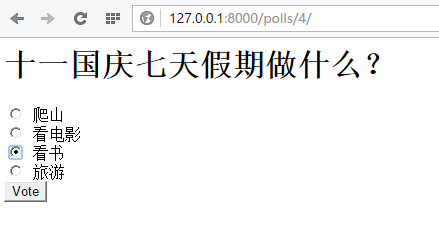
启动web容器,访问:http://127.0.0.1:8000/polls/


django用户投票系统详解的更多相关文章
- Linux 系统的用户和组详解_【all】
1.Linux 用户和用户组详解 2.Linux 文件特殊权限详解 3.Linux 文件的读写执行权限的说明 4.Linux 架构之简述企业网站 5.Linux 环境变量设置详解 6.企业生产环境用户 ...
- java中的io系统详解 - ilibaba的专栏 - 博客频道 - CSDN.NET
java中的io系统详解 - ilibaba的专栏 - 博客频道 - CSDN.NET 亲,“社区之星”已经一周岁了! 社区福利快来领取免费参加MDCC大会机会哦 Tag功能介绍—我们 ...
- Linux 用户及权限详解
Linux 用户及权限详解 用户 , 组 ,权限 安全上下文(secure context): 权限: r,w,x 文件: r : 可读,可以使用类似cat 等命令查看文件内容. w : 可写,可以编 ...
- Vmware12安装centos系统详解
vmware12安装centos7系统详解 用虚拟机12安装centos7系统详细安装过程,后附centos7下载地址. 工具/原料 虚拟机12 centos7系统镜像 方法/步骤 1 1.百度搜索c ...
- centos7.2环境nginx+mysql+php-fpm+svn配置walle自动化部署系统详解
centos7.2环境nginx+mysql+php-fpm+svn配置walle自动化部署系统详解 操作系统:centos 7.2 x86_64 安装walle系统服务端 1.以下安装,均在宿主机( ...
- syslog之一:Linux syslog日志系统详解
目录: <syslog之一:Linux syslog日志系统详解> <syslog之二:syslog协议及rsyslog服务全解析> <syslog之三:建立Window ...
- Django框架 之 querySet详解
Django框架 之 querySet详解 浏览目录 可切片 可迭代 惰性查询 缓存机制 exists()与iterator()方法 QuerySet 可切片 使用Python 的切片语法来限制查询集 ...
- 搭建zabbix监控系统详解
搭建zabbix监控系统详解 文:warren 博文大纲:一.前言 二.zabbix监控架构三.搭建Zabbix监控服务器四.搭建过程中遇到有些服务无法正常启动的解决办法 一.前言 : 要想实时的 ...
- Bootstrap栅格系统详解,响应式布局
Bootstrap栅格系统详解 栅格系统介绍 Bootstrap 提供了一套响应式.移动设备优先的流式栅格系统,随着屏幕或视口(viewport)尺寸的增加,系统会自动分为最多12列. 栅格系统用于通 ...
随机推荐
- 阶段3 3.SpringMVC·_06.异常处理及拦截器_6 SpringMVC拦截器之拦截器入门代码
创建拦截器 新建包 实现拦截器的接口 接口中没有强制实现里面的方法.jdk1.8的特性.接口中已经实现了方法 这就是相当于实现了这个接口.方法已经全帮你实现过了. 如果想去写新的实现方法.Ctrl+o ...
- 阶段3 3.SpringMVC·_06.异常处理及拦截器_5 SpringMVC拦截器之编写controller
先新建包,com.itcast.controller,然后把异常拦截的项目的UserController复制过来. 复制过来稍作修改 创建pages文件件,然后新建success.jsp页面 部署当前 ...
- 性能测试之JMeter远程模式
性能测试之JMeter远程模式 事实上,你的JMeter客户端机器是不能表现出完美的压力请求,来模拟足够多的用户或由于网络限制去向服务施加压力,一种解决方法是通过一个JMeter去控制多个/远程JMe ...
- linux下抓取tomcat相关内存、线程、文件句柄等快照,用于故障排除。
以下脚本推荐放在定时任务里,写好cron表达式,在不影响业务系统的情况下dump一些信息分析系统性能瓶颈以及故障排除. 因为每次dump的时候jvm会暂停(几秒到几十秒不等).所以在生产系统使用时慎用 ...
- JavaScript高程第三版笔记-面向对象编程
之前有篇博客曾提到过一点js的面向对象编程:js面向对象编程. 这里就结合js高程详细剖析一下javascript的面向对象编程. 前序: 1⃣️Object.defineProperty() var ...
- 掌握Pod-Pod调度策略
一 Pod生命周期管理 1.1 Pod生命周期 Pod在整个生命周期过程中被系统定义了如下各种状态. 状态值 描述 Pending API Server已经创建该Pod,且Pod内还有一个或多个容器的 ...
- vscode 配置 GOPATH
我已经放弃goland开发工具了,所以用万能的vscode 作为我学习go的开始: 按照网上的教程一步步配置了GOROOT,GOPATH等等,执行go env 也是没有问题的,但是当我用vscode写 ...
- 【HANA系列】SAP HANA SQL REPLACE替换字符串
公众号:SAP Technical 本文作者:matinal 原文出处:http://www.cnblogs.com/SAPmatinal/ 原文链接:[HANA系列]SAP HANA SQL REP ...
- C#编程 socket编程之unity聊天室
上面我们创建了tcp的客户端和服务端,但是只能进行消息的一次收发.这次我们做一个unity的简易聊天室,使用了线程,可以使用多个客户端连接服务器,并且一个客户端给服务器发消息后,服务器会将消息群发给所 ...
- MySQLdb._exceptions.OperationalError: (2059, <NULL>)
这是将 将数据迁移至mysql8.0时遇到的问题, 在网上找到了解决方案(亲测有用), 这是因为mysql8.0密码加密的问题,mysql8.0对用户密码的加密方式为caching_sha2_pass ...