
Ansible--01 ansible基础 Ansible-ad- hoc
自动化运维工具-Ansible基础
自动化运维的含义
1.手动运维时代
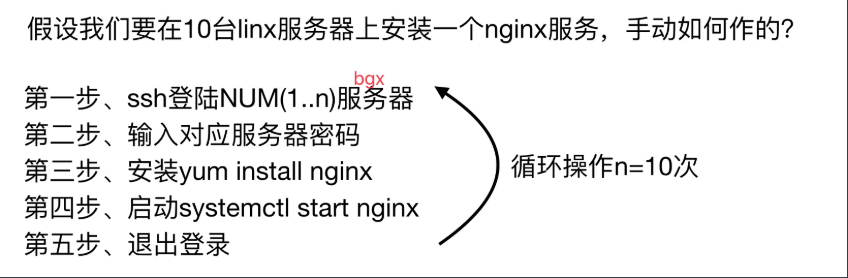
2.自动化运维时代

3.自动化运维工具给运维带来的好处

Ansible 基础及安装
1.什么是Ansible
Ansible是一个自动化统一配置管理工具
2.同类型软件对比
1.puppet 学习难,安装ruby环境难,没有远程执行功能
2.ansible 轻量级,大规模环境下只通过ssh会很慢,串行的
3.saltstack 一般选择salt会使用C/S结构的模式,salt-master和salt-minion,并行的,大规模批量操作的情况下,会比Ansible速度快一些,底层使用的是zero-MQ消协队列
Ansible使用的是python2
saltstack即有python2也有python3
Ansible的功能及优点
1.远程执行
批量执行远程命令,可以对多台主机进行远程操作
2.配置管理
批量配置软件服务,可以进行自动化方式配置,服务的统一配置管理,和启停
3.事件驱动
通过Ansible的模块,对服务进行不同的事件驱动
比如:
1)修改配置后重启
2)只修改配置文件,不重启
3)修改配置文件后,重新加载
4)远程启停服务管理
4.管理公有云
通过API接口的方式管理公有云,不过这方面做的不如saltstack.
saltstack本身可以通过saltcloud管理各大云厂商的云平台。
5.二次开发
因为语法是Python,所以便于运维进行二次开发。
6.任务编排
可以通过playbook的方式来统一管理服务,并且可以使用一条命令,实现一套架构的部署
7.跨平台,跨系统
几乎不受到平台和系统的限制,比如安装apache和启动服务
在Ubuntu上安装apache服务名字叫apache2
在CentOS上安装apache服务名字叫httpd
在CentOS6上启动服务器使用命令:/etc/init.d/nginx start
在CentOS7上启动服务器使用命令:systemctl start nginx
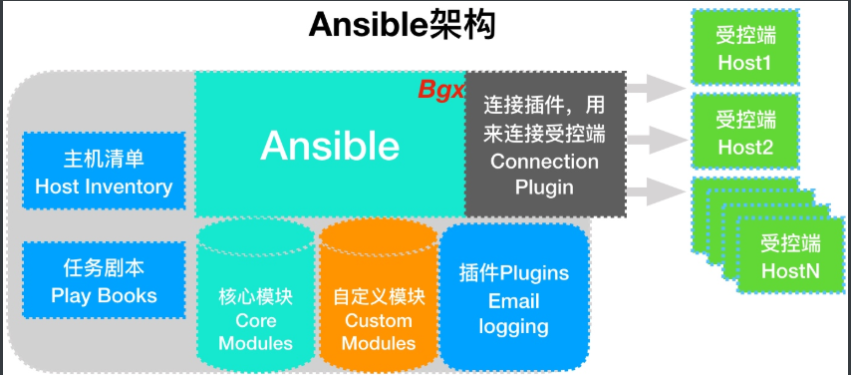
Ansible的架构
1、连接插件connectior plugins用于连接主机 用来连接被管理端
2、核心模块 core modules 连接主机实现操作, 它依赖于具体的模块来做具体的事情
3、自定义模块 custom modules,根据自己的需求编写具体的模块
4、插件 plugins,完成模块功能的补充
5、剧本 playbooks,ansible的配置文件,将多个任务定义在剧本中,由ansible自动执行
6、主机清单 inventor,定义ansible需要操作主机的范围最重要的一点是 ansible是模块化的 它所有的操作都依赖于模块
Ansible的执行流程
1.Ansible读取playbook剧本,剧本中会记录对哪些主机执行哪些任务。
2.首先Ansible通过主机清单找到要执行的主机,然后调用具体的模块。
3.其次Ansible会通过连接插件连接对应的主机并推送对应的任务列表。
4.最后被管理的主机会将Ansible发送过来的任务解析为本地Shell命令执行。
安装Ansible
1.环境准备
| 主机名 | wanIP | lanIP | 角色 |
|---|---|---|---|
| m01 | 10.0.0.61 | 172.16.1.61 | Ansible控制端 |
| web01 | 10.0.0.7 | 172.16.1.7 | Ansible被控端 |
| web02 | 10.0.0.8 | 172.16.1.8 | Ansible被控端 |
2.安装ansible
[root@m01 ~]# yum install -y ansible
3.查看ansible模块及版本
[root@m01 ~]# ansible --version

ansible 2.8.4

  config file = /etc/ansible/ansible.cfg

  configured module search path = [u'/root/.ansible/plugins/modules', u'/usr/share/ansible/plugins/modules']

  ansible python module location = /usr/lib/python2.7/site-packages/ansible

  executable location = /usr/bin/ansible

  python version = 2.7.5 (default, Oct 30 2018, 23:45:53) [GCC 4.8.5 20150623 (Red Hat 4.8.5-36)]
4.ansible参数
# ansible <host-pattern> [options]

--version   #ansible版本信息

-v          #显示详细信息

-i          #主机清单文件路径,默认是在/etc/ansible/hosts

-m          #使用的模块名称,默认使用command模块

-a          #使用的模块参数,模块的具体动作

-k          #提示输入ssh密码,而不使用基于ssh的密钥认证

-C          #模拟执行测试,但不会真的执行

-T          #执行命令的超时
5.ansible配置文件读取顺序
[root@m01 ~]# vim /etc/ansible/ansible.cfg

# nearly all parameters can be overridden in ansible-playbook

# or with command line flags. ansible will read ANSIBLE_CONFIG,

# ansible.cfg in the current working directory, .ansible.cfg in

# the home directory or /etc/ansible/ansible.cfg, whichever it

# finds first

1、$ANSIBLE_CONFIG

2、./ansible.cfg

3、~/.ansible.cfg

4、/etc/ansible/ansible.cfg
ansible配置文件
#inventory      = /etc/ansible/hosts      #主机列表配置文件

#library        = /usr/share/my_modules/  #库文件存放目录

#remote_tmp     = ~/.ansible/tmp          #临时py文件存放在远程主机目录

#local_tmp      = ~/.ansible/tmp          #本机的临时执行目录

#forks          = 5                       #默认并发数

#sudo_user      = root                    #默认sudo用户

#ask_sudo_pass = True                     #每次执行是否询问sudo的ssh密码

#ask_pass      = True                     #每次执行是否询问ssh密码

#remote_port    = 22                      #远程主机端口

host_key_checking = False                 #跳过检查主机指纹

log_path = /var/log/ansible.log           #ansible日志

#普通用户提权操作

[privilege_escalation]

#become=True

#become_method=sudo

#become_user=root

#become_ask_pass=False
ansible Inventory(主机清单文件)
/etc/ansible/hosts 是ansible 默认主机资产清单文件,用于定义被管理机的认证信息,例如ssh登录用户名、密码、以及key相关信息。Inventory文件中填写需要被管理的主机与主机组信息。还可以自定义Inventory 主机清单的位置,使用-i 指定文件位置即可。
场景一:密码方式连接
[root@m01 ~]# cat /etc/ansible/hosts

#方式一、IP+端口+用户+密码

[webs]

10.0.0.7 ansible_ssh_port=22 ansible_ssh_user=root ansible_ssh_pass='1'

10.0.0.8 ansible_ssh_port=22 ansible_ssh_user=root ansible_ssh_pass='1'

#方式二、主机名+密码

[webs]

web0[1:2] ansible_ssh_pass='123456'

#方式三、主机+密码

[webs]

web0[1:2]

[webs:vars]

ansible_ssh_pass='123456'

注意:方式二和方式三,都需要做hosts解析
场景二:密钥方式连接,需要先创建公钥和私钥,并下发公钥至被控端
#创建密钥对

[root@m01 ~]# ssh-keygen

#推送公钥

[root@m01 ~]# ssh-copy-id -i ~/.ssh/id_rsa.pub root@172.16.1.7

[root@m01 ~]# ssh-copy-id -i ~/.ssh/id_rsa.pub root@172.16.1.8

#方式一:主机+端口+密钥

[web_group]

172.16.1.7

172.16.1.8

#方式二:别名+主机+端口+密钥

[webs]

web01 ansible_ssh_host=172.16.1.7

web02 ansible_ssh_host=172.16.1.8
场景三:主机组定义方式
[root@m01 ~]# vim hosts

[web_group]

web01 ansible_ssh_host=172.16.1.7

web02 ansible_ssh_host=172.16.1.8

[db_group]

db01 ansible_ssh_host=172.16.1.51

lb01 ansible_ssh_host=172.16.1.5

[db_group:vars]

ansible_ssh_pass='1'

[nfs_group]

nfs ansible_ssh_host=172.16.1.31

#定义多组,多组汇总整合

[nfs_server:children]

web_group

nfs_group

[lnmp:children]

web_group

db_group

#查看所有主机数量

[root@m01 ~]# ansible 'all' --list-host

  hosts (5):

    nfs

    web01

    web02

    db01

    lb01

[root@m01 ~]# ansible 'web_group' --list-host

  hosts (2):

    web01

    web02

[root@m01 ~]# ansible 'db_group' --list-host

  hosts (2):

    db01

    lb01

[root@m01 ~]# ansible 'lnmp' --list-host

  hosts (4):

    web01

    web02

    db01

    lb01
Ansible ad-hoc
1.什么是AD-HOC
ad-hoc 简而言之就是临时命令,执行完即结束,并不会保存
2.ad-hoc模式的使用场景
比如在多台机器上查看某个进程是否启动,或拷贝指定文件到本地,等等。
3.ad-hoc模式的命令使用

ad-hoc 执行结果返回颜色说明
绿色: 代表被管理端主机没有被修改,或者只是对远程节点信息进行查看

黄色: 代表被管理端主机发现变更

红色: 代表出现了故障,注意查看提示

紫色:表示对命令执行发出警告信息(可能存在的问题,给你一下建议)
ansible常用模块
1.command命令模块
# 默认模块, 执行命令

[root@m01 ~]# ansible 'web_group'  -a "hostname"

# 如果需要一些管道操作,则使用shell

[root@m01 ~]# ansible 'web_group' -m shell -a "ifconfig|grep eth0" -f 50

# -f =forks   /etc/ansible/ansible.cfg #结果返回的数量

[root@m01 ~]# ansible 'web_group' -m command -a 'free -m'

web02 | CHANGED | rc=0 >>

              total        used        free      shared  buff/cache   available

Mem:            972         140         489           7         342         658

Swap:          1023           0        1023

web01 | CHANGED | rc=0 >>

              total        used        free      shared  buff/cache   available

Mem:            972         113         412          13         446         669

Swap:          1023           0        1023
2.shell
[root@m01 ~]# ansible 'web_group' -m shell -a 'ps -ef|grep nginx'

web02 | CHANGED | rc=0 >>

root      12584  12583  0 20:16 pts/1    00:00:00 /bin/sh -c ps -ef|grep nginx

root      12586  12584  0 20:16 pts/1    00:00:00 grep nginx

web01 | CHANGED | rc=0 >>

root      14575  14570  0 12:16 pts/1    00:00:00 /bin/sh -c ps -ef|grep nginx

root      14577  14575  0 12:16 pts/1    00:00:00 grep nginx
注意:
1)command不支持特殊符号
2)shell模块支持特殊符号
3)不指定-m 默认使用的是command模块
3.script脚本模块
#编写脚本

[root@m01 ~]# vim vsftpd.sh

#!/usr/bin/bash

mkdir /tmp/zls

#在本地运行模块,等同于在远程执行,不需要将脚本文件进行推送目标主机执行

[root@m01 ~]# ansible 'web01' -m script -a '/root/vsftpd.sh'

[root@m01 ~]# ansible 'web01' -m shell -a 'ls -l /tmp'
4.yum安装软件模块
[root@m01 ~]# ansible 'web_group' -m yum -a 'name=vsftpd state=present'

#相当于:yum install -y vsftpd

[root@m01 ~]# ansible 'web_group' -m yum -a 'name=https://mirrors.aliyun.com/zabbix/zabbix/4.0/rhel/7/x86_64/zabbix-agent-4.0.0-2.el7.x86_64.rpm state=present'

#相当于:yum install -y https://mirrors.aliyun.com/zabbix/zabbix/4.0/rhel/7/x86_64/zabbix-agent-4.0.0-2.el7.x86_64.rpm

[root@m01 ~]# ansible 'web_group' -m yum -a 'name=file:///root/nagios-4.4.3-1.el7.x86_64.rpm state=present'

#相当于:yum localinstall -y nagios-4.4.3-1.el7.x86_64.rpm

[root@m01 ~]# ansible 'web_group' -m yum -a 'name=vsftpd state=absent'

#相当于:yum remove -y vsftpd

name

    httpd                       #指定要安装的软件包名称

    file://                     #指定本地安装路径(yum localinstall 本地rpm包)

    http://                     #指定yum源(从远程仓库获取rpm包)

state                           #指定使用yum的方法

    installed,present           #安装软件包

    removed,absent              #移除软件包

    latest                      #安装最新软件包
5.yum_repository
- name: Add repository

  yum_repository:

    name: epel

    description: EPEL YUM repo

    baseurl: https://download.fedoraproject.org/pub/epel/$releasever/$basearch/

#添加yum仓库

ansible 'web_group' -m yum_repository -a 'name=zls_epel  description=EPEL baseurl=https://download.fedoraproject.org/pub/epel/$releasever/$basearch/ gpgcheck=no enabled=yes file=zls_epel'

#添加mirrorlist

ansible 'web_group' -m yum_repository -a 'name=zls_epel  description=EPEL baseurl=https://download.fedoraproject.org/pub/epel/$releasever/$basearch/ gpgcheck=no enabled=yes file=epel mirrorlist=http://mirrorlist.repoforge.org/el7/mirrors-rpmforge'

#删除yum仓库

ansible 'web_group' -m yum_repository -a 'name=zls_epel,zls_base file=zls_epel state=absent'

#修改yum仓库

ansible 'web_group' -m yum_repository -a 'name=epel  description=EPEL baseurl=https://download.fedoraproject.org/pub/epel/$releasever/$basearch/ gpgcheck=no enabled=no file=epel'

name 				#指定仓库名字

description			#添加描述(repo文件中的name)

baseurl				#指定yum仓库的地址

gpgcheck			#是否开启校验

	yes

	no

enabled				#是否启用yum仓库

	yes

	no

file				#指定仓库文件名

state

	absent			#删除yum仓库

	present			#创建yum仓库

ansible 'web_group' -m yum_repository -a 'name=zls_yum  description=EPEL baseurl=http://www.driverzeng.com gpgcheck=no enabled=no file=zls'
ansible文件管理模块
1.copy
- name: Copy file with owner and permissions

  copy:

    src: /srv/myfiles/foo.conf

    dest: /etc/foo.conf

    owner: foo

    group: foo

    mode: '0644'

#推送文件

[root@m01 ~]# ansible 'web_group' -m copy -a 'src=/root/index.html dest=/var/www/html owner=root group=root mode=0644'

#推送文件并备份

[root@m01 ~]# ansible 'web_group' -m copy -a 'src=/root/index.html dest=/var/www/html owner=root group=root mode=0644 backup=yes'

#编辑nfs配置文件

[root@m01 ~]# ansible 'web_group' -m copy -a 'content="/data 172.16.1.0/24(rw,sync,all_squash,anonuid=666,anongid=666)" dest=/etc/exports'

src					#指定推送的源文件

dest				#指定推送的目标位置

owner				#指定属主

group				#指定属组

mode				#指定权限(数字方式)

content				#在指定文件中添加内容

backup				#是否备份(注意:控制端和被控端,内容不一致才会备份)

	yes

	no
2.file文件配置模块
- name: Create an insecure file

  file:

    path: /work

    owner: root

    group: root

    mode: 0755

#创建目录 mkdir

[root@m01 ~]# ansible 'web_group' -m file -a 'path=/backup state=directory owner=adm group=adm mode=0700'

#递归创建目录并授权chown -R  chmod -R

[root@m01 ~]# ansible 'web_group' -m file -a 'path=/zls/mysql/db01 state=directory owner=adm group=adm mode=0700 recurse=yes'

#创建文件(前提条件,上级目录必须存在)  touch

[root@m01 ~]# ansible 'web_group' -m file -a 'path=/root/zls.txt state=touch'

#删除目录  rm -fr

[root@m01 ~]# ansible 'web_group' -m file -a 'path=/backup state=absent'

#做软链接 ln -s

[root@m01 ~]# ansible 'web_group' -m file -a 'src=/root/zls.txt dest=/root/zls.txt.ori state=link'

src					#指定软链接的源文件

dest				#指定软连接的目标文件

path				#指定创建目录或文件

state

	touch			#创建文件

	directory		#创建目录

	absent			#删除目录或文件

	link			#做软链接

owner				#指定属主

group				#指定属组

mode				#指定权限

recurse				#递归授权

	yes

	no
3.get_url服务模块
- name: Download foo.conf

  get_url:

    url: http://example.com/path/file.conf

    dest: /etc/foo.conf

    mode: '0440'

#下载worldpress代码

[root@m01 ~]# ansible 'web_group' -m get_url -a 'url=http://test.driverzeng.com/Nginx_Code/wordpress-5.0.3-zh_CN.tar.gz dest=/root mode=0777'

#下载并校验MD5

[root@m01 ~]# ansible 'web_group' -m get_url -a 'url=http://test.driverzeng.com/Nginx_Code/test.txt dest=/root mode=0777 checksum=md5:ba1f2511fc30423bdbb183fe33f3dd0f'

url				#指定下载文件的url

dest			#指定下载的位置

mode			#指定下载后的权限

checksum		#校验

	md5			#md5校验

	sha256		#sha256校验
ansible服务管理模块
1.service,systemd
[root@m01 ~]# ansible 'web_group' -m systemd -a 'name=httpd state=stopped enabled=yes'

[root@m01 ~]# ansible 'web_group' -m systemd -a 'name=httpd state=started enabled=yes'

[root@m01 ~]# ansible 'web_group' -m systemd -a 'name=httpd state=restarted enabled=yes'

[root@m01 ~]# ansible 'web_group' -m systemd -a 'name=httpd state=reloaded enabled=yes'

name					#指定服务名称

state

	started				#启动

	stopped				#停止

	restarted			#重启

	reloaded			#重载

enabled					#是否开机自启

	yes

	no
ansible用户管理模块
1.group
- name: Ensure group "somegroup" exists

  group:

    name: somegroup

    state: present

#创建组

[root@m01 ~]# ansible 'web_group' -m group -a 'name=www gid=666 state=present'

#删除组

[root@m01 ~]# ansible 'web_group' -m group -a 'name=www gid=666 state=absent'

name			#指定组名

gid				#指定gid

state

	present		#创建

	absent		#删除
2.user
- name: Create a 2048-bit SSH key for user jsmith in ~jsmith/.ssh/id_rsa

  user:

    name: jsmith

    generate_ssh_key: yes

    ssh_key_bits: 2048

    ssh_key_file: .ssh/id_rsa

#创建用户

[root@m01 ~]# ansible 'web_group' -m user -a 'name=www uid=666 group=www state=present shell=/sbin/nologin create_home=false'

#删除用户

[root@m01 ~]# ansible 'web_group' -m user -a 'name=www uid=666  state=absent'

#创建用户的同时创建密钥对

[root@m01 ~]# ansible 'web_group' -m user -a 'name=zls generate_ssh_key=yes ssh_key_bits=2048 ssh_key_file=.ssh/id_rsa'

name					#指定用户名

uid						#指定uid

group					#指定属组

groups					#指定附加组

state

	present				#创建用户

	absent				#删除用户

shell					#指定用户登录的shell

	/bin/bash

	/sbin/nologin

create_home				#是否创建家目录

	true

	false

comment					#添加注释

generate_ssh_key		#创建密钥对

ssh_key_bits			#指定密钥对长度

ssh_key_file			#指定密钥文件
实战
写主机清单,一键部署rsync,nfs,nginx,httpd,上传作业代码
1.配置主机
[root@m01 ~]# yum install -y ansible

#创建密钥对

[root@m01 ~]# ssh-keygen

#推送公钥

[root@m01 ~]# ssh-copy-id -i ~/.ssh/id_rsa.pub root@172.16.1.7

[root@m01 ~]# ssh-copy-id -i ~/.ssh/id_rsa.pub root@172.16.1.8

[root@m01 ~]# ssh-copy-id -i ~/.ssh/id_rsa.pub root@172.16.1.9

[root@m01 ~]# ssh-copy-id -i ~/.ssh/id_rsa.pub root@172.16.1.31

[root@m01 ~]# ssh-copy-id -i ~/.ssh/id_rsa.pub root@172.16.1.41

[root@m01 ~]# ssh-copy-id -i ~/.ssh/id_rsa.pub root@172.16.1.51

[root@m01 ~]# ssh-copy-id -i ~/.ssh/id_rsa.pub root@172.16.1.52

[root@m01 ~]# ssh-copy-id -i ~/.ssh/id_rsa.pub root@172.16.1.5

[root@m01 ~]# ssh-copy-id -i ~/.ssh/id_rsa.pub root@172.16.1.6

[root@m01 ~]# ssh-copy-id -i ~/.ssh/id_rsa.pub root@172.16.1.61
2.编写主机清单
[web_group]

gjy_web01 ansible_ssh_host=172.16.1.7

gjy_web02 ansible_ssh_host=172.16.1.8

gjy_web03 ansible_ssh_host=172.16.1.9

[db_group]

gjy_db01 ansible_ssh_host=172.16.1.51

gjy_db02 ansible_ssh_host=172.16.1.52

[nfs_group]

gjy_nfs ansible_ssh_host=172.16.1.31

[backup_group]

gjy_backup ansible_ssh_host=172.16.1.41

[daili_group]

gjy_lb01 ansible_ssh_host=172.16.1.5

gjy_lb02 ansible_ssh_host=172.16.1.6

[m01]

gjy_m01 ansible_ssh_host=172.16.1.61

[rsync_server:children]

nfs_group

backup_group

[nfs_server:children]

web_group

nfs_group

[lnmp_server:children]

web_group

daili_group
3.先编写一个比较low的脚本测试下
#!/bin/bash

#创建用户及组

 ansible 'all' -m group -a 'name=www gid=666 state=present' &&\

 ansible 'all' -m user -a 'name=www uid=666 group=www state=present shell=/sbin/nologin create_home=false' &&\

#部署httpd服务

ansible 'web_group' -m yum -a 'name=httpd,php state=present' &&\

#替换http服务启动用户及组

ansible 'web_group' -m shell -a "sed -i '/^User/c User www' /etc/httpd/conf/httpd.conf" &&\

ansible 'web_group' -m shell -a "sed -i '/^Group/c Group www' /etc/httpd/conf/httpd.conf" &&\

#启动httpd服务

ansible 'web_group' -m systemd -a 'name=httpd  state=started enabled=yes' &&\

 #上传代码,并修改图片路径

ansible 'web_group' -m copy -a 'src=/root/httpd_file/ dest=/var/www/html/ owner=www group=www '

#远程推送作业代码

ansible 'web_group' -m file -a 'path=/var/www/html/uploads state=directory owner=www group=www' &&\

#部署nfs服务

ansible 'nfs_server' -m yum -a 'name=nfs-utils  state=present' &&\

#推送nfs服务配置文件

ansible 'nfs_group' -m copy -a 'content="/data 172.16.1.0/24(rw,sync,all_squash,anonuid=666,anongid=666)" dest=/etc/exports' &&\

#启动nfs服务并开机自启

ansible 'nfs_server' -m systemd -a 'name=nfs-server  state=started enabled=yes' &&\

#远程下载rsync服务

ansible 'rsync_server' -m yum -a 'name=rsync  state=present' &&\

#推送rsync配置文件

ansible 'backup_group' -m copy -a 'src=/root/rsync_file   dest=/etc/rsyncd.conf' &&\

#推送密码文件至rsync服务端

ansible 'backup_group' -m copy -a 'content=rsync_backup:123 dest=/etc/rsync.passwd mode=0600' &&\

#推送密码文件至rsync客户端

ansible 'nfs_group' -m copy -a 'content=123 dest=/etc/rsync.pass mode=0600' &&\

#启动rsync服务,并加入开机自启

ansible 'rsync_server' -m systemd -a 'name=rsyncd  state=started enabled=yes' &&\

#远程下载mariadb服务

 ansible 'db_group' -m yum -a 'name=mariadb-server  state=present' &&\

#启动并加入开机自启

ansible 'db_group' -m systemd -a 'name=mariadb  state=started enabled=yes' &&\

#推送nginx 官方源

ansible 'lnmp_server' -m copy -a 'src=/etc/yum.repos.d/nginx.repo dest=/etc/yum.repos.d/' &&\

#远程下载nginx

ansible 'lnmp_server' -m yum -a 'name=nginx state=present' &&\

#远程修改nginx配置文件

ansible 'lnmp_server' -m shell -a "sed -i '/^user/c user www;' /etc/nginx/nginx.conf" &&\

#启动nginx

ansible 'lnmp_server' -m systemd -a 'name=nginx  state=started enabled=yes'
4.写与脚本对应的配置文件
[root@m01 ~]# vim /root/rsync_file

uid = www

gid = www

port = 873

fake super = yes

use chroot = no

max connections = 200

timeout = 600

ignore errors

read only = false

list = false

auth users = rsync_backup

secrets file = /etc/rsync.passwd

log file = /var/log/rsyncd.log

#####################################

[backup]

comment = welcome to oldboyedu backup!

path = /backup

[data]

comment = welcome to oldboyedu nfs!

path = /data

#传作业压缩包到目录里,并解压修改上传图片路径

[root@m01 ~]# cd httpd_file

#编写nginx官方源

[root@m01 ~]# vim /etc/yum.repos.d/nginx.repo

[nginx]

name=nginx repo

baseurl=http://nginx.org/packages/centos/7/$basearch/

gpgcheck=0

enabled=1
5.执行脚本
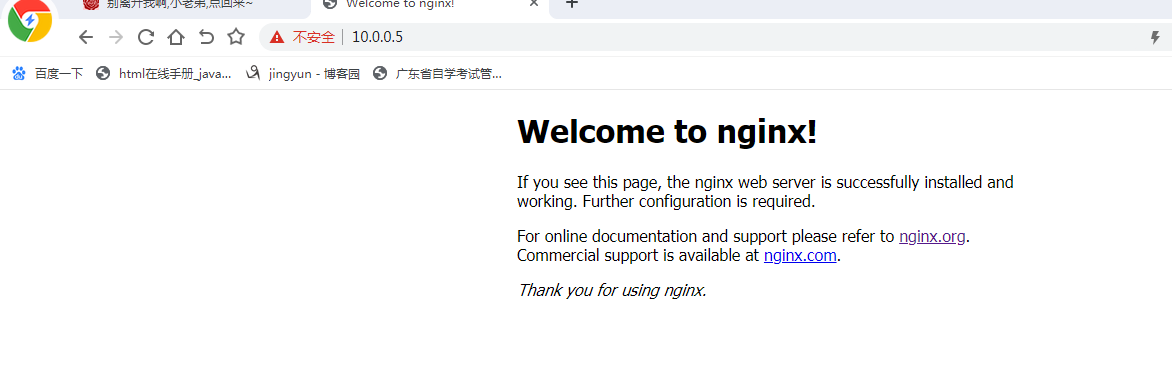
测试:1.web上http服务,上传作业代码

2.lb_group,nginx服务
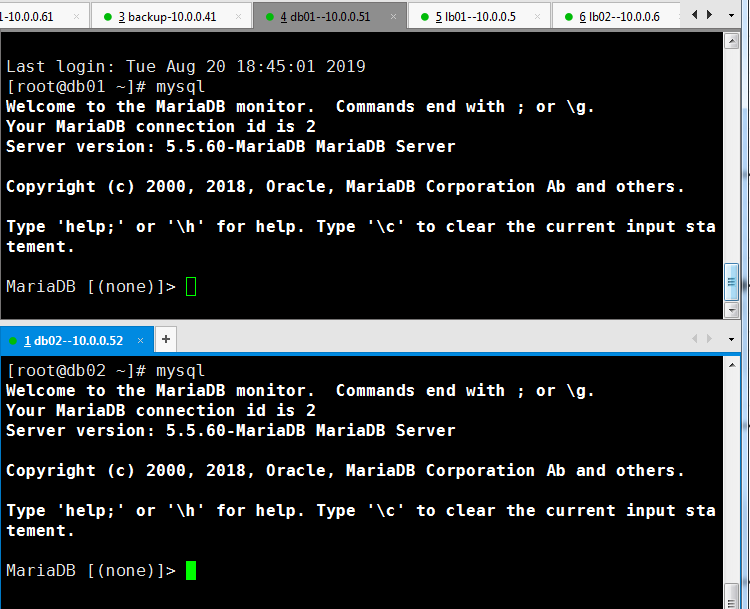
3.测试db_group ,mysql服务
4.测试nfs配置
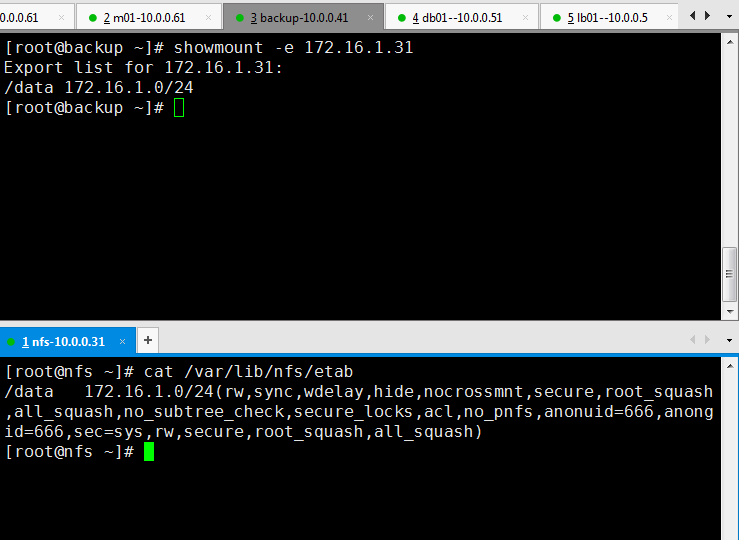
5.测试rsync服务
Ansible--01 ansible基础 Ansible-ad- hoc的更多相关文章
- ansible 主机清单 /etc/ansible/hosts
主机清单 [webservers] ansible01 ansible02 ansible03 ansible04 [root@ftp:/root] > ansible webservers - ...
- ansible入门三(Ansible的基础元素和YAML介绍)
Ansible的基础元素和YAML介绍 本节内容: YAML Ansible常用的数据类型 Ansible基础元素 一.YAML 1. YAML介绍 YAML是一个可读性高的用来表达资料序列的格式 ...
- ansible命令应用基础
ansible命令应用基础: Usage: ansible <host-pattern> [-f forks] [-m module_name][-a args] -f ...
- ansible基础-ansible角色的使用
ansible基础-ansible角色的使用 作者:尹正杰 版权声明:原创作品,谢绝转载!否则将追究法律责任. 我们建议把多个节点都会用到的功能将其定义模块,然后谁要用到该模块就直接调用即可!而在a ...
- 初识Ansible 01
自动化运维工具有很多,从实现的功能.维护的成本.使用的系统来选择,几种常用运维工具比较: Puppet基于 Ruby 开发,采用 C/S 架构,扩展性强,基于 SSL,远程命令执行相对较弱 SaltS ...
- ansible入门一(Ansible介绍及安装部署)
本节内容: 运维工具 Ansible特性 Ansible架构图和核心组件 安装Ansible 演示使用示例 一.运维工具 作为一个Linux运维人员,需要了解大量的运维工具,并熟知这些工具的差异,能够 ...
- 怎么在windows上安装 ansible How to install ansible to my python at Windows
答案是不能再window上安装,答案如下: It's back! Take the 2018 Developer Survey today » Join Stack Overflow to learn ...
- OFDM、FTTx、SCTP、Ad Hoc、WSN术语简介
上课提到一些术语,下来查了一下,总结在这里. OFDM: OFDM(Orthogonal Frequency Division Multiplexing)即正交频分复用技术,实际上OFDM是MCM(M ...
- 即席查询(Ad Hoc)如何做到又快又稳?
数字化与数字生态建设,是当前所有企业成长发展的必经之路.随着"加强新型基础设施建设"第一次被写入政府工作报告,5G.人工智能.工业互联网.智慧城市等新型基建彻底激发了数字的价值. ...
- SQL Server 阻止了对组件 'Ad Hoc Distributed Queries' 的 STATEMENT'OpenRowset/OpenDatasource' 的访问
delphi ado 跨数据库访问 语句如下 ' and db = '帐套1' 报错内容是:SQL Server 阻止了对组件 'Ad Hoc Distributed Queries' 的 STATE ...
随机推荐
- 关于.net中使用reportview所需注意
参考文章链接:http://www.cnblogs.com/watercold/p/5258608.html 这段时间在做一个winform的小项目时,发现使用.net中的ReportViewer插件 ...
- angular 组件通信
单页面应用组件通信有以下几种,这篇文章主要讲 Angular 通信 父组件 => 子组件 子组件 => 父组件 组件A = > 组件B 父组件 => 子组件 子组件 => ...
- 用pycharm运行pytest
安装pytest 1. 在pycharm中建项目,建文件,文件名字要以test_开头 2.在文件中插入pytest模块 import pytest #引用pytest模块 3.定义test函数,以及断 ...
- uwsgi部署django项目
一.更新系统软件包 yum update -y 二.安装软件管理包及依赖 yum -y groupinstall "Development tools" yum install o ...
- excel VBA 编程
Dim cuttent_columns As Integer Dim care_repeat As Integer Private Sub Workbook_Open() Dim i As Integ ...
- onclick 调用js选择器
- 在VMware中配置网卡之NAT模式
为什么要在VMware中配置网卡? 因为在远程连接服务器时,需要虚拟机连接网络 虚拟机网络配置的三种模式:桥接模式,NAT模式,主机模式 NAT模式也称之为网络转换模式,两层路由: 第一层路由:物理机 ...
- 2017 山东一轮集训 Day2 Shadow (三维凸包点在面上投影)
在三维坐标中,给定一个点光源,一个凸多面体,以及一个平面作为地面. 求该凸多面体在地面上阴影的面积. 这三个点共同确定了一个平面,这个平面就是地面.保证这三个点坐标互异且不共线.前三行每行三个实数,每 ...
- FS,FT,DFS,DTFT,DFT,FFT的联系和区别 数字信号处理
DCT变换的原理及算法 文库介绍 对于初学数字信号处理(DSP)的人来说,这几种变换是最为头疼的,它们是数字信号处理的理论基础,贯穿整个信号的处理. 学习过<高等数学>和<信号与系统 ...
- 七、单例设计模式共享数据分析、解决、call_once
一.设计模式大概谈 代码的一些写法,与常规的写法不太一样,程序灵活,维护起来很方便,但是别人接管.阅读代码很痛苦. 用设计模式理念写出来的代码很晦涩.<< head first>&g ...