
flutter Container组件和Text组件
在开始之前,我们先写一个最简单的入口文件:

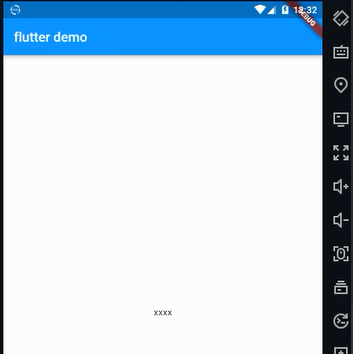
后面,都是在这个结构的基础上面完成的。
由于Container组件和Text组件都是写在body里面的,所以下面,先将body抽离成一个组件的形式。
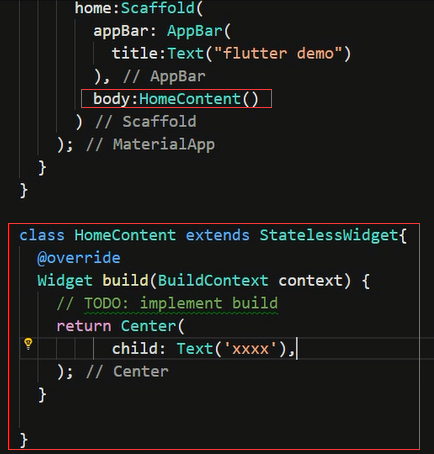
Container组件
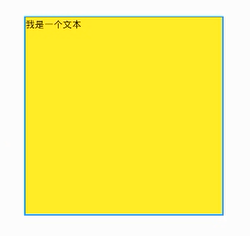
在flutter里面Container组件是一个容器组件,类似于html中的div一样。

在Center组件里面添加Container组件,然后再添加Text组件,和上面的效果是一样的。
Container、Text这些自定义组件的本质都是类,有很多可选的命名参数,在Conrainer里面的常用参数包括:
- alignment :对齐方式
- decoration:背景和边框属性
- margin:
- padding
- transfrom
- height
- width
- child

Text组件
在Text组件中常用的参数如下:
- textAlign:文本对齐方式(center 居中,left 左对齐,right 右对齐,justfy 两端对齐)
- textDirection:文本方向(ltr 从左至右,rtl 从右至左)
- overflow:文字超出屏幕之后的处理方式(clip裁剪,fade 渐隐,ellipsis 省略号)
- textScaleFactor:字体显示倍率
- maxLines:文字显示最大行数
- style:字体的样式设置
其中TextStyle又包括下面这些可选参数:
- decoration:文字装饰线(none 没有线,lineThrough 删除线,overline 上划线,underline 下划线)
- decorationColor:文字装饰线颜色
- decorationStyle :文字装饰线风格([dashed,dotted]虚线,double 两根线,solid 一根实线,wavy 波浪线)
- wordSpacing:单词间隙(如果是负值,会让单词变得更紧凑
- letterSpacing :字母间隙(如果是负值,会让字母变得更紧凑)
- fontStyle :文字样式(italic 斜体,normal 正常体)
- fontSize
- color
- fontWeight


import 'package:flutter/material.dart';

void main(){

  runApp(MyApp());

}

class MyApp extends StatelessWidget{

  @override

  Widget build(BuildContext context) {

    return MaterialApp(

      home:Scaffold(

        appBar: AppBar(

          title:Text("flutter demo")

        ),

        body:HomeContent()

      )

    );

  }

}

class HomeContent extends StatelessWidget{

  @override

  Widget build(BuildContext context) {

    return Center(

          child: Container(

              child: Text(

                'flutter Container组件和Text组件,flutter Container组件和Text组件,flutter Container组件和Text组件',

                textAlign:TextAlign.left,

                overflow:TextOverflow.ellipsis ,

                // overflow:TextOverflow.fade ,

                maxLines: 2,

                textScaleFactor: 1.8,

                style:TextStyle(

                  fontSize: 16.0,

                  color:Colors.red,

                  // color:Color.fromARGB(a, r, g, b)

                  fontWeight: FontWeight.w800,

                  fontStyle: FontStyle.italic,

                  decoration:TextDecoration.lineThrough,

                  decorationColor:Colors.white,

                  decorationStyle: TextDecorationStyle.dashed,

                  letterSpacing: 5.0

                )

              ),

              height: 300.0,

              width: 300.0,

              decoration: BoxDecoration(

                color: Colors.yellow,

                border: Border.all(

                  color: Colors.blue,

                  width: 2.0

                ),

                borderRadius: BorderRadius.all(

                //  Radius.circular(150),    //圆形

                  Radius.circular(10),

                )

              ),

              // padding:EdgeInsets.all(20),

              // padding:EdgeInsets.fromLTRB(10, 30, 5, 0)

              margin: EdgeInsets.fromLTRB(10, 30, 5, 0),

              // transform:Matrix4.translationValues(100,0,0)

              // transform:Matrix4.rotationZ(0.3)

              // transform:Matrix4.diagonal3Values(1.2, 1, 1)

              alignment: Alignment.bottomLeft,

          ),

    );

  }

}
flutter Container组件和Text组件的更多相关文章
- Flutter Container 组件、Text 组件详解
Text 组件 textAlign 文本对齐方式(center 居中,left 左对齐,right 右对齐,justfy 两端对齐) textDirection 文本方向(ltr 从左至右 ...
- 关于Unity中UI中的Mask组件、Text组件和布局
一.Mask组件 遮罩,Rect Mask矩形Mask(Rect Mask2D组件),图片Mask(Mask组件)(图片Mask的透明度不为0的部分显示子图片,为0的部分不显示子图片) Rect Ma ...
- Flutter Container容器组件、Text文本组件详解
import 'package:flutter/material.dart'; void main(){ runApp(MyApp()); } class MyApp extends Stateles ...
- 【Flutter学习】基本组件之文本组件Text
一,概述 文本组件(Text)负责显示文本和定义显示样式, 二,继承关系 Object > Diagnosticable > DiagnosticableTree > Widget ...
- 【Flutter学习】基本组件之容器组件Container
一,前言 Flutter控件本身通常由许多小型.单用途的控件组成,结合起来产生强大的效果,例如,Container是一种常用的控件,由负责布局.绘画.定位和大小调整的几个控件组成,具体来说,Conta ...
- Flutter——Container组件(容器组件)
名称 功能 alignment topCenter:顶部居中对齐 topLeft:顶部左对齐 topRight:顶部右对齐 center:水平垂直居中对齐 centerLeft:垂直居中水平居左对齐 ...
- Flutter入门之有状态组件
StatefulComponent使用方法入门 在上一篇Flutter入门之无状态组件中我们讲到了无状态组件,所谓的无状态组件指的就是其内部的状态是来自其父组件并使用final类型的变量来存储,当组件 ...
- Flutter入门之无状态组件
Flutter核心理念 flutter组件采用函数式响应框架构建,它的灵感来自于React.它设计的核心思想是组件外构建UI,简单解释一下就是组件鉴于它当前的配置和状态来描述它的视图应该是怎样的,当组 ...
- Flutter学习笔记(10)--容器组件、图片组件
如需转载,请注明出处:Flutter学习笔记(10)--容器组件.图片组件 上一篇Flutter学习笔记(9)--组件Widget我们说到了在Flutter中一个非常重要的理念"一切皆为组件 ...
随机推荐
- leetcode 217. 存在重复元素 (python)
给定一个整数数组,判断是否存在重复元素. 如果任何值在数组中出现至少两次,函数返回 true.如果数组中每个元素都不相同,则返回 false. 示例 1: 输入: [1,2,3,1]输出: true示 ...
- 初识HTTP状态码。
HTTP状态码被分成了五类.100-199 用于指定客户端应相应的某些动作.200-299 用于表示请求成功.300-399 用于已经移动的文件并且常被包含在定位头信息中指定新的地址信息.400-49 ...
- 20150803--JS学习笔记(1)
JS中对象的 prototype 的含义: javascript中的每个对象都有prototype属性,Javascript中对象的prototype属性的解释是:返回对象类型原型的引用. A.pro ...
- CentOS7 - 安装 VirtualBox
参考资料 最新的可用安装包可以从这里下载 VirtualBox 是 x86 硬件虚拟化产品,功能上与 VMware Server.KVM.及 Xen 类似,但是 VirtualBox 不修改 Linu ...
- 更新系统时间 & 查看/修改LINUX时区和时间
一.时区0. date '+%Y%M%D' 按照格式显示当前日期,结果如下: date "+%Y-%m-%d %H:%M:%S" 1. 查看当前时区 :[root@master ~ ...
- [LeetCode] 477. Total Hamming Distance(位操作)
传送门 Description The Hamming distance between two integers is the number of positions at which the co ...
- MySql-第七篇单表查询
1.MySQL中可以使用+.-.*./. 1>但MySQL中没有提供字符串连接运算符,可以使用concat(a_str,'xxx')进行连接. 2>在算术表达式中使用null,将会导致整个 ...
- 在vue中运用mt-loadmore 实现上拉加载,下拉刷新(完整源码)
<template> <div class="serverList"> <ul class="scrollModeBox" :st ...
- C#split的使用方式
一,在msdn中我们能看到一下几种使用 二,我们先看看经常使用的, 我们先定义一个数组 string test = "1,2,,3,4,5,6,7"; 第一种,结果大家都熟悉,就不 ...
- 2018-2-13-C#-Find-vs-FirstOrDefault
title author date CreateTime categories C# Find vs FirstOrDefault lindexi 2018-2-13 17:23:3 +0800 20 ...