
负载均衡之nginx+consul(自动更新路由)
前几篇先是记载了如何通过nginx配置服务负载均衡,后面记载了如何通过 ocelot 配置 服务负载均衡,分别介绍了用webapi注册服务以及配置文件注册服务,通过ocelot webapi + consul 配置负载均衡系列学习完毕。
然而nginx负载均衡没有服务发现,依然不能用生产环境,本篇将介绍如何通过 nginx+consul 配置多台服务器的负载均衡并支持服务发现。
试验背景和目的:一个微服务,有一个网关入口,如果网关出现故障,那么整个微服务马上瘫痪,那么我们有必要把网关布署在多台服务器上,如果其中有一台出现故障,还有其他服务器在起到微服务网关角色。
下面依然是在同一台linux机子上模似和试验。
内容包括:
1. nginx服务,做负载均衡
2. consul服务,做服务发现
3. consul template,做动态改变nginx配置并重启nginx服务
4. 3个网关webapi,分别是
192.168.1.23:8101
192.168.1.23:8102
192.168.1.23:8103
(在展开试验步骤之前,对背景进行大概的介绍是非常重要,我发现很多技术文章一上来二话不说就是贴代码)
$ wget https://releases.hashicorp.com/consul/1.4.4/consul_1.4.4_linux_amd64.zip
$ sudo apt-get install unzip
$ unzip consul_1.4.4_linux_amd64.zip
$ sudo mv consul /usr/local/bin/consul
以上命令,在官网下了个包,然后解压了一下,里面只有一个 consul文件,把文件移到了/usr/local/bin/consul。
{
"encrypt": "Wd7HAMtcgg5RQ2hZhHE9xw==",
"services": [
{
"id": "api1",
"name": "apigateway",
"tags": [ "apigateway" ],
"address": "192.168.1.23",
"port": 8101,
"checks": [
{
"id": "ApiServiceA_Check",
"name": "ApiServiceA_Check",
"http": "http://192.168.1.23:8101/health",
"interval": "10s",
"tls_skip_verify": false,
"method": "GET",
"timeout": "1s"
}
]
},
{
"id": "api2",
"name": "apigateway",
"tags": [ "apigateway" ],
"address": "192.168.1.23",
"port": 8102,
"checks": [
{
"id": "ApiServiceB_Check",
"name": "ApiServiceB_Check",
"http": "http://192.168.1.23:8102/health",
"interval": "10s",
"tls_skip_verify": false,
"method": "GET",
"timeout": "1s"
}
]
}
]
}
3、安装 consul-template,
$ wget https://releases.hashicorp.com/consul-template/0.19.3/consul-template_0.19.3_linux_amd64.zip

$ unzip consul-template_0..3_linux_amd64.zip

$ mv consul-template /usr/bin/
测试一下安装有没有成功:
$ consul-template -v
4、创建一个consul 模板文件

文件内容:
upstream ocelot {

    {{range service "apigateway"}}

    server {{ .Address }}:{{ .Port }};

    {{ end }}

}

server {

        listen       ;

        location / {

            proxy_pass   http://ocelot ;

            proxy_http_version 1.1;

            proxy_set_header Upgrade $http_upgrade;

            proxy_set_header Connection keep-alive;

            proxy_set_header Host $http_host;

            proxy_set_header X-Real-IP $remote_addr;

            proxy_set_header X-Forwarded-For $proxy_add_x_forwarded_for;

            proxy_cache_bypass $http_upgrade;

        }

  }
相比之前写死下游服务节点:
 upstream ocelot {

      server localhost:;

      server localhost:;

      server localhost:;

    }
现在这块的内容,将会动态地去consul服务数据库中读取,注意服务名称,"apigateway", 这个名称是注册到consul时所用的 service name。
模板准备好之后,要被nginx配置所引用,下面修改nginx的配置文件:
include /consul/nginx-template/*.conf;
加上这一句,意思是 引用一下
/consul/nginx-template/ 下面的所有conf文件的nginx配置信息
下面运行consul-template:
consul-template --consul-addr 192.168.1.23: --template "/consul/nginx-template/nginx.ctmpl:/consul/nginx-template/vhost.conf:service nginx restart" --log-level=info
这句的意思是,将从consul服务数据中读取 最新的服务发现结果,将有关于 apigateway 的数据,实时地更新到 consul/nginx-template/vhost.conf, 更新的过程用的模板是 /consul/nginx-template/nginx.ctmpl, 更新完之后顺便执行了一下 service nginx restart,重启了nginx服务。
执行完之后,我们可以看到 在consul/nginx-template/ 多了一个 vhost.conf文件,里面的内容是
upstream ocelot {

    server 192.168.1.23:;

    server 192.168.1.23:;

    server 192.168.1.23:;

}

server {

        listen       ;

        location / {

            proxy_pass   http://ocelot ;

            proxy_http_version 1.1;

            proxy_set_header Upgrade $http_upgrade;

            proxy_set_header Connection keep-alive;

            proxy_set_header Host $http_host;

            proxy_set_header X-Real-IP $remote_addr;

            proxy_set_header X-Forwarded-For $proxy_add_x_forwarded_for;

            proxy_cache_bypass $http_upgrade;

        }

  }
确实是我们要内容。
下面,把其中一个webapi停掉,
$ supervisorctl

$ stop apigateway3
把第3个网关api停掉了
看会发生什么事?
// ::24.954777 [INFO] (runner) initiating run

// ::24.958652 [INFO] (runner) rendered "/consul/nginx-template/nginx.ctmpl" => "/consul/nginx-template/vhost.conf"

// ::24.958722 [INFO] (runner) executing command "service nginx restart" from "/consul/nginx-template/nginx.ctmpl" => "/consul/nginx-template/vhost.conf"

// ::24.958913 [INFO] (child) spawning: service nginx restart
这时consul-template会告诉我们,nginx配置更新的消息,
再打开vhost.conf
upstream ocelot {

    server 192.168.1.23:;

    server 192.168.1.23:;

}

server {

        listen       ;

        location / {

            proxy_pass   http://ocelot ;

            proxy_http_version 1.1;

            proxy_set_header Upgrade $http_upgrade;

            proxy_set_header Connection keep-alive;

            proxy_set_header Host $http_host;

            proxy_set_header X-Real-IP $remote_addr;

            proxy_set_header X-Forwarded-For $proxy_add_x_forwarded_for;

            proxy_cache_bypass $http_upgrade;

        }

  }
下游服务节点少了一个,nginx配置确实得到及时的更正。
将consul服务开启加入守护进程,以保证机器重启能自启动consul 服务:
[program:consul]

command=consul agent -server -ui -bootstrap-expect= -data-dir=/tmp/consul -node=consul- -client=0.0.0.0 -bind=0.0.0.0 -datacenter=dc1 -config-dir=/consul/testservices

startsecs=

autostart=true

autorestart=true

stderr_logfile=/var/log/applogs/consul.err.log

stdout_logfile=/var/log/applogs/consul.out.log

user=root

stopsignal=INT

[program:consultemplate]

command=consul-template --consul-addr 192.168.1.23: --template "/consul/nginx-template/nginx.ctmpl:/consul/nginx-template/vhost.conf:service nginx restart" --log-level=info

startsecs=

autostart=true

autorestart=true

stderr_logfile=/var/log/applogs/consul-template.err.log

stdout_logfile=/var/log/applogs/consul-template.out.log

user=root

stopsignal=INT
上面是在做试验,但生产环境下:
1.只有一台nginx服务器是不够的,最好要有两台nginx服务,通过keepalived配置两台nginx服务器,一主一从。这样就避免了如果一台nginx服务器故障了,就没法做负载均衡。
2.只有一个consul服务是不够的,官方建议是要有3个node共同组成一个datacenter。这样就避免了只有一台服务器在提供服务发现的功能。
3. 3个网关应该是部署在3台不同的web 服务器上面。
后面,可能会学习一下如果对2台nginx服务器做keepalive联盟。关于nginx+keepalive 配置双机 master/backup 的文章:https://blog.51cto.com/12922638/2155817
本文参考文章:https://www.jianshu.com/p/fa41434d444a
最后盗一下里面两张图:

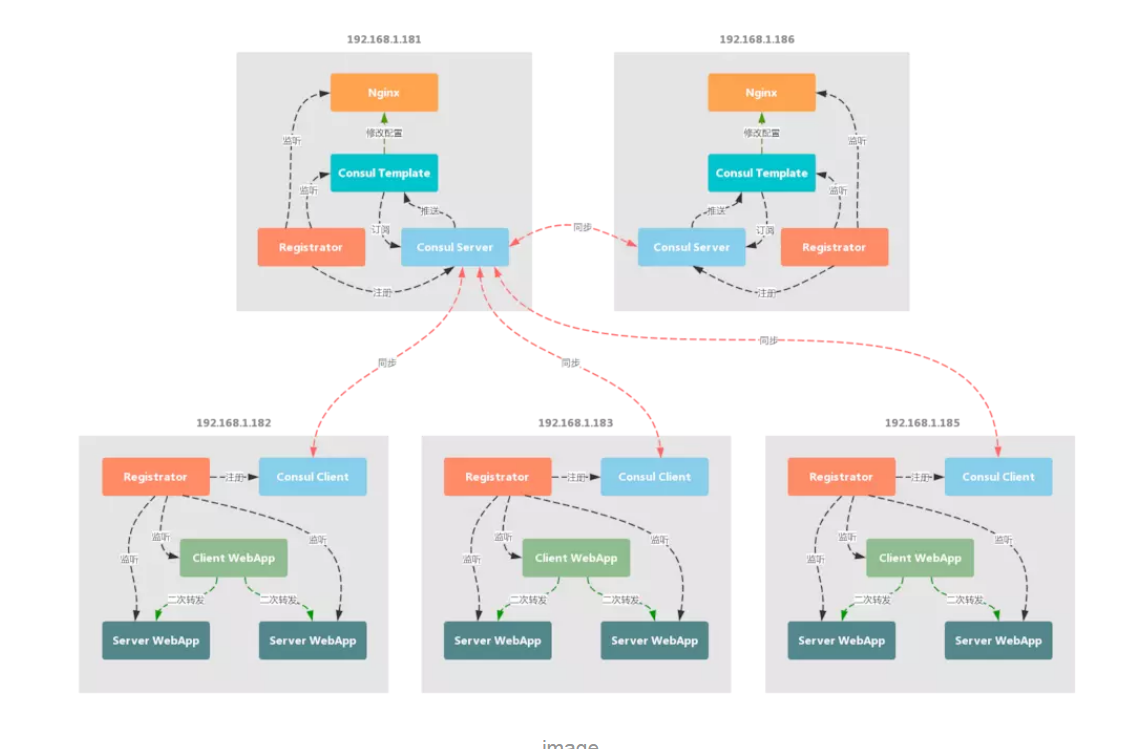
负载均衡之nginx+consul(自动更新路由)的更多相关文章
- 动态负载均衡(Nginx+Consul+UpSync)
Http动态负载均衡 什么是动态负载均衡 传统的负载均衡,如果Upstream参数发生变化,每次都需要重新加载nginx.conf文件, 因此扩展性不是很高,所以我们可以采用动态负载均衡,实现Upst ...
- 动态负载均衡(Nginx+Consul+UpSync)环境搭建
首先 安装好 Consul upsync 然后: 1.配置安装Nginx 需要做配置,包括分组之类的,创建目录,有些插件是需要存放在这些目录的 groupadd nginx useradd -g ng ...
- 负载均衡之Ocelot+Consul(WebAPI注册服务)
上一篇 负载均衡之Ocelot+Consul(文件配置注册服务),介绍了如何通过json文件注册服务,本篇将学习如何通过web api 注册服务. 在展开学习过程之前,且先总结一下 consul服 ...
- 反向代理负载均衡之nginx
一.集群 1.1 什么是集群 集群是一组相互独立的.通过高速网络互联的计算机,它们构成了一个组,并以单一系统的模式加以管理.一个客户与集群相互作用时,集群像是一个独立的服务器.集群配置是用于提高可用性 ...
- 终于等到你---订餐系统之负载均衡(nginx+memcached+ftp上传图片+iis)
又见毕业 对面工商大学的毕业生叕在拍毕业照了,一个个脸上都挂满了笑容,也许是满意自己四年的修行,也许是期待步入繁华的社会... 恰逢其时的连绵细雨与满天柳絮,似乎也是在映衬他们心中那些离别的忧伤,与对 ...
- Nginx负载均衡——扩展功能(NGINX Plus)
本文主要是介绍了NGINX Plus的相关功能,横跨了NGINX Plus R5/R6/R7/R9等各个不同版本的更新. 什么是NGINX Plus? 顾名思义,就是Nginx的加强版或者扩展版.我们 ...
- nginx 负载均衡-- 常用nginx配置
中文官方网站http://wiki.nginx.org/Chshttp://www.howtocn.org/ --------------------------------------------- ...
- 大数据高并发系统架构实战方案(LVS负载均衡、Nginx、共享存储、海量数据、队列缓存)
课程简介: 随着互联网的发展,高并发.大数据量的网站要求越来越高.而这些高要求都是基础的技术和细节组合而成的.本课程就从实际案例出发给大家原景重现高并发架构常用技术点及详细演练. 通过该课程的学习,普 ...
- 负载均衡之 nginx
什么是负载均衡负载均衡(Load Balance)是分布式系统架构设计中必须考虑的因素之一,它通常是指,将请求/数据[均匀]分摊到多个操作单元上执行,负载均衡的关键在于[均匀].在使用nginx负载均 ...
随机推荐
- gitlab调试
Bundle complete! 104 Gemfile dependencies, 161 gems now installed.Gems in the groups development, te ...
- sql让时间调前,调后的语句
时间调前,调后 select billid,DATEADD(mm,2,billdate) from bi_Bill 注:用dateadd(/时间年/月/日,调前或后多少,字段) mm为月份,2为调前两 ...
- 洛谷 P2365 任务安排【dp】
其实是可以斜率优化的但是没啥必要 设st为花费时间的前缀和,sf为Fi的前缀和,f[i]为分组到i的最小花费 然后枚举j转移,考虑每次转移都是把j到i分为一组这样意味着j及之后的都要增加s的时间,同时 ...
- 牛客网NOIP赛前集训营 提高组(第七场)
中国式家长 2 链接:https://www.nowcoder.com/acm/contest/179/A来源:牛客网 时间限制:C/C++ 1秒,其他语言2秒 空间限制:C/C++ 262144K, ...
- 洛谷P3698 [CQOI2017]小Q的棋盘
传送门 考虑一个贪心,先在根节点周围转一圈,然后再往下走最长链肯定是最优的 然后设最长链的长度为$d$,如果$m\leq d$,那么答案为$m+1$ 否则的话还剩下$m-d+1$步,又得保证能走回来, ...
- NOIP前的刷题记录
因为这几天要加油,懒得每篇都来写题解了,就这里记录一下加上一句话题解好了 P4071 [SDOI2016]排列计数 组合数+错排 loj 6217 扑克牌 暴力背包 P2511 [HAOI2008 ...
- 【杂文】C++头文件加速
[杂文]C++头文件加速 骚年,冲钱送开挂哦,可以助你超神于OI战场 如果你发现你的暴力超时了的话,可以尝试用一下头文件加速,说不定就过了呢! #pragma once//只编译一次 #pragma ...
- post和get区别,其他答案真的太坑
原理: get和post都是http定义与服务器交互的方法,还有put,delete url是网络上的资源,那么http中的get,post,put,delete对应的就是对这个资源的查,改,增,删四 ...
- 2017 Pycharm激活码
BIG3CLIK6F-eyJsaWNlbnNlSWQiOiJCSUczQ0xJSzZGIiwibGljZW5zZWVOYW1lIjoibGFuIHl1IiwiYXNzaWduZWVOYW1lIjoiI ...
- Poj 3177 Redundant Paths (双连通分支+节点统计)
题目描述: 给出一个无向的连通图,问最少加入几条边,才能使所给的图变为无桥的双连通图? 解题思路: 可以求出原图中所有的不包含桥的所有最大连通子图,然后对连通子图进行标记缩点,统计度为1的叶子节点le ...