
Spring MVC_Hello World
【Hello World】
步骤:
(1)加入jar包,
(2)在web.xml中配置DispatcherServlet,
(3)加入Spring MVC的配置文件,
(4)编写处理请求的处理器,并标识为处理器
(5)编写视图
(1)
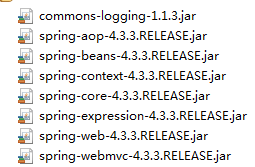
(2)
web.xml:
 <?xml version="1.0" encoding="UTF-8"?>

 <web-app xmlns:xsi="http://www.w3.org/2001/XMLSchema-instance"

     xmlns="http://java.sun.com/xml/ns/javaee"

     xsi:schemaLocation="http://java.sun.com/xml/ns/javaee http://java.sun.com/xml/ns/javaee/web-app_2_5.xsd"

     id="WebApp_ID" version="2.5">

     <!-- 配置DispatcherServlet -->

     <!-- The front controller of this Spring Web application, responsible for handling all application requests -->

     <servlet>

         <servlet-name>springDispatcherServlet</servlet-name>

         <servlet-class>org.springframework.web.servlet.DispatcherServlet</servlet-class>

         <!-- 配置DispatcherServlet的一个初始化参数:配置Spring MVC配置文件的位置和名称 -->

         <init-param>

             <param-name>contextConfigLocation</param-name>

             <param-value>classpath:springmvc.xml</param-value>

         </init-param>

         <load-on-startup>1</load-on-startup>

     </servlet>

     <servlet-mapping>

         <servlet-name>springDispatcherServlet</servlet-name>

         <url-pattern>/</url-pattern>

     </servlet-mapping>

 </web-app>
(3)
springmvc.xml:
 <?xml version="1.0" encoding="UTF-8"?>

 <beans xmlns="http://www.springframework.org/schema/beans"

     xmlns:xsi="http://www.w3.org/2001/XMLSchema-instance"

     xmlns:context="http://www.springframework.org/schema/context"

     xmlns:mvc="http://www.springframework.org/schema/mvc"

     xsi:schemaLocation="http://www.springframework.org/schema/mvc http://www.springframework.org/schema/mvc/spring-mvc-4.3.xsd

         http://www.springframework.org/schema/beans http://www.springframework.org/schema/beans/spring-beans.xsd

         http://www.springframework.org/schema/context http://www.springframework.org/schema/context/spring-context-4.3.xsd">

    <!-- 配置自动扫描的包 -->

    <context:component-scan base-package="com.hk.springmvc"></context:component-scan>

    <!-- 配置视图解析器:如何把handler方法返回值解析为物理视图 -->

    <bean class="org.springframework.web.servlet.view.InternalResourceViewResolver">

         <property name="prefix" value="/WEB-INF/views/"></property>

         <property name="suffix" value=".jsp"></property>

    </bean>

 </beans>
(4)
 package com.hk.springmvc.handlers;

 import org.springframework.stereotype.Controller;

 import org.springframework.web.bind.annotation.RequestMapping;

 //控制器

 @Controller

 public class HelloWorld {

     /*

      * 1.使用@RequestMapping注解来映射请求的URL

      * 2.返回值会通过视图解析器解析为物理的视图,对于InternalResourceViewResolver 视图解析器会做如下的解析:

      *      prefix + returnval + 后缀,

      *   通过这样的方式得到实际的物理视图,然后做转发操作

      *   /WEB-INF/views/success.jsp

      */

     @RequestMapping("/helloworld")

     public String hello(){

         System.out.println("Hello World");

         return "success";

     }

 }
(5)
index.jsp:
 <%@ page language="java" contentType="text/html; charset=ISO-8859-1"

     pageEncoding="ISO-8859-1"%>

 <!DOCTYPE html PUBLIC "-//W3C//DTD HTML 4.01 Transitional//EN" "http://www.w3.org/TR/html4/loose.dtd">

 <html>

 <head>

 <meta http-equiv="Content-Type" content="text/html; charset=ISO-8859-1">

 <title>Insert title here</title>

 </head>

 <body>

    <a href="helloworld">Hello World</a>

 </body>

 </html>
success.jsp:
 <%@ page language="java" contentType="text/html; charset=ISO-8859-1"

     pageEncoding="ISO-8859-1"%>

 <!DOCTYPE html PUBLIC "-//W3C//DTD HTML 4.01 Transitional//EN" "http://www.w3.org/TR/html4/loose.dtd">

 <html>

 <head>

 <meta http-equiv="Content-Type" content="text/html; charset=ISO-8859-1">

 <title>Insert title here</title>

 </head>

 <body>

    <h4>SUCCESS</h4>

 </body>

 </html>
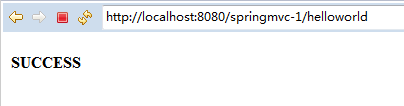
运行结果:

点击“Hello World”
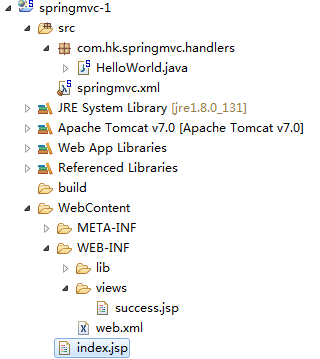
附:
Spring MVC_Hello World的更多相关文章
- 基于spring注解AOP的异常处理
一.前言 项目刚刚开发的时候,并没有做好充足的准备.开发到一定程度的时候才会想到还有一些问题没有解决.就比如今天我要说的一个问题:异常的处理.写程序的时候一般都会通过try...catch...fin ...
- 玩转spring boot——快速开始
开发环境: IED环境:Eclipse JDK版本:1.8 maven版本:3.3.9 一.创建一个spring boot的mcv web应用程序 打开Eclipse,新建Maven项目 选择quic ...
- Spring基于AOP的事务管理
Spring基于AOP的事务管理 事务 事务是一系列动作,这一系列动作综合在一起组成一个完整的工作单元,如果有任何一个动作执行失败,那么事务 ...
- [Spring]IoC容器之进击的注解
先啰嗦两句: 第一次在博客园使用markdown编辑,感觉渲染样式差强人意,还是github的样式比较顺眼. 概述 Spring2.5 引入了注解. 于是,一个问题产生了:使用注解方式注入 JavaB ...
- 学习AOP之透过Spring的Ioc理解Advisor
花了几天时间来学习Spring,突然明白一个问题,就是看书不能让人理解Spring,一方面要结合使用场景,另一方面要阅读源代码,这种方式理解起来事半功倍.那看书有什么用呢?主要还是扩展视野,毕竟书是别 ...
- 学习AOP之深入一点Spring Aop
上一篇<学习AOP之认识一下SpringAOP>中大体的了解了代理.动态代理及SpringAop的知识.因为写的篇幅长了点所以还是再写一篇吧.接下来开始深入一点Spring aop的一些实 ...
- 学习AOP之认识一下Spring AOP
心碎之事 要说知道AOP这个词倒是很久很久以前了,但是直到今天我也不敢说非常的理解它,其中的各种概念即抽象又太拗口. 在几次面试中都被问及AOP,但是真的没有答上来,或者都在面上,这给面试官的感觉就是 ...
- 为什么做java的web开发我们会使用struts2,springMVC和spring这样的框架?
今年我一直在思考web开发里的前后端分离的问题,到了现在也颇有点心得了,随着这个问题的深入,再加以现在公司很多web项目的控制层的技术框架由struts2迁移到springMVC,我突然有了一个新的疑 ...
- Spring之旅(2)
Spring简化Java的下一个理念:基于切面的声明式编程 3.应用切面 依赖注入的目的是让相互协作的组件保持松散耦合:而AOP编程允许你把遍布应用各处的功能分离出来形成可重用的组件. AOP面向切面 ...
随机推荐
- E2017614-hm
pluck n. 勇气,精神; 内脏; 快而猛的拉; 〈俚〉不及格; vt. 拔掉; 采,摘; 鼓起(勇气等); 弹(乐器); scope n. (处理.研究事务的) 范围; 眼界,见识 ...
- oracle创建数据库与配置监听器
上述是数据库创建完毕 *检测创建 -------------------------------------------------------------2配置监听器---------------- ...
- Python基础 — NumPy
NumPy--简介 Numpy(Numerical Python的简称)是一个由多维数组对象和用于处理数组的例程集合组成的库. Numpy内部解除了Python的PIL(全局解释器锁),运算效率极 ...
- bzoj 1654: [Usaco2006 Jan]The Cow Prom 奶牛舞会【tarjan】
几乎是板子,求有几个size>1的scc 直接tarjan即可 #include<iostream> #include<cstdio> #include<cstri ...
- GIT学习之路第三天 文件操作
本文参考廖雪峰老师的博客进行总结,完整学习请转廖雪峰博客 一.版本回退 1.git log提交日志 在git中可以通过个git log 命令显示从最近到最远的提交日志. $ git log commi ...
- 微信小程序打卡第五天
2018-02-1823:55:53大年初三 微信小程序已经学了5个夜晚了,没有很努力,只是简单地接触,感觉从今天开始有了突破的进展,很爽! 无意间发现一个很好的教程,也是一个老哥分享的,很给力 ht ...
- 面试中的一些小问题之html5和html4的区别?
HTML5建立的一些新规则: 新特性应该基于HTML.CSS.DOM.JavaScript: 减少对外部插件的需求,如flash将会用video标签和audio标签代替: 更加优秀的错误处理: 更多取 ...
- binlog_format不同模式下,对mysqlbinlog恢复的影响
binlog_format='mixed' (root)[(none)]>use test; Reading table information for completion of tabl ...
- Sublime——基本操作
基本安装 程序下载地址:https://www.sublimetext.com/ package control安装 View -> Show Console打开控制台或者用快捷键ctrl+~打 ...
- 动态设置缩放比例和html字体大小
<!DOCTYPE html> <html lang="zh-CN"> <head> <meta charset="UTF-8& ...