
nginx 静态网站配置
/**************************************************************************************

 *                               nginx 静态网站配置

 * 说明:

 *     配置下面的配置中包括python、php、静态网站的配置,配置静态网站主要目的是为了以后

 * 能够跑Markdown生成的静态网站。

 *

 *                                                  2016-8-7 深圳 南山平山村 曾剑锋

 *************************************************************************************/

一、参考文档:

    阿里云 ECS 使用心得5:nginx 静态网站配置

        http://frontenddev.org/article/ali-cloud-ecs-usage-insight-5-nginx-static-site-configuration.html

二、nginx配置:

    root@aplex:/etc/nginx# ls

    conf.d          koi-utf  mime.types        naxsi.rules          nginx.conf    scgi_params      sites-enabled  win-utf

    fastcgi_params  koi-win  naxsi_core.rules  naxsi-ui.conf.1.4.  proxy_params  sites-available  uwsgi_params

    root@aplex:/etc/nginx# cat sites-available/default

    # You may add here your

    # server {

    #   ...

    # }

    # statements for each of your virtual hosts to this file

    ##

    # You should look at the following URL's in order to grasp a solid understanding

    # of Nginx configuration files in order to fully unleash the power of Nginx.

    # http://wiki.nginx.org/Pitfalls

    # http://wiki.nginx.org/QuickStart

    # http://wiki.nginx.org/Configuration

    #

    # Generally, you will want to move this file somewhere, and start with a clean

    # file but keep this around for reference. Or just disable in sites-enabled.

    #

    # Please see /usr/share/doc/nginx-doc/examples/ for more detailed examples.

    ##

    server {

        listen  default_server;

        listen [::]: default_server ipv6only=on;

        root /home/aplex/website/mysite;

        index index.html index.htm;

        # Make site accessible from http://localhost/

        server_name localhost;

        location / {

            # First attempt to serve request as file, then

            # as directory, then fall back to displaying a .

            # try_files $uri $uri/ =;

            include  uwsgi_params;

                    uwsgi_pass  127.0.0.1:;              #必须和uwsgi中的设置一致

            # Uncomment to enable naxsi on this location

            # include /etc/nginx/naxsi.rules

        }

        # Only for nginx-naxsi used with nginx-naxsi-ui : process denied requests

        #location /RequestDenied {

        #   proxy_pass http://127.0.0.1:8080;

        #}

        #error_page  /.html;

        # redirect server error pages to the static page /50x.html

        #

        #error_page     /50x.html;

        #location = /50x.html {

        #   root /usr/share/nginx/html;

        #}

        # pass the PHP scripts to FastCGI server listening on 127.0.0.1:

        #

        #location ~ \.php$ {

        #   fastcgi_split_path_info ^(.+\.php)(/.+)$;

        #   # NOTE: You should have "cgi.fix_pathinfo = 0;" in php.ini

        #

        #   # With php5-cgi alone:

        #   fastcgi_pass 127.0.0.1:;

        #   # With php5-fpm:

        #   fastcgi_pass unix:/var/run/php5-fpm.sock;

        #   fastcgi_index index.php;

        #   include fastcgi_params;

        #}

        # deny access to .htaccess files, if Apache's document root

        # concurs with nginx's one

        #

        #location ~ /\.ht {

        #   deny all;

        #}

    }

    # another virtual host using mix of IP-, name-, and port-based configuration

    #

    #server {

    #   listen ;

    #   listen somename:;

    #   server_name somename alias another.alias;

    #   root html;

    #   index index.html index.htm;

    #

    #   location / {

    #       try_files $uri $uri/ =;

    #   }

    #}

    # HTTPS server

    #

    #server {

    #   listen ;

    #   server_name localhost;

    #

    #   root html;

    #   index index.html index.htm;

    #

    #   ssl on;

    #   ssl_certificate cert.pem;

    #   ssl_certificate_key cert.key;

    #

    #   ssl_session_timeout 5m;

    #

    #   ssl_protocols SSLv3 TLSv1 TLSv1. TLSv1.;

    #   ssl_ciphers "HIGH:!aNULL:!MD5 or HIGH:!aNULL:!MD5:!3DES";

    #   ssl_prefer_server_ciphers on;

    #

    #   location / {

    #       try_files $uri $uri/ =;

    #   }

    #}

    server {

        listen  default_server;

        listen [::]: default_server ipv6only=on;

        root /home/aplex/website/phpsite;

        index index.html index.htm index.php;

        # Make site accessible from http://localhost/

        server_name localhost;

        # location / {

        #   # First attempt to serve request as file, then

        #   # as directory, then fall back to displaying a .

        #   # try_files $uri $uri/ =;

        #   # include  uwsgi_params;

            #       # uwsgi_pass  127.0.0.1:;              #必须和uwsgi中的设置一致

        #   # Uncomment to enable naxsi on this location

        #   # include /etc/nginx/naxsi.rules

        # }

        # Only for nginx-naxsi used with nginx-naxsi-ui : process denied requests

        #location /RequestDenied {

        #   proxy_pass http://127.0.0.1:8080;

        #}

        #error_page  /.html;

        # redirect server error pages to the static page /50x.html

        #

        #error_page     /50x.html;

        #location = /50x.html {

        #   root /usr/share/nginx/html;

        #}

        # pass the PHP scripts to FastCGI server listening on 127.0.0.1:

        #

        location ~ \.php$ {

            fastcgi_split_path_info ^(.+\.php)(/.+)$;

        #   # NOTE: You should have "cgi.fix_pathinfo = 0;" in php.ini

        #

        #   # With php5-cgi alone:

        #   fastcgi_pass 127.0.0.1:;

        #   # With php5-fpm:

            fastcgi_pass unix:/var/run/php5-fpm.sock;

            fastcgi_index index.php;

            include fastcgi_params;

        }

        # deny access to .htaccess files, if Apache's document root

        # concurs with nginx's one

        #

        #location ~ /\.ht {

        #   deny all;

        #}

    }

    server {

        listen  default_server;

        listen [::]: default_server ipv6only=on;

        root /home/aplex/website/site;

        index index.html index.htm index.php;

        # Make site accessible from http://localhost/

        server_name localhost;

    }

    root@aplex:/etc/nginx#

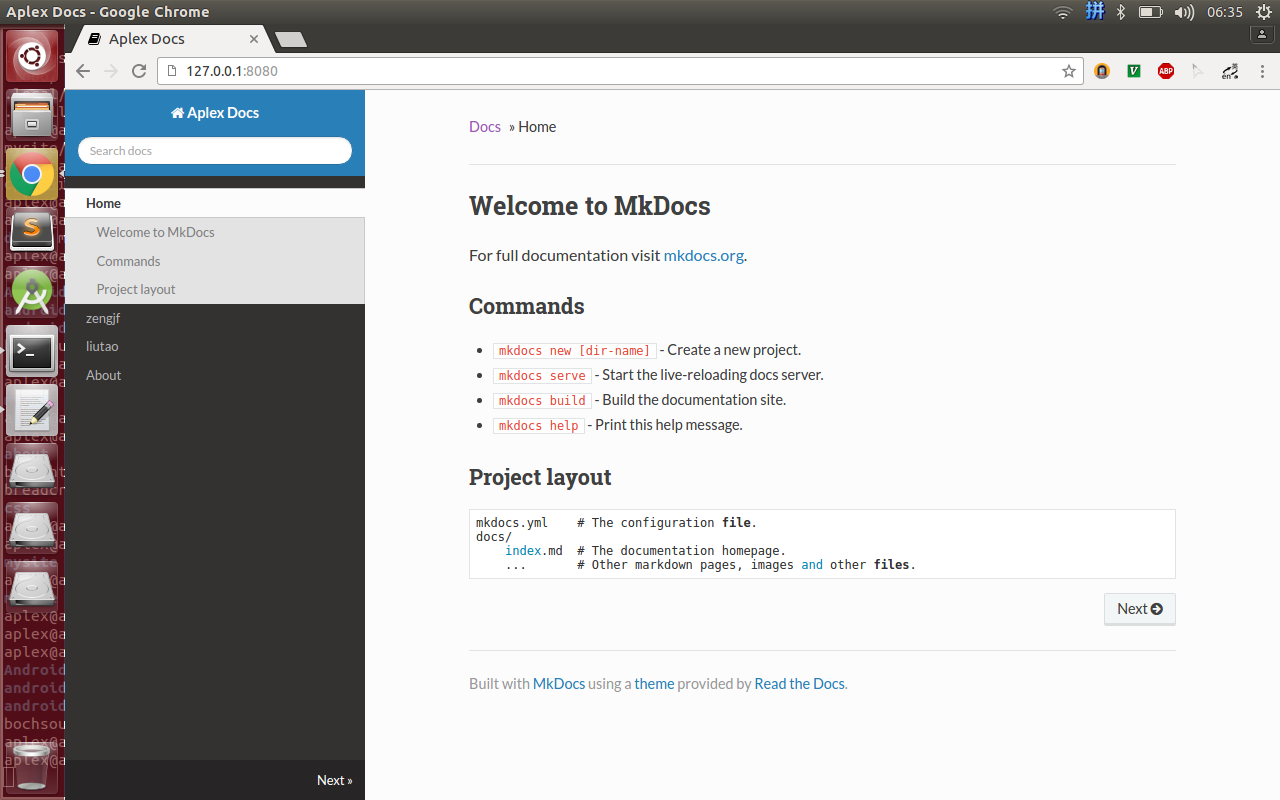
三、效果如图:
nginx 静态网站配置的更多相关文章
- 【URLOS应用开发基础】10分钟制作一个nginx静态网站环境应用
URLOS开发者功能已上线有一段时间了,目前通过部分开发者的使用体验来看,不得不说URLOS在服务器软件开发效率方面确实有着得天独厚的优势,凭借docker容器技术与其良好的应用生态环境,URLOS必 ...
- (转)Nginx静态服务配置---详解root和alias指令
Nginx静态服务配置---详解root和alias指令 原文:https://www.jianshu.com/p/4be0d5882ec5 静态文件 Nginx以其高性能著称,常用与做前端反向代理服 ...
- Nginx静态服务配置---详解root和alias指令
Nginx静态服务配置---详解root和alias指令 静态文件 Nginx以其高性能著称,常用与做前端反向代理服务器.同时nginx也是一个高性能的静态文件服务器.通常都会把应用的静态文件使用ng ...
- Nginx静态网站的部署
静态网站的部署 首先先看一下nginx/conf/nginx.conf 配置文件内的信息: #user nobody; worker_processes 1; #error_log logs/erro ...
- 腾讯云,搭建nginx静态网站服务器
搭建Http静态服务器环境 任务时间:15min ~ 30min 搭建静态网站,首先需要部署环境.下面的步骤,将告诉大家如何在服务器上通过 Nginx 部署 HTTP 静态服务. 安装 Nginx 在 ...
- nginx 静态目录配置规则,路径匹配与本地资源
经常配了nginx静态目录,死活访问不了,每次访问404.查看文档后,发现nginx配置静态目录使 用以下规则 假如nginx是在本机,静态目录也是在本机, 1.子目录匹配 如下配置 location ...
- 基于CentOS搭建Nginx 静态网站
系统要求: CentOS 7.2 64 位操作系统 一. 安装 Nginx(在 CentOS 上,可直接使用 yum 来安装 Nginx) yum install nginx -y 安装完成后,使用 ...
- 云服务器搭建 Nginx 静态网站
第一步:安装 Nginx 在 CentOS 上,可直接使用 yum 来安装 Nginx(当然也可以通过下载压缩包.解压.编译的方式安装,不过太麻烦了) yum install nginx -y 第二步 ...
- 通过Nginx为网站配置二级域名
目录 配置域名解析 配置Nginx 重启Nginx 补充 需求:服务器上面运行多个项目:实现每个二级域名访问对应项目: 服务器:阿里云服务器:域名:阿里云注册: 配置域名解析 即配置DNS解析.一定要 ...
随机推荐
- HDU1754-I Hate It,线段数水题~~2016.4.11
I Hate It ...
- [luoguP1773] 符文之语_NOI导刊2010提高(02)(DP)
传送门 f[i][j]表示前i个数余数为j的最优解 sum[i][j]表示字符串i~j所构成的数 #include <cstdio> #include <cstring> #d ...
- 一个APP的由来
之前在站酷.UI中国.优设等网站看过不少的APP教程.规范等一些东西.自认为有些规范讲的内容过于繁琐,对于像我这样的大多数设计师来说看着看着就懵逼了....
- eclipse提速03 - 禁用动画
- HDTVI,HDCVI
HDTVI是海康的同轴高清标准,HDCVI是大华的同轴高清标准,二者互相不兼容.
- mysql查询今天,昨天,近7天,近30天,本月,上一月数据的SQL
原文:http://www.open-open.com/code/view/1423207309170 select * from ad_proTrack_t where to_days(crt_ti ...
- N+6 裁员裁出幸福感的背后
01. 史上最牛逼的数据库公司,Oracle 裁员了. 2019年5月7日,甲骨文召开了面向全中国区的电话会议,亚太区人力资源负责人在会上简要介绍道,公司正进行业务结构调整,导致一部分人要离开岗位,这 ...
- 深度学习综述(LeCun、Bengio和Hinton)
原文摘要:深度学习可以让那些拥有多个处理层的计算模型来学习具有多层次抽象的数据的表示.这些方法在很多方面都带来了显著的改善,包含最先进的语音识别.视觉对象识别.对象检測和很多其他领域,比如药物发现和基 ...
- 【python】super()
转自: http://www.cnblogs.com/lovemo1314/archive/2011/05/03/2035005.html
- C/C++实现bmp文件读写
之前知道点bmp图的格式,然后对8位操作过,然后今天弄了一下24位真彩色的. C++读取.旋转和保存bmp图像文件编程实现 主要是理解bmp文件的格式8/24位的区别 8位图有调色板,24位在文件头和 ...