
Nginx静态网站的部署
静态网站的部署
首先先看一下nginx/conf/nginx.conf 配置文件内的信息:
#user  nobody;

worker_processes  1;

#error_log  logs/error.log;

#error_log  logs/error.log  notice;

#error_log  logs/error.log  info;

#pid        logs/nginx.pid;

events {

    worker_connections  1024;

}

http {

    include       mime.types;

    default_type  application/octet-stream;

    #log_format  main  '$remote_addr - $remote_user [$time_local] "$request" '

    #                  '$status $body_bytes_sent "$http_referer" '

    #                  '"$http_user_agent" "$http_x_forwarded_for"';

    #access_log  logs/access.log  main;

    sendfile        on;

    #tcp_nopush     on;

    #keepalive_timeout  0;

    keepalive_timeout  65;

    #gzip  on;

    #下面这个server就是默认的主机信息

    #listen 端口, server_name 主机名称, location-root 网站根目录,location-index 网站默认页面

    server {

        listen       80;

        server_name  localhost;

        #charset koi9-r;

        #access_log  logs/host.access.log  main;

        location / {

            root   html;

            index  index.html index.htm;

        }

        #error_page  404              /404.html;

        # redirect server error pages to the static page /50x.html

        #

        error_page   500 502 503 504  /50x.html;

        location = /50x.html {

            root   html;

        }

        # proxy the PHP scripts to Apache listening on 127.0.0.1:80

        #

        #location ~ \.php$ {

        #    proxy_pass   http://127.0.0.1;

        #}

        # pass the PHP scripts to FastCGI server listening on 127.0.0.1:9000

        #

        #location ~ \.php$ {

        #    root           html;

        #    fastcgi_pass   127.0.0.1:9000;

        #    fastcgi_index  index.php;

        #    fastcgi_param  SCRIPT_FILENAME  /scripts$fastcgi_script_name;

        #    include        fastcgi_params;

        #}

        # deny access to .htaccess files, if Apache's document root

        # concurs with nginx's one

        #

        #location ~ /\.ht {

        #    deny  all;

        #}

    }

    #我们以后自己配置虚拟主机的话 就在这个地方新添加server即可

    # another virtual host using mix of IP-, name-, and port-based configuration

    #

    #server {

    #    listen       8000;

    #    listen       somename:8080;

    #    server_name  somename  alias  another.alias;

    #    location / {

    #        root   html;

    #        index  index.html index.htm;

    #    }

    #}

    # HTTPS server

    #

    #server {

    #    listen       443 ssl;

    #    server_name  localhost;

    #    ssl_certificate      cert.pem;

    #    ssl_certificate_key  cert.key;

    #    ssl_session_cache    shared:SSL:1m;

    #    ssl_session_timeout  5m;

    #    ssl_ciphers  HIGH:!aNULL:!MD5;

    #    ssl_prefer_server_ciphers  on;

    #    location / {

    #        root   html;

    #        index  index.html index.htm;

    #    }

    #}

}
nginx.conf
所以我们部署静态网站,把静态的html页面相关放到html这个目录下即可,当然也可以自己定义目录,修改配置文件即可
那么如果我们想在一个nginx上部署多个网站(不同端口),应该怎么做呢?
配置虚拟主机
虚拟主机,也叫“网站空间”,就是把一台运行在互联网上的物理服务器划分成多个“虚拟”服务器。虚拟主机技术极大的促进了网络技术的应用和普及。同时虚拟主机的租用服务也成了网络时代的一种新型经济形式。
一、端口绑定(以web1,web2两个网站为例)
1,将网站web1(web1网站的所有静态文件,比如web001.html),web2,分别上传到/usr/local/nginx/web1和/usr/local/nginx/web2下
2,修改nginx/conf/nginx.conf 配置文件:(添加两个server信息)
    server {

        listen       81;

        server_name  localhost;

        location / {

            root   web1;

            index  web001.html;

        }

    }

    server {

        listen       82;

        server_name  localhost;

        location / {

            root   web2;

            index  web002.html;

        }

    }
3,重启nginx
./nginx -s reload
4,用浏览器访问ip+port
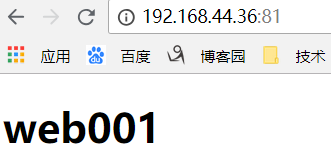
二、域名绑定
我们上面部署的静态网站目前只能通过ip+port访问,那么如果想通过域名访问呢?
答案很简单,只需要修改我们刚才添加到配置文件中的server信息中的server_name:
    server {

        listen       80;

        server_name  web1.zy.com;

        location / {

            root   web1;

            index  web001.html;

        }

    }

    server {

        listen       80;

        server_name  web2.zy.com;

        location / {

            root   web2;

            index  web002.html;

        }

    }
前提是你需要有这个域名,并将这个域名指向了这个ip。
Nginx静态网站的部署的更多相关文章
- 【URLOS应用开发基础】10分钟制作一个nginx静态网站环境应用
URLOS开发者功能已上线有一段时间了,目前通过部分开发者的使用体验来看,不得不说URLOS在服务器软件开发效率方面确实有着得天独厚的优势,凭借docker容器技术与其良好的应用生态环境,URLOS必 ...
- nginx 静态网站配置
/************************************************************************************** * nginx 静态网站 ...
- 腾讯云,搭建nginx静态网站服务器
搭建Http静态服务器环境 任务时间:15min ~ 30min 搭建静态网站,首先需要部署环境.下面的步骤,将告诉大家如何在服务器上通过 Nginx 部署 HTTP 静态服务. 安装 Nginx 在 ...
- Git+Gitlab+Ansible的roles实现一键部署Nginx静态网站(一)--技术流ken
前言 截止目前已经写了<Ansible基础认识及安装使用详解(一)--技术流ken>,<Ansible常用模块介绍及使用(二)--技术流ken><Ansible剧本介绍及 ...
- Git+Gitlab+Ansible的roles实现一键部署Nginx静态网站(4)
前言 截止目前已经写了<Ansible基础认识及安装使用详解(一)–技术流ken>,<Ansible常用模块介绍及使用(二)–技术流ken><Ansible剧本介绍及使用 ...
- nginx静态资源分离部署
修改nginx.conf文件,用于nginx处理静态资源. 主要配置如下(在server配置中加入location配置即可): server { listen 80; server_name 123. ...
- 基于CentOS搭建Nginx 静态网站
系统要求: CentOS 7.2 64 位操作系统 一. 安装 Nginx(在 CentOS 上,可直接使用 yum 来安装 Nginx) yum install nginx -y 安装完成后,使用 ...
- 云服务器搭建 Nginx 静态网站
第一步:安装 Nginx 在 CentOS 上,可直接使用 yum 来安装 Nginx(当然也可以通过下载压缩包.解压.编译的方式安装,不过太麻烦了) yum install nginx -y 第二步 ...
- 搭建 Nginx 静态网站
示例代码:/etc/nginx/nginx.conf user nginx;worker_processes auto;error_log /var/log/nginx/error.log;pid / ...
随机推荐
- WMS专业名词解释
1.摘果:按照单一客户上订单的内容进行拣选货品(即去货位上拣货),拣选完成后即可直接进行质检.包装. 2.播种:将多个客户订单上的货品进行汇总,然后对这些货品进行拣选.拣选完成后,再区分出每一个客户的 ...
- android 删除SD卡或者手机的缓存图片和目录
public static final String TEMP_PHOTO_FILE_NAME = "temp_photo.jpg"; private static String ...
- 可视化CNN神经网路第一层参数
在上Andrew Ng的课的时候搜集到了课程里面自带的显示NN参数的代码,但是只能显示灰度图,而且NN里的参数没有通道的概念.所以想要获得可视化CNN的参数,并且达到彩色的效果就不行了. 所以就自己写 ...
- 题目一:给出一个n,代表有从1到n的数字[1,2,3,··· n],问可以构成多少种二叉搜索树?
题目一:给出一个n,代表有从1到n的数字[1,2,3,··· n],问可以构成多少种二叉搜索树? 一开始的想法是直接递归构造,时间复杂度是指数上升:后来想法是找规律:先看例子: n = 1, 有一个元 ...
- grep 常用正则匹配
1.或操作 grep -E '123|abc' filename // 找出文件(filename)中包含123或者包含abc的行 egrep '123|abc' filename // 用egrep ...
- 【解题报告】[动态规划]RQNOJ - PID82 / 又上锁妖塔
原题地址:http://www.rqnoj.cn/problem/82 解题思路: 简单的动态规划 状态表示:DP[i][0]表示当前在第i层,且当前跳跃状态不可用,此时消耗的最短时间. DP[i ...
- Windows下运行Hadoop
Windows下运行Hadoop,通常有两种方式:一种是用VM方式安装一个Linux操作系统,这样基本可以实现全Linux环境的Hadoop运行:另一种是通过Cygwin模拟Linux环境.后者的好处 ...
- Oracle Sql Developer 连接oracle
PL/Sql 初次使用需要配置文件内容,对于我这种Oracle新手来说各种配置有点凌乱,所以果断选择Sql Developer. 选择它是因为初次使用的时候它不用想PL/Sql那样配置文件,而只需要添 ...
- matlab的fda工具使用方法
MATLAB中用FDATool设计滤波器及使用 该文章讲述了MATLAB中用FDATool设计滤波器及使用. 1. 在Matlab中键入fdatool运行Filter Design and Analy ...
- 一分钟理解js闭包
什么是闭包?先看一段代码: ? 1 2 3 4 5 6 7 8 9 10 function a(){ var n = 0; function inc() { n++; cons ...