
centos6 磁盘与文件系统管理
一、磁盘管理
- 磁盘构成
1、圆形磁盘
2、磁盘读取头
3、机械手臂
4、主轴马达
- 运作原理
数据存储在具有磁性物质的圆形磁盘上,读写操作主要是通过机械手臂上的磁盘读取头来达成,实际运作时,主轴马达让磁盘转动,然后机械手臂可伸展让读取头在磁盘上进行读写
- 结构
sector(扇区):磁盘的最小存储单位,主要分为512byte和4Kbyte两种规格;
track(磁道):由同一个同心圆的扇区组合成的圆就是磁道;
cylinder(柱面):所有磁盘上面的同一磁道形成的圆柱;早期时柱面是最小的分区单位,现在可以使用扇区为最小单位;

- MBR分区表与GPT分区表
MBR:存放于第一个扇区,第一扇区包含主要起动记录区(MBR)446byte(储存开机管理程序)和分区表64字节(记录分区信息)。
GPT:相对于早期的每个扇区512byte,现在可以达到4Kbyte,所以为了兼容所有硬盘,GPT采用逻辑区块地址(Logical Block Adress即LBA),每个LBA默认为512byte,第一块为LBA0,GPT使用34个LBA来记录分区信息,并且使用整个磁盘最后33个LBA最为备份。LBA0与MBR类似,由446byte储存开机管理程序和46byte的标识(用来标识GPT格式)。LBA1表头记录,记录分区表本身得大小和位置。LBA2-33实际的分区信息记录的地方,每个LBA可以记录4个分区。
- 分区操作
1、查看分区与目录的容量
[root@web01 ~]# df     ####直接查看所有分区
Filesystem     1K-blocks    Used Available Use% Mounted on
/dev/sda3            % /
tmpfs                           % /dev/shm
/dev/sda1                  % /boot
[root@web01 ~]# df -h /dev/sda1    #####-h 以人类可读的显示分区容量,接具体分区可查看具体分区容量
Filesystem      Size  Used Avail Use% Mounted on
/dev/sda1       194M   29M  155M  % /boot
[root@web01 ~]# df -i /dev/sda1        ######查看分区的inode值
Filesystem     Inodes IUsed IFree IUse% Mounted on
/dev/sda1                % /boot#################################Filesystem:文件系统所在的分区1K-blocks:以KB为单位显示总容量Used:使用量Available:剩余空间Use%:使用率Mounted on:挂载地址##################################[root@web01 ~]# lsblk     #######列出所有存储设备NAME   MAJ:MIN RM  SIZE RO TYPE MOUNTPOINTsda      8:0    0   20G  0 disk ├─sda1   8:1    0  200M  0 part /boot├─sda2   8:2    0    1G  0 part [SWAP]└─sda3   8:3    0 18.8G  0 part /sdb      8:16   0    8G  0 disk sr0     11:0    1  4.2G  0 rom [root@web01 ~]# blkid      #####列出所有设备的uuid/dev/sda1: UUID="ccad4cd9-7fa5-4160-aebb-d9db56f09b79" TYPE="ext4" /dev/sda2: UUID="9729cf63-ac88-4939-951a-994330570127" TYPE="swap" /dev/sda3: UUID="bafd90ed-80ae-463e-9aa6-c7ea68d4de44" TYPE="ext4"

[root@web01 ~]# du -s /etc/    ####-s 列出总量,而不列出目录下个别目录的占用量27888    /etc/[root@web01 ~]# du --max-depth=0 /etc/    ####--max-depth=0  列出当前目录容量27888    /etc/[root@web01 ~]# du --max-depth=1 /etc/    ####--max-depthp=1  列出当前目录,以下一层目录的容量28    /etc/abrt8    /etc/cron.monthly28    /etc/kdump-adv-conf...中间省略...184    /etc/fonts27888    /etc
2、磁盘分区
[root@web01 ~]# fdisk -l    ####

Disk /dev/sda:  bytes
 heads,  sectors/track,  cylinders
Units = cylinders of  *  =  bytes
Sector size (logical/physical):  bytes /  bytes
I/O size (minimum/optimal):  bytes /  bytes
Disk identifier: 0x000bd0d6

   Device Boot      Start         End      Blocks   Id  System
/dev/sda1   *                                Linux
Partition  does not end on cylinder boundary.
/dev/sda2                                 Linux swap / Solaris
Partition  does not end on cylinder boundary.
/dev/sda3                              Linux

Disk /dev/sdb:  MB,  bytes
 heads,  sectors/track,  cylinders
Units = cylinders of  *  =  bytes
Sector size (logical/physical):  bytes /  bytes
I/O size (minimum/optimal):  bytes /  bytes
Disk identifier: 0x00026c48

   Device Boot      Start         End      Blocks   Id  System

[root@web01 ~]# fdisk /dev/sdb      #####将mbr格式的硬盘分区GPT可以使用gdisk(centos7)

WARNING: DOS-compatible mode is deprecated. It's strongly recommended to         switch off the mode (command 'c') and change display units to         sectors (command 'u').

Command (m for help): m      #######打印帮助选项Command action   a   toggle a bootable flag   b   edit bsd disklabel   c   toggle the dos compatibility flag   d   delete a partition        ######删除一个分区   l   list known partition types   m   print this menu   n   add a new partition      ######增加一个分区   o   create a new empty DOS partition table   p   print the partition table    ####打印出分区表   q   quit without saving changes    ####不保存就离开   s   create a new empty Sun disklabel   t   change a partition's system id   u   change display/entry units   v   verify the partition table   w   write table to disk and exit    ####保存配置后离开   x   extra functionality (experts only)

Command (m for help): n        ####新增分区Command action   e   extended   p   primary partition (1-4)p                    #####选择主分区Partition number (1-4): 1First cylinder (1-1044, default 1):     #####直接回车,从默认位置Using default value 1Last cylinder, +cylinders or +size{K,M,G} (1-1044, default 1044): +1G      ####给予分区1G容量

Command (m for help): p        ####打印分区

Disk /dev/sdb: 8589 MB, 8589934592 bytes255 heads, 63 sectors/track, 1044 cylindersUnits = cylinders of 16065 * 512 = 8225280 bytesSector size (logical/physical): 512 bytes / 512 bytesI/O size (minimum/optimal): 512 bytes / 512 bytesDisk identifier: 0x00026c48

   Device Boot      Start         End      Blocks   Id  System/dev/sdb1               1         132     1060258+  83  Linux

[root@web01 ~]# partprobe     更新linux核心的分区表信息
二、文件系统管理
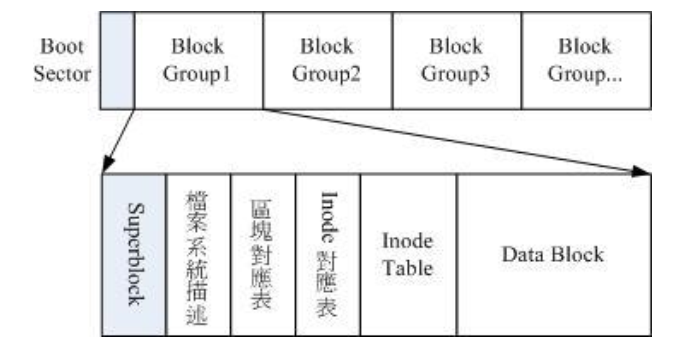
- ext4索引式文件系统,文件系统在格式化的时候会区分多个区块群组,每个区块群组都是独立的。通常会将文件的权限属性与实际数据放在不同的区块,权限予属性放置到inode中,数据放置在data block区块中。主要包含如下部分(每个文件系统只有第一个是block goup里是superblock其他的都是备份)
、data block:数据块,用来存放文件内容数据的地方,原则上,block的大小与数量在格式化完就不能在改变,除非重新格式化;每个blocku最多只能存放一个文件的数据;
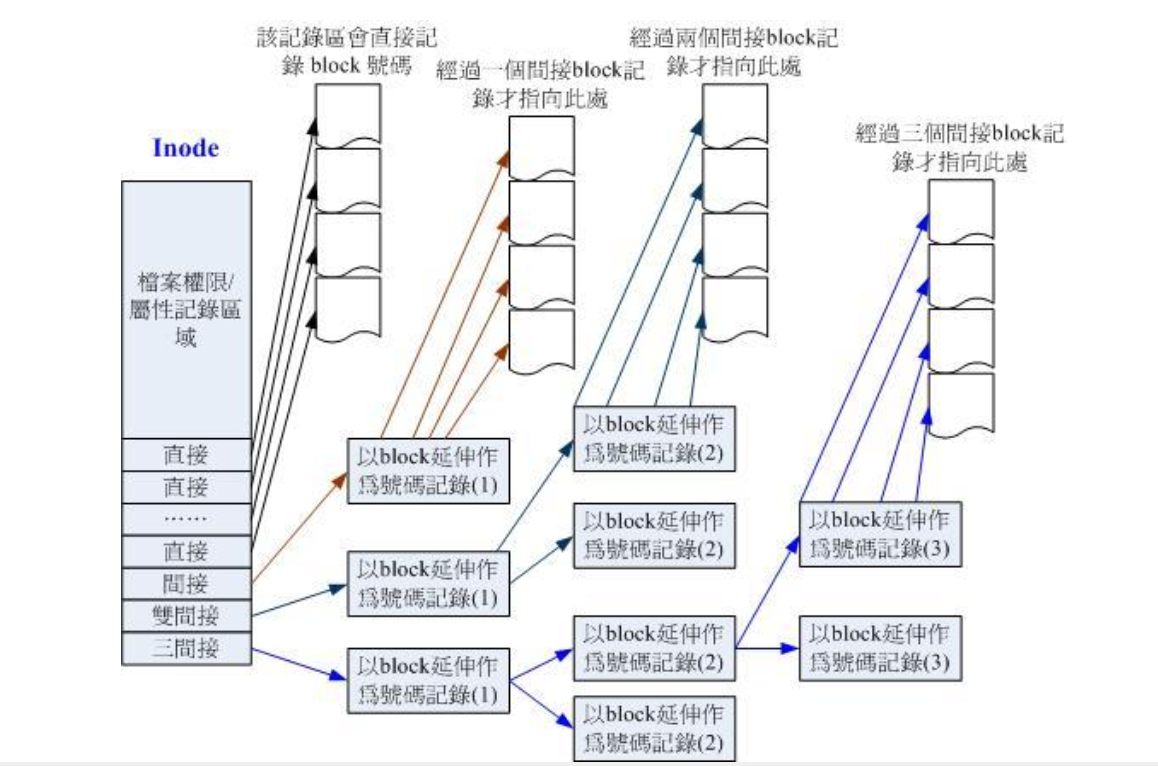
、inode table:inode表格,记录文件的属性与数据指向block的具体位置
、superblock:超级区块,记录整个filesystem的相关信息,包括inode与block的总量,已使用量,剩余量,大小;
、filesystem description:文件描述符,记录每个block group开始与结束的block号码;
、block bitmap:记录block已使用的block和未使用的block;
、inode bitmap:记录inode已使用的inode和未使用的inode;
- inode
- 查看文件系统信息
[root@web01 ~]# dumpe2fs /dev/sda1    ###查看文件系统
dumpe2fs  (-May-)
Filesystem volume name:   <none>    #####文件系统的名称(不一定会有)
Last mounted on:          /boot    ######上一次挂载的目录
Filesystem UUID:          ccad4cd9-7fa5--aebb-d9db56f09b79  #####UUID
Filesystem magic number:  0xEF53
Filesystem revision #:     (dynamic)
Filesystem features:      has_journal ext_attr resize_inode dir_index filetype needs_recovery extent flex_bg sparse_super huge_file uninit_bg dir_nlink extra_isize
Filesystem flags:         signed_directory_hash
Default mount options:    user_xattr acl
Filesystem state:         clean      #####文件系统的状态,clean是没问题
Errors behavior:          Continue
Filesystem OS type:       Linux
Inode count:              51200    #####inode总数
Block count:              204800   ######block总数
Reserved block count:     10240    #####保留的block总数
Free blocks:              168662    ######空闲的block数量
Free inodes:              51162    #####空闲的inode数量
First block:
Block size:               1024     #########单个block大小
Fragment size:
Reserved GDT blocks:
Blocks per group:
Fragments per group:
Inodes per group:
Inode blocks per group:
Flex block group size:
Filesystem created:       Sun Apr  ::
Last mount time:          Wed May  ::
Last write time:          Wed May  ::
Mount count:
Maximum mount count:      -
Last  ::
Check interval:            (<none>)
Lifetime writes:           MB
Reserved blocks uid:       (user root)
Reserved blocks gid:       (group root)
First inode:
Inode size:              128      ####inode容量大小
Journal inode:            8      #######指向记录journal区块的inode
Default directory hash:   half_md4
Directory Hash Seed:      180b408c-5ab1-49eb--c2395862e7b0
Journal backup:           inode blocks
Journal features:         (none)
Journal size:             4096k    ######journal大小
Journal length:           4096
Journal sequence:         0x00000032
Journal start:

Group : (Blocks -) [ITABLE_ZEROED]    ####第一块block group的位置
  Checksum
  Primary superblock at , Group descriptors at -2  主要superblock的所在
  Reserved GDT blocks at -
  Block bitmap at  (+), Inode bitmap at  (+)
  Inode table at - (+)
   free blocks,  free inodes,  directories,  unused inodes
  Free blocks: -
  Free inodes: -2048......省略.........
- 格式化分区
[root@web01 ~]# mkfs.ext4 -b   /dev/sdb1
mke2fs  (-May-)
Filesystem label=
OS type: Linux
Block size= (log=)
Fragment size= (log=)
Stride= blocks, Stripe width= blocks
 inodes,  blocks
 blocks (5.00%) reserved for the super user
First data block=
Maximum filesystem blocks=
 block groups
 blocks per group,  fragments per group
 inodes per group
Superblock backups stored on blocks:
    , , ,

Writing inode tables: done
Creating journal ( blocks): done
Writing superblocks and filesystem accounting information: done

This filesystem will be automatically  mounts or
 days, whichever comes first.  Use tune2fs -c or -i to override.
三、磁盘配额Quota
- 模式
1、限制某一群组能使用的最大磁盘配额(组员的资源分配不均匀,如果a,b,c三人共100G空间,如果a,b各使用了40G,那么c最多只能由20G)
2、限制某一用户的最大磁盘限额
注:这是根据用户在文件系统下所有的文件统计,不针对单个目录
- 使用限制
1、只能针对整个文件系统
2、核心必须支持quota
3、只对一般用户有效
- 实现方法
1、限制inode使用量,限制存放的文件数量
2、限制block使用量,限制存放的文件容量
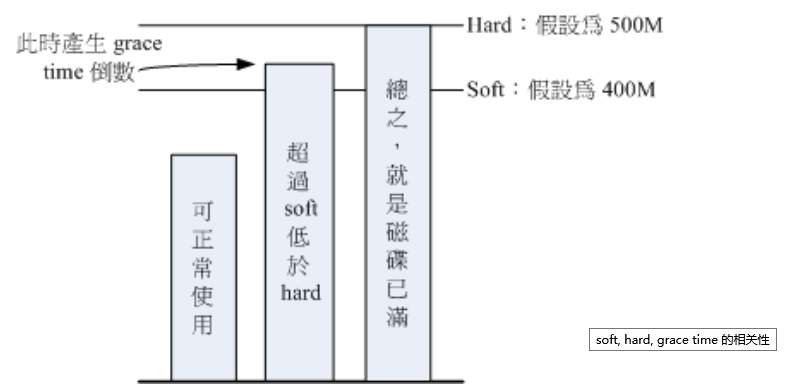
3、hard值:绝对不能超过的值
4、soft值:超过限制仍可以正常使用,但是系统会提示警告信息
5、grace time:宽限时间,在超过soft值后会进入倒计时,倒计时结束前,仍可以使用,倒计时结束后,以soft值代替hard值,使用者便不能使用磁盘
- 操作
1、开启文件系统quota支持
[root@web01 ~]# mount|grep /mnt/dev/sdb1 on /mnt type ext4 (rw)[root@web01 ~]# vim /etc/fstab /dev/sdb1 /mnt ext4 defaults,usrquota,grpquota 0 ####挂载参数中,启用quota[root@web01 ~]# umount /mnt[root@web01 ~]# mount -a[root@web01 ~]# mount |grep /mnt/dev/sdb1 on /mnt type ext4 (rw,usrquota,grpquota)
2、创建quota配置文件
[root@web01 ~]# quotacheck -avug   #####创建quota配置文件,不要重复创建
quotacheck: Your kernel probably supports journaled quota but you are not using it. Consider switching to journaled quota to avoid running quotacheck after an unclean shutdown.
quotacheck: Scanning /dev/sdb1 [/mnt] done
quotacheck: Cannot stat old user quota file /mnt/aquota.user: No such file or directory. Usage will not be substracted.
quotacheck: Cannot stat old group quota file /mnt/aquota.group: No such file or directory. Usage will not be substracted.
quotacheck: Cannot stat old user quota file /mnt/aquota.user: No such file or directory. Usage will not be substracted.
quotacheck: Cannot stat old group quota file /mnt/aquota.group: No such file or directory. Usage will not be substracted.
quotacheck: Checked  directories and  files
quotacheck: Old file not found.
quotacheck: Old file not found.
[root@web01 ~]# ll  /mnt/
total
-rw-------  root root   May  : aquota.group
-rw-------  root root   May  : aquota.user
drwx------  root root  May  : lost+found
3、启动,关闭与限制值配置
[root@web01 ~]# quotaon -avug    ####开启quota
/dev/sdb1 [/mnt]: group quotas turned on
/dev/sdb1 [/mnt]: user quotas turned on
[root@web01 ~]# edquota -u user    ####针对用户user做磁盘限额,以下为配置文件

Disk quotas for user user (uid 1015):
  Filesystem                   blocks       soft       hard     inodes     soft     hard
  /dev/sdb1                         0          0          0          0        0        0############注释#############################Filesystem:文件系统,说明该限制是针对那个文件系统blocks:磁盘容量,系统自动算出,不能动soft:第一个soft,block的soft限制值,单位KBhard:第一个hard,block的hard限制值,单位KBinodes:系统自动算出,不能动soft:第二个soft,inode的soft限制值,单位 个hard:第二个hard,inode的hard限制值,单位 个

[root@web01 ~]# edquota -t    #########修改宽限时间

Grace period before enforcing soft limits for users:Time units may be: days, hours, minutes, or seconds  Filesystem             Block grace period     Inode grace period  /dev/sdb1                     7days                  7days

[root@web01 ~]# edquota -p user -u test  #######将用户user磁盘配额属性复制给test     [root@web01 ~]# quotaoff -a           ######关闭所有磁盘配额[root@web01 ~]# quotaoff -u /mnt    ######关闭基于用户限制的磁盘配额[root@web01 ~]# quotaoff -g /mnt           #########关闭基于组限制的磁盘配额
4、查看用户磁盘配额情况
[root@web01 ~]# quota -uvs user test    ####查看用户quota情况
Disk quotas ):
     Filesystem  blocks   quota   limit   grace   files   quota   limit   grace
      /dev/sdb1
Disk quotas ):
     Filesystem  blocks   quota   limit   grace   files   quota   limit   grace
      /dev/sdb1                                                         #####[root@web01 ~]# quota -gvs user test    为查看用户组磁盘配额情况
- 不改动现有环境对某目录做磁盘限额
1、挂载新的文件系统,例:挂载在/data目录
2、将需要做磁盘限额的目录里的数据移动到/data目录下
3、将需要做磁盘限额的目录软连接到/data目录
4、对挂载在/data目录的文件系统进行磁盘配额
centos6 磁盘与文件系统管理的更多相关文章
- 磁盘及文件系统管理(以及btrfs)
Linux系统管理 磁盘分区及文件系统管理 raid lvm 网络属性管理 程序包管理 sed及awk 进程查看和管理 内核管理(内核的编译和安装) 系统启动流程 定制,编译内核,busybox 系统 ...
- Linux学习笔记之Linux磁盘及文件系统管理笔记
Linux磁盘及文件系统管理 CPU,memory(RAM),I/O i/o: disks,ehtercard disks:持久存储数据 接口类型: IDE(ata): 并口,133MB/s;并行总线 ...
- linux(3)磁盘与文件系统管理/查看硬盘、内存空间/文件系统的操作/ 文件的压缩和打包
一.磁盘与文件系统管理 1.分区与文件系统分区:记录每一个分区的开始柱面和结束柱面主引导区(master boot recorder):记录分区的数据,记录硬盘里所有的分区信息分区划分好后,要将分区格 ...
- Linux之磁盘与文件系统管理
磁盘及文件系统管理详解 [参考文献:马哥视频] 原文:http://blog.csdn.net/u013008795/article/details/51150075 目前市场上主流的磁盘是机械式硬盘 ...
- Linux磁盘与文件系统管理笔记
### Linux磁盘与文件系统管理 linux 最传统的文件系统格式是EXT2,centos7 默认文件系统是xfs(日志式文件系统) 磁盘的组成: 盘片 机械手臂 主轴马达 (机械硬盘) 磁盘格式 ...
- Linux学习笔记—Linux磁盘与文件系统管理(转载)
认识EXT2文件系统 文件的系统特性 Linux的正规文件系统为Ext2 文件数据除了文件实际内容外,还包括其他属性(文件权限.文件属性). 文件系统将这两部分数据分别存放在不同的块,权限和属性放在i ...
- Linux磁盘与文件系统管理概要
Linux磁盘与文件系统管理 硬盘组成与分区 硬盘组成 圆形的盘片(主要记录数据) 机械手臂与磁头(可读取盘片上的数据) 主轴马达,转动盘片,让机械手臂的磁头在盘片上读取数据 扇区(Sector)为最 ...
- Linux磁盘及文件系统管理
在LINUX中我们知道一个很重要的概念,那就是"一切皆文件",这里的一切表示所有在LINUX系统的对象,自然也包括了LINUX中的硬盘设备.在LINUX中所有设备都被抽象成一个文件 ...
- Linux入门-3 Linux磁盘及文件系统管理
1. 磁盘基本概念 1.1 磁盘结构:盘片(单碟vs多碟).磁头(读写数据) 1.2 磁盘在Linux中的表示 1.3 分区概念 2 使用fdisk进行磁盘管理 3 Linux文件系统 mke2fs ...
随机推荐
- bzoj 1556: 墓地秘密【状压dp+spfa】
显然是状压,显然不可能把所有格子压起来 仔细观察发现只有机关周围的四个格子有用以及起点,所以我们用spfa处理出这些格子两两之间的距离(注意细节--这里写挂了好几次),然后设f[s][i]为碰完的机关 ...
- 洛谷 P4009 汽车加油行驶问题 【最小费用最大流】
分层图,建k层,设(i,j,0)为点(i,j)的满油状态,全图的流量都是1,因为重复走到一个点没有意义.如果当前点是加油站,那么它向它上左的点连费用为a的边,向下右连费用为a+b的边: 否则,这个点的 ...
- 搜索刷题记录by cellur925
我好菜啊!连暴搜都不会! 注意边界退出! 特开此帖,记录搜索学习之路!(逃) 1.全排列 2.八皇后 3.数的划分 由于此题有同一划分方法算一个的限制,我们为了避免搜多,可以使搜出的结果满足单调不降性 ...
- 如何快捷安装并配置MySQL 下载破解Navicat for mysql
首先,要先下载MySQL,进官网下载相应的mysql版本,这个不收费,实在不知道的可以参考一下这篇:https://blog.csdn.net/qq_37172528/article/details/ ...
- [SRM625 Div1 Hard] Seatfriends
题目链接:Portal Vjudge Solution 一开始拿到这一题Sb了,把空放到dp中一起考虑了,这样计数就变得很麻烦. 其实我们可以把空位拿出来,假设它是存在的,最后再放回去. 那么就可以钦 ...
- [poj3744] Scout YYF I【概率dp 数学期望】
传送门:http://poj.org/problem?id=3744 令f(i)表示到i,安全的概率.则f(i) = f(i - 1) * p + f(i - 2) * (1 - p),若i位置有地雷 ...
- 题解报告:hdu 1398 Square Coins(母函数或dp)
Problem Description People in Silverland use square coins. Not only they have square shapes but also ...
- eclipse控制台不显示输出的解决办法
1.进windows菜单 -> show view -> console2.还是windows菜单里面 -> preferences -> 打开左边的run/debug -&g ...
- 转-iOS开发系列--地图与定位
来自: http://www.cnblogs.com/kenshincui/p/4125570.html#autoid-3-4-0 概览 现在很多社交.电商.团购应用都引入了地图和定位功能,似乎地图功 ...
- 转】RDD与DataFrame的转换
原博文出自于: http://www.cnblogs.com/namhwik/p/5967910.html RDD与DataFrame转换1. 通过反射的方式来推断RDD元素中的元数据.因为RDD本身 ...