
移动web——touch事件介绍
基本概念
1、在移动web端点击事件或者滑动屏幕、捏合等动作都是由touchstar、touchmove、touchend这三个事件组合在一起使用的
2、click事件在移动端会有0.2秒的延迟,下面是测试click在移动web端的延迟,最好在手机浏览器中测试
<script>

    window.onload = function () {

        var currentTime = 0;

        document.body.addEventListener('click', function (ev) {

            console.log(Date.now() - currentTime);

        })

        document.body.addEventListener('touchstart', function (ev) {

            currentTime = Date.now();

        });

    }

</script>
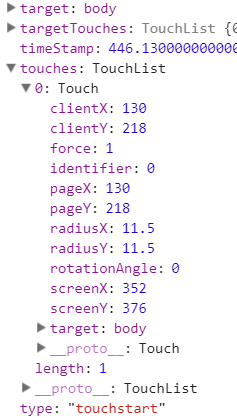
3、touchstar、touchmove、touchend这三个事件我们关注的是里面的touches属性,这是一个数组,里面有鼠标clientX与clinetY属性
<!DOCTYPE html>

<html lang="en">

<head>

    <meta charset="UTF-8">

    <meta name="viewport" content="width=device-width, initial-scale=1.0">

    <title>Title</title>

    <style>

        html, body {

            height: 100%;

            background-color: pink;

        }

    </style>

</head>

<body>

<script>

    window.onload = function () {

        document.body.addEventListener('touchstart', function (ev) {

            console.log(ev);

        });

        document.body.addEventListener('touchmove', function (ev) {

            console.log(ev);

        });

        document.body.addEventListener('touchend', function (ev) {

            console.log(ev);

        })

    }

</script>

</body>

</html>
touchstart:touches中有长度为1的数组,touches[0]中clientX,clientY是有值的
touchmove:touches中有长度为1的数组,touches[0]中clientX,clientY是有值的,而且不断在变化
touchend:touches中有长度为0的数组,因为我们只是一个鼠标在点击,鼠标弹起的时候touches是不会存储值的
点击事件
既然click有延迟,那么我们就用touch的三个事件来代替click事件,只要满足下面几种情况,我们就能够说明这次动作是点击事件,而不是长按屏幕或者滑动屏幕
1、touchstart与touchend触发的事件大于250就证明这不是点击事件
2、touchmove事件在这次动作中被触发就证明这不是点击事件
3、下面是封装的一个toush事件模仿点击事件,需要注意的是回调函数的参数,它的实参是在函数中被传入的
<!DOCTYPE html>

<html lang="en">

<head>

    <meta charset="UTF-8">

    <meta name="viewport" content="width=device-width, initial-scale=1.0">

    <title>Title</title>

    <style>

        html, body {

            height: 100%;

            background-color: pink;

        }

    </style>

</head>

<body>

<script>

    var ele = document.querySelector('body');

    fox_tap(ele, function (e) {

        console.log('点击');

        console.log(e);

    });

    /*

        element:绑定的dom元素

        callback:回调函数

    */

    function fox_tap(element, callback) {

        var statTime = 0;

        var isMove = false;

        var maxTime = 250;

        var event = null;

        element.addEventListener('touchstart', function (e) {

            statTime = Date.now();

            /*

                每次执行注册事件都要初始化此值,因为touchmove事件触发的时候会更改isMove的值,不更改,

                下次再进入touchtend事件会沿用上次touchmove修改过的isMove的值,这样就一直终端函数

            */

            isMove = false;

            event = e;

        });

        element.addEventListener('touchmove', function (e) {

            isMove = true;

        });

        element.addEventListener('touchend', function (e) {

            if (isMove == true) {

                return;

            }

            if ((Date.now() - statTime) > maxTime) {

                return;

            }

            callback(event);

        });

    }

</script>

</body>

</html>
移动web——touch事件介绍的更多相关文章
- javascript——touch事件介绍与实例演示
分类: javascript2014-02-12 16:42 1742人阅读 评论(0) 收藏 举报 touch事件touchmovetouchstarttouchend 前言 诸如智能手机和平板 ...
- 移动web touch事件
参考:http://www.cnblogs.com/dojo-lzz/p/5452575.html wap中的原生touch 事件,touchstart.touchmove.touchend.touc ...
- 移动web——touch事件应用
基本概况 1.touch事件在移动端被用来代替click事件,因为click事件的触发会延迟影响了用户体验 2.touch事件还可以与translate构成吸附效果 3.现行有一种排版方式是左边宽度是 ...
- 从零开始学 Web 之 移动Web(五)touch事件的缺陷,移动端常用插件
大家好,这里是「 从零开始学 Web 系列教程 」,并在下列地址同步更新...... github:https://github.com/Daotin/Web 微信公众号:Web前端之巅 博客园:ht ...
- HTML5触摸屏touch事件使用介绍1
市面上手机种类繁多,在触屏手机上运行的网页跟传统PC网页相比还是有很大差别的.由于设备的不同浏览器的事件的设计也不同.传统PC站的 click 和 onmouseover 等事件在一般触屏的手机上也可 ...
- 移动web开发之touch事件
前面的话 iOS版Safari为了向开发人员传达一些特殊信息,新增了一些专有事件.因为iOS设备既没有鼠标也没有键盘,所以在为移动Safari开发交互性网页时,常规的鼠标和键盘事件根本不够用.随着An ...
- Touch事件在移动端web开发中的详解
一.pc端事件回顾 HTML事件.DOM0事件.DOM2事件 事件对象. 如果上述概念不清楚,请先去了解. 二.移动端事件简介 2.1 pc端事件在移动端的问题 移动设备主要特点是不配备鼠标,键盘 ...
- 移动端Web界面滚动touch事件
解决办法一: elem.addEventListener( 'touchstart', fn, { passive: false } ); 解决办法二: * { touch-action: pan-y ...
- javascript移动设备Web开发中对touch事件的封装实例
在触屏设备上,一些比较基础的手势都需要通过对 touch 事件进行二次封装才能实现.zepto 是移动端上使用率比较高的一个类库,但是其 touch 模块模拟出来的一些事件存在一些兼容性问题,如 ta ...
随机推荐
- hdu 1527威佐夫博弈
//http://www.cnblogs.com/bo-tao/archive/2012/04/16/2452633.html #include<stdio.h> #include< ...
- Prime Land(poj 1365)
题意:这题题意难懂,看了题解才知道的.比如第二组sample,就是5^1*2^1=10, 求10-1即9的质因数分解,从大到小输出,即3^2.本来很简单的嘿,直接最快速幂+暴力最裸的就行了. #inc ...
- pt工具加字段脚本
#!/bin/bashcnn_db=$1table=$2alter_conment=$3 cnn_host='192.168.10.14'cnn_user='root'cnn_pwd='123456' ...
- [Vue @Component] Write Vue Functional Components Inline
Vue's functional components are small and flexible enough to be declared inside of .vue file next to ...
- Flume NG源代码分析(二)支持执行时动态改动配置的配置模块
在上一篇中讲了Flume NG配置模块主要的接口的类,PropertiesConfigurationProvider提供了基于properties配置文件的静态配置的能力,这篇细说一下PollingP ...
- 【c++】简单的string类的几个基本函数
// string的几个基本函数的实现 #include <iostream> #include <assert.h> #include <string.h> us ...
- 转 java synchronized详解
转自 http://www.cnblogs.com/GnagWang/archive/2011/02/27/1966606.html Java语言的关键字,当它用来修饰一个方法或者一个代码块的时候,能 ...
- HTTP的GET和POST请求
1.GET请求: 格式例如以下: request-line headers blank-line request-body 如图是我用wireshark截的一个GET请求的HTTP首部: GET请求发 ...
- Java中根据字节截取字符串
一.简介 为了统一世界各国的字符集,流行开了Unicode字符集,java也支持Unicode编码,即java中char存的是代码点值,即无论是‘A’还是‘中’都占两个字节. 代码点值:与Unicod ...
- mysql安装后改动port号password默认字符编码
1.改动password grant all privileges on *.* to 'root'@'localhost' identified by 'new password'; 2.改动por ...