
RadioButton ---- 样式效果切换
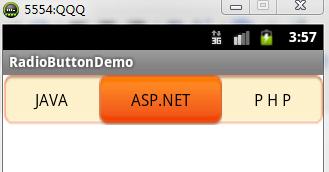
\res\drawable\radio_button_bg.xml
<?xml version="1.0" encoding="utf-8"?>

<selector xmlns:android="http://schemas.android.com/apk/res/android">

    <item android:drawable="@drawable/raido_button_checked"

        android:state_checked="true"/>

    <item android:drawable="@android:color/transparent" />

</selector>
\res\values\strings.xml
<?xml version="1.0" encoding="utf-8"?>

<resources>

    <string name="app_name">RadioButtonDemo</string>

    <string name="hello_world">Hello world!</string>

    <string name="menu_settings">Settings</string>

    <string name="radio_button_1">JAVA</string>

    <string name="radio_button_2">ASP.NET</string>

    <string name="radio_button_3">P H P</string>

</resources>
\res\values\styles.xml
    <style name="RadioButtonStyles">

        <item name="android:layout_gravity">center_vertical</item>

        <item name="android:layout_height">fill_parent</item>

        <item name="android:layout_width">wrap_content</item>

        <item name="android:layout_weight">1</item>

        <item name="android:button">@null</item>

        <item name="android:background">@drawable/radio_button_bg</item>

        <item name="android:gravity">center</item>

    </style>
\res\menu\activity_radio_button_demo.xml
<menu xmlns:android="http://schemas.android.com/apk/res/android" >

    <item

        android:id="@+id/menu_settings"

        android:orderInCategory="100"

        android:showAsAction="never"

        android:title="@string/menu_settings"/>

</menu>
\res\layout\activity_radio_button_demo.xml
<RelativeLayout xmlns:android="http://schemas.android.com/apk/res/android"

    android:layout_width="match_parent"

    android:layout_height="match_parent" >

    <RadioGroup

        android:id="@+id/radioGroup1"

        android:layout_width="fill_parent"

        android:layout_height="50dp"

        android:background="@drawable/x_proposal_tab_bg"

        android:orientation="horizontal" >

        <RadioButton

            android:id="@+id/radio0"

            style="@style/RadioButtonStyles"

            android:text="@string/radio_button_1" />

        <RadioButton

            android:id="@+id/radio1"

            style="@style/RadioButtonStyles"

            android:text="@string/radio_button_2" />

        <RadioButton

            android:id="@+id/radio2"

            style="@style/RadioButtonStyles"

            android:text="@string/radio_button_3" />

    </RadioGroup>

</RelativeLayout>
RadioButtonDemoActivity.java
public class RadioButtonDemoActivity extends Activity {

    @Override

    protected void onCreate(Bundle savedInstanceState) {

        super.onCreate(savedInstanceState);

        setContentView(R.layout.activity_radio_button_demo);

    }

    @Override

    public boolean onCreateOptionsMenu(Menu menu) {

        // Inflate the menu; this adds items to the action bar if it is present.

        getMenuInflater().inflate(R.menu.activity_radio_button_demo, menu);

        return true;

    }

}
DEMO下载地址:http://download.csdn.net/detail/androidsj/5865317
RadioButton ---- 样式效果切换的更多相关文章
- 利用target的特性,可以实现纯css的tab效果切换
基础知识: :target起作用的是href连接到的位置 如 <a href="#tab1">tab1</a> <div id="tab1& ...
- Android RadioButton 语言无法切换问题
1.Dialog在不退出界面的情况下,RadioButton在语言切换时,无法匹配系统语言的问题: 解决办法为:在RadioButton添加属性 android:saveEnabled="f ...
- wpf radiobuttong 去前面的圆点, 自定义radiobutton样式
自定义radiobutton样式代码: <windows.Resources> <LinearGradientBrush x:Key="CheckRadioFillNorm ...
- dialog 中装listview并让每一个item分隔悬空,并具有radiobutton的效果
先上图 两个关键地方,一是让dialog全透明,二是让listitem分开. 首先定义一个自定义的dialog 布局文件,这个只是包含一个listview而已 <?xml version=&qu ...
- 转:android 自定义RadioButton样式
http://gundumw100.iteye.com/blog/1146527 上面这种3选1的效果如何做呢?用代码写? 其实有更简单的办法,忘了RadioButton有什么特性了吗? 我就用Ra ...
- vue页面切换效果(slide效果切换)
最近碰到一个需求,单页应用里面页面切换的效果需要做成跟轮播图滑动slide一样,让这个页面在切换时感觉是一个页面.反复琢磨的vue里面的transition,最终将实现的核心代码贴出来.这里实现的是上 ...
- WPF 自定义RadioButton样式
一.RadioButton基本样式 RadioButton基本样式包含两种状态,这里也是使用两张图片来代替两种状态,当然你也可以通过IconFont或Path来替换这两种状态. 效果如下: 样式代码如 ...
- Android 自定义RadioButton样式
上面这种3选1的效果如何做呢?用代码写? 其实有更简单的办法,忘了RadioButton有什么特性了吗? 我就用RadioButton实现了如上效果,其实很简单的. 首先定义一张background ...
- 纯css3艺术文字样式效果代码
效果:http://hovertree.com/texiao/css3/1/ 本效果主要使用text-shadow实现.参考:http://hovertree.com/h/bjaf/css3_text ...
随机推荐
- 【VB编程】05.MsgBox与InputBox函数
在VBA程序中,数据的输入输出是通过函数实现的,其实现的方式是通过对话框的形式表示出来的.例如MsgBox,Inputbox等,不要误认为是输入输出语句的关键字,其实仅仅是一个普通函数而已. [Msg ...
- 【微信小程序】微信小程序wx.previewImage预览图片
一.小知识 二.例子,配合轮播图使用效果更佳!(如图1) 1.wxml <scroll-view scroll-y="true"> <swiper catchta ...
- nginx 配置一个文件下载服务
cat openvpn.conf server { listen ; server_name localhost; location / { root /home/openvpn/client_fil ...
- spring声明式事务以及配置
使用spring提供的事务处理机制的好处是程序员可以不用关心事务的切面了,只要配置就好了,可以少写代码. spring声明式事务处理 spring 声明:针对的是程序员,程序员告诉spring容器,哪 ...
- 解决Win10系统下 C# DateTime 出现星期几的问题 解决ASP.NET MVC 接受Request Playload参数问题
解决Win10系统下 C# DateTime 出现星期几的问题 昨天晚上写代码的时候偶然发现 DateTime 里出现了星期几,当时一阵凌乱,去网上百度没有详细解决办法,很多人说可以用用 ToStri ...
- photoshop 动作 自己定义快捷键 播放选定的动作
今天在制作一组效果图.要用到动作.而且是同一个动作,便在网上寻找"播放选定的动作"就是那个三角形播放button的快捷键. 预期这样会大大加快制作过程. 首先制作好动作. 然后,在 ...
- 悟道—位IT高管20年的职场心经(读书笔记一)
悟道--一位IT高管20年的职场心经 第一章 修炼! 修炼! 别跟我谈事业,先把工作做好. 别跟我说理想,先把饭碗端好: 志不可天天立.道必须日日修.没有实力,一切皆为妄谈. 修炼是硬道理. 1.1 ...
- Docker 私有仓库最简便的搭建方法
http://blog.csdn.net/wangtaoking1/article/details/44180901/ Docker学习笔记 — Docker私有仓库搭建http://www.jian ...
- cocos2dx 3.x Node::schedule
auto callback = [=](float dt){ //do something }; node->schedule(callback, 1.0/60, "mySchedul ...
- IIS8.5设置 MVC HTTP 错误 404.0 - Not Found
0. 确认 设置IIS的“ISAPI和CGI限制”中的“ASP.NET v4.0.0.30319”为允许 1. 解决方案 <system.webServer> <modules ...