
Qt 之模型/视图(自定义按钮)
https://blog.csdn.net/liang19890820/article/details/50974059
简述
衍伸前面的章节,我们对QTableView实现了数据显示、自定义排序、显示复选框、进度条等功能的实现,本节主要针对自定义按钮进行讲解,这节过后,也希望大家对自定义有更深入的了解,在以后的功能开发过程中,相信无论遇到什么样式形式,我们都可以很好地实现。
| 版权声明:一去、二三里,未经博主允许不得转载。
效果
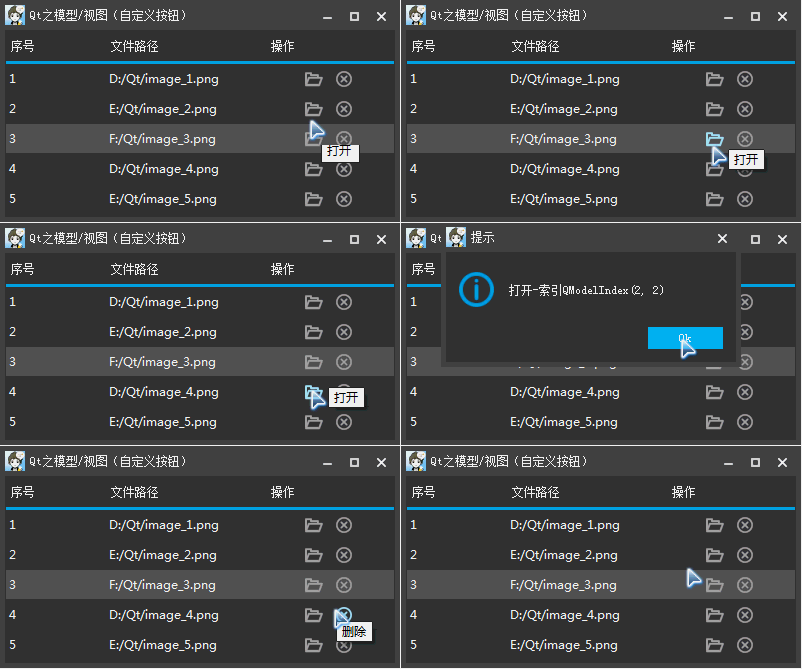
QStyledItemDelegate
源码
.h
包含显示按钮需要用到的智能指针,按钮的宽度、高度、按钮之间的间距、鼠标的坐标等。
class TableViewDelegate: public QStyledItemDelegate

{

    Q_OBJECT

public:

    explicit TableViewDelegate(QWidget *parent = 0);

    ~TableViewDelegate();

    void paint(QPainter *painter, const QStyleOptionViewItem &option, const QModelIndex &index) const;

    bool editorEvent(QEvent* event, QAbstractItemModel* model, const QStyleOptionViewItem& option, const QModelIndex& index);

signals:

    void open(const QModelIndex &index);

    void deleteData(const QModelIndex &index);

private:

    QPoint m_mousePoint;  // 鼠标位置

    QScopedPointer<QPushButton> m_pOpenButton;

    QScopedPointer<QPushButton> m_pDeleteButton;

    QStringList m_list;

    int m_nSpacing;  // 按钮之间的间距

    int m_nWidth;  // 按钮宽度

    int m_nHeight;  // 按钮高度

    int m_nType;  // 按钮状态-1:划过 2:按下

};
.cpp
主要设置按钮样式,实现鼠标划过、按下,响应鼠标事件等操作。
TableViewDelegate::TableViewDelegate(QWidget *parent)

    : QStyledItemDelegate(parent),

      m_pOpenButton(new QPushButton()),

      m_pDeleteButton(new QPushButton()),

      m_nSpacing(5),

      m_nWidth(25),

      m_nHeight(20)

{

    // 设置按钮正常、划过、按下样式

    m_pOpenButton->setStyleSheet("QPushButton {border: none; background-color: transparent; image:url(:/Images/open);} \

                                 QPushButton:hover {image:url(:/Images/openHover);} \

                                 QPushButton:pressed {image:url(:/Images/openPressed);}");

    m_pDeleteButton->setStyleSheet("QPushButton {border: none; background-color: transparent; image:url(:/Images/delete);} \

                                 QPushButton:hover {image:url(:/Images/deleteHover);} \

                                 QPushButton:pressed {image:url(:/Images/deletePressed);}");

    m_list << QStringLiteral("打开") << QStringLiteral("删除");

}

TableViewDelegate::~TableViewDelegate()

{

}

// 绘制按钮

void TableViewDelegate::paint(QPainter *painter, const QStyleOptionViewItem &option, const QModelIndex &index) const

{

    QStyleOptionViewItem viewOption(option);

    initStyleOption(&viewOption, index);

    if (option.state.testFlag(QStyle::State_HasFocus))

        viewOption.state = viewOption.state ^ QStyle::State_HasFocus;

    QStyledItemDelegate::paint(painter, viewOption, index);

    if (index.column() == FILE_OPERATE_COLUMN)

    {

        // 计算按钮显示区域

        int nCount = m_list.count();

        int nHalf = (option.rect.width() - m_nWidth * nCount - m_nSpacing * (nCount - 1)) / 2;

        int nTop = (option.rect.height() - m_nHeight) / 2;

        for (int i = 0; i < nCount; ++i)

        {

            // 绘制按钮

            QStyleOptionButton button;

            button.rect = QRect(option.rect.left() + nHalf + m_nWidth * i + m_nSpacing * i,

                                option.rect.top() + nTop,  m_nWidth, m_nHeight);

            button.state |= QStyle::State_Enabled;

            //button.iconSize = QSize(16, 16);

            //button.icon = QIcon(QString(":/Images/%1").arg(m_list.at(i)));

            if (button.rect.contains(m_mousePoint))

            {

                if (m_nType == 0)

                {

                    button.state |= QStyle::State_MouseOver;

                    //button.icon = QIcon(QString(":/Images/%1Hover").arg(m_list.at(i)));

                }

                else if (m_nType == 1)

                {

                    button.state |= QStyle::State_Sunken;

                    //button.icon = QIcon(QString(":/Images/%1Pressed").arg(m_list.at(i)));

                }

            }

            QWidget *pWidget = (i == 0) ? m_pOpenButton.data() : m_pDeleteButton.data();

            QApplication::style()->drawControl(QStyle::CE_PushButton, &button, painter, pWidget);

        }

    }

}

// 响应按钮事件 - 划过、按下

bool TableViewDelegate::editorEvent(QEvent* event, QAbstractItemModel* model, const QStyleOptionViewItem& option, const QModelIndex& index)

{

    if (index.column() != FILE_OPERATE_COLUMN)

        return false;

    m_nType = -1;

    bool bRepaint = false;

    QMouseEvent *pEvent = static_cast<QMouseEvent *> (event);

    m_mousePoint = pEvent->pos();

    int nCount = m_list.count();

    int nHalf = (option.rect.width() - m_nWidth * nCount - m_nSpacing * (nCount - 1)) / 2;

    int nTop = (option.rect.height() - m_nHeight) / 2;

    // 还原鼠标样式

    QApplication::restoreOverrideCursor();

    for (int i = 0; i < nCount; ++i)

    {

        QStyleOptionButton button;

        button.rect = QRect(option.rect.left() + nHalf + m_nWidth * i + m_nSpacing * i,

                            option.rect.top() + nTop,  m_nWidth, m_nHeight);

        // 鼠标位于按钮之上

        if (!button.rect.contains(m_mousePoint))

            continue;

        bRepaint = true;

        switch (event->type())

        {

        // 鼠标滑过

        case QEvent::MouseMove:

        {

            // 设置鼠标样式为手型

            QApplication::setOverrideCursor(Qt::PointingHandCursor);

            m_nType = 0;

            QToolTip::showText(pEvent->globalPos(), m_list.at(i));

            break;

        }

        // 鼠标按下

        case QEvent::MouseButtonPress:

        {

            m_nType = 1;

            break;

        }

        // 鼠标释放

        case QEvent::MouseButtonRelease:

        {

            if (i == 0)

            {

                emit open(index);

            }

            else

            {

                emit deleteData(index);

            }

            break;

        }

        default:

            break;

        }

    }

    return bRepaint;

}
衍伸
通过上面的实现,我们可以自定义按钮的样式、文本、显示区域、等,我们也可以通过QStyleOptionButton的icon和iconSize来设置按钮的图标与图标大小,通过响应按钮来实现我们自己的事件。
Qt 之模型/视图(自定义按钮)的更多相关文章
- Qt之模型/视图(自定义风格)
Qt之模型/视图(自定义风格) 关于自定义风格是针对视图与委托而言的,使用事件与QSS都可以进行处理,今天关于美化的细节讲解一下. 先看下图: 先撇开界面的美观性(萝卜青菜,各有所爱),就现有的这些风 ...
- Qt之模型/视图(自定义按钮)
简述 衍伸前面的章节,我们对QTableView实现了数据显示.自定义排序.显示复选框.进度条等功能的实现,本节主要针对自定义按钮进行讲解,这节过后,也希望大家对自定义有更深入的了解,在以后的功能开发 ...
- Qt之模型/视图(自定义进度条)
简述 在之前的章节中分享过关于QHeaderView表头排序.添加复选框等内容,相信大家模型/视图.自定义风格有了一定的了解,下面我们来分享一个更常用的内容-自定义进度条. 实现方式: 从QAbstr ...
- 【转】Qt之模型/视图
[本文转自]http://blog.sina.com.cn/s/blog_a6fb6cc90101hh20.html 作者: 一去丶二三里 关于Qt中MVC的介绍与使用,助手中有一节模型/视图编程 ...
- Qt之模型/视图(委托)
概念 不同于模型 - 视图 - 控制器模式,模型/视图设计不包括用于管理与用户交互的一个完全独立的组件.一般情况,视图负责将模型数据呈现给用户以及处理用户输入.为了输入更加具有灵活性,则由委托来执行交 ...
- QT MVC 模型/视图
1. 模型视图实例一, QFileSystemModel QTreeView ,model/view示例. #include <QApplication> #include <QF ...
- Qt之模型/视图(实时更新数据)
上两节简单介绍了Qt中对于模型/视图的编程,大部分助手里说的很清楚了,现在就开始实战部分吧! 在实际应用中,视图展示的数据往往并非一成不变的,那么如何实时更新成了一个很重要的问题!功能:(1)添加委托 ...
- Qt之模型/视图(自定义按钮)(使用QStyleOption的子类进行drawControl,和我用的方法完全不一样)
http://blog.csdn.net/liang19890820/article/details/50974059
- Qt之模型/视图(自定义按钮)(重绘QStyleOptionButton)
http://blog.csdn.net/liang19890820/article/details/50974059#comments
随机推荐
- [转] 公共DNS,114.114.114.114和8.8.8.8
[From] https://zhidao.baidu.com/question/304558434158495364.html 一.两者的联系 114.114.114.114和8.8.8.8,这两个 ...
- Python3.0版本 从听说python可以做爬虫到自己第一成功做出爬虫的经历
前言 我自己是个python小白,工作也不是软件行业,但是日常没事时喜欢捣鼓一些小玩意,自身有点C语言基础. 听说python很火,可以做出爬虫去爬一些数据图片视频之类的东东,我的兴趣一下子就来了.然 ...
- 解决VS在高DPI下设计出的Winform程序界面变形问题
在目前高分屏流行的情况下,windows缩放与布局仍然设置为100%就显得太小(特别是笔记本),通常会调整为125%或150%, VS在缩放与布局设置为非100%的时候,就会自动启动DPI感知模式,以 ...
- centsos 查看系统版本信息
[root@hostuser gitlab]# lsb_release -a LSB Version: :core-4.1-amd64:core-4.1-noarch:cxx-4.1-amd64:cx ...
- 简说LINUX 下chmod|chown|chgrp和用法和区别
1.chgrp(改变文件所属用户组) chgrp 用户组 文件名 ###就是这个格了.如果整个目录下的都改,则加-R参数用于递归. 如:chgrp -R user smb.con ...
- vim安装与配置
vim 8.0 安装 git clone https://github.com/vim/vim.git sudo apt-get install libncurses5-dev # vim依赖一个n ...
- dubbo序列化hibernate.LazyInitializationException could not initialize proxy - no Session懒加载异常的解决
dubbo序列化,hibernate.LazyInitializationException could not initialize proxy - no Session懒加载异常的解决 转载声明: ...
- LR自我总结的问题
1.Controller中添加负载测试时,最后运行完提示the following graph s were not created.导致最后没有数据报表生成. 解决方法:在result中将auto ...
- lua默认是double类型
把c#的float类型传给lua ,lua自己换转成double ,一转就出精度问题 lua只有double没有float ===================================== ...
- JS中的instanceof和typeof
原文链接:http://hi.baidu.com/pryzjvvpkkbhjyq/item/440fb91cda5cb90b8ebde43f typeof用以获取一个变量的类型 语法:typeof a ...