
Android CoordinatorLayout 入门介绍
Android CoordinatorLayout 入门介绍
在 2015 年的 I/O 开发者大会上,Google 介绍了一个新的 Android Design Support Library,该库可以帮助开发者在应用上使用 meterial design。它包含了许多重要的 meterial design 的构建块,并且它支持 API 7及以上的版本。如果你错过了这次大会,那就请打开谷歌开发者站点来查阅它的相关信息吧:传送门。
CoordinatorLayout
在库中所有好的东东之间,看起来真正有趣的是 CoordinatorLayout,它是一个 FrameLayout。从它的名字中,你或许已经猜到:该布局的强大在于,能够协调子元素之间的依赖关系。
你需要做的就是把 View 包含在 CoordinatorLayout 中。让我们直接进入代码吧。下面的例子非常简单,它包含了 Floating Action Button,点击时会触发一个 Snackbar。
首先,在 gradle 文件中引入 meterial design 库:
compile 'com.android.support:design:22.2.0'
接下来,为 Activity 创建一个简单的布局文件:
<?xml version="1.0" encoding="utf-8"?>

<android.support.design.widget.CoordinatorLayout

    xmlns:android="http://schemas.android.com/apk/res/android"

    android:layout_width="match_parent"

    android:layout_height="match_parent">

    <android.support.design.widget.FloatingActionButton

        android:id="@+id/fab"

        android:layout_width="wrap_content"

        android:layout_height="wrap_content"

        android:layout_gravity="end|bottom"

        android:layout_margin="16dp"

        android:src="@drawable/ic_done" />

</android.support.design.widget.CoordinatorLayout>
还需要添加 MainActivity:
public class MainActivity extends AppCompatActivity {

  @Override

  protected void onCreate(Bundle savedInstanceState) {

    super.onCreate(savedInstanceState);

    setContentView(R.layout.activity_main);

    findViewById(R.id.fab).setOnClickListener(new View.OnClickListener() {

      @Override

      public void onClick(View view) {

        Snackbar.make(view, "Hello Snackbar", Snackbar.LENGTH_LONG).show();

      }

    });

  }

}
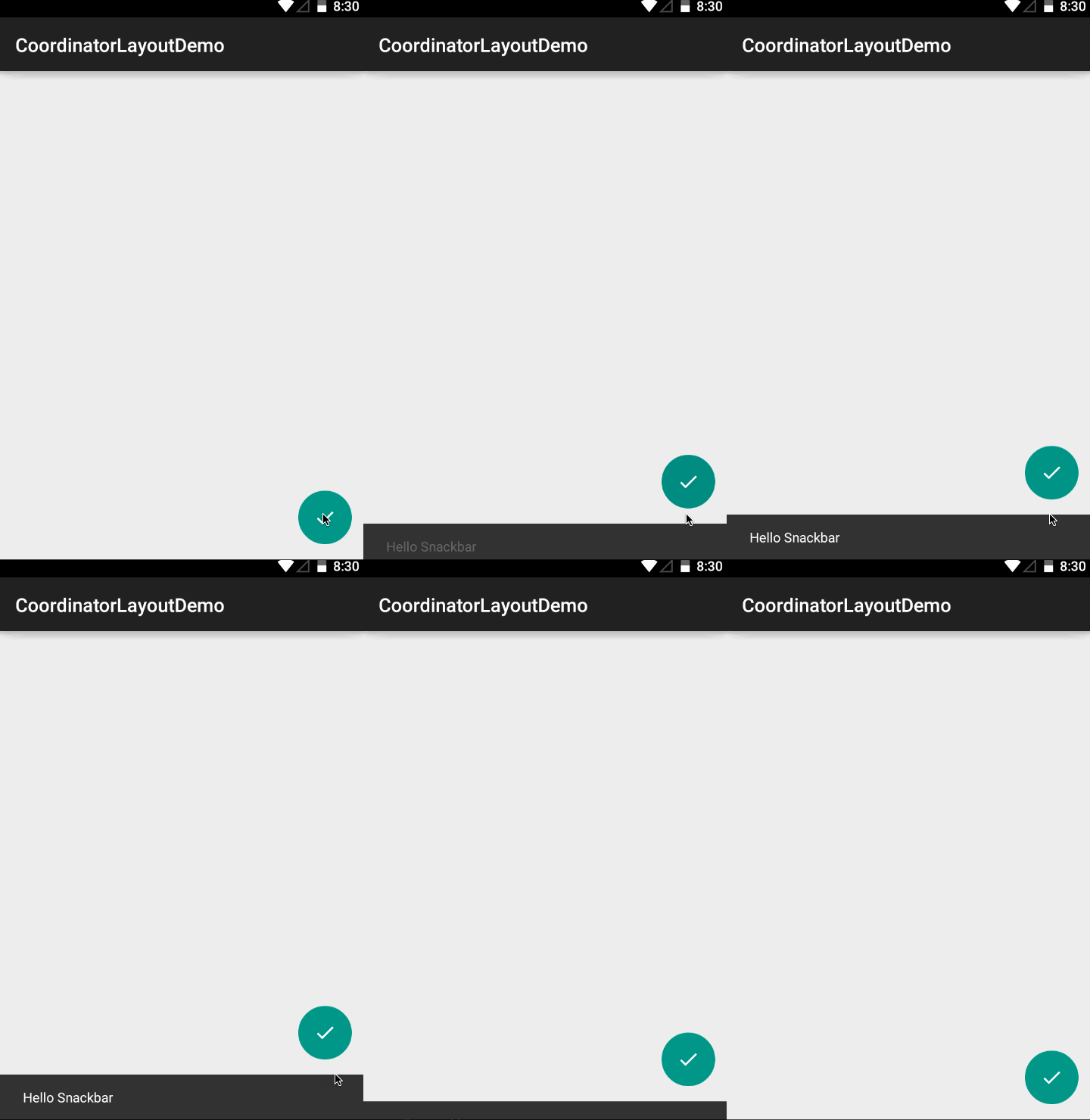
非常酷,是吗?
但是,如果你想使用其它 FAB 的实现又会怎么样呢?因为 Support Library 中的 FAB 实现没有菜单选项,于是,我们尝试一下由开发者 Base 实现的 FAB 开源库。
compile 'com.getbase:floatingactionbutton:1.9.1'
<?xml version="1.0" encoding="utf-8"?>

<android.support.design.widget.CoordinatorLayout

    xmlns:android="http://schemas.android.com/apk/res/android"

    xmlns:app="http://schemas.android.com/apk/res-auto"

    android:layout_width="match_parent"

    android:layout_height="match_parent">

    <com.getbase.floatingactionbutton.FloatingActionButton

        android:id="@+id/fab"

        android:layout_width="wrap_content"

        android:layout_height="wrap_content"

        android:layout_gravity="end|bottom"

        android:layout_margin="16dp"

        app:fab_icon="@drawable/ic_done" />

</android.support.design.widget.CoordinatorLayout>
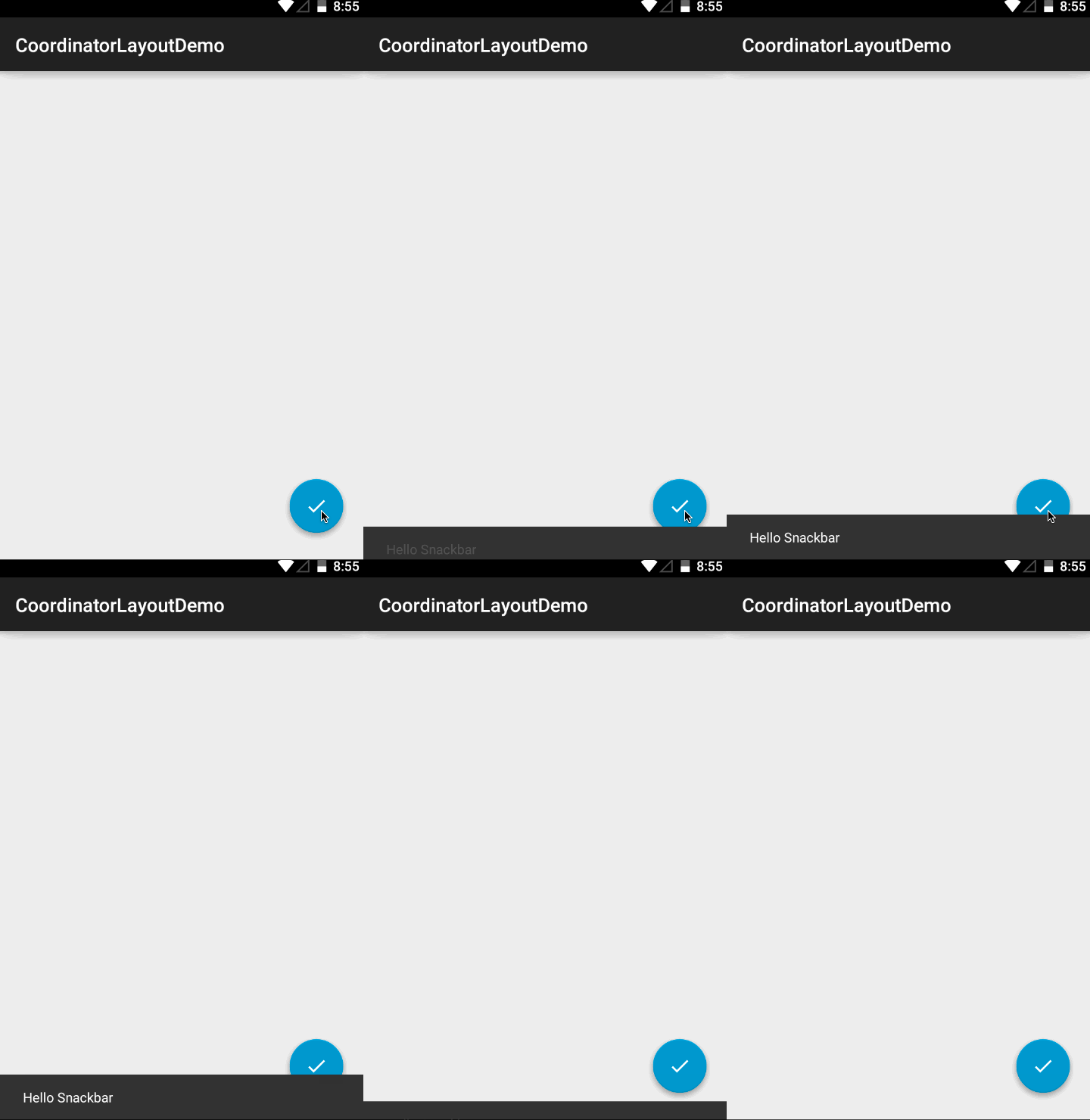
如图所示,在这种情况下,CoordinatorLayout 不能正常工作。这是因为 View 没有默认的CoordinatorLayout.Behavior 的实现。现有的解决方案就是等待有人来完善它。
或者呢,我们可以为这个组件写一个自定义的行为实现。:D
View 知道如何表现
这个框架真的非常强大,要给 view 自定义行为时,你根本不需要获取这个 view。你还可以改变任意 view 的默认行为。
首先,需要继承 Behavior 类:
public class FloatingActionButtonBehavior extends CoordinatorLayout.Behavior<FloatingActionButton>
为了使这个类可以填充 xml 中的内容,我们需要给它设置一个构造方法,方法有两个参数:Context 和AttributeSet。
public FloatingActionButtonBehavior(Context context, AttributeSet attrs) {}
接下来的步骤是重写 layoutDependsOn() 方法,并且,如果我们想监听改变,就让方法返回 true。在例子中,我们只想监听 Snackbar 对象的改变。
@Override

public boolean layoutDependsOn(CoordinatorLayout parent, FloatingActionButton child, View dependency) {

  return dependency instanceof SnackbarLayout;

}
现在,让我们继承真正行为的实现。当 CoordinatorLayout 中的 view 每次发生变化时,onDependentViewChanged 方法都会被调用。在这个方法中,我们要读取当前 Snackbar 的状态。当Snackbar 显示的时候,我们想把 FAB 也移上来。要实现这样的目的,我们需要把 FAB 的 Y 坐标设置为Snackbar 的高度。要得到正确的转换值,我们需要从转化的 Y 值中减去 Snackbar 的高度。
@Override

public boolean onDependentViewChanged(CoordinatorLayout parent, FloatingActionButton child, View dependency) {

  float translationY = Math.min(0, dependency.getTranslationY() - dependency.getHeight());

  child.setTranslationY(translationY);

  return true;

}
最后一步就是告诉 CoordinatorLayout 使用 FloatingActionButtonBeahvior:
<?xml version="1.0" encoding="utf-8"?>

<android.support.design.widget.CoordinatorLayout

    xmlns:android="http://schemas.android.com/apk/res/android"

    xmlns:app="http://schemas.android.com/apk/res-auto"

    android:layout_width="match_parent"

    android:layout_height="match_parent">

    <com.getbase.floatingactionbutton.FloatingActionButton

        android:id="@+id/fab"

        android:layout_width="wrap_content"

        android:layout_height="wrap_content"

        android:layout_gravity="end|bottom"

        android:layout_margin="16dp"

        app:layout_behavior="com.getbase.coordinatorlayoutdemo.FloatingActionButtonBehavior"

        app:fab_icon="@drawable/ic_done" />

</android.support.design.widget.CoordinatorLayout>
最终,问题被修正了:
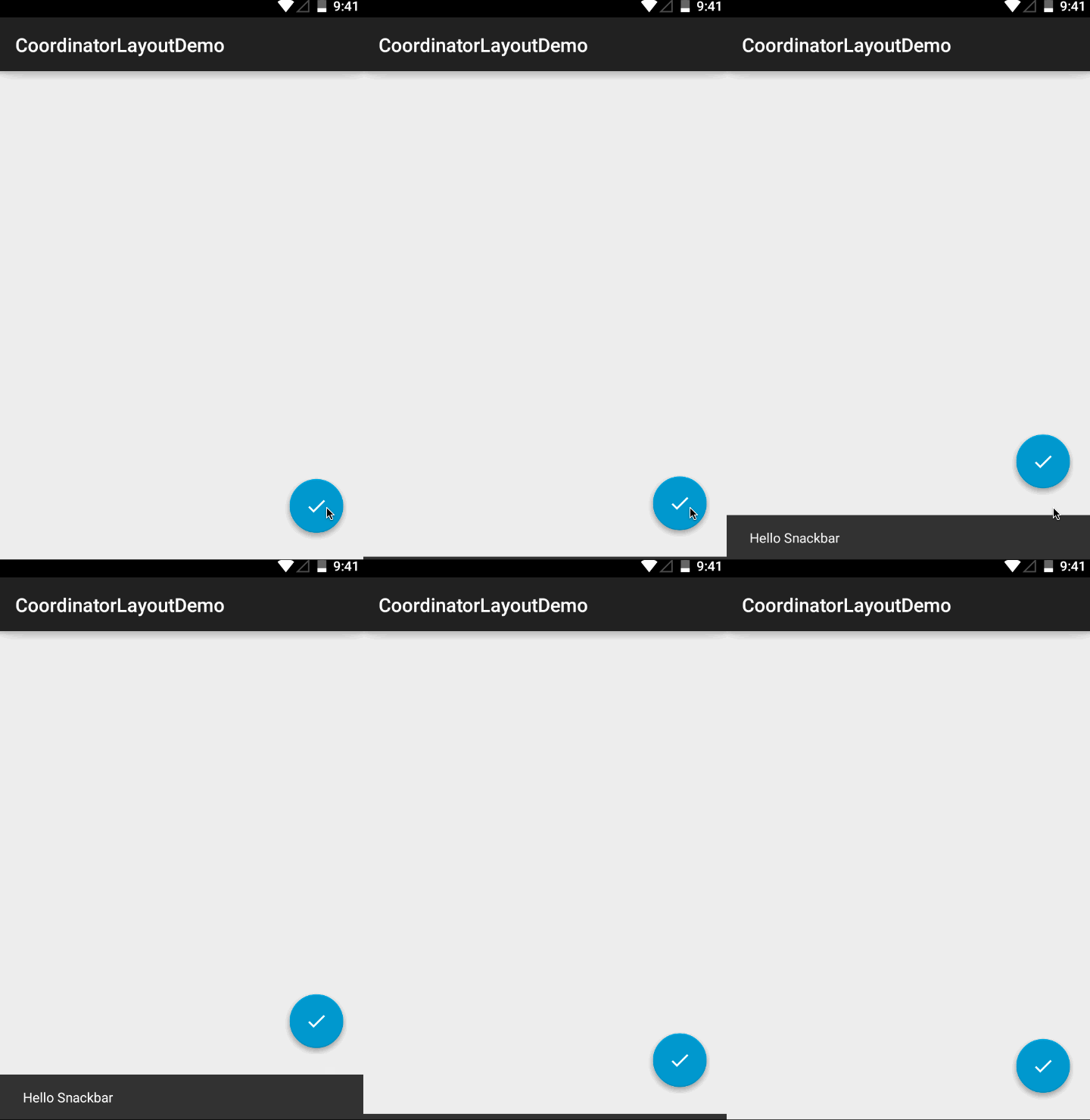
如果你想为 view 定义默认行为,只需要在你的 Behavior 类上添加 DefaultBehavior 注解就可以了。
以上代码的 GitHub 地址为:https://github.com/ggajews/coordinatorlayoutwithfabdemo 。
祝大家编码愉快!
Android CoordinatorLayout 入门介绍的更多相关文章
- [原]Android Fragment 入门介绍
Fragment Fragment 产生,优点,用途,使用方法简介 1 Fragmeng简介 自从Android 3.0中引入fragments 的概念,根据词海的翻译可以译为:碎片.片段.其上的是为 ...
- android surfaceview 入门介绍
由于工作中需自定义控件,以前没写过. 开始时,实用view 实现了,经理说不好,担心效率低,要求每秒需要刷新10次左右. 然后,学习使用 surfaceview. 看了网上简单的Demo,找到him ...
- [译]:Xamarin.Android开发入门——Hello,Android Multiscreen深入理解
原文链接:Hello, Android Multiscreen_DeepDive. 译文链接:Xamarin.Android开发入门--Hello,Android Multiscreen深入理解. 本 ...
- [译]:Xamarin.Android开发入门——Hello,Android深入理解
返回索引目录 原文链接:Hello, Android_DeepDive. 译文链接:Xamarin.Android开发入门--Hello,Android深入理解 本部分介绍利用Xamarin开发And ...
- [译]:Xamarin.Android开发入门——Hello,Android快速上手
返回索引目录 原文链接:Hello, Android_Quickstart. 译文链接:Xamarin.Android开发入门--Hello,Android快速上手 本部分介绍利用Xamarin开发A ...
- Hello, Android 快速入门
Hello, Android Android 开发与 Xamarin 简介 在这两节指南中,我们将 (使用 Xamarin Studio或 Visual Studio)建立我们的第一个 Xamarin ...
- Android编译系统入门(二)
Android.mk的使用方法 在上一篇Android编译系统入门(一)中我们只要介绍了Android系统使用make命令默认编译的依赖树是droid,而droid是一个伪目标,它有两个先决条件dro ...
- Android开发入门要点记录:四大组件
cocos2dx跨平台开发中需要了解android开发,昨天快速的浏览了一本Android开发入门教程,因为之前也似懂非懂的写过Activity,Intent,XML文件,还有里面许多控件甚至编程思想 ...
- 《Delphi XE6 android 编程入门教程》推荐
近5.6年已经没有看见关于delphi的新技术的书出来了(看来在国内delphi的使用量确实很低了), 高勇同学最近出了一本<Delphi XE6 android 编程入门教程>,上周刚拿 ...
随机推荐
- PHP100精华:很靠谱linux常用命令
vim是打开vim编辑器,别的编辑器还有vi(功能没有vim 强大),nano,emacs等等,感觉还是vim最强大,其次是vi,别的就要差一些了. 我听我们老师说,用图形界面本身已经会被高手笑了,如 ...
- 快速实现一个生产者-消费者模型demo
package jesse.test1; import java.util.concurrent.ArrayBlockingQueue; import java.util.concurrent.Blo ...
- Shiro(4)默认鉴权与自定义鉴权
=========默认鉴权======== 过滤链中定义: <!-- 过滤链定义 --> <property name="filterChainDefinitions&qu ...
- fc游戏反编译流程
最近打算玩一下nes游戏,重拾一下6502汇编. 摸索了几天,觉得下面这个反汇编的流程比较好: 用 fceux 载入游戏,选择debug菜单Code/Data Logger,点击Start,稍微玩一下 ...
- 2017.12.25 Mybatis物理分页插件PageHelper的使用(二)
参考来自: 官方文档的说明:https://github.com/pagehelper/Mybatis-PageHelper/blob/master/wikis/zh/HowToUse.md 上篇博客 ...
- 【转】-ECshop数据库表结构
-- 表的结构 `ecs_account_log`CREATE TABLE IF NOT EXISTS `ecs_account_log` (`log_id` mediumint(8) unsigne ...
- zookeeper伪分布式集群安装
1.安装3个zookeeper 1.1创建集群安装的目录 1.2配置一个完整的服务 这里不做详细说明,参考我之前写的 zookeeper单节点安装 进行配置即可,此处直接复制之前单节点到集群目录 创建 ...
- UISegmentedControl 修改字体大小 和 颜色
UISegmentedControl 修改字体大小 和 颜色 大小: UIFont *font = [UIFont boldSystemFontOfSize:14.0f]; NSDictionary ...
- css新单位 vw , vh
考虑到未来响应式设计的开发,如果你需要,浏览器的高度也可以基于百分比值调整.但使用基于百分比值并不总是相对于浏览器窗口的大小定义的最佳方式,比如字体大小不会随着你窗口改变而改变,如今css3引入的新单 ...
- CentOS安装glibc-2.14(转)
到http://ftp.gnu.org/gnu/glibc/下载glibc-2.14.tar.xz tar glibc-2.14.tar.gz cd glibc-2.14 mkdir build cd ...