
element-ui国际化探索(大型项目适用)
配置好了,自己感觉是比较简单的,就是有一点点繁琐,加油吧。
由于保密,无法拿出项目,故写了一个小demo,记录一下,适用于大型项目:
项目中需要自定义切换中/英文(国际化),基于vue.js,结合vue-i18n,ElementUI,以下是使用方法。
ElementUI国际化链接: http://element-cn.eleme.io/#/...
vue-i18n:https://github.com/kazupon/vu...
安装: npm install vue-i18n
目录结构如下图:
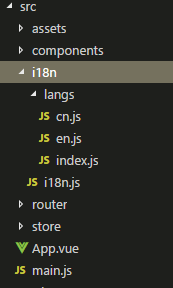
//i18n.js

import Vue from 'vue'

import VueI18n from 'vue-i18n'

import messages from './langs'

Vue.use(VueI18n)

//从localStorage中拿到用户的语言选择,如果没有,那默认中文。

const i18n = new VueI18n({

    locale: localStorage.lang || 'cn',

    messages,

})

export default i18n
//langs/index.js

import en from './en';

import cn from './cn';

export default {

    en: en,

    cn: cn

}
//en.js

const en = {

    message: {

        'hello': 'hello, world',

    }

}

export default en;
//cn.js

const cn = {

    message: {

        'hello': '你好,世界',

    }

}

export default cn;
//main.js添加下面代码

import i18n from './i18n/i18n';

window.app = new Vue({

  el: '#app',

  router,

  store,

  i18n,

  template: '<App/>',

  components: { App }

})
接下来是在页面中使用、切换语言。
//html:

<p>{{$t('message.hello')}}</p> // hello, world
//js切换语言

data() {

    return {

        lang: 'en'

    }

},

methods: {

    switchLang()  {

        this.$i18n.locale = this.lang

    }

}
vue.js+vue-i18n+elementUI国际化
更改的地方不多,如下
//i18n.js

import Vue from 'vue'

import locale from 'element-ui/lib/locale';

import VueI18n from 'vue-i18n'

import messages from './langs'

Vue.use(VueI18n)

//从localStorage中拿到用户的语言选择,如果没有,那默认中文。

const i18n = new VueI18n({

    locale: localStorage.lang || 'cn',

    messages,

})

locale.i18n((key, value) => i18n.t(key, value)) //为了实现element插件的多语言切换

export default i18n
$t()绑定方式
举栗:
一:<p>{{$t('message.hello')}}</p>
二::label="$t('cr.productCMO')"
三::rules="[{ required: true, message:$t('cr.textbox'), trigger: 'blur' }]"
四:Hae.alert(this.$t('cr.pushFailed'))
五:<h5>{{$t('cr.twarehouse')}}</h5>
六:<el-select v-model="value8" clearable @change="handleSelect" :placeholder="$t('cr.selectVersion')">
v-text、v-html中: <p v-text="$t('message.hello')"></p>
data中: label: this.$t('message.hello')
  <el-form-item :label="$t('cr.productCMO')" prop="SignUser.ProductCMO" :rules="[{ required: true, message:$t('cr.textbox'), trigger: 'blur' }]">

                <el-autocomplete popper-class="my-autocomplete" v-model="versionReleaseInfo.ParaData.SignUser.ProductCMO" :fetch-suggestions="querySearch" :placeholder="$t('cr.query')" @select="handleSelect0" clearable>

                  <i class="el-icon-search el-input__icon" slot="suffix">

                  </i>

                  <table slot-scope="props">

                    <tr>

                      <td style="width:200px">{{ props.item.person_notes_cn }}</td>

                      <td style="width:80px">{{ props.item.last_name }}</td>

                      <td style=" width:140px ">{{ props.item.dept }}</td>

                    </tr>

                  </table>

                </el-autocomplete>

                <!-- <el-input v-model="versionReleaseInfo.ParaData.SignUser.ProductCMO" clearable></el-input> -->

              </el-form-item>
书山有路勤为径,学海无涯苦作舟。
我在模仿,参照,如有侵权,请联系本人删除。
element-ui国际化探索(大型项目适用)的更多相关文章
- element ui form表单清空规则
公司项目重构,经过商定使用element ui.在重构项目的时候发现一下element ui上很蛋疼的东西. 例如,这个form表单就是一个.趁着在高铁上没事,把想写的东西写一下. 先说一下eleme ...
- vue实现多语言国际化(vue-i18n),结合element ui、vue-router、echarts以及joint等。
老板说我们的项目要和国际接轨,于是乎,加上了多语言(vue-i18n).项目用到的UI框架是element ui ,后续echarts.joint等全都得加上多语言. 一.言归正传,i18n在vue项 ...
- Vue + Element UI项目初始化
1.安装相关组件 1.1安装Node 检查本地是否安装node node -v 如果没有安装,从Node官网下载 1.2安装npm npm -v 如果没有安装:使用该指令安装: npm install ...
- Electron-vue实战(一)—搭建项目与安装Element UI
Electron-vue实战—搭建项目与安装Element UI 作者:狐狸家的鱼 本文链接 GitHub:sueRimn 一.新建项目1.初始化项目打开cmd,新建一个项目,我使用的是electro ...
- FastAPI实践项目:SayHello(FastAPI + vue.js + axios + element ui)
目录 简介 翻版 VS 本尊 后端服务 源码 接下来 简介 这次带来的是FastAPI + vue.js + axios + element ui (一个html文件里使用的) 实现的<Flas ...
- vue项目使用element ui的Checkbox
最近使用到element ui的下拉多选框Checkbox Checkbox用法可参考与于 http://element.eleme.io/#/zh-CN/component/checkbox Che ...
- vue+element ui项目总结点(二)table合计栏目,按照起始年份--截止年份 插入数据并向后追加数据以最后一条年份+1
1.oninput 事件在用户输入时触发; <template> <div class="test_box"> <p>hell,你好</p ...
- vue+element ui项目总结点(一)select、Cascader级联选择器、encodeURI、decodeURI转码解码、mockjs用法、路由懒加载三种方式
不多说上代码: <template> <div class="hello"> <h1>{{ msg }}</h1> <p> ...
- 🎉 Element UI for Vue 3.0 来了!
第一个使用 TypeScript + Vue 3.0 Composition API 重构的组件库 Element Plus 发布了 ~ 2016 年 3 月 13 日 Element 悄然诞生,经历 ...
随机推荐
- 如果你使用WebView+FloatingActionButton
在WebView中想要使用FAB,如果你想向上滑动的时候隐藏FAB,那么需要再WebView外面套一个ScrollView! 原因之前也分析过,和为什么ListView不能让ToolBar.Tab隐藏 ...
- oracle 12c 列式存储 ( In Memory 理论)
随着Oracle 12c推出了in memory组件,使得Oracle数据库具有了双模式数据存放方式,从而能够实现对混合类型应用的支持:传统的以行形式保存的数据满足OLTP应用:列形式保存的数据满足以 ...
- 添加一个用户并且让用户获得root权限
1.创建一般用户: 完全参考默认值创建一个用户, 一般账号UID应该是500以后的. 默认会创建用户家目录和账号一模一样的群组名.创建使用账号且给予口令才算完成了用户的创建流程. useradd us ...
- Poj1258_Agri-Net(最小生成树)
一.Description(poj1258) Farmer John has been elected mayor of his town! One of his campaign promises ...
- POJ2080:Calendar(计算日期)
Calendar Time Limit: 1000MS Memory Limit: 30000K Total Submissions: 12842 Accepted: 4641 Descrip ...
- 【转】Pro Android学习笔记(十三):用户界面和控制(1):UI开发
目录(?)[-] UI开发 方式一通过XML文件 方式二通过代码 方式三XML代码 UI开发 先理清一些UI概念: view.widget.control:这三个名词其实没有什么区别,都是一个UI元素 ...
- mybatis 学习一 总体概述
mybatis使用起来不复杂,大体上来说,就是将db连接信息,所有的sql语句信息,都放到配置文件里面,然后去读配置信息,根据db信息,创建好session工厂,然后拿到sqlsession回话之后, ...
- javascript面向对象的测试实例
- centos6.5安装zookeeper教程(三)
阅读前建议先阅读: http://www.cnblogs.com/duenboa/articles/6665159.html 1. 下载安装文件zookeeper-3.4.6.tar.gz 镜像地 ...
- C++之string类
1.String对象的初始化 string s1; 默认构造函数,s1为空串 string s4(n, 'c'); 将s4初始化为字符c的n个副本 string s ...