
SpringMVC—对Ajax的处理(含 JSON 类型)(3)
五、服务器端的 SpringMVC 如何返回 JSON 类型的字符串。
请求:
$("#testJson8").click(function () {

    $.ajax({

        url: "testReturnJsonValue",

        type: "post",

        success: function (result) {

            console.log(result);

        }

    });

});
1.返回单个对象
handler 方法:
@ResponseBody

@RequestMapping("/testReturnJsonValue")public Person testReturnJsonValue() {

    Person person = new Person();

    person.setName("lily");

    person.setAge(23);    return person;

}
在浏览器控制台正常打印了 Person 对象。
注意:这里没有指定 dataType。
2.返回多个对象
handler 方法:
@ResponseBody

@RequestMapping("/testReturnJsonValue")public List<Person> testReturnJsonValue() {

    List<Person> personList = new ArrayList<>();

    Person person = new Person();

    person.setName("lily");

    person.setAge(23);

    Person person2 = new Person();

    person2.setName("lucy");

    person2.setAge(33);

    personList.add(person);

    personList.add(person2);    return personList;

}
在浏览器控制条正常打印了 Person 数组。
3.返回 Map
@ResponseBody

@RequestMapping("/testReturnJsonValue")public Map<String, Person> testReturnJsonValue() {

    Map<String, Person> map = new HashMap<>();

    Person person = new Person();

    person.setName("lily");

    person.setAge(23);

    Person person2 = new Person();

    person2.setName("lucy");

    person2.setAge(33);

    map.put("1", person);

    map.put("2", person2);    return map;

}
浏览器控制台输出: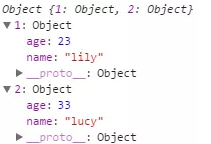
4.在实际生产环境下的 Ajax 返回值。
封装一个返回值类型:
public class AjaxResult implements Serializable {
public static final String RESULT_CODE_0000 = "0000";
public static final String RESULT_CODE_0001 = "0001";
private String code;
private String message;
private Object data;
public AjaxResult() {

    }
public String getCode() {        return this.code;

    }
public void setCode(String code) {        this.code = code;

    }
public String getMessage() {        return this.message;

    }
public void setMessage(String message) {        this.message = message;

    }
public Object getData() {        return this.data;

    }
public void setData(Object data) {        this.data = data;

    }

}
实际使用:
@ResponseBody

@RequestMapping("/testReturnJsonValue")
public AjaxResult testReturnJsonValue() {

    AjaxResult ajaxResult = new AjaxResult();
try {

        Map<String, Person> map = new HashMap<>();

        Person person = new Person();

        person.setName("lily");

        person.setAge(23);

        Person person2 = new Person();

        person2.setName("lucy");

        person2.setAge(33);

        map.put("1", person);

        map.put("2", person2);

        ajaxResult.setData(map);

        ajaxResult.setMessage("success!");

        ajaxResult.setCode(AjaxResult.RESULT_CODE_0000);

    } catch(Exception e) {

        e.printStackTrace();

        ajaxResult.setMessage("fail!");

        ajaxResult.setCode(AjaxResult.RESULT_CODE_0001);

    }    return ajaxResult;

}

六、Request Payload
(1)出现的条件:
contentType: 'application/json;charset=utf-8'
type:post
(2)具体请参看
http://xiaobaoqiu.github.io/blog/2014/09/04/form-data-vs-request-payload/
(3)建议尽量不要手动的去处理此种情况,能选用别的方式避免就尽量避免。
七、总结
主要介绍了SpringMVC 对 Ajax 的支持,对与 Ajax 数据如何组织,重点介绍了对表单的支持。
SpringMVC—对Ajax的处理(含 JSON 类型)(3)的更多相关文章
- SpringMVC—对Ajax的处理(含 JSON 类型)(2)
这里编写了一个通用的类型转换器: 用来转换形如: firstName=jack&lastName=lily&gender=1&foods=Steak&foods=Piz ...
- SpringMVC—对Ajax的处理(含 JSON 类型)(1)
一.首先要搞明白的一些事情. 1.从客户端来看,需要搞明白: (1)要发送什么样格式的 JSON 数据才能被服务器端的 SpringMVC 很便捷的处理,怎么才能让我们写更少的代码,如何做好 JSON ...
- 本文使用springMVC和ajax,实现将JSON对象返回到页面
一.引言 本文使用springMVC和ajax做的一个小小的demo,实现将JSON对象返回到页面,没有什么技术含量,纯粹是因为最近项目中引入了springMVC框架. 二.入门例子 ①. 建立工程, ...
- 通过Ajax进行POST提交JSON类型的数据到SpringMVC Controller的方法
现在在做的项目用到了SpringMVC框架,需要从前端angular接收请求的JSON数据,为了测试方便,所以直接先用AJAX进行测试,不过刚开始用平时用的ajax方法,提交请求会出现415或者400 ...
- springmvc通过ajax异步请求返回json格式数据
jsp 首先创建index.jsp页面 <script type="text/javascript"> $(function () { $("#usernam ...
- SpringMVC——对Ajax的处理(包含 JSON 类型)
一.首先要搞明白的一些事情. 1.从客户端来看,需要搞明白: (1)要发送什么样格式的 JSON 数据才能被服务器端的 SpringMVC 很便捷的处理,怎么才能让我们写更少的代码,如何做好 JSON ...
- SpringMVC中出现" 400 Bad Request "错误(用@ResponseBody处理ajax传过来的json数据转成bean)的解决方法
最近angularjs post到后台 400一头雾水 没有任何错误. 最后发现好文,感谢作者 SpringMVC中出现" 400 Bad Request "错误(用@Respon ...
- springMVC参数绑定JSON类型的数据
需求就是: 现在保存一个Student,并且保存Student的friend,一个student会有多个朋友,这里要传递到后台的参数是: var friends = new Array(); var ...
- springmvc接收JSON类型的数据
1.在使用AJAX传递JSON数据的时候要将contentType的类型设置为"application/json",否则的话会提示415错误 2.传递的data需要时JSON类型的 ...
随机推荐
- MyBatis联合查询association使用
1.需求 两张表 channels(频道表) member(会员表) 频道表里面有会员id,查询频道列表的时候需要关联查询出会员的名称,头像等信息 . 2.channels.xml定义,配置主要在这 ...
- 剑指Offer——链表中倒数第k个节点
Question 输入一个链表,输出该链表中倒数第k个结点. Solution 一种想法就是扫描两边,第一遍求出总的节点个数,第二遍从头开始走n-k个 第二种思想类似于fast-slow指针的方法,f ...
- VC 写注册表
BOOL Running() { HKEY hKey; LPCTSTR strRegPath = L"SOFTWARE\\Microsoft\\Windows\\CurrentVersion ...
- JAVA题库01
说出一些常用的类,包,接口,请各举5个 常用的类:BufferedReader BufferedWriter FileReader FileWirter String Integer java ...
- ubuntu安装Qt5
1.ubuntu 10.04 desktop amd64 问题: 1.1. 没有GLIBCXX_3.4.15版本,或是更高的版本 http://blog.chinaunix.net/uid-91530 ...
- 阿里云分布式缓存OCS与DB之间的数据一致性
[分布式系统的数据一致性问题] OCS概要介绍 据AlertSite网络分析公司表示,Facebook的响应时间在2010年平均为1秒钟,到2011年中期已提高到了0.73秒.对比来看,响应时间占 ...
- 【疯了Labview】(一)仿JKI的RCF 挂件
最近在疯狂的学习C#中,学习的最好的一个途径便是论坛,发帖,看帖和被骂,新手往往在这个过程中慢慢长大一直想做个类似JKI RCF挂件的东西,目前实现了,想想其实思路也不是很难, RCF是JKI做的通过 ...
- Memcached之缓存雪崩,缓存穿透,缓存预热,缓存算法
缓存雪崩 缓存雪崩可能是因为数据未加载到缓存中,或者缓存同一时间大面积的失效,从而导致所有请求都去查数据库,导致数据库CPU和内存负载过高,甚至宕机. 解决思路: 1,采用加锁计数,或者使用合理的队列 ...
- python中的列表和字典(一)
一. 列表 1. 列表的定义 [] 2. 列表特征:有序列表,可以包含任意内容,可以重复 3. 列表的赋值(顺序赋值):listA = [A, B, C] 4. 列表的取值:list[index] ...
- ES6-浏览器运行环境配置方法
现在ES6用的越来越多,想要学习使用ES6,只需简单搭建引入几个js即可运行ES6代码 但是需要基本的服务器环境下运行(如http://10.12.8.161:8047/js-test/export/ ...