
笔记-python-standard library-16.3 time
笔记-python-standard library-16.3 time
1. time
1.1. 开始
time模块中时间表现的格式主要有三种:
- timestamp时间戳,时间戳表示的是从1970年1月1日00:00:00开始按秒计算的偏移量
- struct_time时间元组,共有九个元素组。
- format time 格式化时间,已格式化的结构使时间更具可读性。包括自定义格式和固定格式。
时间戳单位最适于做日期运算。但是1970年之前的日期就无法以此表示了。太遥远的日期也不行,UNIX和Windows只支持到2038年。
1.2. 时间格式转换图
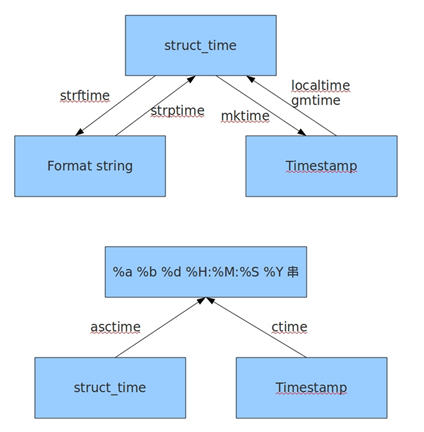
1.3. 常用时间格式和转换方法
import time
# timestamp
t = time.time()
# 从时间组转换为时间戳
t_m = time.mktime(time.localtime())
#print(t)
#print(t_m)
# 时间戳转本地时间,可带参数可不带,不带就是当前时间了
t1 = time.localtime(t)
#print(t1)
# 时间戳转格林尼治时间,同上一函数
t2 = time.gmtime(t)
#print(t2)
# 格式化输出
# %b 表示英文缩写月份,还有很多格式
# 常规的就下面一行了,更多格式化内容查看文档
t_s1 = time.strftime('%Y-%m-%d %H:%M:%S',t1)
# 另一种格式化,是一种特定格式
t_s2 = time.asctime(t1)
#print(t_s1)
#print(t_s2)
# 字符串转时间
# time.strftime(fmt[,tupletime])
# 接收以时间元组,并返回以可读字符串表示的当地时间,格式由fmt决定。
print (time.strftime("%Y-%m-%d %H:%M:%S",
time.localtime()))
# time.strptime(str,fmt='%a %b %d %H:%M:%S %Y')
# 根据fmt的格式把一个时间字符串解析为时间元组。
struct_time = time.strptime("30 Nov 00", "%d
%b %y")
print("返回元组: ", struct_time)
# 休眠,单位秒,支持浮点数
# 注意:一般会比给定时间长,因为还有系统调用的影响。
time.sleep()
笔记-python-standard library-16.3 time的更多相关文章
- Python Standard Library
Python Standard Library "We'd like to pretend that 'Fredrik' is a role, but even hundreds of vo ...
- The Python Standard Library
The Python Standard Library¶ While The Python Language Reference describes the exact syntax and sema ...
- Python语言中对于json数据的编解码——Usage of json a Python standard library
一.概述 1.1 关于JSON数据格式 JSON (JavaScript Object Notation), specified by RFC 7159 (which obsoletes RFC 46 ...
- 《The Python Standard Library》——http模块阅读笔记1
官方文档:https://docs.python.org/3.5/library/http.html 偷个懒,截图如下: 即,http客户端编程一般用urllib.request库(主要用于“在这复杂 ...
- 《The Python Standard Library》——http模块阅读笔记2
http.server是用来构建HTTP服务器(web服务器)的模块,定义了许多相关的类. 创建及运行服务器的代码一般为: def run(server_class=HTTPServer, handl ...
- 《The Python Standard Library》——http模块阅读笔记3
http.cookies — HTTP state management http.cookies模块定义了一系列类来抽象cookies这个概念,一个HTTP状态管理机制.该模块支持string-on ...
- Python Standard Library 学习(一) -- Built-in Functions 内建函数
内建函数列表 Built-in Functions abs() divmod() input() open() staticmethod() all() enumerate() int() ord() ...
- [译]The Python Tutorial#11. Brief Tour of the Standard Library — Part II
[译]The Python Tutorial#Brief Tour of the Standard Library - Part II 第二部分介绍更多满足专业编程需求的高级模块,这些模块在小型脚本中 ...
- [译]The Python Tutorial#10. Brief Tour of the Standard Library
[译]The Python Tutorial#Brief Tour of the Standard Library 10.1 Operating System Interface os模块为与操作系统 ...
- C++11新特性——The C++ standard library, 2nd Edition 笔记(一)
前言 这是我阅读<The C++ standard library, 2nd Edition>所做读书笔记的第一篇.这个系列基本上会以一章一篇的节奏来写,少数以C++03为主的章节会和其它 ...
随机推荐
- php的yii框架开发总结7
protected\config\main.php是整个网站中很重要的一个文件,引用文件,连接数据库,默认页面等都是在这里设置: 'import'=>array( 'application.mo ...
- mysql自增ID
InnoDB引擎的表,执行清空操作之后,表的auto_increment值不会受到影响:一旦重启MySQL,auto_increment值将变成1. MyISAM引擎的表,执行清空操作之后,表的aut ...
- vscode:快速生成html的方法
第一步:在空文档中输入! 第二步:按下tab键. 以上
- TP5.1:模板赋值与变量输出
模板赋值:assign() 模板渲染:fetch() 前提准备: 1.在app/index/controller下建立一个控制器,名为Templates.php,里面有test1和test2方法,并且 ...
- April 4 2017 Week 14 Tuesday
Problems are not stop signs, they are guidelines. 问题不是休止符,而是引向标. It is ture during our explorations ...
- naive bayes classifier in data mining
https://www-users.cs.umn.edu/~kumar001/dmbook/slides/chap4_naive_bayes.pdf -- textbook https://www. ...
- 【转载】#370 - Subscribe to an Event by Adding an Event Handle
You subscribe to a particular event in C# by defining an event handler-code that will be called when ...
- 【转载】#346 - Polymorphism
Recall that polymorphism is one of the three core principles of object-oriented programming. Polymor ...
- 基于ASP.NET WPF技术及MVP模式实战太平人寿客户管理项目开发(Repository模式)
亲爱的网友,我这里有套课程想和大家分享,假设对这个课程有兴趣的.能够加我的QQ2059055336和我联系. 课程背景 本课程是教授使用WPF.ADO.NET.MVVM技术来实现太平人寿保险有限公司 ...
- 1.4 配置备份策略(Policy)
1.1 配置备份策略(Policy) 一个备份策略由四部分组成. Attributes(属性) Policy是否Active Policy类型 由此Policy产生的任务的优先级 使用的Storage ...