
【java】java自带的java.util.logging.Logger日志功能
偶然翻阅到一篇文章,注意到Java自带的Logger日志功能,特地来细细的看一看,记录一下。
1.Java自带的日志功能,默认的配置
①Logger的默认配置,位置在JRE安装目录下lib中的logging.properties中
②logging.properties日志文件内容如下:
############################################################

#      Default Logging Configuration File

#

# You can use a different file by specifying a filename

# with the java.util.logging.config.file system property.

# For example java -Djava.util.logging.config.file=myfile

############################################################

############################################################

#      Global properties

############################################################

# "handlers" specifies a comma separated list of log Handler

# classes.  These handlers will be installed during VM startup.

# Note that these classes must be on the system classpath.

# By default we only configure a ConsoleHandler, which will only

# show messages at the INFO and above levels.

handlers= java.util.logging.ConsoleHandler

# To also add the FileHandler, use the following line instead.

#handlers= java.util.logging.FileHandler, java.util.logging.ConsoleHandler

# Default global logging level.

# This specifies which kinds of events are logged across

# all loggers.  For any given facility this global level

# can be overriden by a facility specific level

# Note that the ConsoleHandler also has a separate level

# setting to limit messages printed to the console.

.level= INFO

############################################################

# Handler specific properties.

# Describes specific configuration info for Handlers.

############################################################

# default file output is in user's home directory.

java.util.logging.FileHandler.pattern = %h/java%u.log

java.util.logging.FileHandler.limit = 50000

java.util.logging.FileHandler.count = 1

java.util.logging.FileHandler.formatter = java.util.logging.XMLFormatter

# Limit the message that are printed on the console to INFO and above.

java.util.logging.ConsoleHandler.level = INFO

java.util.logging.ConsoleHandler.formatter = java.util.logging.SimpleFormatter

# Example to customize the SimpleFormatter output format

# to print one-line log message like this:

#     <level>: <log message> [<date/time>]

#

# java.util.logging.SimpleFormatter.format=%4$s: %5$s [%1$tc]%n

############################################################

# Facility specific properties.

# Provides extra control for each logger.

############################################################

# For example, set the com.xyz.foo logger to only log SEVERE

# messages:

com.xyz.foo.level = SEVERE
关于日志文件中,需要关注的第一点是:

需要关注的第二点是:
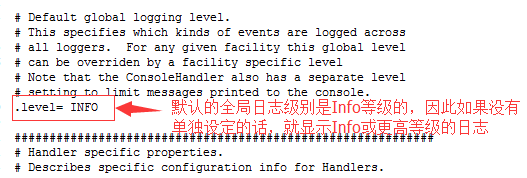
需要关注的第三点是:

需要关注的第四点是:

2.java.util.logging.Level类设定了日志级别类的设定
可以从API看出来,出了以下的Level各个级别,还有OFF和ALL两个级别。
如果设置为Level.INFO级别的话,日志只会显示INFO以及以上的级别。

3.Logger的简单使用
首先明确一点,java.util.logging.Logger的初始化方法
static Logger getLogger(String name)
name代表你的Logger名称,如果指定getLogeger相同名称,则仅会创建一个对象
static Logger getLogger(String name, String resourceBundleName)
name代表你的Logger名称,resourceBundleName代表本地化的Logger名称,也就是记录到本地磁盘的日志文件中,每一条Logger的名称
接下来,看看效果:
package com.sxd.util;

import java.util.logging.Level;

import java.util.logging.Logger;

import org.junit.Test;

/**

 * 测试Java自带的Log日志功能

 * @author sxd

 *

 */

public class TestLog {

    @Test

    public void test(){

        Logger log1 = Logger.getLogger("log-Test");

        log1.setLevel(Level.INFO);

        Logger log2 = Logger.getLogger("log-Test");

        System.out.println("log1和log2是否相等:"+(log1 == log2));    //true

        Logger log3 = Logger.getLogger("log-test");

        System.out.println("log1和log3是否相等:"+(log1 == log3));    //false

        log3.setLevel(Level.WARNING);

        log1.info("info级别打印:info级别的日志信息");

        log3.info("warning级别打印:info级别的日志信息");        //打印不出来

        log3.severe("warning级别打印:severe级别的日志信息");

    }

}
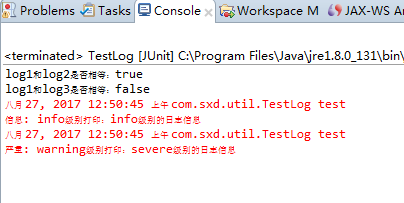
由此,可以证明,①设定的日志级别仅能打印到本级别以及高级别的日志信息;②同名的Logger仅会创建一个。
4.设定FileHandler,为日志本地化设定
package com.sxd.util;

import java.io.IOException;

import java.util.logging.ConsoleHandler;

import java.util.logging.FileHandler;

import java.util.logging.Level;

import java.util.logging.Logger;

import org.junit.Test;

/**

 * 测试Java自带的Log日志功能

 * @author sxd

 *

 */

public class TestLog {

    @Test

    public void test() throws SecurityException, IOException{

        Logger log1 = Logger.getLogger("log-Test");

        ConsoleHandler consoleHandler = new ConsoleHandler();

        consoleHandler.setLevel(Level.ALL);

        log1.addHandler(consoleHandler);

        FileHandler fileHandler = new FileHandler("d:/testLog%g.log");

        fileHandler.setLevel(Level.WARNING);

        log1.addHandler(fileHandler);

        log1.info("ALL级别打印:info级别的日志信息");

        log1.severe("warning级别打印:severe级别日志信息");

    }

}
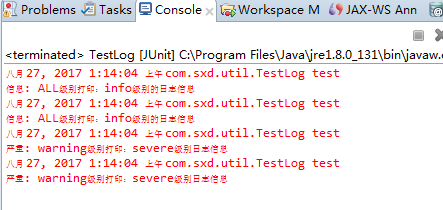
控制台:
【注意】这里控制台打印了两遍相同的日志,是因为,java默认的已经设定了一个ConsoleHandler,但是这个级别是INFO级别的。
而程序中有重新设定了一个新的ConsoleHandler,这个级别是ALL的,两个不一样,所以都执行了打印,所以打印了两遍一模一样的。
本地日志文件:
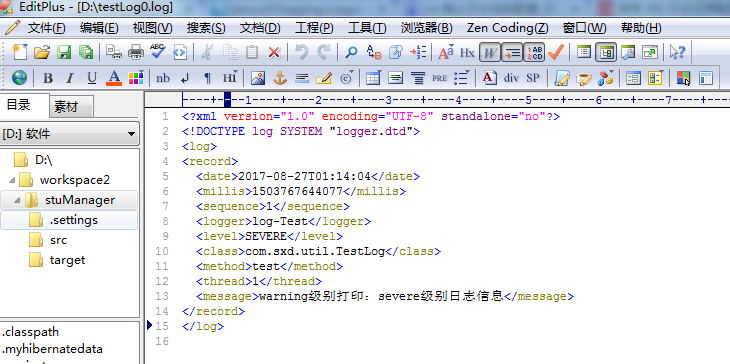
【注意】仅打印了一个日志,这个根据代码日志级别就可以理解。
关键日志文件是XML格式的内容,是因为上面解释了FileHandler的相关设置中,默认是XML格式

【注意2】FileHandler指定日志文件名称,有以下的规范:

5.为本地化的日志文件设置自定义的日志格式
java.util.logging.LogRecord;
java.util.logging.Formatter;
package com.sxd.util;

import java.io.IOException;

import java.util.logging.ConsoleHandler;

import java.util.logging.FileHandler;

import java.util.logging.Formatter;

import java.util.logging.Level;

import java.util.logging.LogRecord;

import java.util.logging.Logger;

import org.junit.Test;

/**

 * 测试Java自带的Log日志功能

 * @author sxd

 *

 */

public class TestLog {

    @Test

    public void test() throws SecurityException, IOException{

        Logger log1 = Logger.getLogger("log-Test");

        FileHandler fileHandler = new FileHandler("d:/testLog%g.log");

        fileHandler.setLevel(Level.WARNING);

        fileHandler.setFormatter(new MyFormatter());

        log1.addHandler(fileHandler);

        log1.severe("warning级别打印:severe级别日志信息");

    }

    class MyFormatter extends Formatter{

        @Override

        public String format(LogRecord record) {

            return record.getLoggerName()

                    + ">>"

                    +record.getLevel()

                    +">>"

                    +record.getMessage();

        }

    }

}
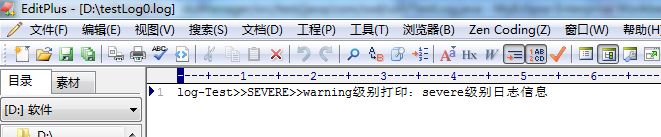
=======================================到这里,告一段落=========================================
【java】java自带的java.util.logging.Logger日志功能的更多相关文章
- java.lang.NoClassDefFoundError: Lcom/opensymphony/xwork2/util/logging/Logger tomcat6 启动错误
用tomcat6启动时,出现下面的错误Java.lang.NoClassDefFoundError: Lcom/opensymphony/xwork2/util/logging/Logger; Cau ...
- 通配置文件的方式控制java.util.logging.Logger日志输出
转自:http://zochen.iteye.com/blog/616151 简单的实现了下利用JDK中类java.util.logging.Logger来记录日志.主要在于仿照log4j方式用配置文 ...
- java.util.logging.Logger日志生成过程浅析 (转)
http://www.tuicool.com/articles/vy6Zrye ****************************************** java.util.logging ...
- Java日志组件1---Jdk自带Logger(java.util.logging.Logger)
最近在看日志的一些东西,发现利用JDK自带的log也可以简单的实现日志的输出,将日志写入文件的过程记录如下: 1.新建LogUtil.Java( 里面写了几个静态方法,为log设置等级.添加log控制 ...
- Java日志工具之java.util.logging.Logger
今天总结下JDK自带的日志工具Logger,虽然它一直默默无闻,但有时使用它却比较方便.更详细的信息可以查看JDK API手册,本文只是简单示例入门. 创建Logger 我们可以使用Logger的工厂 ...
- java.util.logging.Logger基础
1. 定义 java.util.logging.Logger是Java自带的日志类,可以记录程序运行中所产生的日志.通过查看所产生的日志文件,可以分析程序的运行状况,出现异常时,分析及定位异常. 2. ...
- 2.java.util.logging.Logger使用详解
一.java.util.logging.Logger简介 java.util.logging.Logger不是什么新鲜东西了,1.4就有了,可是因为log4j的存在,这个logger一直沉默着, 其实 ...
- java.util.logging.Logger使用详解 (转)
http://lavasoft.blog.51cto.com/62575/184492/ ************************************************* java. ...
- java.util.logging.Logger使用具体解释
java.util.logging.Logger不是什么新奇东西了,1.4就有了,但是由于log4j的存在,这个logger一直沉默着,事实上在一些測试性的代码中,jdk自带的logger比log4j ...
随机推荐
- maven中mapper.xml不发布的问题
在自定义的包中定义了mapper.xml然后利用mybatis的扫描包形式来动态创建mapper 开启工程报错: 说无效的绑定 原因: 发布的war中,工程包中的mapper根本就没有出现在class ...
- android桌面悬浮窗实现
首先是一个小的悬浮窗显示的是当前使用了百分之多少的内存,点击一下小悬浮窗,就会弹出一个大的悬浮窗,可以一键加速.好,我们现在就来模拟实现一下类似的效果. ...
- 使用C#创建windows服务程序
创建windows服务项目 一.创建服务 1.文件->新建->项目->windows桌面->windows服务,修改你要的项目名称.我这不改名,仍叫WindowsService ...
- 旅行规划(travel)
题目描述 OIVillage 是一个风景秀美的乡村,为了更好的利用当地的旅游资源,吸引游客,推动经济发展,xkszltl 决定修建了一条铁路将当地 nnn 个最著名的经典连接起来,让游客可以通过火车从 ...
- 模拟Json格式传值请求与数据接收
a.php代码: function http_post_json($url, $jsonStr) { $ch = curl_init(); curl_setopt($ch, CURLOPT_POST, ...
- 汕头市队赛 SRM14 T2 最长上升子序列
最长上升子序列 (tree.pas/c/cpp) 128MB 1s 有一个长度为n的序列a[i],其中1到n的整数各自在a[i]中出现恰好一次. 现在已知另一个等长的序列f[i],表示a[i]中以第i ...
- Linux Mint---shutter截图软件
shutter 可以说是linux下最好的截图软件了,默认安装好后不能编辑截图,解决方法如下: 1-关闭shutter 2-sudo apt-get install shutter libgoo-ca ...
- suse10与suse11连接Xmanager的配置
原创作品,允许转载,转载时请务必以超链接形式标明文章 原始出处 .作者信息和本声明.否则将追究法律责任.http://feidandelion.blog.51cto.com/1050439/42217 ...
- ScrollLayer
http://www.oschina.net/p/scrolllayer ScrollLayer 编辑/纠错 分享到: 已用 +1 收藏 +12 4月18日 武汉 源创会开始报名,送华为开 ...
- 【leetcode】500. Keyboard Row
问题描述: Given a List of words, return the words that can be typed using letters of alphabet on only on ...