
WCF服务跟踪
如果在开发过程中,WCF服务出现问题,我们可以通过服务引用,然后直接断点调试进去。然而,对于已经发布的服务,出现错误时,寻找错误信息会变得麻烦。
幸好,微软提供了服务跟踪查看器工具 (SvcTraceViewer.exe)这个工具来跟踪已发布的服务。
可以在文件夹: C:\Program Files (x86)\Microsoft SDKs\Windows\v7.0A\Bin找到(我的系统是WIN7,.NET 4.0)
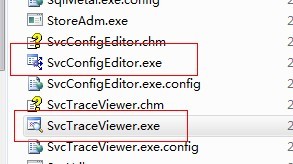
配置服务跟踪相当简单,可以用上面的SvcConfigEditor.exe来打开服务的config文件配置。
也可以手动修改配置,增加一个diagnostics的配置节点。
<?xml version="1.0" encoding="utf-8"?>

<configuration>

  <system.web>

    <compilation targetFramework="4.5" />

    <httpRuntime targetFramework="4.5"/>

  </system.web>

  <system.serviceModel>
<!--添加跟踪节点-->
<diagnostics>

    <messageLogging logEntireMessage="true" logMalformedMessages="true"

       logMessagesAtTransportLevel="true" />

    </diagnostics>

    <behaviors>

      <serviceBehaviors>

        <behavior>

          <!-- 为避免泄漏元数据信息,请在部署前将以下值设置为 false -->

          <serviceMetadata httpGetEnabled="true" httpsGetEnabled="true"/>

          <!-- 要接收故障异常详细信息以进行调试,请将以下值设置为 true。在部署前设置为 false 以避免泄漏异常信息 -->

          <serviceDebug includeExceptionDetailInFaults="true"/>

        </behavior>

      </serviceBehaviors>

    </behaviors>

    <protocolMapping>

      <add binding="basicHttpsBinding" scheme="https" />

    </protocolMapping>

    <serviceHostingEnvironment aspNetCompatibilityEnabled="true" multipleSiteBindingsEnabled="true" />

    <bindings>

      <basicHttpBinding>

        <binding name="ServiceProxyBinding" closeTimeout="00:10:00" receiveTimeout="00:10:00"

          sendTimeout="00:10:00" maxBufferSize="2147483647" maxReceivedMessageSize="2147483647">

          <readerQuotas maxStringContentLength="2147483647" />

        </binding>

        <binding name="BasicHttpBinding_IAircraftService" maxBufferSize="2147483647"

          maxReceivedMessageSize="2147483647" />

        <binding name="BasicHttpBinding_ITransCenter" />

        <binding name="BasicHttpBinding_IDecodeService" />

      </basicHttpBinding>

    </bindings>

    <client>

      <endpoint address="http://192.168.85.70:5596/TransCenterSer.svc"

        binding="basicHttpBinding" bindingConfiguration="BasicHttpBinding_ITransCenter"

        contract="TransCenterSer.ITransCenter" name="BasicHttpBinding_ITransCenter" />

      <endpoint address="http://192.168.85.70:8010/AHMTService/DecodeService.svc"

        binding="basicHttpBinding" bindingConfiguration="BasicHttpBinding_IDecodeService"

        contract="DecodeService.IDecodeService" name="BasicHttpBinding_IDecodeService" />

    </client>

  </system.serviceModel>
<!--配置跟踪节点-->
 <system.diagnostics>

   <sources>

     <source name="System.ServiceModel.MessageLogging" switchValue="Warning, ActivityTracing">

       <listeners>

         <add type="System.Diagnostics.DefaultTraceListener" name="Default">

           <filter type="" />

         </add>

         <add name="ServiceModelMessageLoggingListener">

           <filter type="" />

         </add>

       </listeners>

     </source>

     <source name="System.ServiceModel" switchValue="Warning, ActivityTracing"

       propagateActivity="true">

       <listeners>

         <add type="System.Diagnostics.DefaultTraceListener" name="Default">

           <filter type="" />

         </add>

         <add name="ServiceModelTraceListener">

           <filter type="" />

         </add>

       </listeners>

     </source>

   </sources>

   <sharedListeners>

     <add initializeData="D:\LogData\MoveQarData_messages.svclog"

       type="System.Diagnostics.XmlWriterTraceListener, System, Version=2.0.0.0, Culture=neutral, PublicKeyToken=b77a5c561934e089"

       name="ServiceModelMessageLoggingListener" traceOutputOptions="Timestamp">

       <filter type="" />

     </add>

     <add initializeData="D:\LogData\MoveQarData_tracelog.svclog"

       type="System.Diagnostics.XmlWriterTraceListener, System, Version=2.0.0.0, Culture=neutral, PublicKeyToken=b77a5c561934e089"

       name="ServiceModelTraceListener" traceOutputOptions="Timestamp">

       <filter type="" />

     </add>

   </sharedListeners>

   <trace autoflush="true" />

</system.diagnostics>

  <system.webServer>

    <modules runAllManagedModulesForAllRequests="true"/>

    <!--

        若要在调试过程中浏览 Web 应用程序根目录,请将下面的值设置为 True。

        在部署之前将该值设置为 False 可避免泄露 Web 应用程序文件夹信息。

      -->

    <directoryBrowse enabled="true"/>

  </system.webServer>

</configuration>
参考:http://msdn.microsoft.com/zh-cn/library/ms732023.aspx
http://www.cnblogs.com/cbcye/archive/2009/06/02/1494734.html
http://www.cnblogs.com/cnblogsfans/archive/2009/03/16/1413069.html
WCF服务跟踪的更多相关文章
- 关于WCF服务的调试跟踪
关于WCF服务的调试跟踪信息,请利用好以下几个工具,具体的例子MSDN上都有,进去看吧... 服务跟踪查看器工具 (SvcTraceViewer.exe): http://msdn.microsoft ...
- Entity Framework 6 Recipes 2nd Edition(9-7)译->在WCF服务中序列化代理
9-7. 在WCF服务中序列化代理 问题 从一个查询里返回一个动态代理对象,想要把它序列为一个POCO(Plain-Old CLR Objects)对象. 实现基于POCO实体对象, 在运行时,EF会 ...
- WCF学习之旅—WCF服务部署到IIS7.5(九)
上接 WCF学习之旅—WCF寄宿前的准备(八) 四.WCF服务部署到IIS7.5 我们把WCF寄宿在IIS之上,在IIS中宿主一个服务的主要优点是在发生客户端请求时宿主进程会被自动启动,并且你可以 ...
- WCF初探-8:WCF服务承载 (上)
前言 任何一个程序的运行都需要依赖一个确定的进程中,WCF服务也不例外.如果使用WCF服务,我们就必须将服务承载于创建它并控制它的上下文和生存期的运行时环境中,承载服务环境的程序,我们称之为宿主.WC ...
- WCF服务运行一段时间后客户端无法连接WCF服务的解决办法 (转)
WCF服务运行一段时间后客户端无法连接WCF服务的解决办法 (转) Windows Communication Foundation (WCF)是Microsoft为构建面向服务的应用提供的分布式通信 ...
- 编写寄宿于windows服务的WCF服务
由于业务中有些任务需要在后台静默长期运行,或者有些服务队响应的要求比较苛刻,这样的WCF服务就不适合寄宿于IIS中.IIS每隔一段时间w3wp进程会闲置超时,造成服务的运行停止,因此这种耗时或者定时任 ...
- 练习 配置WCF服务
http://blog.csdn.net/suntanyong88/article/details/8203572 目录(?)[+] 1OrderTrackWindowsKZT 控制台应用 程 ...
- WCF系列教程之WCF服务宿主与WCF服务部署
本文参考自http://www.cnblogs.com/wangweimutou/p/4377062.html,纯属读书笔记,加深记忆. 一.简介 任何一个程序的运行都需要依赖一个确定的进程中,WCF ...
- WCF服务调用超时错误:套接字连接已中止。这可能是由于处理消息时出错或远程主机超过接收超时或者潜在的网络资源问题导致的。本地套接字超时是“00:05:30”(已解决)
问题: 线上正式环境调用WCF服务正常,但是每次使用本地测试环境调用WCF服务时长就是出现:套接字连接已中止.这可能是由于处理消息时出错或远程主机超过接收超时或者潜在的网络资源问题导致的.本地套接字超 ...
随机推荐
- jquery submit()不执行
好吧我承认我竟然犯低级错误了...我忏悔...为了提醒自己置顶一个礼拜 <form id="form" method="post"> <inp ...
- Environment 常用方法
* 方法:getDataDirectory()解释:返回 File ,获取 Android 数据目录.* 方法:getDownloadCacheDirectory()解释:返回 File ,获取 An ...
- 【解决】同一url的http请求所获取的结果总是相同
曾经在WP7写过一个通过HTTP获取网页内容的小程序,当时一直没能够解决: 有一个网址,在每次点击刷新之后页面所呈现的内容都是不同的.但是进行HTTP请求时,结果将会一直重复. 从网上查资料得知,在请 ...
- 如何设计PHP业务模块(函数/方法)返回结果的结构?
如题:如何设计业务模块返回结果的结构? 一个业务函数/方法执行后,对外输出数据的结构通常有以下几种: 1.返回数字,如 成功时返回 0,失败时返回 -1,有的还会用一个全局变量输出错误信息: < ...
- Git 常用命令2
Git 常用命令 Git 是一个很强大的分布式版本控制系统.它不但适用于管理大型开源软件的源代码,管理私人的文档和源代码也有很多优势. Git常用操作命令: 1) 远程仓库相关命令 检出仓库:$ gi ...
- jquery获取和设置表单数据
1.需求 正好做到设置和获取表单数据的功能,做个整理 2.计划安排 3.计划实施 1.获取值 <!--1获取普通文本框的值--> <input type="text&quo ...
- python 函数的调用 和执行 小知识
1.符号表 执行一个函数会引入一个用于函数的局部变量的新符号表. 更确切地说, 函数中的所有的赋值都是将值存储在局部符号表: 而变量引用首先查找局部符号表, 然后是上层函数的局部符号表, 然后是全局符 ...
- FTP 传输中的主动模式和被动模式
最近做一个项目用到FTP和其它系统进行文件传输,结果在FTP网络连接的问题上花了很多时间,由于太久没搞多FTP,忘记了FTP不单单开放21端口,客户端采用不同连接模式对网络有不同.在此重温一下FTP的 ...
- PHP开发神器——phpstorm
常用快捷键 快捷键 说明 ctrl+j 插入活动代码提示 ctrl+alt+t 当前位置插入环绕代码 alt+insert 生成代码菜单 Shift + Enter 新一行 ctrl+q 查看代码注释 ...
- C语言的执行
在ANSIC 的任何一种实现中,有两种不同的环境 翻译环境:将源代码转换为可执行的机器代码 执行环境:用于执行代码 这两种环境可以运行于同一个机器上,也可以运行于不同的机器上 例如交叉编译器:在一台机 ...