
Android开发之Fragment
一、Fragment生命周期:
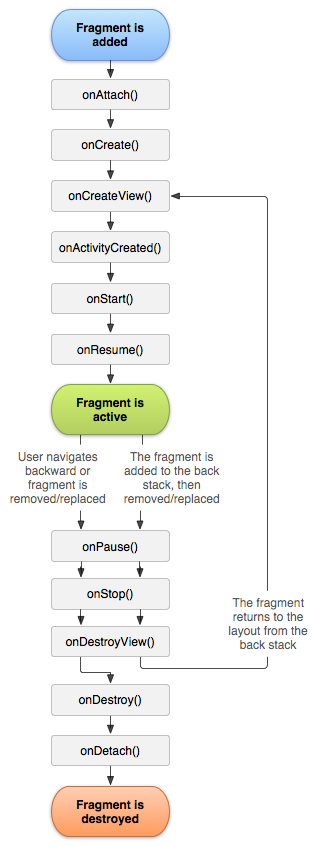
二、动态添加Fragment的三步:
1、获得Fragment的管理者FragmentManager
FragmentManager fragmentManager = getFragmentManager();
2、开启事务:
FragmentTransaction transaction = fragmentManager.beginTransaction();
3、提交事务:
transaction.commit();
下面是四个Fragment的切换:
     public void onClick(View view) {
         //获得fragment的管理者
         android.app.FragmentManager fragmentManager = getFragmentManager();
         //开启事物
         FragmentTransaction transaction = fragmentManager.beginTransaction();
         switch (view.getId()){
             case R.id.btn_wx:{//点击类微信
                 transaction.replace(R.id.ll,new WxFragment());
             }break;
             case R.id.btn_contact:{//点击了联系人
                 transaction.replace(R.id.ll,new ContactFragment());
             }break;
             case R.id.btn_discover:{//点击了发现
                 transaction.replace(R.id.ll,new DiscoverFragment());
             }break;
             case R.id.btn_me:{//点击了me
                 transaction.replace(R.id.ll,new MeFragment());
             }break;
             default: break;
         }
         //最后一步,提交事物
         transaction.commit();
     }
以WxFragment为例:
public View onCreateView(LayoutInflater inflater, ViewGroup container, Bundle savedInstanceState) {
        //通过打气筒把一个布局转换成一个view对象
        View view = inflater.inflate(R.layout.fragment_wx,null);
        return view;
    }
三、Fragment之间的通信:
已Fragment1修改Fragment2的TextView的值为例:
MainActivity:
         android.app.FragmentManager fragmentManager = getFragmentManager();
         FragmentTransaction transaction = fragmentManager.beginTransaction();

         transaction.replace(R.id.ll1,new Fragment1(),"f1");
         transaction.replace(R.id.ll2,new Fragment2(),"f2");

         transaction.commit();
Fragment1:
 public View onCreateView(LayoutInflater inflater, ViewGroup container, Bundle savedInstanceState) {
         View view = inflater.inflate(R.layout.fragment1,null);
         view.findViewById(R.id.bnt).setOnClickListener(new View.OnClickListener() {
             @Override
             public void onClick(View view) {
                 //修改TextView的值
                 Fragment2 f2 = (Fragment2)getActivity().getFragmentManager().findFragmentByTag("f2");
           //调Fragment2中的setText函数修改TextView的值
                 f2.setText("haha");
             }
         });
         return view;
     }
Fragment2:
 public View onCreateView(LayoutInflater inflater, ViewGroup container, Bundle savedInstanceState) {
         View view = inflater.inflate(R.layout.fragment2,null);
         tv = (TextView) view.findViewById(R.id.tv);
         return view;
     }
     public void setText(String content){
         tv.setText(content);
     }
ps:通过Tag可以得到Fragment2的实例,然后去修改值就行了。
Android开发之Fragment的更多相关文章
- android开发之Fragment加载到一个Activity中
Fragments 是android3.0以后添加的.主要是为了方便android平板端的开发.方便适应不同大小的屏幕.此代码是为了最简单的Fragment的使用,往一个Activity中添加Frag ...
- Android开发之Fragment的介绍、使用及生命周期
Fragment官网介绍-http://developer.android.com/guide/components/fragments.html 郭大神的使用实例文章:http://blog.csd ...
- Android开发之Fragment传递參数的几种方法
Fragment在Android3.0開始提供,而且在兼容包中也提供了Fragment特性的支持. Fragment的推出让我们编写和管理用户界面更快捷更方便了. 但当我们实例化自己定义Fragmen ...
- Android开发之ViewPager+ActionBar+Fragment实现响应式可滑动Tab
今天我们要实现的这个效果呢,在Android的应用中十分地常见,我们可以看到下面两张图,无论是系统内置的联系人应用,还是AnyView的阅读器应用,我们总能找到这样的影子,当我们滑动屏幕时,Tab可 ...
- Android开发之Java集合类性能分析
对于Android开发者来说深入了解Java的集合类很有必要主要是从Collection和Map接口衍生出来的,目前主要提供了List.Set和 Map这三大类的集合,今天Android吧(ard8. ...
- Android开发之InstanceState详解
Android开发之InstanceState详解 本文介绍Android中关于Activity的两个神秘方法:onSaveInstanceState() 和 onRestoreInstanceS ...
- Android开发之Git配置
Android开发之Git配置 1.首先git配置: 输入命令: git config --global user.name "xxx.xx" git config --globa ...
- 【Android UI】Android开发之View的几种布局方式及实践
引言 通过前面两篇: Android 开发之旅:又见Hello World! Android 开发之旅:深入分析布局文件&又是“Hello World!” 我们对Android应用程序运行原理 ...
- Android开发之旅: Intents和Intent Filters(理论部分)
引言 大部分移动设备平台上的应用程序都运行在他们自己的沙盒中.他们彼此之间互相隔离,并且严格限制应用程序与硬件和原始组件之间的交互. 我们知道交流是多么的重要,作为一个孤岛没有交流的东西,一定毫无意义 ...
随机推荐
- read
从标准输入读入一行内容并以空格为分隔符赋值给变量,如果输入的内容过多,则把剩下的所有内容都赋值给最后一个变量 $read A B C 123 456 789 101 $echo "$A&qu ...
- ubuntu 安装配置jdk+eclipse+android sdk
共5步: 1.安装jdk 2.安装eclipse 3.安装android-sdk 4.安装adb 5.在eclipse中安装ADT 1.安装jdk 之前已经安装好了. 用下面的命令安装,只需一些时间, ...
- Redhat使用CentOS的Yum 网络源
Redhat 的更新包只对注册的用户生效,所以我们自己手动更改成CentOS 的更新包,CentOS几乎和redhat是一样的. 1.首先查看redhat 7.0系统本身所安装的那些yum 软件包:[ ...
- monkeyrunner之环境搭建及实例(三)
Monkeyrunner工具提供了一个API,使用此API写出的程序可以在Android代码之外控制Android设备和模拟器. 一.Monkeyrunner简介 1.MOnkeyrunner相对Mo ...
- Linux 中如何卸载已安装的软件(转载)
Linux 中如何卸载已安装的软件. Linux软件的安装和卸载一直是困扰许多新用户的难题.在Windows中,我们可以使用软件自带的安装卸载程序或在控制面板中的“添加/删除程序”来实 ...
- Appium学习实践(四)结构优化
随着我们测试脚本中的用例越来越多,我们不可能将所有的用例都放在同一个脚本中,所以我们需要优化我们的结构.将脚本放在一个文件夹中,再通过别的脚本来执行脚本.这样,我们也可以有选择性的执行我们的脚本 先来 ...
- CF719C. Efim and Strange Grade[DP]
C. Efim and Strange Grade time limit per test 1 second memory limit per test 256 megabytes input sta ...
- session和cookie的区别和联系
使用session会在客户端生成一个文件,这个文件是以session_id来命名,用来保存文件:生成的文件保存在这个路径中:session.save_path = "D:/wampstack ...
- 嵌入式Linux驱动学习之路(三)u-boot配置分析
u-boot配置流程分析 执行make tiny4412_config后,将会对u-boot进行一些列的配置,以便于后面的编译. 打开顶层目录下的Makefile,查找对于的规则tiny4412_co ...
- JS常用方法函数整理
1.document.write("");为输出语句 2.JS中的注释为// 3.传统的HTML文档顺序是:document->html->(head,body) 4. ...