
莫烦tensorflow学习记录 (4)Classification 分类学习
MNIST 数据
首先准备数据(MNIST库)
from tensorflow.examples.tutorials.mnist import input_data

mnist = input_data.read_data_sets('MNIST_data', one_hot=True)
一个谷歌提供的手写数据库,数据中包含55000张训练图片,每张图片的分辨率是28×28,所以我们的训练网络输入应该是28×28=784个像素数据。
搭建网络
from __future__ import print_function

import tensorflow as tf

from tensorflow.examples.tutorials.mnist import input_data

# number 1 to 10 data

mnist = input_data.read_data_sets('MNIST_data', one_hot=True)

def add_layer(inputs,in_size,out_size,activation_function=None): #定义添加神经层的函数def add_layer(),它有四个参数:输入值、输入的大小、输出的大小和激励函数,我们设定默认的激励函数是None。

    Weights = tf.Variable(tf.random_normal([in_size,out_size]))

    biases = tf.Variable(tf.zeros([1,out_size])+ 0.1)  #机器学习中推荐biases不为0,所以加个0.1

    #定义Wx_plus_b, 即神经网络未激活的值。其中,tf.matmul()是矩阵的乘法。

    Wx_plus_b = tf.matmul(inputs, Weights) + biases

    #当activation_function——激励函数为None时,输出就是当前的预测值——Wx_plus_b,不为None时,就把Wx_plus_b传到activation_function()函数中得到输出。

    if activation_function is None:

        outputs = Wx_plus_b

    else:

        outputs = activation_function(Wx_plus_b)

    return outputs

# 计算精度函数,利用测试集来测试

def compute_accuracy(v_xs,v_ys):

    global prediction  # 将输出定义为全局变量

    y_pre = sess.run(prediction, feed_dict={xs: v_xs}) # v_xs 进入到preduction里面计算y的预测值

    correct_prediction = tf.equal(tf.argmax(y_pre, 1), tf.argmax(v_ys, 1)) # 预测值与测试集的y值对比

    accuracy = tf.reduce_mean(tf.cast(correct_prediction, tf.float32)) # 统计对比结果

    result = sess.run(accuracy, feed_dict={xs: v_xs, ys: v_ys})

    return result

# 为网络输入定义占位符

xs = tf.placeholder(tf.float32, [None, 784]) # 28x28,图片有784个像素点

ys = tf.placeholder(tf.float32, [None, 10]) # 每张图片都表示一个数字,所以我们的输出是数字0到9,共10类。

# 神经网络

l1 = add_layer(xs,784,150,activation_function=tf.nn.tanh)

prediction = add_layer(l1,150,10,activation_function=tf.nn.softmax)

# 损失函数,预测与实际数据之间的误差

# loss函数(即最优化目标函数)选用交叉熵函数。交叉熵用来衡量预测值和真实值的相似程度,

# 如果完全相同,它们的交叉熵等于零。

cross_entropy = tf.reduce_mean(-tf.reduce_sum(ys*tf.log(prediction),

                                              reduction_indices=[1]))   #loss

# 训练步骤

train_step = tf.train.GradientDescentOptimizer(0.5).minimize(cross_entropy) #

# 初始化变量

init = tf.global_variables_initializer()

# 上面所有的都还没有运行

sess = tf.Session()

sess.run(init) # 这里运行了init

for i in range(1000):

    batch_xs,batch_ys = mnist.train.next_batch(100) #现在开始train,每次只取100张图片,免得数据太多训练太慢。

    sess.run(train_step,feed_dict={xs:batch_xs,ys:batch_ys})

    if i%50==0:

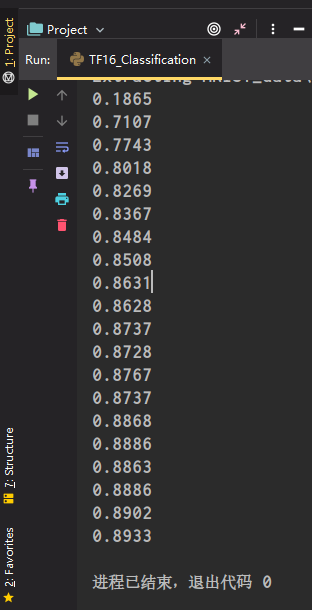
        print(compute_accuracy(

            mnist.test.images,mnist.test.labels

        ))
运行结果
莫烦tensorflow学习记录 (4)Classification 分类学习的更多相关文章
- TensorFlow基础笔记(3) cifar10 分类学习
TensorFlow基础笔记(3) cifar10 分类学习 CIFAR-10 is a common benchmark in machine learning for image recognit ...
- TensorFlow基础笔记(2) minist分类学习
(1) 最简单的神经网络分类器 # encoding: UTF-8 import tensorflow as tf from tensorflow.examples.tutorials.mnist i ...
- 莫烦tensorflow(9)-Save&Restore
import tensorflow as tfimport numpy as np ##save to file#rember to define the same dtype and shape w ...
- 莫烦tensorflow(8)-CNN
import tensorflow as tffrom tensorflow.examples.tutorials.mnist import input_data#number 1 to 10 dat ...
- 莫烦tensorflow(7)-mnist
import tensorflow as tffrom tensorflow.examples.tutorials.mnist import input_data#number 1 to 10 dat ...
- 莫烦tensorflow(6)-tensorboard
import tensorflow as tfimport numpy as np def add_layer(inputs,in_size,out_size,n_layer,activation_f ...
- 莫烦tensorflow(5)-训练二次函数模型并用matplotlib可视化
import tensorflow as tfimport numpy as npimport matplotlib.pyplot as plt def add_layer(inputs,in_siz ...
- 莫烦tensorflow(4)-placeholder
import tensorflow as tf input1 = tf.placeholder(tf.float32)input2 = tf.placeholder(tf.float32) outpu ...
- 莫烦tensorflow(3)-Variable
import tensorflow as tf state = tf.Variable(0,name='counter') one = tf.constant(1) new_value = tf.ad ...
- 莫烦tensorflow(2)-Session
import os os.environ['TF_CPP_MIN_LOG_LEVEL']='2' import tensorflow as tfmatrix1 = tf.constant([[3,3] ...
随机推荐
- 重新点亮linux 命令树————守护进程[二十三]
前言 简单整理一下守护进程. 正文 守护进程一般是开机启动的. 使用nohup 与 & 符号配合运行一个命令 nohup命令使进程忽略hangup(挂起)信号 使用tail 查看log文件. ...
- js 是单线程吗?
前言 在html5中,js中允许操作多个线程执行,但是不能操作dom元素,这是一个痛点. 但是在mvvm依然存在很大的作用力,因为我们只需要操作数据,在操作数据的时候委托机制在主线程中就实现了对dom ...
- 布匹瑕疵检测数据集EDA分析
分析数据集中 train 集的每个类别的 bboxes 数量分布情况.因为训练集分了两个:train1,train2.先根据两个数据集的 anno_train.json 文件分析类别分布.数据集:布匹 ...
- Android、iOS、jenkins全自动化打包
主要流程思路[粗略讲处理思路,若遇到具体问题可留言交流]: 1.android的打包命令 2.ios的打包命令 3.jenkins的参数化构建 4.七牛的上传命令等 5.处理ipa的下载操作及ipa过 ...
- 如何解决python安装mysqlclient失败问题
在使用Django等框架来操作MySQL时,实际上底层还是通过Python来操作的,首先需要安装一个驱动程序,在Python3中,驱动程序有多种选择,比如有pymysql以及mysqlclient等. ...
- background-blend-mode
由于 mix-blend-mode 这个属性的强大,很多应用场景和动效的制作不断完善和被发掘出来,遂另起一文继续介绍一些使用 mix-blend-mode 制作的酷炫动画. CSS3 新增了一个很有意 ...
- Linux下的权限(角色,文件权限)
目录 1.什么是权限 2.文件类型及权限 ①Linux文件类型: ②剩余9个字符对应的含义: ③文件权限值的表示方法(进制法) 3.如何操作权限 3.1改变权限的命令操作 chmod #change ...
- 牛客网-SQL专项训练23
①假设创建新用户nkw,现在想对于任何IP的连接,仅拥有user数据库里面的select和insert权限,则列表语句中能够实现这一要求的语句是(B) 解析: 考察知识点-数据库授权命令: GRANT ...
- 消息队列 RabbitMQ 遇上可观测--业务链路可视化
简介: 本篇文章主要介绍阿里云消息队列 RabbitMQ 版的可观测功能.RabbitMQ 的可观测能力相对开源有了全面的加强,为业务链路保驾护航. 作者:文婷.不周 本篇文章主要介绍阿里云消息队列 ...
- Hexo博客框架—轻量、一令部署
简介:Hexo 是一个快速.简洁且高效的博客框架.Hexo 使用 Markdown(或其他渲染引擎)解析文章,在几秒内,即可利用靓丽的主题生成静态网页.Hexo支持Github Flavored M ...