
next.js app目录 i18n国际化简单实现
最近在用next写一个多语言的项目,找了好久没找到简单实现的教程,实践起来感觉都比较复杂,最后终于是在官方文档找到了,结合网上找到的代码demo,终于实现了,在这里简单总结一下。
此教程适用于比较简单的项目实现,如果你是刚入门next,并且不想用太复杂的方式去实现一个多语言项目,那么这个教程就挺适合你的。
此教程适用于app目录的next项目。
先贴一下参阅的连接:
实现思路
结合文件结构解说一下大致逻辑:
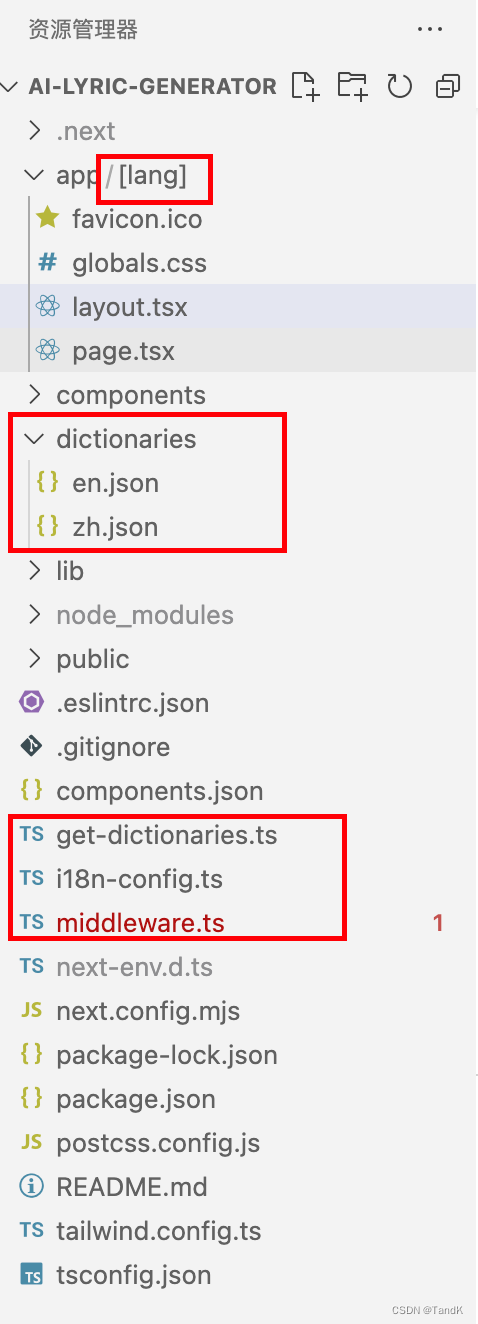
i18n-config.ts只是一个全局管理多语言简写的枚举文件,其他文件可以引用这个文件,这样就不会出现不同文件对不上的情况。middleware.ts做了一层拦截,在用户访问localhost:3000的时候能通过请求头判断用户常用的语言,配合app目录多出来的[lang]目录,从而实现跳转到localhost:3000/zh这样。dictionaries文件夹下放各语言的json字段,通过字段的引用使页面呈现不同的语种。
事实上每个页面的layout.tsx和page.tsx都会将语言作为参数传入,在对应的文件里,再调用get-dictionaries.ts文件里的方法就能读取到对应的json文件里的内容了。
大致思路是这样,下面贴对应的代码。
/i18n-config.ts
export const i18n = {

    defaultLocale: "en",

    // locales: ["en", "zh", "es", "hu", "pl"],

    locales: ["en", "zh"],

} as const;

export type Locale = (typeof i18n)["locales"][number];
/middleware.ts,需要先安装两个依赖,这两个依赖用于判断用户常用的语言:
npm install @formatjs/intl-localematcher

npm install negotiator
然后才是/middleware.ts的代码:
import { NextResponse } from "next/server";

import type { NextRequest } from "next/server";

import { i18n } from "./i18n-config";

import { match as matchLocale } from "@formatjs/intl-localematcher";

import Negotiator from "negotiator";

function getLocale(request: NextRequest): string | undefined {

  // Negotiator expects plain object so we need to transform headers

  const negotiatorHeaders: Record<string, string> = {};

  request.headers.forEach((value, key) => (negotiatorHeaders[key] = value));

  // @ts-ignore locales are readonly

  const locales: string[] = i18n.locales;

  // Use negotiator and intl-localematcher to get best locale

  let languages = new Negotiator({ headers: negotiatorHeaders }).languages(

    locales,

  );

  const locale = matchLocale(languages, locales, i18n.defaultLocale);

  return locale;

}

export function middleware(request: NextRequest) {

  const pathname = request.nextUrl.pathname;

  // // `/_next/` and `/api/` are ignored by the watcher, but we need to ignore files in `public` manually.

  // // If you have one

  // if (

  //   [

  //     '/manifest.json',

  //     '/favicon.ico',

  //     // Your other files in `public`

  //   ].includes(pathname)

  // )

  //   return

  // Check if there is any supported locale in the pathname

  const pathnameIsMissingLocale = i18n.locales.every(

    (locale) =>

      !pathname.startsWith(`/${locale}/`) && pathname !== `/${locale}`,

  );

  // Redirect if there is no locale

  if (pathnameIsMissingLocale) {

    const locale = getLocale(request);

    // e.g. incoming request is /products

    // The new URL is now /en-US/products

    return NextResponse.redirect(

      new URL(

        `/${locale}${pathname.startsWith("/") ? "" : "/"}${pathname}`,

        request.url,

      ),

    );

  }

}

export const config = {

  // Matcher ignoring `/_next/` and `/api/`

  matcher: ["/((?!api|_next/static|_next/image|favicon.ico).*)"],

};
/dictionaries下的因项目而异,可以看个参考:
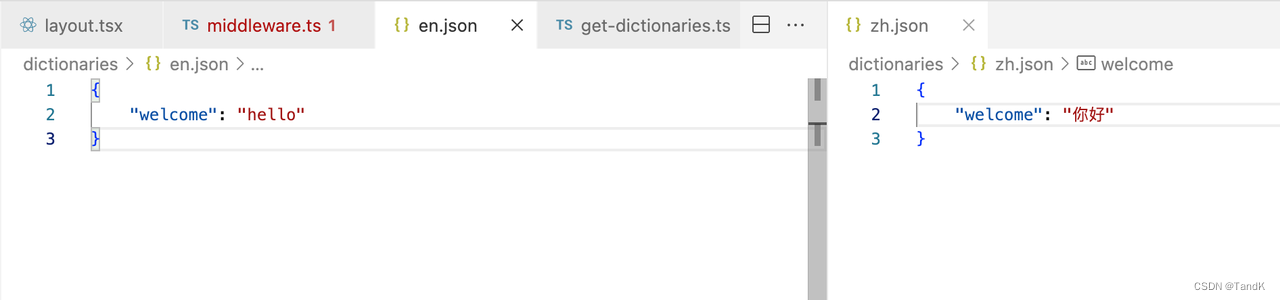
文件以语言简写命名,/i18n-config.ts里的locales有什么语言,这里就有多少个对应的文件就行了。
/get-dictionaries.ts
import "server-only";

import type { Locale } from "./i18n-config";

// We enumerate all dictionaries here for better linting and typescript support

// We also get the default import for cleaner types

const dictionaries = {

  en: () => import("./dictionaries/en.json").then((module) => module.default),

  zh: () => import("./dictionaries/zh.json").then((module) => module.default),

};

export const getDictionary = async (locale: Locale) => dictionaries[locale]?.() ?? dictionaries.en();
实际使用可以做个参考:
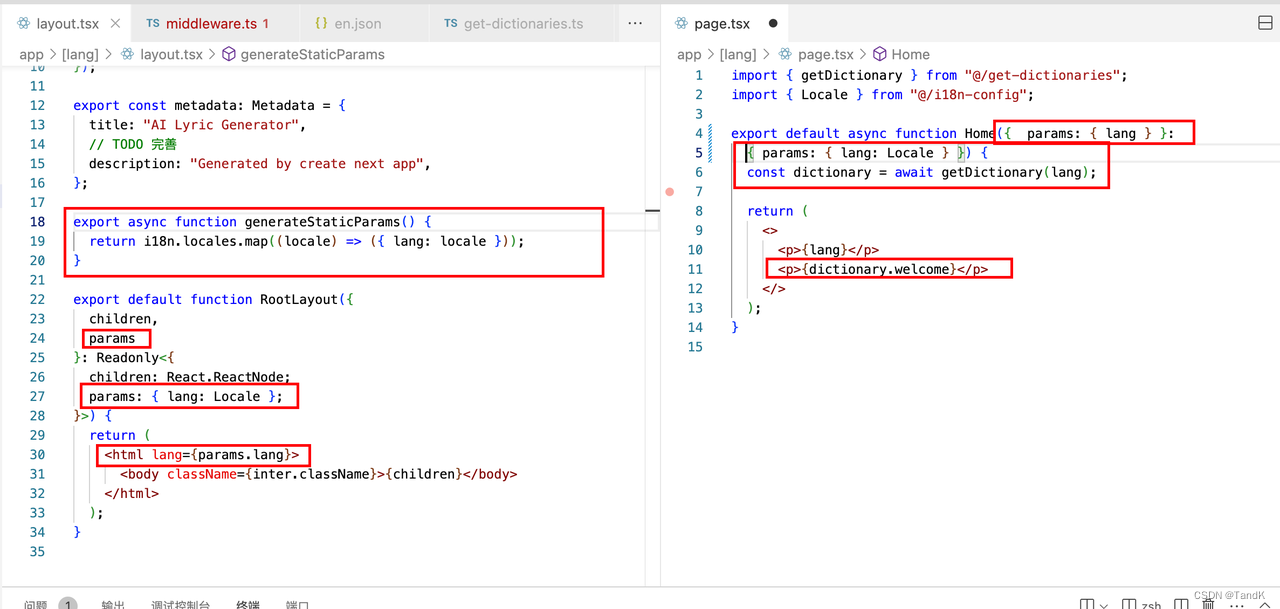
到这里其实就实现了,但是下面的事情需要注意:
如果你的项目有集成了第三方需要配知道middleware的地方,比如clerk,需要调试一下是否冲突。
如果你不知道clerk是什么,那么下面可以不用看,下面将以clerk为例,描述一下可能遇到的问题和解决方案。
Clerk适配
clerk是一个可以快速登录的第三方库,用这个库可以快速实现用户登录的逻辑,包括Google、GitHub、邮箱等的登录。
clerk允许你配置哪些页面是公开的,哪些页面是需要登录之后才能看的,如果用户没登录,但是却访问了需要登录的页面,就会返回401,跳转到登录页面。
就是这里冲突了,因为我们实现多语言的逻辑是,用户访问localhost:3000的时候判断用户常用的语言,从而实现跳转到localhost:3000/zh这样。
这两者实现都在middleware.ts文件中,上面这种配置会有冲突,这两者只有一个能正常跑通,而我们想要的效果是两者都能跑通,既能自动跳转到登录页面,也能自动跳转到常用语言页面。
技术问题定位:这是因为你重写了middleware方法,导致不会执行Clerk的authMiddleware方法,视觉效果上,就是多语言导致了Clerk不会自动跳转登录。
所以要把上面的middleware方法写到authMiddleware方法里的beforeAuth里去,Clerk官方有说明: Clerk authMiddleware说明
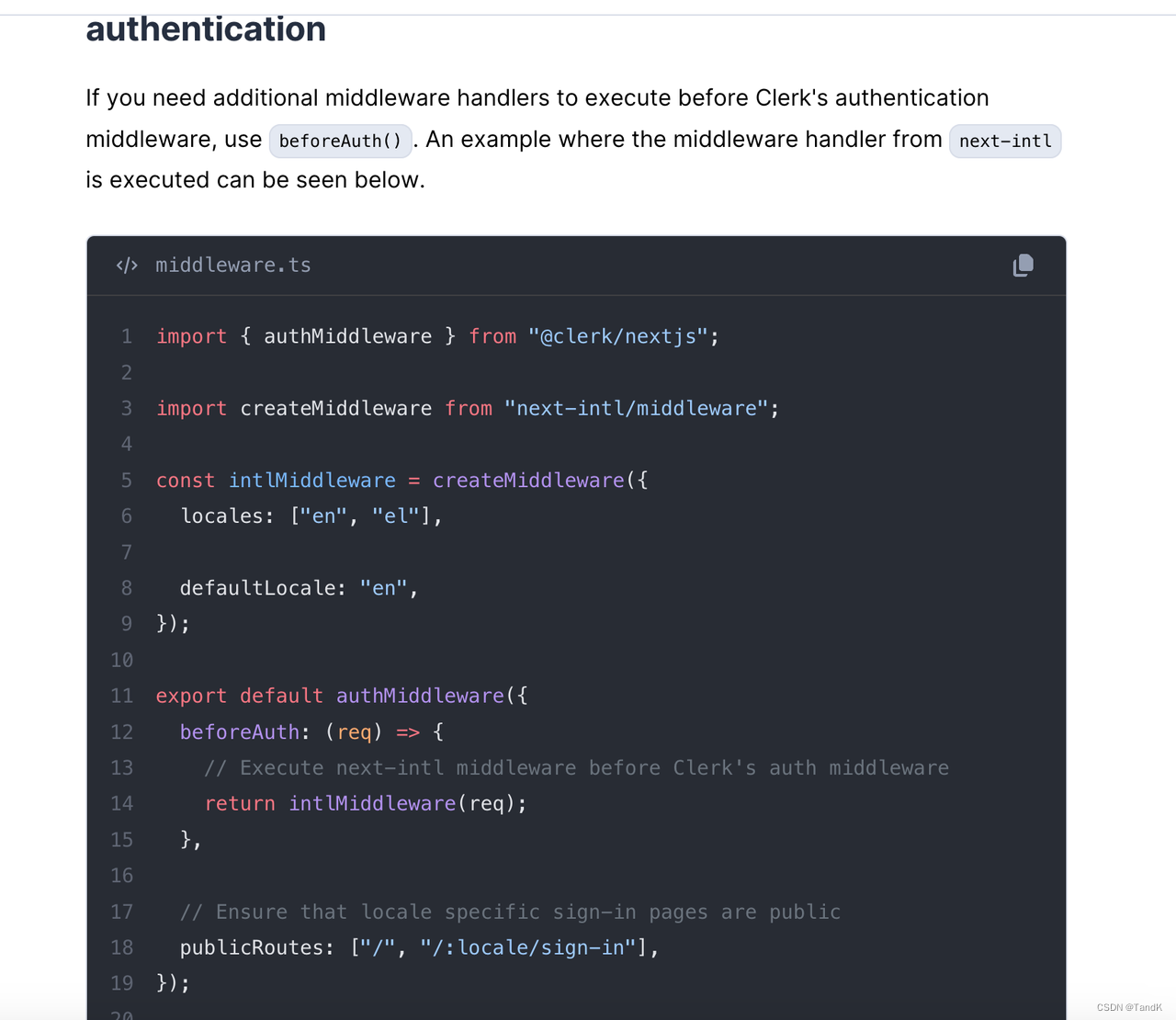
所以现在/middleware.ts文件内的内容变成了:
import { NextResponse } from "next/server";

import type { NextRequest } from "next/server";

import { authMiddleware } from "@clerk/nextjs";

import { i18n } from "./i18n-config";

import { match as matchLocale } from "@formatjs/intl-localematcher";

import Negotiator from "negotiator";

function getLocale(request: NextRequest): string | undefined {

  // Negotiator expects plain object so we need to transform headers

  const negotiatorHeaders: Record<string, string> = {};

  request.headers.forEach((value, key) => (negotiatorHeaders[key] = value));

  // @ts-ignore locales are readonly

  const locales: string[] = i18n.locales;

  // Use negotiator and intl-localematcher to get best locale

  let languages = new Negotiator({ headers: negotiatorHeaders }).languages(

    locales,

  );

  const locale = matchLocale(languages, locales, i18n.defaultLocale);

  return locale;

}

export const config = {

  // Matcher ignoring `/_next/` and `/api/`

  matcher: ["/((?!api|_next/static|_next/image|favicon.ico).*)"],

  // matcher: ["/((?!.+\\.[\\w]+$|_next).*)", "/", "/(api|trpc)(.*)"],

};

export default authMiddleware({

  publicRoutes: ['/anyone-can-visit-this-route'],

  ignoredRoutes: ['/no-auth-in-this-route'],

  beforeAuth: (request) => {

    const pathname = request.nextUrl.pathname;

    // // `/_next/` and `/api/` are ignored by the watcher, but we need to ignore files in `public` manually.

    // // If you have one

    if (

      [

        '/manifest.json',

        '/favicon.ico',

        '/serviceWorker.js',

        '/en/sign-in'

        // Your other files in `public`

      ].includes(pathname)

    )

      return

    // Check if there is any supported locale in the pathname

    const pathnameIsMissingLocale = i18n.locales.every(

      (locale) =>

        !pathname.startsWith(`/${locale}/`) && pathname !== `/${locale}`,

    );

    // Redirect if there is no locale

    if (pathnameIsMissingLocale) {

      const locale = getLocale(request);

      // e.g. incoming request is /products

      // The new URL is now /en-US/products

      return NextResponse.redirect(

        new URL(

          `/${locale}${pathname.startsWith("/") ? "" : "/"}${pathname}`,

          request.url,

        ),

      );

    }

  }

});
这样就OK了,大功告成。
next.js app目录 i18n国际化简单实现的更多相关文章
- ext.js的目录结构的简单解释
adapter:负责将里面提供第三方底层库(包括Ext自带的底层库)映射为Ext所支持的底层库. build: 压缩后的ext全部源码(里面分类存放). docs: API帮助文档. ...
- i18n,国际化翻译,excel与js互转
背景 公司开发新产品时,要求适配多国语言,采用i18n国际化工具,但翻译字典(js的json)还是需要前端自己写的.字典最终需要转换成excel给专业人员翻译,翻译完成后再转换成js字典文件. 如果手 ...
- Django1.9开发博客(12)- i18n国际化
国际化与本地化的目的为了能为各个不同的用户以他们最熟悉的语言和格式来显示网页. Django能完美支持文本翻译.日期时间和数字的格式化.时区. 另外,Django还有两点优势: 允许开发者和模板作者指 ...
- Bootstrap-datepicker3官方文档中文翻译---I18N/国际化(原文链接 http://bootstrap-datepicker.readthedocs.io/en/latest/index.html)
I18N/国际化 这个插件支持月份和星期名以及weekStart选项的国际化.默认是英语(“en”); 其他有效的译本语言在 js/locales/ 目录中, 只需在插件后包含您想要的地区. 想要添加 ...
- vue.js 2.0实现的简单分页
<!DOCTYPE html> <html> <head> <meta charset="UTF-8" /> <title&g ...
- 玩转Node.js(四)-搭建简单的聊天室
玩转Node.js(四)-搭建简单的聊天室 Nodejs好久没有跟进了,最近想用它搞一个聊天室,然后便偶遇了socket.io这个东东,说是可以用它来简单的实现实时双向的基于事件的通讯机制.我便看了一 ...
- 用node.js从零开始去写一个简单的爬虫
如果你不会Python语言,正好又是一个node.js小白,看完这篇文章之后,一定会觉得受益匪浅,感受到自己又新get到了一门技能,如何用node.js从零开始去写一个简单的爬虫,十分钟时间就能搞定, ...
- 从源码MessageSource的三个实现出发实战spring·i18n国际化
1.前言 互联网业务出海,将已有的业务Copy to Global,并且开始对各个国家精细化,本土化的运营.对于开发人员来说,国际化很重要,在实际项目中所要承担的职责是按照客户指定的语言让服务端返回相 ...
- 【转】Maven Jetty 插件的问题(css/js等目录死锁)的解决
Maven Jetty 插件的问题(css/js等目录死锁,不能自动刷新)的解决: 1. 打开下面的目录:C:\Users\用户名\.m2\repository\org\eclipse\jetty ...
- android 开发 system/app目录下面有多个重复包名的apk,会不会冲突
环境:已经拥有了root权限的android系统,我们的apk是开机启动 测试:将2个相同的版本拷贝到系统system/app目录下面 adb root #获取root权限,前提是已经开放了root权 ...
随机推荐
- 油猴脚本 - dicts.cn 单词自动跳转 双核浏览器可用
跳转格式 http://www.dicts.cn/?w=blight 20230605 更新 // ==UserScript== // @name dicts.cn 单词自动跳转 双核浏览器可用 // ...
- C#使用Stateless和箭头控件实现状态机的控制及显示
之前开发一个小工具,内部实现一个状态机,并显示状态机当前状态及状态间的转移过程.我使用了Stateless开源类库及一个开源自定义箭头控件.自定义箭头控件是HZHControls其中一个控件,我单独把 ...
- python 判断bytes是否相等的几种方法
一 前言: python判断bytes是否相等,一般要用到这几种方法:is,==,operator.下面做几个例子让大家看一下. 二 正文: 1 相等方法: test1=b'0xab' test2=b ...
- Navicat 15 最新破解版下载_永久激活注册码(附图文安装教程)
Navicat 15 最新破解版下载_永久激活注册码(附图文安装教程) 欢迎关注博主公众号「java大师」, 专注于分享Java领域干货文章, 关注回复「资源」, 免费领取全网最热的Java架构师学习 ...
- Android 获取设备的CPU型号和设备型号
原文: Android 获取设备的CPU型号和设备型号-Stars-One的杂货小窝 之前整的项目的总结信息,可能不太全,凑合着用吧,代码在最下面一节 CPU型号数据 华为: ro.mediatek. ...
- springMVC之对象中的基本类型数据绑定遇到的问题
最进在开发关于SpringMVC框架的项目时,发现个数据绑定的问题,如果这个实体对象里的字段类型为long.int.double时,客户端就报400语法错误 源代码: controller: @Req ...
- mybatis之Mapped Statements collection does not contain value for...错误原因分析
错误原因有几种: 1.mapper.xml中没有加入namespace: 2.mapper.xml中的方法和接口mapper的方法不对应: 3.mapper.xml没有加入到mybatis-co ...
- 不使用microlib实现STM32串口printf重定向:
不使用microlib实现STM32串口printf重定向: 突然发现有一篇markdown忘记上传了,补一下 注:使用的是CubeMX生成的工程文件 生成后,在usart.c中添加如下代码: //u ...
- 开发必会系列:hibernate事务
一 事务定义及特性 1.数据库事务的定义:数据库事务(Database Transaction) 是指由一个或多个SQL语句组成的工作单元,这个工作单元中的SQL语句相互依赖,如果有一个SQL语句执 ...
- 一些 IL 语言解释
跳转指令集合 Public field Static Beq 如果两个值相等,则将控制转移到目标指令. Public field Static Beq_S 如果两个值相 ...