
mybatis学习笔记(可复用的相关配置信息)
结果集映射:
resultMap解决数据库字段名和属性名不一致的问题
id	name	pwd

id	name	password

column 是数据库的字段名 property 是实体类的属性名
<?xml version="1.0" encoding="UTF-8" ?>

<!DOCTYPE mapper

        PUBLIC "-//mybatis.org//DTD Mapper 3.0//EN"

        "http://mybatis.org/dtd/mybatis-3-mapper.dtd">

<mapper namespace="com.kuang.dao.UserMapper">

    <!--结果集映射 -->

    <resultMap id="UserMap" type="User">

        <result column="id" property="id"></result>

        <result column="name" property="name"></result>

        <result column="pwd" property="password"></result>

    </resultMap>

    <select id="getUserByID" resultMap="UserMap" parameterType="int">

      select * from user WHERE id = #{id}

    </select>

</mapper>
动态SQL
什么是动态SQL?
根据不同的条件生成不同的SQL语句
官网描述:

    MyBatis 的强大特性之一便是它的动态 SQL。如果你有使用 JDBC 或其它类似框架的经验,你就能体会到根据不同条件拼接 SQL 语句的痛苦。例如拼接时要确保不能忘记添加必要的空格,还要注意去掉列表最后一个列名的逗号。利用动态 SQL 这一特性可以彻底摆脱这种痛苦。

    虽然在以前使用动态 SQL 并非一件易事,但正是 MyBatis 提供了可以被用在任意 SQL 映射语句中的强大的动态 SQL 语言得以改进这种情形。

    动态 SQL 元素和 JSTL 或基于类似 XML 的文本处理器相似。在 MyBatis 之前的版本中,有很多元素需要花时间了解。MyBatis 3 大大精简了元素种类,现在只需学习原来一半的元素便可。MyBatis 采用功能强大的基于 OGNL 的表达式来淘汰其它大部分元素。

    -------------------------------

    - if

    - choose (when, otherwise)

    - trim (where, set)

    - foreach

    -------------------------------
MybatisUtils工具类
package com.kuang.utils;

import org.apache.ibatis.io.Resources;

import org.apache.ibatis.session.SqlSession;

import org.apache.ibatis.session.SqlSessionFactory;

import org.apache.ibatis.session.SqlSessionFactoryBuilder;

import java.io.IOException;

import java.io.InputStream;

public class MybatisUtils {

	//从SqlSessionFactory中获得SqlSession的实例,SqlSession完全包含了SQL命令的执行方法

	private static SqlSessionFactory sqlSessionFactory;

	static {

		try {

			String resource = "mybatis-config.xml";

			//SqlSessionFactoryBuilder去创建sqlSessionFactory 创建完就不再需要它了

			//sqlSessionFactory 可以理解为数据库连接池

			//sqlSessionFactory 创建 sqlSession

			InputStream inputStream = Resources.getResourceAsStream(resource);

			sqlSessionFactory = new SqlSessionFactoryBuilder().build(inputStream);

		} catch (IOException e) {

			e.printStackTrace();

		}

	}

	//获取SqlSession连接

	public static SqlSession getSession(){

		return sqlSessionFactory.openSession();

	}

}
mybatis-config.xml
<?xml version="1.0" encoding="UTF-8" ?>
<!DOCTYPE configuration
PUBLIC "-//mybatis.org//DTD Config 3.0//EN"
"http://mybatis.org/dtd/mybatis-3-config.dtd">
<configuration>
<environments default="development">
<environment id="development">
<transactionManager type="JDBC"/>
<dataSource type="POOLED">
<property name="driver" value="com.mysql.jdbc.Driver"/>
<property name="url" value="jdbc:mysql://localhost:3306/mybatis?useSSL=false&useUnicode=true&characterEncoding=utf8"/>
<property name="username" value="root"/>
<property name="password" value="000429"/>
</dataSource>
</environment>
</environments>
<mappers>
<!--<mapper resource="com/kuang/dao/userMapper.xml"/>-->
<!--
使用映射器接口实现类的完全限定类名
需要配置文件名称和接口名称一致,并且位于同一目录下
-->
<!--<mapper class="com.kuang.dao.UserMapper"/>-->
<!--
将包内的映射器接口实现全部注册为映射器
但是需要配置文件名称和接口名称一致,并且位于同一目录下
-->
<package name="com.kuang.dao"/>
</mappers>
</configuration>
测试类
@Test

	public void test(){

		//sqlSession对象相当于是一个JDBC的PreparedStatement对象,这个对象可以执行sql语句

		//我们现在做的事情就是:获取数据库连接,得到sqlSession对象,通过这个对象去实现我们定义的数据操作接口

		//UserMapper,这个接口再通过解析我们定义的userMapper.xml文件去执行带有SQL语句的特定方法。

		SqlSession sqlSession = MybatisUtils.getSession();

		UserMapper mapper = sqlSession.getMapper(UserMapper.class);

		//根据ID取

		User user=mapper.getUserByID(2);

		System.out.println(user);

		sqlSession.close();

		//更新一条数据 id为1

//		updateUser();

		//删除一个用户

//		deleteUser();

	}
目录结构
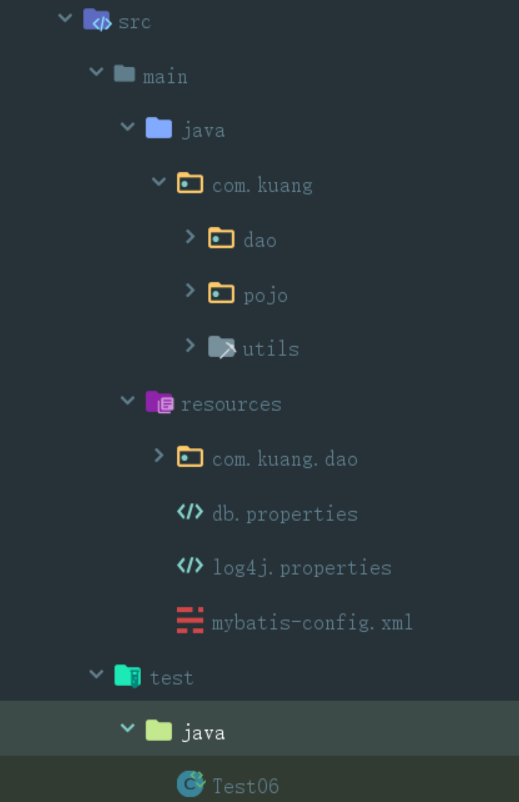
db.properties
driver=com.mysql.jdbc.Driver

url=jdbc:mysql://localhost:3306/mybatis?useSSL=true&useUnicode=true&characterEncoding=utf8

username=root

password=000429
在mybatis-config.xml中
<!--导入properties文件-->

<properties resource="db.properties"/>
log4j.properties
#将等级为DEBUG的日志信息输出到console和file这两个目的地,console和file的定义在下面的代码

log4j.rootLogger=DEBUG,console,file

#控制台输出的相关设置

log4j.appender.console = org.apache.log4j.ConsoleAppender

log4j.appender.console.Target = System.out

log4j.appender.console.Threshold=DEBUG

log4j.appender.console.layout = org.apache.log4j.PatternLayout

log4j.appender.console.layout.ConversionPattern=[%c]-%m%n

#文件输出的相关设置

log4j.appender.file = org.apache.log4j.RollingFileAppender

log4j.appender.file.File=./log/kuang.log

log4j.appender.file.MaxFileSize=10mb

log4j.appender.file.Threshold=DEBUG

log4j.appender.file.layout=org.apache.log4j.PatternLayout

log4j.appender.file.layout.ConversionPattern=[%p][%d{yy-MM-dd}][%c]%m%n

#日志输出级别

log4j.logger.org.mybatis=DEBUG

log4j.logger.java.sql=DEBUG

log4j.logger.java.sql.Statement=DEBUG

log4j.logger.java.sql.ResultSet=DEBUG

log4j.logger.java.sql.PreparedStatement=DEBUG
在mybatis-config.xml中
<!--日志-->

<settings>

    <setting name="logImpl" value="LOG4J"/>

</settings>
多对一
<?xml version="1.0" encoding="UTF-8" ?>

<!DOCTYPE mapper

        PUBLIC "-//mybatis.org//DTD Mapper 3.0//EN"

        "http://mybatis.org/dtd/mybatis-3-mapper.dtd">

<mapper namespace="com.StudentMapper">

    <select id="getStudent" resultMap="studentTeacher">

        select * from mybatis.student

    </select>

    <resultMap id="studentTeacher" type="student">

        <result property="id" column="id"></result>

        <result property="name" column="name"></result>

        <!--

        对象用association  多对一

        集合用collection   一对多

        -->

        <association property="teacher" column="tid" javaType="Teacher" select="getTeacher"/>

    </resultMap>

    <select id="getTeacher" resultType="Teacher">

        select * from teacher where id=#{id};

    </select>

    <!--

        按照结果嵌套处理

    -->

    <select id="getStudent2" resultMap="StudentTeacher2" >

        select s.id sid, s.name sname , t.name tname

        from student s,teacher t

        where s.tid = t.id

    </select>

    <resultMap id="StudentTeacher2" type="Student">

        <result property="id" column="sid"/>

        <result property="name" column="sname"/>

        <!--关联对象property 关联对象在Student实体类中的属性-->

        <association property="teacher" javaType="Teacher">

            <result property="name" column="tname"/>

        </association>

    </resultMap>

</mapper>
一对多
<?xml version="1.0" encoding="UTF-8" ?>

<!DOCTYPE mapper

        PUBLIC "-//mybatis.org//DTD Mapper 3.0//EN"

        "http://mybatis.org/dtd/mybatis-3-mapper.dtd">

<mapper namespace="com.kuang.dao.TeacherMapper">

    <select id="getTeacher1" resultType="Teacher">

        select * from mybatis.teacher

    </select>

    <!--

    思路:

        1. 从学生表和老师表中查出学生id,学生姓名,老师姓名

        2. 对查询出来的操作做结果集映射

            1. 集合的话,使用collection!

            JavaType和ofType都是用来指定对象类型的

            JavaType是用来指定pojo中属性的类型

            ofType指定的是映射到list集合属性中pojo的类型。

    -->

    <select id="getTeacher2" resultMap="TeacherStudent">

        select s.id sid, s.name sname , t.name tname, t.id tid

        from student s,teacher t

        where s.tid = t.id and t.id=#{id}

    </select>

    <resultMap id="TeacherStudent" type="Teacher">

        <result property="id" column="tid"></result>

        <result  property="name" column="tname"/>

        <collection property="students" ofType="Student">

            <result property="id" column="sid" />

            <result property="name" column="sname" />

            <result property="tid" column="tid" />

        </collection>

    </resultMap>

</mapper>
标准mapper.xml
<?xml version="1.0" encoding="UTF-8" ?>

<!DOCTYPE mapper

        PUBLIC "-//mybatis.org//DTD Mapper 3.0//EN"

        "http://mybatis.org/dtd/mybatis-3-mapper.dtd">

<mapper namespace="com.kuang.mapper.BlogMapper">

</mapper>
标准mybatis-config.xml
<?xml version="1.0" encoding="UTF-8" ?>

<!DOCTYPE configuration

        PUBLIC "-//mybatis.org//DTD Config 3.0//EN"

        "http://mybatis.org/dtd/mybatis-3-config.dtd">

<configuration>

</configuration>
mybatis学习笔记(可复用的相关配置信息)的更多相关文章
- mybatis学习笔记(三)-- 优化数据库连接配置
原来直接把数据库连接配置信息写在conf.xml配置中,如下 <?xml version="1.0" encoding="UTF-8"?> < ...
- ElasticSearch学习笔记--2、ES相关配置
1.配置文件 ES的配置文件位置:config/elasticsearch.yml可以直接搜索elasticsearch.yml 2.配置远程api访问 network.host: 192.168.1 ...
- Struts2学习笔记(1)---相关配置
Struts 2是Struts的下一代产品,是在 struts 1和WebWork的技术基础上进行了合并的全新的Struts 2框架. 1创建action对象(三种) 1 创建普通的类,不继承任何类, ...
- Mybatis学习笔记(二) 之实现数据库的增删改查
开发环境搭建 mybatis 的开发环境搭建,选择: eclipse j2ee 版本,mysql 5.1 ,jdk 1.7,mybatis3.2.0.jar包.这些软件工具均可以到各自的官方网站上下载 ...
- mybatis学习笔记(五):mybatis 逆向工程
mybatis学习笔记(五):mybatis 逆向工程 在日常开发中,如果数据库中存在多张表,自己手动创建 多个pojo 类和编写 SQL 语法配置文件,未免太过繁琐,mybatis 也提供了一键式生 ...
- mybatis 学习笔记(一):mybatis 初认识
mybatis 学习笔记(一):mybatis 初认识 简介 MyBatis是一个Java持久层框架,它通过XML描述符或注解把对象与存储过程或SQL语句关联起来.mybatis 可以将 prepar ...
- Mybatis学习笔记导航
Mybatis小白快速入门 简介 本人是一个Java学习者,最近才开始在博客园上分享自己的学习经验,同时帮助那些想要学习的uu们,相关学习视频在小破站的狂神说,狂神真的是我学习到现在觉得最GAN的老师 ...
- 【MyBatis学习笔记】
[MyBatis学习笔记]系列之预备篇一:ant的下载与安装 [MyBatis学习笔记]系列之预备篇二:ant入门示例 [MyBatis学习笔记]系列之一:MyBatis入门示例 [MyBatis学习 ...
- MyBatis:学习笔记(1)——基础知识
MyBatis:学习笔记(1)--基础知识 引入MyBatis JDBC编程的问题及解决设想 ☐ 数据库连接使用时创建,不使用时就释放,频繁开启和关闭,造成数据库资源浪费,影响数据库性能. ☐ 使用数 ...
- mybatis学习笔记(五) -- maven+spring+mybatis从零开始搭建整合详细过程(附demo和搭建过程遇到的问题解决方法)
文章介绍结构一览 一.使用maven创建web项目 1.新建maven项目 2.修改jre版本 3.修改Project Facts,生成WebContent文件夾 4.将WebContent下的两个文 ...
随机推荐
- 易语言连接Mysql
最近在写游戏的辅助工具研究了下易语言,下面就说下如何连接Mysql. .版本 2 .支持库 mysql .支持库 spec Mysql句柄 = 连接MySql ("127.0.0.1&quo ...
- 神经网络优化篇:详解TensorFlow
TensorFlow 先提一个启发性的问题,假设有一个损失函数\(J\)需要最小化,在本例中,将使用这个高度简化的损失函数,\(Jw= w^{2}-10w+25\),这就是损失函数,也许已经注意到该函 ...
- 如何用Apipost校验响应结果
数据校验的意义 我们可以通过 json-schema 预先定义接口的数据返回格式,当接口完成后,我们可以通过匹配 实际响应结果 和 预先定义的接口格式 ,来发现接口问题.如下图: 数据校验的设置 我们 ...
- python-鼠标宏
按下鼠标左键, 连击 按下鼠标右键, 停止 import win32api import time from pynput.mouse import Button, Controller mouse ...
- [Revit二次开发] 使用过滤器时,可能存在的坑:FilteredElementCollector.MoveNext()报错
1.问题描述 在使用FilteredElementCollector时,如果涉及到需要对collector进行多次过滤处理,可能会出现MoveNext的报错. 问题代码如下: 1 var collec ...
- ABP模块的测试项目从默认的Microsoft SQL Server替换成MySQL
1.替换项目引用 2.重新生成解决方案 3.删除Migrations 4.模块的引用 替换成:AbpEntityFrameworkCoreMySQLModule 5.命名空间 替换成:Volo.Abp ...
- Jmeter json断言的使用
1 添加方式:取样器右键->添加->断言->JSON断言 作用:使用JSON表达式提取实际数据与预期进行比较 2首先我们来了解下断言组件的各个功能: Asset JSON Pat ...
- 8、zookeeper的集群搭建
完全配置--https://zookeeper.apache.org/doc/r3.4.14/zookeeperAdmin.html#sc_zkMulitServerSetup https://zoo ...
- MarkDown --- 数学公式语法集
介绍 Markdown 是一种轻量级标记语言,它允许你使用易于阅读.易于编写的纯文本格式来创建富文本内容.通过简单的标记符号,如井号(#).星号(*)和下划线(_),可以快速地添加标题.粗体.斜体.链 ...
- Lua中pair和ipair的区别
Lua中pair和ipair的区别? 二者都是Lua中内置的迭代器,可以对数组或table进行遍历. 在正常的数组或table的遍历中,二者没有区别. tableNormal={"this& ...