
python2.7运行报警告:UnicodeWarning: Unicode equal comparison failed to convert both arguments to Unicode - interpreting them as being unequal解决办法
1. 程序源代码报错部分:
#选择年级
if grade == '幼升小':
    outline.nianji().pop(0).click()
elif grade == "一年级":
    outline.nianji().pop(1).click()  # 一年级
elif grade == "二年级":
    outline.nianji().pop(2).click()  # 二年级
elif grade == "三年级":
    outline.nianji().pop(3).click()  # 三年级
elif grade == "四年级":
    outline.nianji().pop(4).click()  # 四年级
elif grade == "五年级":
    outline.nianji().pop(5).click()  # 五年级

2.运行程序时的报错信息:
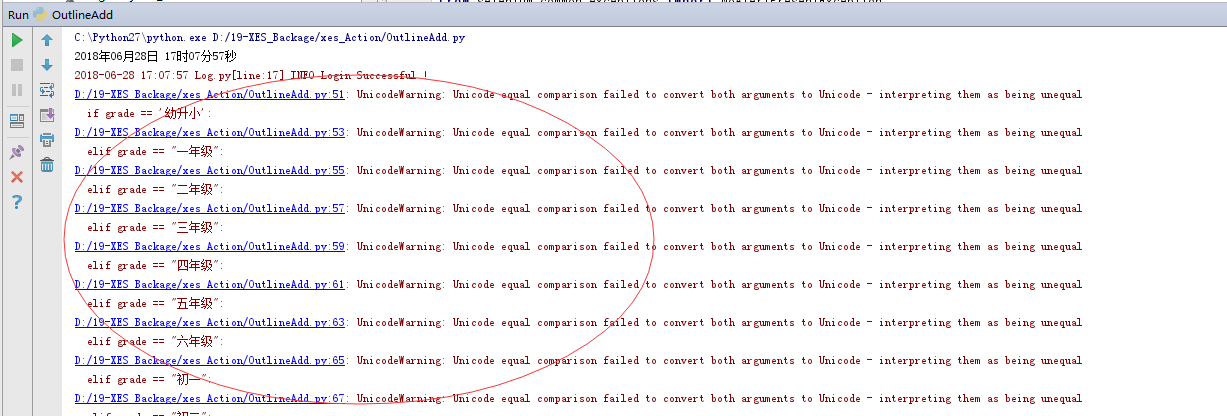
uncode编码警告:在unicode等价比较中,把两个参数同时转换为unicode编码失败。中断并认为他们不相等。
windows下的字符串str默认编码是ascii,而python编码是utf8
3. 解决办法:
在代码中加入如下:
import sys
reload(sys)
sys.setdefaultencoding('utf8')
python2.7运行报警告:UnicodeWarning: Unicode equal comparison failed to convert both arguments to Unicode - interpreting them as being unequal解决办法的更多相关文章
- python2.7运行出现的Warning: UnicodeWarning: Unicode equal comparison failed to convert both arguments to Unicode - interpreting them as being unequal
运行出现如下错误 uncode编码警告:在unicode等价比较中,把两个参数同时转换为unicode编码失败.中断并认为他们不相等. windows下的字符串str默认编码是ascii,而pytho ...
- Python——UnicodeWarning: Unicode equal comparison failed to convert both arguments to Unicode - interpreting them as being unequal
当字符串比较中有中文时,需要在中文字符串前加 u 转为unicode编码才可以正常比较. str == u"中文"
- 关于在2.7中出现 "UnicodeWarning: Unicode equal comparison failed to convert both arguments to Unicode - interpreting them as being unequal"
在中文字符串前面加u. Make sure your code is in UTF-8 (NOT Latin-1) and/or use a coding line as so: #! /usr/bi ...
- Mac环境安装非APP STORE中下载的软件,运行报错:“XXX” is damaged and can’t be opened. You should move it to the Trash. 解决办法
出现这个错误的大多数原因都是因为系统设置的问题,因为系统不信任你从其他地方下载的软件安装包,所以运行时就给你阻止了.具体的设置步骤如下: 1. 打开系统偏好设置 (System Preferences ...
- 【转载】Docker 安装后 报 Cannot connect to the Docker daemon at unix:///var/run/docker.sock. Is the docker daemon running? 解决办法
Docker Docker 安装后 报 Cannot connect to the Docker daemon at unix:///var/run/docker.sock. Is the docke ...
- xcode 运行报错 Command /usr/bin/codesign failed with exit code 1
因为更换了证书,导致在运行时报错 Command /usr/bin/codesign failed with exit code 1,查看了网上各种方法,最后发现以下两个值没有同步更新
- jdk1.8+SpringAOP注解报java.lang.IllegalArgumentException: error at ::0 can't find referenced pointcut select错误的不知原因的解决办法[仅供参考]
先说办法:如果Aspectweaver-1.*.*jar这三个包版本比较低, 比如1.5.0这一层次的,可以找版本高一点的包替换低版本的包,问题可以得到解决 jar包的下载地址:https://mvn ...
- 运行报警告UserWarning: Unknown extension is not supported and will be removed warn(msg)
运行python代码,出现如下警告: C:\Users\niko\PycharmProjects\python_new\venv\lib\site-packages\openpyxl\reader\w ...
- spring 以Ant Build方式运行build.xml文件,报warning: 'includeantruntime' was not set, defaulting to build.sysclasspath=last; set to false for repeatable builds 的解决办法
Buildfile: F:\experience\spring_pdf\sourcecode\example1\build.xml compile: [javac] F:\experience\spr ...
随机推荐
- 【C++】【MFC】创建新的线程函数
DWORD WINAPI MyThreadProc (LPVOID lpParam){ somestruct* pN = (somestruct*)lpParam; // 将参数转为你的类型 ... ...
- SSH中懒加载异常--could not initialize proxy - no Session
SSH进行关联的表进行显示时出现的问题,老是显示你的OGNL表达式错误,但是找了很久确实没错,在网上找了一下,下面的这个方法本人认为是最有效的方法(已经测试可以使用) 在web.xml中加入 程序代码 ...
- linux 命令——12 more (转)
more命令,功能类似 cat ,cat命令是整个文件的内容从上到下显示在屏幕上. more会以一页一页的显示方便使用者逐页阅读,而最基本的指令就是按空白键(space)就往下一页显示,按 b 键就会 ...
- IOS - (id)initWithStyle... 方法的使用
// 该方法只有在通过代码创建控件的时候才会调用, 如果控件是通过xib或者storyboard创建出来的不会调用该方法- (id)initWithStyle:(UITableViewCellStyl ...
- WCF的问题
使用service调用WCF的时候,有时候会出现 其他信息: HTTP 无法注册 URL 进程不具有此命名空间的访问权限 这样的问题,这时候就需要进行如下尝试: 1,VS的管理权限使用管理员的权限. ...
- selenium 使用键盘时 提示java.lang.IllegalArgumentException: Key Down / Up events only make sense for modifier keys.
输入某个内容后,使用enter键进行确认,最开始使用方式为: driver.findElement(By.xpath("//input[@name='supplier_name'][@id= ...
- AOJ 558 Cheese(bfs)
题意:网格图,老鼠吃奶酪,吃完奶酪体力值会增加,只能吃硬度不大于体力值的,问最小步数. 思路:按硬度从小到大的吃起,依次求最短路. 我用曼哈顿距离估价的A*,和普通bfs的time没区别啊,还把优先级 ...
- Linux 的歷史
Unix 狹義作業系統提供應用程式及命令直譯器. 作業系統發展初期並不具可攜性. Bell, GE 及 MIT 合作開發的 "Multice" 系統( 相容分時系統 ). 1969 ...
- 在maven项目中 配置代理对象远程调用crm
1 在maven项目中配置代理对象远程调用crm 1.1 在项目的pom.xml中引入CXF的依赖 <dependency> <groupId>org.apache.cxf&l ...
- vue-awesome-swiper实现轮播图
1.首先通过npm安装vue-awesome-swiper,我在项目中用的是2.6.7版本 npm install vue-awesome-swiper@2.6.7 –save 2. 在main.js ...