
Why containers? Why should we care? 新旧容器的对比
https://kubernetes.io/docs/concepts/overview/what-is-kubernetes/
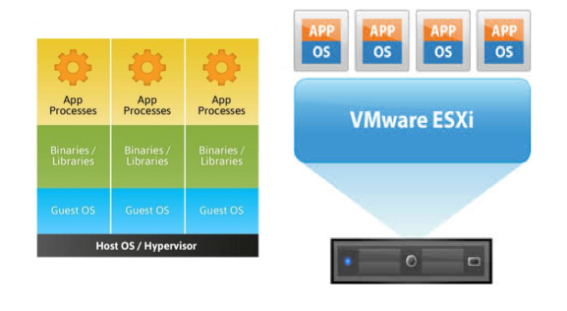
The Old Way to deploy applications was to install the applications on a host using the operating system package manager. This had the disadvantage of entangling the applications’ executables, configuration, libraries, and lifecycles with each other and with the host OS. One could build immutable virtual-machine images in order to achieve predictable rollouts and rollbacks, but VMs are heavyweight and non-portable.
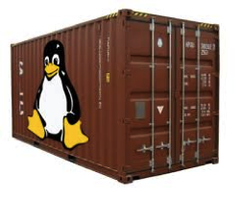
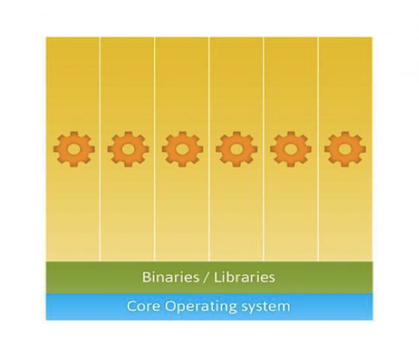
The New Way is to deploy containers based on operating-system-level virtualization rather than hardware virtualization. These containers are isolated from each other and from the host: they have their own filesystems, they can’t see each others’ processes, and their computational resource usage can be bounded. They are easier to build than VMs, and because they are decoupled from the underlying infrastructure and from the host filesystem, they are portable across clouds and OS distributions.
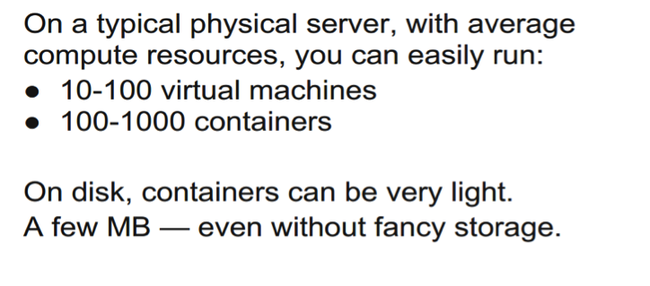
Because containers are small and fast, one application can be packed in each container image. This one-to-one application-to-image relationship unlocks the full benefits of containers. With containers, immutable container images can be created at build/release time rather than deployment time, since each application doesn’t need to be composed with the rest of the application stack, nor married to the production infrastructure environment. Generating container images at build/release time enables a consistent environment to be carried from development into production. Similarly, containers are vastly more transparent than VMs, which facilitates monitoring and management. This is especially true when the containers’ process lifecycles are managed by the infrastructure rather than hidden by a process supervisor inside the container. Finally, with a single application per container, managing the containers becomes tantamount to managing deployment of the application.
Summary of container benefits:
- Agile application creation and deployment: Increased ease and efficiency of container image creation compared to VM image use.
- Continuous development, integration, and deployment: Provides for reliable and frequent container image build and deployment with quick and easy rollbacks (due to image immutability).
- Dev and Ops separation of concerns: Create application container images at build/release time rather than deployment time, thereby decoupling applications from infrastructure.
- Environmental consistency across development, testing, and production: Runs the same on a laptop as it does in the cloud.
- Cloud and OS distribution portability: Runs on Ubuntu, RHEL, CoreOS, on-prem, Google Container Engine, and anywhere else.
- Application-centric management: Raises the level of abstraction from running an OS on virtual hardware to run an application on an OS using logical resources.
- Loosely coupled, distributed, elastic, liberated micro-services: Applications are broken into smaller, independent pieces and can be deployed and managed dynamically – not a fat monolithic stack running on one big single-purpose machine.
- Resource isolation: Predictable application performance.
- Resource utilization: High efficiency and density.
https://aucouranton.com/2014/06/13/linux-containers-parallels-lxc-openvz-docker-and-more/
A container (Linux Container) at its core is an allocation, portioning, and assignment of host (compute) resources such as CPU Shares, Network I/O, Bandwidth, Block I/O, and Memory (RAM) so that kernel level constructs may jail-off, isolate or “contain” these protected resources so that specific running services (processes) and namespaces may solely utilize them without interfering with the rest of the system. These processes could be lightweight Linux hosts based on a Linux image, multiple web severs and applications, a single subsystem like a database backend, to a single process such as ‘echo “Hello”’ with little to no overhead.
Commonly known as “operating system-level virtualization” or “OS Virtual Environments” containers differ from hypervisor level virtualization. The main difference is that the container model eliminates the hypervisor layer, redundant OS kernels, binaries, and libraries needed to typically run workloads in a VM.
基于操作系统而非硬件 based on operating-system-level virtualization rather than hardware virtualization
独立文件系统filesystems,进程互补可见 processes
Why containers? Why should we care? 新旧容器的对比的更多相关文章
- Arcgis API For IOS扩展AGSDynamicLayer新旧版API对比
AGSDynamicLayer(ForSubclassEyesOnly) Category Reference Description This category organizes the meth ...
- Android新旧版本Notification
Android新旧版本Notification 在notification.setLatestEventInfo() 过时了 以前: NotificationManager mn = (Notific ...
- Matlab神经网络函数newff()新旧用法差异
摘要 在Matlab R2010a版中,如果要创建一个具有两个隐含层.且神经元数分别为5.3的前向BP网络,使用旧的语法可以这样写: net1 = newff(minmax(P), [5 3 1]); ...
- [ACM_数学] Taxi Fare [新旧出租车费差 水 分段函数]
Description Last September, Hangzhou raised the taxi fares. The original flag-down fare in Hangzhou ...
- Flex布局新旧混合写法详解(兼容微信)
原文链接:https://www.usblog.cc/blog/post/justzhl/Flex布局新旧混合写法详解(兼容微信) flex是个非常好用的属性,如果说有什么可以完全代替 float 和 ...
- 浅谈 angular新旧版本问题
一直在学习angularJs,之前用的版本比较老,前些天更新了一下angularJs的版本,然后发现了一些问题,希望和大家分享一下. 在老的版本里控制器直接用函数定义就可以 比如: 在angularJ ...
- css弹性盒子新旧兼容
前言:本篇随笔是对弹性盒子有了解的人来写的这篇文章,具体属性产生的效果这里不做说明,基础的东西去查文档.这里只是总结. 时至今日,css3的flex弹性盒子在移动端基本上都是支持的,但不排除有些些低版 ...
- spring加载配置新旧方式对比
老方式 1.首先要配置配置文件,如beans.xml,内容如下: <?xml version="1.0" encoding="UTF-8"?> &l ...
- Flex布局新旧混合写法详解
flex是个非常好用的属性,如果说有什么可以完全代替 float 和 position ,那么肯定是非它莫属了(虽然现在还有很多不支持 flex 的浏览器).然而国内很多浏览器对 Flex 的支持都不 ...
随机推荐
- postgresql-9.0.18-1-linux.run启动
下载地址:http://www.enterprisedb.com/products-services-training/pgdownload选择合适版本 基本都是下一步就可以到设置密码时记住密码以后要 ...
- yii 数据库添加,修改,删除相关操作总结
yii中关于数据信息的添加数据,修改数据,删除数据的相关操作,刚刚学习没几天,仅记录了一些,以后慢慢再充实,有需要的朋友可以看看. 添加数据的方法 (1)save 方法(对象形式操作) $user=n ...
- AC日记——三连击 洛谷 P1008
题目背景 本题为提交答案题,您可以写程序或手算在本机上算出答案后,直接提交答案文本,也可提交答案生成程序. 题目描述 将1,2,…,9共9个数分成三组,分别组成三个三位数,且使这三个三位数构成1:2: ...
- React-Native Navigator 过渡动画卡顿的解决方案
在RN0.44版本之前,路由导航跳转几乎是使用的是Navigator组件,在0.44版本以后就不推荐使用了,官方推荐的是react-navigation,当然还是可以在废弃的库中找到: import ...
- springboot快速集成swagger
今天技术总监说:小明,我们本次3.0改造,使用swagger2.0作为前后端分离的接口规范,它可以一键生成前后端的API,一劳永逸--小明:??? Spring Boot 框架是目前非常流行的微服务框 ...
- xcode5 asset catalogs 由于图标尺寸错误导致编译问题解决[原创]
如下图,即使图片尺寸不规范,xcode5也可以正常预览(这里我提供的尺寸是57*57, 而需要的是120*120) 但编译运行失败,报的错是: Images.xcassets: error: The ...
- Windows系统文件详解【大全】
这是网络上转载的一篇文章,找不到原创的出处了--详细的介绍了WINDOWS系统文件的用途,我想各位保存一份以后说不定会有用吧,呵呵..这里按A到Z为大家分好类了,查询的话可以按键盘的Ctrl+F进行搜 ...
- Unity Shaders and Effects Cookbook (3-4) 使用高光贴图
在学习完上一节之后.已经了解了在Unity 中怎样实现一个高光 Shader ,可是会有一个问题.就是效果看起来不切实际,如以下的问题 我用一张图片贴到了Cube上面.然后用了一个高光材质,得到了下图 ...
- redis 在我做的容器中的配置路劲
配置 /etc/redis/redis.conf 数据库位置 /var/lib/redis/dump.rdb
- Java太阳系小游戏分析和源代码
Java太阳系小游戏分析和源代码 -20150809 近期看了面向对象的一些知识.然后跟着老师的解说做了一个太阳系各行星绕太阳转的小游戏,来练习巩固一下近期学的知识: 用到知识点:类的继承.方法的重载 ...