
Django中三种方式写form表单
除了在html中自己手写form表单外,django还可以通过 继承django.forms.Form 或django.forms.ModelForm两个类来自动生成form表单,下面依次利用三种方式来实现form表单,实现向数据库中添加书籍的页面,效果如下:
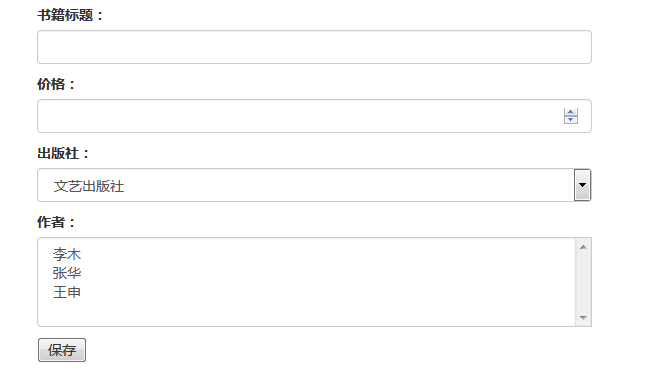
首先在models类中定义了Book,Author和Publish类,并定义了关联关系,publish,author和book分别为一对多和多对多关系,代码如下:
class Book(models.Model):

    title = models.CharField(max_length=64)

    price = models.DecimalField(max_digits=5,decimal_places=2,default=0)

    author = models.ManyToManyField(to='Author')

    publish = models.ForeignKey(to='Publish')

    def __str__(self):

        return self.title

class Author(models.Model):

    name = models.CharField(max_length=128)

    age = models.IntegerField()

    def __str__(self):

        return self.name

class Publish(models.Model):

    name = models.CharField(max_length=255)

    address = models.CharField(max_length=255)

    def __str__(self):

        return self.name
1 原生form表单
在html页面中手写表单,很简单,直接上代码,对应的Html和视图函数如下:
addbook.html
<form action="" method="post">

    {% csrf_token %}

    <p >

        <label>书籍标题:</label>

        <input type="text" name="title" class="form-control"/>

    </p>

    <p>

        <label>价格:</label>

        <input type="number" name="price" class="form-control"/>

    </p>

    <p>

        <label>出版社:</label>

        <select name="publish" class="form-control">

            {% for publish in publishs %}

            <option value="{{ publish.pk }}">{{ publish.name }}</option>

            {% endfor %}

        </select>

    </p>

    <p>

        <label>作者:</label>

        <select multiple="multiple" name="author" class="form-control">

            {% for author in authors %}

            <option value="{{ author.pk }}">{{ author.name }}</option>

            {% endfor %}

        </select>

    </p>

    <input type="submit" value="保存"/>

</form>
views.py
def addbook(request):

    authors = models.Author.objects.all()

    publishs = models.Publish.objects.all()

    if request.method=='POST':

        title = request.POST.get('title')

        price = request.POST.get('price')

        author = request.POST.getlist('author')

        publish = request.POST.get('publish')

        # print author, publish

        book_obj = models.Book.objects.create(title=title,price=price,publish_id=publish)

        book_obj.author.add(*author)  #此时添加的为author的id值 [u'1', u'3]

        # for i in author:

        #     book_obj.author.add(int(i))

        # book_obj.save()

        return redirect('/listbook/')

    return render(request,'addbook.html',locals())
2 继承django.forms.Form类
model 字段和form字段的对应关系
首先定义一个BookForm类,继承forms.Form,根据models中定义的Book类,逐个定义相应的字段,字段中可以定义相应的参数,如required=True,表示默认为True,字段不能为空;label定义标签;initial设置初始值;以及error_messages和widget等,参数详细使用见https://docs.djangoproject.com/zh-hans/2.0/ref/forms/fields/。
BookForm类如下:
class BookForm(forms.Form):

    title=forms.CharField(

        label='书籍标题',

        max_length=32,

        widget=forms.widgets.TextInput(attrs={'class':'form-control'})

    )

    price = forms.DecimalField(

        label='价格',

        widget=forms.widgets.TextInput(attrs={'type':'number','class':'form-control'})

    )  # 设置type来改变类型,显示数字输入框

    publish = forms.ModelChoiceField(

        label='出版社',

        queryset=models.Publish.objects.all(),

        widget=forms.widgets.Select(attrs={'class': 'form-control'})

    )

    # gender=forms.ChoiceField(choices=((1,"男"),(2,"女"),(3,"其他")))

    # publish=forms.ChoiceField(choices=Publish.objects.all().values_list("pk","title"))

    #ModelChoiceField继承了ChoiceField

    author = forms.ModelMultipleChoiceField(

        label='作者',

        queryset=models.Author.objects.all(),

        widget=forms.widgets.SelectMultiple(attrs={'class': 'form-control'})

    )
定义好BookForm类后只需在视图函数中进行实例化,并将实例传给前端html,就能自动生成表单,视图函数和html代码如下。BookForm类除了能自动生成前端表单外,还能对数据进行校验,若校验通过,is_valid()方法返回True,并将校验后的数据以字典形式封装到cleaned_data中
views.py
def addbook(request):

    if request.method=='POST':

        form = BookForm(request.POST)

        if form.is_valid():

            author = form.cleaned_data.pop('author')

            # print form.cleaned_data, author

            book_obj = models.Book.objects.create(**form.cleaned_data)

            for i in author:

                book_obj.author.add(i)  #此时添加的为author queryset对象

            book_obj.save()

            return redirect('/listbook/')

    form = BookForm()

    return render(request,'addbook.html',locals())
addbook.html
<form  action="" method="post">

    {% csrf_token %}

    {% for field in form %}

    <div >

        {{ field.label }}

        {{ field }}

    </div>

    {% endfor %}

    <input type="submit" value="保存"/>

</form>
3 继承django.forms.ModelForm类
定义一个BookModelForm类,继承forms.ModelForm,相比forms.Form其更加简单,不用逐个定义字段,只需将Book类和需要显示的字段传入,也可以自定义label,widget等参数,详细使用见 https://docs.djangoproject.com/en/2.1/topics/forms/modelforms/
BookModelForm类如下:
    class Meta:

        model = models.Book

        fields = '__all__'  # 类似于fields = ['title','price','publish','author'],可以自定义需要显示的字段,__all__为所有字段

        labels = {

            'title': '书籍名称',

            'price': '价格',

            'author':'作者',

            'publish': '出版社'

        }

        widgets = {

            'title':forms.widgets.TextInput(attrs={'class':'form-control'}),

            'price':forms.widgets.TextInput(attrs={'class':'form-control','type':'number'}),

            'author': forms.widgets.SelectMultiple(attrs={'class': 'form-control'}),

            'publish': forms.widgets.Select(attrs={'class':'form-control'})

        }  #必须按定义的字段顺序排列
和forms.Form一样,在视图函数中向前端传入BookModelForm实例对象,就能自动生成form表单,但其对表单数据处理更加简单,可以直接调用save方法,而且若未对表单数据校验时,save方法会对数据进行校验,另外可以通过BookModelForm(request.POST,instance=a)形式来传入单个实例,储存一条数据记录,如下:
>>> a = Article.objects.get(pk=1)

>>> f = ArticleForm(request.POST, instance=a)

>>> f.save()
具体的视图函数和前端代码如下:
views.py
def addbook(request):

    form = BookModelForm()

    if request.method=='POST':

        form = BookModelForm(request.POST)  # 参数中还可以传单个实例,来储存一条数据

        form.save()                      # 若未进行数据校验时,save()方法会对数据进行校验

        return redirect('/listbook/')

    return render(request,'addbook.html',locals())
addbook.html
<form  action="" method="post">

    {% csrf_token %}

    {% for field in form %}

    <div >

        {{ field.label }}

        {{ field }}

    </div>

    {% endfor %}

    <input type="submit" value="保存"/>

</form>
相关参考博客:http://www.cnblogs.com/yuanchenqi/articles/8034442.html
http://www.cnblogs.com/yuanchenqi/articles/7614921.html
Django中三种方式写form表单的更多相关文章
- java:JavaScript2:(setTimeout定时器,history.go()前进/后退,navigator.userAgent判断浏览器,location.href,五种方法获取标签属性,setAttribute,innerHTML,三种方法获取form表单信息,JS表单验证,DOM对象,form表单操作)
1.open,setTimeout,setInterval,clearInterval,clearTimeout <!DOCTYPE> <html> <head> ...
- jQuery中.bind() .live() .delegate() .on()的区别 和 三种方式写光棒事件 动画
地狱的镰刀 bind(type,[data],fn) 为每个匹配元素的特定事件绑定事件处理函数. $("a").bind("click",function(){ ...
- JavaScript--------------------jQuery中.bind() .live() .delegate() .on()的区别 和 三种方式写光棒事件 动画
bind(type,[data],fn) 为每个匹配元素的特定事件绑定事件处理函数. $("a").bind("click",function(){alert( ...
- Jobs(三) HTML的form表单提交中文后,后台取出乱码的问题
解决form表单中提取的中文在后台乱码的问题有两种情况: form表单以GET方式提交: form表单以POST方式提交 一. 解决以GET方式提交的中文乱码问题,可以更改Tomcat服务器的配置文件 ...
- jquery下的提交,点击按钮没反应,post方法不执行 JSON方式在FORM表单下不起作用
jquery下的提交,点击按钮没反应,post方法不执行 JSON方式在FORM表单下不起作用
- Django学习笔记(6)——Form表单
知识储备:HTML表单form学习 表单,在前端页面中属于最常见的一个东西了.基本上网站信息的提交都用到了表单,所以下面来学习Django中优雅的表单系统:Form 表单的主要作用是在网页上提供一个图 ...
- SpringMVC中使用bean来接收form表单提交的参数时的注意点
这是前辈们对于SpringMVC接收表单数据记录下来的总结经验: SpringMVC接收页面表单参数 springmvc请求参数获取的几种方法 下面是我自己在使用时发现的,前辈们没有记录的细节和注意点 ...
- ajax无刷新方式对form表单进行赋值!
/** * 把json数据填充到from表单中 */ <form id="editForm" action="user.php"> 用户名:< ...
- django中写form表单时csrf_token的作用
之前在学习django的时候,在template中写form时,出现错误.百度,google后要加{% csrf_token %}才可以,之前一直也没研究,只是知道要加个这个东西,具体是什么也不明白. ...
随机推荐
- PHP 多维数组将下标从0开始
点击链接加入群[php/web 学习课堂]:https://jq.qq.com/?_wv=1027&k=5645xiw 欢迎大家加入,一起讨论学习 模拟一个: public function ...
- 开源跨境ERP - 小老板 Docker/Docker Compose一键部署
先上部署成功后的截图,各个菜单点击均无报错 DockerCompose 包含: 1. 三个mysql5.7数据库 2. redis php会话存储+ memcached 3. 小老板php主程序 do ...
- ASE19团队项目alpha阶段model组 scrum8 记录
本次会议于11月12日,19时整在微软北京西二号楼sky garden召开,持续15分钟. 与会人员:Jiyan He, Kun Yan, Lei Chai, Linfeng Qi, Xueqing ...
- 总结 String、StringBuffer与StringBuilder类中常用的方法
一.String类的常用方法 1.获取: 1)获取字符串str长度 int i = str.length(); 2)根据位置(index)获取字符 char c = str.charAt(index) ...
- PHP点击按钮拷贝
一.PHP中点击按钮拷贝文本,我一个页面有多个按钮,相同颜色的标注代表了相同的列或ID 二.这是HTML代码 <tr> <td>直播流地址(延时60秒)</td> ...
- 用例图,ER图,架构图
用例图 ER图 架构图 注:附上小组画图文档链接 提取码:t7ij v\:* {behavior:url(#default#VML);} o\:* {behavior:url(#default#VM ...
- java——maven依赖版本冲突
博客:maven依赖jar包时版本冲突的解决
- java--mybatis的实现原理
动态代理? 需要调试下,看下源码,再研究下……
- [SDOI2008]山贼集团
题目描述 某山贼集团在绿荫村拥有强大的势力,整个绿荫村由\(N\)个连通的小村落组成,并且保证对于每两个小村落有且仅有一条简单路径相连. 小村落用阿拉伯数字编号为\(1,2,3,4, \dots ,n ...
- ICPC2019徐州站游记
day0 出师不利 差两分钟没赶上高铁回去我一定每天都到下边玩跑步 改签成卧铺,原来3点发7点到现在11点发9点到 本来计划火车上3个人练习一场,晚上宾馆还可以cf 结果全泡汤了,在火车站浪了一晚上 ...