
Python3 Selenium自动化web测试 ==> 第一节 起始点之Python单元测试框架 unittest
前置步骤
Python版本:3.6.4
selenium版本:3.11.0
>>> import selenium

>>> help(selenium)
IDE:Pycharm
学习目的
- 掌握Python版本的selenium自动化技能,对所学的知识总结,可以作为日后工作的参考;
- 对学习的Python脚本编码能力再磨练,实战中学习;
- 为后续的跳槽作准备,说难听点,不会编码的测试,去哪都没啥竞争力
正式步骤
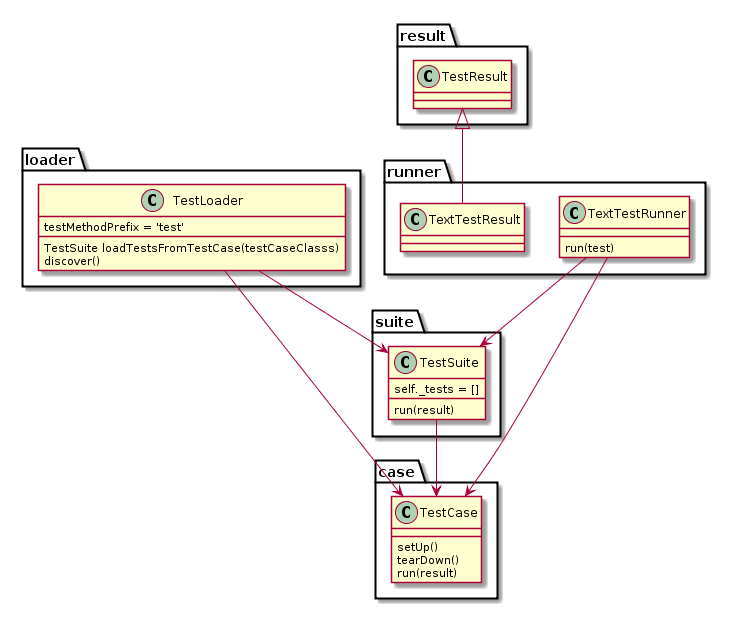
Step1:unittest框架中最核心的4个概念:test fixture(测试固件)、test case(测试用例)、test suite(测试套件)、test runner(测试运行器)
运行工作图:
运行数据流:
- 一个TestCase的实例就是一个测试用例。什么是测试用例呢?就是一个完整的测试流程,包括测试前准备环境的搭建(setUp),执行测试代码(run),以及测试后环境的还原(tearDown)。元测试(unit test)的本质也就在这里,一个测试用例是一个完整的测试单元,通过运行这个测试单元,可以对某一个问题进行验证。
- 而多个测试用例集合在一起,就是TestSuite,而且TestSuite也可以嵌套TestSuite。
- TestLoader是用来加载TestCase到TestSuite中的,其中有几个loadTestsFrom__()方法,就是从各个地方寻找TestCase,创建它们的实例,然后add到TestSuite中,再返回一个TestSuite实例。
- TextTestRunner是来执行测试用例的,其中的run(test)会执行TestSuite/TestCase中的run(result)方法。测试的结果会保存到TextTestResult实例中,包括运行了多少测试用例,成功了多少,失败了多少等信息。
- 而对一个测试用例环境的搭建和销毁,是一个fixture。
简单示例:
import unittest

class TestStringMethods(unittest.TestCase):

    def test_upper(self):

        self.assertEqual('foo'.upper(), 'FOO')

    def test_isupper(self):

        self.assertTrue('FOO'.isupper())

        self.assertFalse('FFF'.isupper(),msg='wrong flag')

    def test_split(self):

        s = 'hello world'

        self.assertEqual(s.split(), ['hello', 'world'])

        # check that s.split fails when the separator is not a string

        with self.assertRaises(TypeError):

            s.split(2)

if __name__ == '__main__':

    unittest.main()
运行结果:
F..

======================================================================

FAIL: test_isupper (__main__.TestStringMethods)

----------------------------------------------------------------------

Traceback (most recent call last):

  File "F:/python_stack/python_autotest/demo.py", line 10, in test_isupper

    self.assertFalse('FFF'.isupper(),msg='wrong flag')

AssertionError: True is not false : wrong flag

----------------------------------------------------------------------

Ran 3 tests in 0.001s

FAILED (failures=1)
运行结果告诉我们:
1.测试用例执行后,结果顺序是随机排序;
2.测试用例以test为前缀;
3.如果想单独运行一个用例,点击相应的测试用例代码区域,右键点击运行相应的方法
4,运行测试套件可以点击run(alt+shift+F10)
Step2:test fixture之setUp() + tearDown() 和 setUpClass() 与 tearDownClass()
setUp() + tearDown() :在每个测试方法执行前以及执行后执行一次,setUp用来为测试准备环境,tearDown用来清理环境,准备之后的测试
setUpClass() 与 tearDownClass():在所有case执行之前准备一次环境,并在所有case执行结束之后再清理环境
实例代码:
import unittest

class TestStringMethods(unittest.TestCase):

    @classmethod

    def setUpClass(cls):

        #只执行一次,在所有用例开始前执行,一般用来预制数据,也可以为下发自动化task初始化

        print('setUpClass'+'\n')

    @classmethod

    def tearDownClass(cls):

        #只执行一次,在所用测试用例执行完毕后运行,一般用来清理测试环境

        print('tearDownClass'+'\n')

    def setUp(self):

        # 每个用例都执行,在单个用例运行前执行

        print('准备开始执行用例'+'\n')

    def tearDown(self):

        #每个用例都执行,在单个用例运行后执行

        print('清理此用例的初始化'+'\n')

    def test_upper(self):

        self.assertEqual('foo'.upper(), 'FOO')

        print('test_upper'+'\n')

    def test_isupper(self):

        self.assertTrue('FOO'.isupper())

        self.assertFalse('Foo'.isupper(),msg='wrong flag')

        print('test_isupper'+'\n')

    def test_split(self):

        s = 'hello world'

        self.assertEqual(s.split(), ['hello', 'world'])

        # check that s.split fails when the separator is not a string

        with self.assertRaises(TypeError):

            s.split(2)

        print('test_split'+'\n')

if __name__ == '__main__':

    unittest.main()
运行结果:
...

----------------------------------------------------------------------

Ran 3 tests in 0.000s

OK

setUpClass

准备开始执行用例

test_isupper

清理此用例的初始化

准备开始执行用例

test_split

清理此用例的初始化

准备开始执行用例

test_upper

清理此用例的初始化

tearDownClass
Step3:test suite 的使用方法
test suite(测试套件)的作用是批量运行多个测试用例,此外还可以做的操作是:
- 调整测试用例执行顺序
- 多个test suite中的test case执行
- (暂留)
实例1: 同一个文件中不同测试类中的测试用例加载到测试套件中
import unittest

class TestStringMethods(unittest.TestCase):

    def test_upper(self):

        self.assertEqual('foo'.upper(), 'FOO')

    def test_isupper(self):

        self.assertTrue('FOO'.isupper())

        self.assertFalse('Foo'.isupper())

    def test_split(self):

        s = 'hello world'

        self.assertEqual(s.split(), ['hello', 'world'])

        # check that s.split fails when the separator is not a string

        with self.assertRaises(TypeError):

            s.split(2)

class MathMethods(unittest.TestCase):

    def test_sum(self):

        s = 'Python'

        self.assertNotEquals('python',s.islower())

if __name__ == '__main__':

    testcase1 = unittest.TestLoader().loadTestsFromTestCase(MathMethods)

    testcase2 = unittest.TestLoader().loadTestsFromTestCase(TestStringMethods)

    suite = unittest.TestSuite([testcase1,testcase2])

    #verbosity的参数为0/1/2,2的回显结果最详细

    unittest.TextTestRunner(verbosity=2).run(suite)
运行结果:
test_sum (__main__.MathMethods) ... ok

test_isupper (__main__.TestStringMethods) ... ok

test_split (__main__.TestStringMethods) ... ok

test_upper (__main__.TestStringMethods) ... ok

----------------------------------------------------------------------

Ran 4 tests in 0.001s

OK
实例2:按照特定顺序执行用例
import unittest

class TestStringMethods(unittest.TestCase):

    def test_upper(self):

        self.assertEqual('foo'.upper(), 'FOO')

        print('test_upper')

    def test_isupper(self):

        self.assertTrue('FOO'.isupper())

        self.assertFalse('Foo'.isupper())

        print('test_isupper')

    def test_split(self):

        s = 'hello world'

        self.assertEqual(s.split(), ['hello', 'world'])

        # check that s.split fails when the separator is not a string

        with self.assertRaises(TypeError):

            s.split(2)

        print('test_split')

if __name__ == '__main__':

    print('单个单个添加测试用例')

    suite = unittest.TestSuite()

    suite.addTest(TestStringMethods('test_upper'))

    suite.addTest(TestStringMethods('test_split'))

    suite.addTest(TestStringMethods('test_isupper'))

    runner = unittest.TextTestRunner()

    runner.run(suite)

    print('同时添加多个测试用例')

    suite1 = unittest.TestSuite()

    suite1.addTests([TestStringMethods('test_split'),TestStringMethods('test_isupper'),TestStringMethods('test_upper')])

    runner2 = unittest.TextTestRunner()

    runner2.run(suite1)
Step4: 忽略某个测试用例不执行,也就是跳过某个用例不执行
import unittest

import sys

class TestStringMethods(unittest.TestCase):

    @unittest.skipIf('F'=='f','不满足判断条件就执行')

    def test_upper2(self):

        self.assertEqual('foo'.upper(), 'FOO')

        print('test_upper2')

    @unittest.skipIf('F'=='f'.upper(),'满足判断条件就不执行')

    def test_upper(self):

        self.assertEqual('foo'.upper(), 'FOO')

        print('test_upper')

    @unittest.skip('忽略此用例不执行')

    def test_isupper(self):

        self.assertTrue('FOO'.isupper())

        self.assertFalse('Foo'.isupper())

        print('test_isupper')

#skipUnless表示如果系统名称是linux,用例就忽略执行,提示用户使用win,sys.platform返回操作系统平台名称

#Python startswith() 方法用于检查字符串是否是以指定子字符串开头

    @unittest.skipUnless(sys.platform.startswith('linux'),'we need windows')

    def test_split(self):

        s = 'hello world'

        self.assertEqual(s.split(), ['hello', 'world'])

        # check that s.split fails when the separator is not a string

        with self.assertRaises(TypeError):

            s.split(2)

        print('test_split')

if __name__ == '__main__':

    suite1 = unittest.TestSuite()

    suite1.addTests([TestStringMethods('test_upper2'),TestStringMethods('test_split'),TestStringMethods('test_isupper'),TestStringMethods('test_upper')])

    runner2 = unittest.TextTestRunner(verbosity=2)

    runner2.run(suite1)
运行结果:
test_upper2 (__main__.TestStringMethods) ... ok

test_upper2

test_split (__main__.TestStringMethods) ... skipped 'we need windows'

test_isupper (__main__.TestStringMethods) ... skipped '忽略此用例不执行'

test_upper (__main__.TestStringMethods) ... skipped '满足判断条件就不执行'

----------------------------------------------------------------------

Ran 4 tests in 0.001s

OK (skipped=3)
Step5:将运行结果保存到文件中
import unittest

import sys

class TestStringMethods(unittest.TestCase):

    @unittest.skipIf('F'=='f','不满足判断条件就执行')

    def test_upper2(self):

        self.assertEqual('foo'.upper(), 'FOO')

        print('test_upper2')

    @unittest.skipIf('F'=='f'.upper(),'满足判断条件就不执行')

    def test_upper(self):

        self.assertEqual('foo'.upper(), 'FOO')

        print('test_upper')

    @unittest.skip('忽略此用例不执行')

    def test_isupper(self):

        self.assertTrue('FOO'.isupper())

        self.assertFalse('Foo'.isupper())

        print('test_isupper')

#skipUnless表示如果系统名称是linux,用例就忽略执行,提示用户使用win,sys.platform返回操作系统平台名称

#Python startswith() 方法用于检查字符串是否是以指定子字符串开头

    @unittest.skipUnless(sys.platform.startswith('linux'),'we need windows')

    def test_split(self):

        s = 'hello world'

        self.assertEqual(s.split(), ['hello', 'world'])

        # check that s.split fails when the separator is not a string

        with self.assertRaises(TypeError):

            s.split(2)

        print('test_split')

if __name__ == '__main__':

    suite1 = unittest.TestSuite()

    suite1.addTests([TestStringMethods('test_upper2'),TestStringMethods('test_split'),TestStringMethods('test_isupper'),TestStringMethods('test_upper')])

    with open('result.txt','a+',encoding='utf-8') as f:

        runner2 = unittest.TextTestRunner(stream=f,verbosity=2)

        runner2.run(suite1)
方法就是上述代码所示
Step6: 使用HTMLTestRunner生成HTML格式测试报告
测试脚本:
import unittest

import os

from HTMLTestRunner import HTMLTestRunner

class TestStringMethods(unittest.TestCase):

    def test_upper(self):

        self.assertEqual('foo'.upper(), 'FOO')

        print('test_upper')

    def test_isupper(self):

        self.assertTrue('FOO'.isupper())

        self.assertFalse('Foo'.isupper())

        print('test_isupper')

    def test_split(self):

        s = 'hello world'

        self.assertEqual(s.split(), ['hello', 'world'])

        # check that s.split fails when the separator is not a string

        with self.assertRaises(TypeError):

            s.split(2)

        print('test_split')

if __name__ == '__main__':

    report = os.path.join('D:/Python36/report/report.html')

    suite1 = unittest.TestSuite()

    suite1.addTests([TestStringMethods('test_split'),TestStringMethods('test_isupper'),TestStringMethods('test_upper')])

    with open(report,'wb') as f:

        runner2 = HTMLTestRunner(stream=f,title='Test Result',description='operator:admin',verbosity=2)

        runner2.run(suite1)
测试结果:
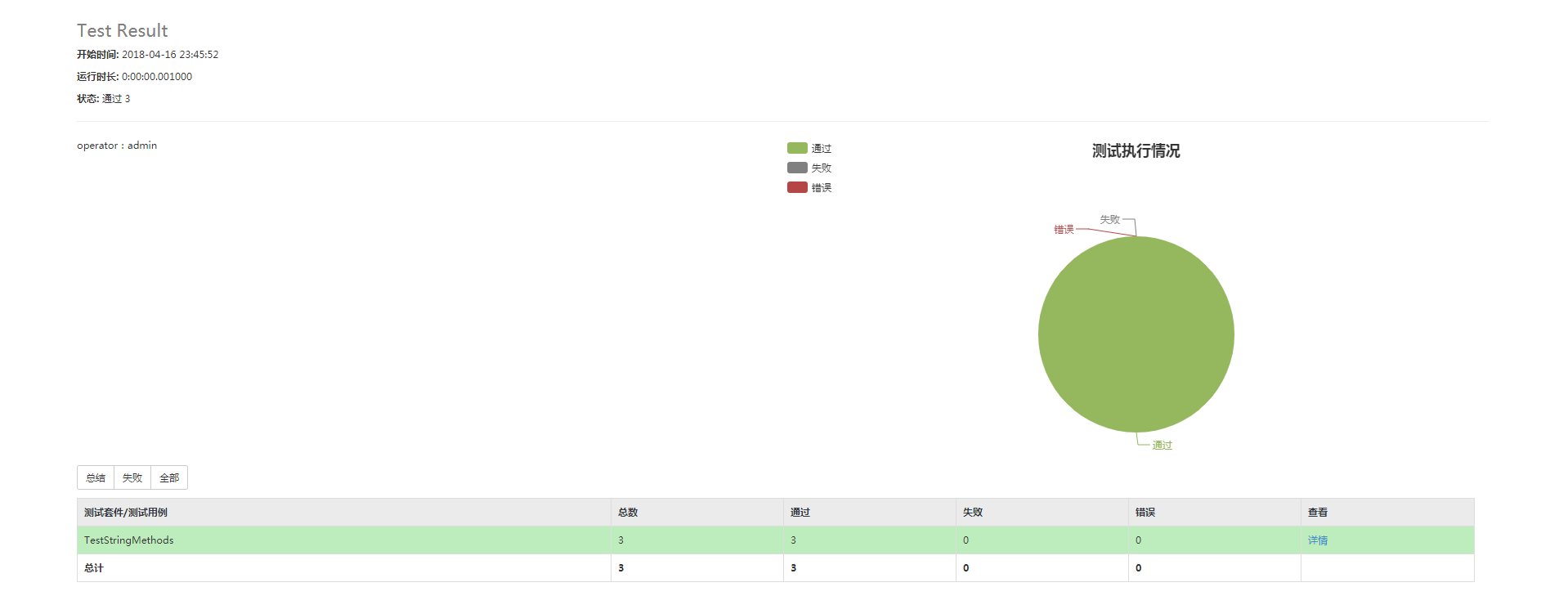
HTMLTestRunner脚本来自:https://blog.csdn.net/huilan_same/article/details/77944829
难点分析:
1. Python3很多测试类不支持,没有Python2那么好找解决办法
2. 效率太慢,明天继续
学习总结:
磨磨蹭蹭终于开始做自己想做的事情了,希望半个月到一个月内,可以输出stepbystep的测试步骤,而且是Python3脚本,挺有意思的,就是公司没有外网,坑啊
参考资料:
https://docs.python.org/3.6/library/unittest.html#
https://blog.csdn.net/huilan_same/article/details/52944782
Python3 Selenium自动化web测试 ==> 第一节 起始点之Python单元测试框架 unittest的更多相关文章
- Python3 Selenium自动化web测试 ==> 第二节 页面元素的定位方法 <上>
前置步骤: 上一篇的Python单元测试框架unittest,我认为相当于功能测试测试用例设计中的用例模板,在自动化用例的设计过程中,可以封装一个模板,在新建用例的时候,把需要测试的步骤添加上去即可: ...
- Python3 Selenium自动化web测试 ==> 第九节 WebDriver高级应用 -- 操作select 和 alert
学习目的: 掌握页面常规元素的定位方法 场景: 网页正常的select元素下拉框常规方法和select专属方法 正式步骤: step1:常规思路select页面元素定位 处理HTML代码截图 # -* ...
- Python3 Selenium自动化web测试 ==> 第二节 页面元素的定位方法 -- iframe专题 <下>
学习目的: 掌握iframe矿建的定位,因为前端的iframe框架页面元素信息,大多时候都会带有动态ID,无法重复定位. 场景: 1. iframe切换 查看iframe 切换iframe 多个ifr ...
- Python3 Selenium自动化web测试 ==> 第七节 WebDriver高级应用 -- 浮动框中,单击选择某个关键字选项
学习目的: 了解WebDriver的高级应用 正式步骤: 测试Python3代码 # -*- coding:utf-8 -*- from selenium import webdriver from ...
- Python3 Selenium自动化web测试 ==> 第六节 WebDriver高级应用 -- 操作web页面的滚动条
学习目的: 掌握页面元素定位以外的其他重要知识点. 正式步骤: 测试Python3代码 # -*- coding:utf-8 -*- from selenium import webdriver fr ...
- Python3 Selenium自动化web测试 ==> 第五节 WebDriver高级应用 -- 使用JavaScript操作页面元素
学习目的: 中级水平技术提升 在WebDriver脚本代码中执行JS代码,可以解决某些 .click()方法无法生效等问题 正式步骤: Python3代码如下 # -*- coding:utf-8 - ...
- Python3 Selenium自动化web测试 ==> 第十一节 WebDriver高级应用 -- 显示等待 + 二次封装
学习目的: 掌握显示等待 掌握二次封装 正式步骤: step1:显示等待的代码示例 # -*- coding:utf-8 -*- from selenium import webdriver from ...
- Python3 Selenium自动化web测试 ==> 第十节 WebDriver高级应用 -- xpath语法
学习目的: xpath定位是针对常规定位方法中,最有效的定位方式. 场景: 页面元素的定位. 正式步骤: step1:常规属性 示例UI 示例UI相关HTML代码 相关代码示例: #通过id定位 dr ...
- Python3 Selenium自动化web测试 ==> 第三节 常用WebDriver API使用示例上(24个API)
前置步骤: 安装selenium,chrome驱动,Python3.6 学习目的: 常见API的使用 涉及的API: step1: 访问一个网址 step2: 网页的前进和后退 step3: 刷新当前 ...
随机推荐
- python | 不可变数据类型
目录 第1节 分类 第2节 不可变数据类型 2.1 布尔型(bool) 2.2 数字型(number) 2.3 字符串(string) 2.4 元组(tuple) 第1节 分类 python中有7种标 ...
- Selenium(五)鼠标和键盘事件
1.模拟鼠标找到大分类下的子分类.以网易严选为例. 如果直接找到 坚果炒货 这个元素,然后点击它来实现跳转,是会报错的. 模拟鼠标停留--点击行为: 页面已成功跳转 2.键盘事件 模拟搜索操作: ...
- informix创建同义词
搜索词条 1.informix不同主机的数据库同义词创建? 2.informix怎么实现跨服务器数据抽取? 3.informix 数据库跨库访问的配置?https://blog.csdn.net/Da ...
- linux 优化
如何优化Linux系统? 1)不用root超级用户登录,添加普通用户,通过sudo授权管理:/etc/sudoers 2)更改默认的远程连接ssh服务端口号,禁止root用户远程登录到服务器:/etc ...
- jQuery于js的区别和联系
一.什么是jQuery jQuery 是 js 的一个库,封装了我们开发过程中常用的一些功能,方便我们调用,提高开发效率. js库是把我们常用的功能放到一个单独的文件中,我们用的时候,直接引用到页面里 ...
- C# GridView 的使用
1.GridView无代码分页排序: 1.AllowSorting设为True,aspx代码中是AllowSorting="True":2.默认1页10条,如果要修改每页条数,修改 ...
- BZOJ 3672[NOI2014]购票(树链剖分+线段树维护凸包+斜率优化) + BZOJ 2402 陶陶的难题II (树链剖分+线段树维护凸包+分数规划+斜率优化)
前言 刚开始看着两道题感觉头皮发麻,后来看看题解,发现挺好理解,只是代码有点长. BZOJ 3672[NOI2014]购票 中文题面,题意略: BZOJ 3672[NOI2014]购票 设f(i)f( ...
- python--第五天练习题
# 1.按alist中元素的age由大到小排序 alist = [{'name': 'a', 'age': 20}, {'name': 'b', 'age': 30}, {'name': 'v', ' ...
- 在Ubuntu上安装openResty #1
在Ubuntu上安装openResty #1 OpenResty® 是一个基于 Nginx 与 Lua 的高性能 Web 平台,其内部集成了大量精良的 Lua 库.第三方模块以及大多数的依赖项.用于方 ...
- 字典-Python基础前传(9)
(一)Python中为什么要有字典 jacky说科学存在的逻辑只有两个: 1.解释问题 2.解决问题 我们明白了科学的逻辑,我们理解任何的知识和技能,都是很简单的 之前jacky跟大家说list因为太 ...