
JavaWeb-SpringSecurity图片验证ImageCode
系列博文
项目已上传至guthub 传送门
JavaWeb-SpringSecurity初认识 传送门
JavaWeb-SpringSecurity在数据库中查询登陆用户 传送门
JavaWeb-SpringSecurity自定义登陆页面 传送门
JavaWeb-SpringSecurity实现需求-判断请求是否以html结尾 传送门
JavaWeb-SpringSecurity自定义登陆配置 传送门
JavaWeb-SpringSecurity图片验证ImageCode 传送门
JavaWeb-SpringSecurity记住我功能 传送门
JavaWeb-SpringSecurity使用短信验证码登陆 传送门
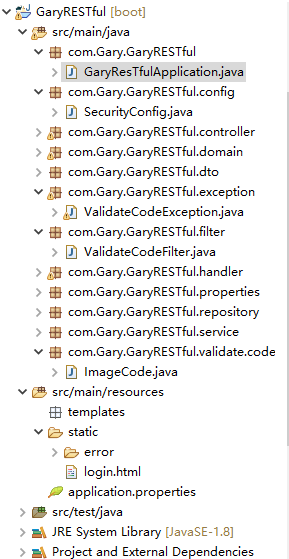
创建一个validate.code存放编写验证码校验代码,创建ImageCode.class图片验证码工具类
package com.Gary.GaryRESTful.validate.code;

import java.awt.image.BufferedImage;

import java.time.LocalDateTime;

//图片验证码

public class ImageCode {

    //给前台展示的图片

    private BufferedImage image;

    //验证码

    private String code;

    //过期时间

    private LocalDateTime expireTime;

    public ImageCode(BufferedImage image,String code,int expreTime)

    {

        this.image = image;

        this.code = code;

        this.expireTime = LocalDateTime.now().plusSeconds(expreTime);

    }

    public ImageCode(BufferedImage image,String code,LocalDateTime expireTime)

    {

        this.image = image;

        this.code = code;

        this.expireTime = expireTime;

    }

    public BufferedImage getImage() {

        return image;

    }

    public void setImage(BufferedImage image) {

        this.image = image;

    }

    public String getCode() {

        return code;

    }

    public void setCode(String code) {

        this.code = code;

    }

    public LocalDateTime getExpireTime() {

        return expireTime;

    }

    public void setExpireTime(LocalDateTime expireTime) {

        this.expireTime = expireTime;

    }

}
ImageCode.class
在controller层中创建ValidateCodeController.class
图片验证三步骤
@GetMapping("/code/image")

    public void createCode(HttpServletRequest request,HttpServletResponse response) throws IOException

    {

        //生成随机数的图片

        ImageCode imageCode = createImageCode();

        //将随机数放入到session中

        sessionStrategy.setAttribute(new ServletWebRequest(request), sessionKey, imageCode);

        //将我们生成的图片写到接口的响应的输出流中

        ImageIO.write(imageCode.getImage(), "JPEG", response.getOutputStream());

    }
package com.Gary.GaryRESTful.controller;

import java.io.IOException;

import javax.imageio.ImageIO;

import javax.servlet.http.HttpServletRequest;

import javax.servlet.http.HttpServletResponse;

import org.springframework.social.connect.web.HttpSessionSessionStrategy;

import org.springframework.social.connect.web.SessionStrategy;

import org.springframework.web.bind.annotation.GetMapping;

import org.springframework.web.bind.annotation.RestController;

import org.springframework.web.context.request.ServletWebRequest;

import com.Gary.GaryRESTful.validate.code.ImageCode;

@RestController

public class ValidateCodeController {

    //操作Session

    private SessionStrategy sessionStrategy = new HttpSessionSessionStrategy();

    private String sessionKey = "session_key_image_code";

    @GetMapping("/code/image")

    public void createCode(HttpServletRequest request,HttpServletResponse response) throws IOException

    {

        //生成随机数的图片

        ImageCode imageCode = createImageCode();

        //将随机数放入到session中

        sessionStrategy.setAttribute(new ServletWebRequest(request), sessionKey, imageCode);

        //将我们生成的图片写到接口的响应的输出流中

        ImageIO.write(imageCode.getImage(), "JPEG", response.getOutputStream());

    }

    //生成图片验证码(验证码,图片,失效的时间)

    private ImageCode createImageCode()

    {

        return null;

    }

}
ValidateCodeController.class
编写验证码的逻辑
1、定义验证码图片长与宽
2、获取画笔工具
3、设置画笔工具的颜色
4、画长方形
5、改变画笔工具的颜色
6、画干扰线
7、改变画笔工具的颜色
8、画数据
9、关闭画笔工具
登陆页面login.html
<form action="/loginPage" method="post">

        用户名:

        <input type="text" name="username">

        <br>

        密码:

        <input type="password" name="password">

        <br>

        图片验证码:

        <input type="text" name="imageCode">

        <img src="/code/image">

        <input type="submit">

</form>
ValidateCodeController.java中实现绘画验证码方法createImageCode()
//生成图片验证码(验证码,图片,失效的时间)

    private ImageCode createImageCode()

    {

        //定义图片的长和宽

        int width = 67;

        int height = 23;

        //生成一张图片

        BufferedImage image = new BufferedImage(width,height,BufferedImage.TYPE_INT_RGB);

        //获得画笔工具

        Graphics g = image.getGraphics();

        //画一个矩形

        g.setColor(new Color(255,255,255));

        g.fillRect(0, 0, width, height);

        //画干扰线

        g.setColor(new Color(0,0,0));

        //设置字体

        g.setFont(new Font("Time New Roman",Font.ITALIC,20));

        Random random = new Random();

        for(int i=0;i<20;i++)

        {

            int x = random.nextInt(width);

            int y = random.nextInt(height);

            int x1 = random.nextInt(12);

            int y1 = random.nextInt(12);

            //(x,y)到(x+x1,y+y1)

            g.drawLine(x, y, x+x1, y+y1);

        }

        //画数据

        String sRand = "";

        for(int i = 0;i<4;i++)

        {

            String rand =String.valueOf(random.nextInt(10));

            sRand += rand;

            //每一个字都改变一下颜色

            g.setColor(new Color(20+random.nextInt(110),20+random.nextInt(110),20+random.nextInt(110)));

            //画每一个数据

            g.drawString(rand, 13*i, 16);

        }

        g.dispose();

        //生成我们自己的验证码数据(图片,验证码,过期时间)

        return new ImageCode(image,sRand,60);

    }
package com.Gary.GaryRESTful.controller;

import java.awt.Color;

import java.awt.Font;

import java.awt.Graphics;

import java.awt.image.BufferedImage;

import java.io.IOException;

import java.util.Random;

import javax.imageio.ImageIO;

import javax.servlet.http.HttpServletRequest;

import javax.servlet.http.HttpServletResponse;

import org.springframework.social.connect.web.HttpSessionSessionStrategy;

import org.springframework.social.connect.web.SessionStrategy;

import org.springframework.web.bind.annotation.GetMapping;

import org.springframework.web.bind.annotation.RestController;

import org.springframework.web.context.request.ServletWebRequest;

import com.Gary.GaryRESTful.validate.code.ImageCode;

@RestController

public class ValidateCodeController {

    //操作Session

    private SessionStrategy sessionStrategy = new HttpSessionSessionStrategy();

    private String sessionKey = "session_key_image_code";

    @GetMapping("/code/image")

    public void createCode(HttpServletRequest request,HttpServletResponse response) throws IOException

    {

        //生成随机数的图片

        ImageCode imageCode = createImageCode();

        //将随机数放入到session中

        sessionStrategy.setAttribute(new ServletWebRequest(request), sessionKey, imageCode);

        //将我们生成的图片写到接口的响应的输出流中

        ImageIO.write(imageCode.getImage(), "JPEG", response.getOutputStream());

    }

    //生成图片验证码(验证码,图片,失效的时间)

    private ImageCode createImageCode()

    {

        //定义图片的长和宽

        int width = 67;

        int height = 23;

        //生成一张图片

        BufferedImage image = new BufferedImage(width,height,BufferedImage.TYPE_INT_RGB);

        //获得画笔工具

        Graphics g = image.getGraphics();

        //画一个矩形

        g.setColor(new Color(255,255,255));

        g.fillRect(0, 0, width, height);

        //画干扰线

        g.setColor(new Color(0,0,0));

        //设置字体

        g.setFont(new Font("Time New Roman",Font.ITALIC,20));

        Random random = new Random();

        for(int i=0;i<20;i++)

        {

            int x = random.nextInt(width);

            int y = random.nextInt(height);

            int x1 = random.nextInt(12);

            int y1 = random.nextInt(12);

            //(x,y)到(x+x1,y+y1)

            g.drawLine(x, y, x+x1, y+y1);

        }

        //画数据

        String sRand = "";

        for(int i = 0;i<4;i++)

        {

            String rand =String.valueOf(random.nextInt(10));

            sRand += rand;

            //每一个字都改变一下颜色

            g.setColor(new Color(20+random.nextInt(110),20+random.nextInt(110),20+random.nextInt(110)));

            //画每一个数据

            g.drawString(rand, 13*i, 16);

        }

        g.dispose();

        //生成我们自己的验证码数据(图片,验证码,过期时间)

        return new ImageCode(image,sRand,60);

    }

}
ValidateCodeController.java
处理验证码拦截器,添加处理图片验证码的Filter
如果验证码登陆成功,则放行,否则进行拦截
配置验证码拦截器ValidateCodeException.java,继承AuthenticationException.java
//AuthenticationException是springsecurity中所有异常的基类

public class ValidateCodeException extends AuthenticationException{

    public ValidateCodeException(String msg) {

        super(msg);

        // TODO Auto-generated constructor stub

    }

}
检验验证码是否正确方法
//校验验证码是否正确

    private void validate(ServletWebRequest request) throws ServletRequestBindingException {

        // 获得session域中正确的验证码

        ImageCode codeInSession =  (ImageCode) sessionStrategy.getAttribute(request, ValidateCodeController.sessionKey);

        // 获得request域中的用户输入的验证码imageCode

        String codeInRequest = ServletRequestUtils.getStringParameter(request.getRequest(), "imageCode");

        // 判断用户输入的验证码是否为空

        if(StringUtils.isEmpty(codeInRequest))

        {

            throw new ValidateCodeException("验证码不能为空");

        }

        // 判断session域中的验证码是否为null

        if(codeInSession == null)

        {

            throw new ValidateCodeException("验证码不存在");

        }

        // 判断验证码是否过期

        if(codeInSession.isExpried())

        {

            throw new ValidateCodeException("验证码已过期");

        }

        // 校验两个验证码是否匹配

        if(!StringUtils.pathEquals(codeInSession.getCode(), codeInRequest))

        {

            //System.out.println("正确的:"+codeInSession.getCode());

            //System.out.println("用户输入的:"+codeInRequest);

            throw new ValidateCodeException("验证码不匹配");

        }

        // 将验证码从session域中移除

        sessionStrategy.removeAttribute(request, ValidateCodeController.sessionKey);

    }
如果用户验证码正确则放行用户登陆步骤,当用户登陆输入正确输入账号密码时,则给与用户下一步操作,否则返回"坏的凭证"
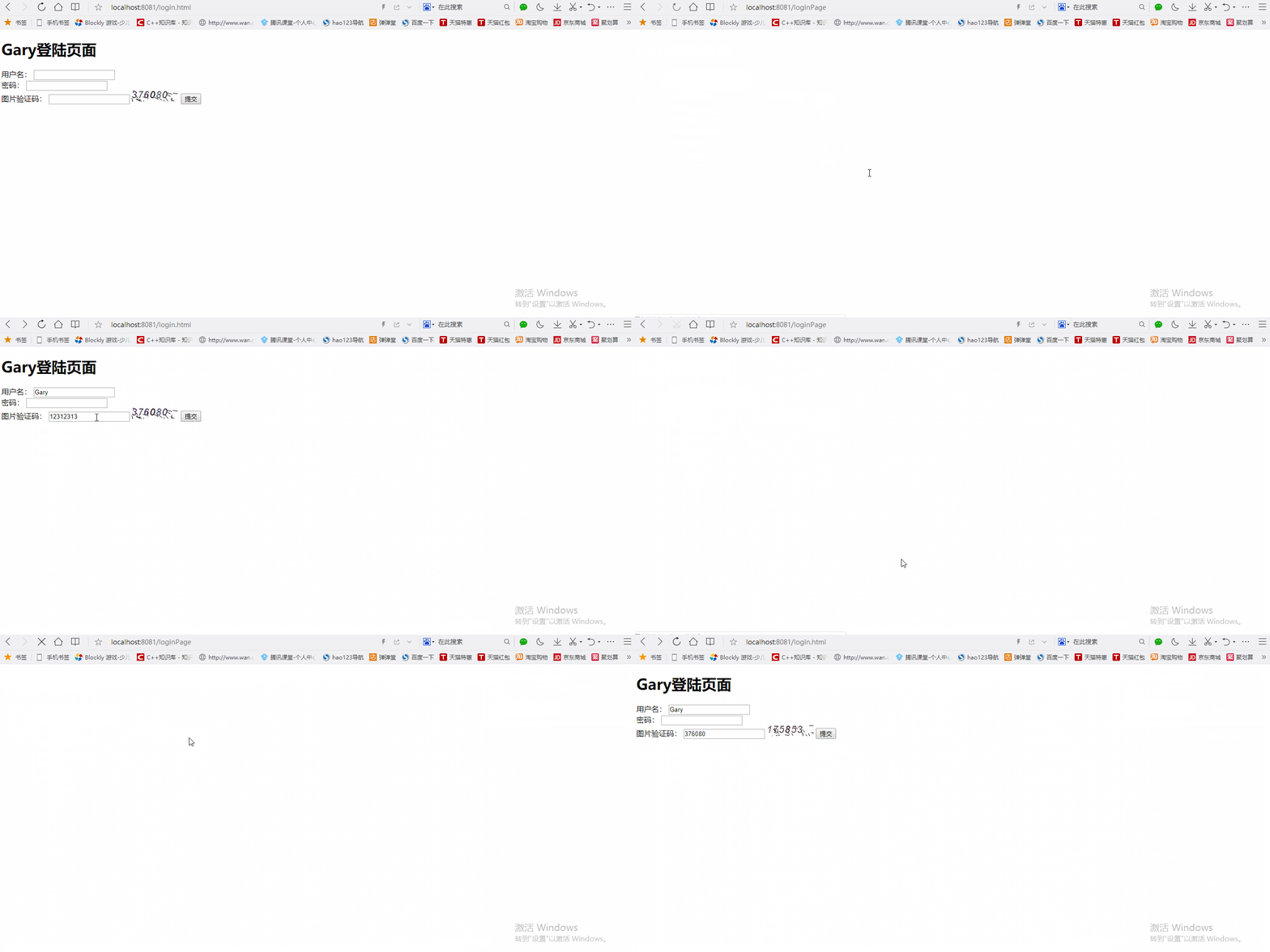
验证码如果没有输入正确,不会放行用户登陆步骤
SecurityConfig.java配置
//Web应用安全适配器

@Configuration

public class SecurityConfig extends WebSecurityConfigurerAdapter{

    //告诉SpringSecurity密码用什么加密的

    @Bean

    public PasswordEncoder passwordEncoder()

    {

        return new BCryptPasswordEncoder();

    }

    @Autowired

    private LoginSuccessHandler loginSuccessHandler;

    @Autowired

    private LoginFailureHandler loginFailureHandler;

    protected void configure(HttpSecurity http) throws Exception{

        //声明我们自己写的过滤器

        ValidateCodeFilter validateCodeFilter = new ValidateCodeFilter();

        //给过滤器赋值

        validateCodeFilter.setAuthenticationFailureHandler(loginFailureHandler);

        //表单验证(身份认证)

        http.addFilterBefore(validateCodeFilter, UsernamePasswordAuthenticationFilter.class)

            .formLogin()

            //自定义登陆页面

            .loginPage("/require")

            //如果URL为loginPage,则用SpringSecurity中自带的过滤器去处理该请求

            .loginProcessingUrl("/loginPage")

            //配置登陆成功调用loginSuccessHandler

            .successHandler(loginSuccessHandler)

            //配置登陆失败调用loginFailureHandler

            .failureHandler(loginFailureHandler)

            .and()

            //请求授权

            .authorizeRequests()

            //在访问我们的URL时,我们是不需要省份认证,可以立即访问

            .antMatchers("/login.html","/require","/code/image").permitAll()

            //所有请求都被拦截,跳转到(/login请求中)

            .anyRequest()

            //都需要我们身份认证

            .authenticated()

            //SpringSecurity保护机制

            .and().csrf().disable();

    }

<!DOCTYPE html>

<html>

<head>

<meta charset="UTF-8">

<title>Insert title here</title>

</head>

<body>

<h1>Gary登陆页面</h1>

    <form action="/loginPage" method="post">

        用户名:

        <input type="text" name="username">

        <br>

        密码:

        <input type="password" name="password">

        <br>

        图片验证码:

        <input type="text" name="imageCode">

        <img src="/code/image">

        <input type="submit">

    </form>

</body>

</html>
login.html
package com.Gary.GaryRESTful.config;

import org.springframework.beans.factory.annotation.Autowired;

import org.springframework.context.annotation.Bean;

import org.springframework.context.annotation.Configuration;

import org.springframework.security.config.annotation.web.builders.HttpSecurity;

import org.springframework.security.config.annotation.web.configuration.WebSecurityConfigurerAdapter;

import org.springframework.security.crypto.bcrypt.BCryptPasswordEncoder;

import org.springframework.security.crypto.password.PasswordEncoder;

import org.springframework.security.web.authentication.UsernamePasswordAuthenticationFilter;

import com.Gary.GaryRESTful.filter.ValidateCodeFilter;

import com.Gary.GaryRESTful.handler.LoginFailureHandler;

import com.Gary.GaryRESTful.handler.LoginSuccessHandler;

//Web应用安全适配器

@Configuration

public class SecurityConfig extends WebSecurityConfigurerAdapter{

    //告诉SpringSecurity密码用什么加密的

    @Bean

    public PasswordEncoder passwordEncoder()

    {

        return new BCryptPasswordEncoder();

    }

    @Autowired

    private LoginSuccessHandler loginSuccessHandler;

    @Autowired

    private LoginFailureHandler loginFailureHandler;

    protected void configure(HttpSecurity http) throws Exception{

        //声明我们自己写的过滤器

        ValidateCodeFilter validateCodeFilter = new ValidateCodeFilter();

        //给过滤器赋值

        validateCodeFilter.setAuthenticationFailureHandler(loginFailureHandler);

        //表单验证(身份认证)

        http.addFilterBefore(validateCodeFilter, UsernamePasswordAuthenticationFilter.class)

            .formLogin()

            //自定义登陆页面

            .loginPage("/require")

            //如果URL为loginPage,则用SpringSecurity中自带的过滤器去处理该请求

            .loginProcessingUrl("/loginPage")

            //配置登陆成功调用loginSuccessHandler

            .successHandler(loginSuccessHandler)

            //配置登陆失败调用loginFailureHandler

            .failureHandler(loginFailureHandler)

            .and()

            //请求授权

            .authorizeRequests()

            //在访问我们的URL时,我们是不需要省份认证,可以立即访问

            .antMatchers("/login.html","/require","/code/image").permitAll()

            //所有请求都被拦截,跳转到(/login请求中)

            .anyRequest()

            //都需要我们身份认证

            .authenticated()

            //SpringSecurity保护机制

            .and().csrf().disable();

    }

}
SecurityConfig.java
package com.Gary.GaryRESTful.validate.code;

import java.awt.image.BufferedImage;

import java.time.LocalDateTime;

//图片验证码

public class ImageCode {

    //给前台展示的图片

    private BufferedImage image;

    //验证码

    private String code;

    //过期时间

    private LocalDateTime expireTime;

    public ImageCode(BufferedImage image,String code,int expreTime)

    {

        this.image = image;

        this.code = code;

        this.expireTime = LocalDateTime.now().plusSeconds(expreTime);

    }

    public ImageCode(BufferedImage image,String code,LocalDateTime expireTime)

    {

        this.image = image;

        this.code = code;

        this.expireTime = expireTime;

    }

    //判断验证码是否过去

    public boolean isExpried()

    {

        //判断当前时间是否在过期时间之后

        return LocalDateTime.now().isAfter(expireTime);

    }

    public BufferedImage getImage() {

        return image;

    }

    public void setImage(BufferedImage image) {

        this.image = image;

    }

    public String getCode() {

        return code;

    }

    public void setCode(String code) {

        this.code = code;

    }

    public LocalDateTime getExpireTime() {

        return expireTime;

    }

    public void setExpireTime(LocalDateTime expireTime) {

        this.expireTime = expireTime;

    }

}
ImageCode.java
package com.Gary.GaryRESTful.controller;

import java.awt.Color;

import java.awt.Font;

import java.awt.Graphics;

import java.awt.image.BufferedImage;

import java.io.IOException;

import java.util.Random;

import javax.imageio.ImageIO;

import javax.servlet.http.HttpServletRequest;

import javax.servlet.http.HttpServletResponse;

import org.springframework.social.connect.web.HttpSessionSessionStrategy;

import org.springframework.social.connect.web.SessionStrategy;

import org.springframework.web.bind.annotation.GetMapping;

import org.springframework.web.bind.annotation.RestController;

import org.springframework.web.context.request.ServletWebRequest;

import com.Gary.GaryRESTful.validate.code.ImageCode;

@RestController

public class ValidateCodeController {

    //操作Session

    private SessionStrategy sessionStrategy = new HttpSessionSessionStrategy();

    public SessionStrategy getSessionStrategy() {

        return sessionStrategy;

    }

    public void setSessionStrategy(SessionStrategy sessionStrategy) {

        this.sessionStrategy = sessionStrategy;

    }

    public static String getSessionKey() {

        return sessionKey;

    }

    public static void setSessionKey(String sessionKey) {

        ValidateCodeController.sessionKey = sessionKey;

    }

    public static String sessionKey = "session_key_image_code";

    @GetMapping("/code/image")

    public void createCode(HttpServletRequest request,HttpServletResponse response) throws IOException

    {

        //生成随机数的图片

        ImageCode imageCode = createImageCode();

        //将随机数放入到session中

        sessionStrategy.setAttribute(new ServletWebRequest(request), sessionKey, imageCode);

        //将我们生成的图片写到接口的响应的输出流中

        ImageIO.write(imageCode.getImage(), "JPEG", response.getOutputStream());

    }

    //生成图片验证码(验证码,图片,失效的时间)

    private ImageCode createImageCode()

    {

        //定义图片的长和宽

        int width = 67;

        int height = 23;

        //生成一张图片

        BufferedImage image = new BufferedImage(width,height,BufferedImage.TYPE_INT_RGB);

        //获得画笔工具

        Graphics g = image.getGraphics();

        //画一个矩形

        g.setColor(new Color(255,255,255));

        g.fillRect(0, 0, width, height);

        //画干扰线

        g.setColor(new Color(0,0,0));

        //设置字体

        g.setFont(new Font("Time New Roman",Font.ITALIC,20));

        Random random = new Random();

        for(int i=0;i<20;i++)

        {

            int x = random.nextInt(width);

            int y = random.nextInt(height);

            int x1 = random.nextInt(12);

            int y1 = random.nextInt(12);

            //(x,y)到(x+x1,y+y1)

            g.drawLine(x, y, x+x1, y+y1);

        }

        //画数据

        String sRand = "";

        for(int i = 0;i<4;i++)

        {

            String rand =String.valueOf(random.nextInt(10));

            //System.out.println(rand);

            sRand += rand;

            //每一个字都改变一下颜色

            g.setColor(new Color(20+random.nextInt(110),20+random.nextInt(110),20+random.nextInt(110)));

            //画每一个数据

            g.drawString(rand, 13*i, 16);

        }

        g.dispose();

        //生成我们自己的验证码数据(图片,验证码,过期时间)

        return new ImageCode(image,sRand,60000);

    }

}
ValidateCodeController.java
package com.Gary.GaryRESTful.exception;

import org.springframework.security.core.AuthenticationException;

//AuthenticationException是springsecurity中所有异常的基类

public class ValidateCodeException extends AuthenticationException{

    public ValidateCodeException(String msg) {

        super(msg);

        // TODO Auto-generated constructor stub

    }

}
ValidateCodeException.java
package com.Gary.GaryRESTful.filter;

import java.io.IOException;

import javax.servlet.FilterChain;

import javax.servlet.ServletException;

import javax.servlet.http.HttpServletRequest;

import javax.servlet.http.HttpServletResponse;

import org.springframework.security.web.authentication.AuthenticationFailureHandler;

import org.springframework.social.connect.web.HttpSessionSessionStrategy;

import org.springframework.social.connect.web.SessionStrategy;

import org.springframework.util.StringUtils;

import org.springframework.web.bind.ServletRequestBindingException;

import org.springframework.web.bind.ServletRequestUtils;

import org.springframework.web.context.request.ServletWebRequest;

import org.springframework.web.filter.OncePerRequestFilter;

import com.Gary.GaryRESTful.controller.ValidateCodeController;

import com.Gary.GaryRESTful.exception.ValidateCodeException;

import com.Gary.GaryRESTful.validate.code.ImageCode;

//继承OncePerRequestFilter,保证这个filter只会执行一次

public class ValidateCodeFilter extends OncePerRequestFilter{

    private AuthenticationFailureHandler authenticationFailureHandler;

    //操作session域的工具

    private SessionStrategy sessionStrategy = new HttpSessionSessionStrategy();

    //Filter执行

    @Override

    protected void doFilterInternal(HttpServletRequest request, HttpServletResponse response, FilterChain filterChain)

            throws ServletException, IOException {

        //loginPage

        if(StringUtils.pathEquals("/loginPage", request.getRequestURI()) && StringUtils.startsWithIgnoreCase(request.getMethod(), "post"))

        {

            //filter才会执行

            try

            {

                validate(new ServletWebRequest(request));

            }

            catch(ValidateCodeException e) {

                //判处验证码的异常

                authenticationFailureHandler.onAuthenticationFailure(request,response,e);

                //一旦出现异常,我们就不就不能继续执行(应该放行),应该return

                return;

            }

        }

        //放行

        filterChain.doFilter(request, response);

    }

    //校验验证码是否正确

    private void validate(ServletWebRequest request) throws ServletRequestBindingException {

        // 获得session域中正确的验证码

        ImageCode codeInSession =  (ImageCode) sessionStrategy.getAttribute(request, ValidateCodeController.sessionKey);

        // 获得request域中的用户输入的验证码imageCode

        String codeInRequest = ServletRequestUtils.getStringParameter(request.getRequest(), "imageCode");

        // 判断用户输入的验证码是否为空

        if(StringUtils.isEmpty(codeInRequest))

        {

            throw new ValidateCodeException("验证码不能为空");

        }

        // 判断session域中的验证码是否为null

        if(codeInSession == null)

        {

            throw new ValidateCodeException("验证码不存在");

        }

        // 判断验证码是否过期

        if(codeInSession.isExpried())

        {

            throw new ValidateCodeException("验证码已过期");

        }

        // 校验两个验证码是否匹配

        if(!StringUtils.pathEquals(codeInSession.getCode(), codeInRequest))

        {

            //System.out.println("正确的:"+codeInSession.getCode());

            //System.out.println("用户输入的:"+codeInRequest);

            throw new ValidateCodeException("验证码不匹配");

        }

        // 将验证码从session域中移除

        sessionStrategy.removeAttribute(request, ValidateCodeController.sessionKey);

    }

    public AuthenticationFailureHandler getAuthenticationFailureHandler() {

        return authenticationFailureHandler;

    }

    public void setAuthenticationFailureHandler(AuthenticationFailureHandler authenticationFailureHandler) {

        this.authenticationFailureHandler = authenticationFailureHandler;

    }

    public SessionStrategy getSessionStrategy() {

        return sessionStrategy;

    }

    public void setSessionStrategy(SessionStrategy sessionStrategy) {

        this.sessionStrategy = sessionStrategy;

    }

}
ValidateCodeFilter.java
优化:增加代码的重用性
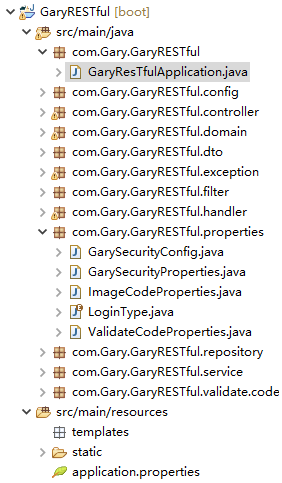
在GaryRESTful.properties包下创建ValidateCodeProperties.class,用于管理配置图片验证码的功能,再创建一个ImageCodeProperties.class,用于管理图片验证码的生成
优化图片验证码的生成
application.properties
#配置登陆方式

gary.security.loginType = JSON

server.port=8081

#验证码长度

gary.security.code.image.length = 6

#验证码图片的长

gary.security.code.image.width = 100

#datasource

spring.datasource.url=jdbc:mysql:///springsecurity?serverTimezone=UTC&characterEncoding=utf-8

spring.datasource.username=root

spring.datasource.password=123456

spring.datasource.dricer-class-name=com.mysql.jdbc.Driver

#jpa

#打印出数据库语句

spring.jpa.show-sql=true

#更新数据库表

spring.jpa.hibernate.ddl-auto=update

#配置登陆方式

gary.security.loginType = JSON

server.port=8081

#验证码长度

gary.security.code.image.length = 6

#验证码图片的长

gary.security.code.image.width = 100
application.properties
package com.Gary.GaryRESTful.controller;

import java.awt.Color;

import java.awt.Font;

import java.awt.Graphics;

import java.awt.image.BufferedImage;

import java.io.IOException;

import java.util.Random;

import javax.imageio.ImageIO;

import javax.servlet.http.HttpServletRequest;

import javax.servlet.http.HttpServletResponse;

import org.springframework.beans.factory.annotation.Autowired;

import org.springframework.social.connect.web.HttpSessionSessionStrategy;

import org.springframework.social.connect.web.SessionStrategy;

import org.springframework.web.bind.ServletRequestUtils;

import org.springframework.web.bind.annotation.GetMapping;

import org.springframework.web.bind.annotation.RestController;

import org.springframework.web.context.request.ServletWebRequest;

import com.Gary.GaryRESTful.properties.GarySecurityProperties;

import com.Gary.GaryRESTful.validate.code.ImageCode;

@RestController

public class ValidateCodeController {

    //操作Session

    private SessionStrategy sessionStrategy = new HttpSessionSessionStrategy();

    public static String sessionKey = "session_key_image_code";

    @Autowired

    private GarySecurityProperties garySecurityProperties;

    public SessionStrategy getSessionStrategy() {

        return sessionStrategy;

    }

    public void setSessionStrategy(SessionStrategy sessionStrategy) {

        this.sessionStrategy = sessionStrategy;

    }

    public static String getSessionKey() {

        return sessionKey;

    }

    public static void setSessionKey(String sessionKey) {

        ValidateCodeController.sessionKey = sessionKey;

    }

    @GetMapping("/code/image")

    public void createCode(HttpServletRequest request,HttpServletResponse response) throws IOException

    {

        //生成随机数的图片

        ImageCode imageCode = createImageCode(request);

        //将随机数放入到session中

        sessionStrategy.setAttribute(new ServletWebRequest(request), sessionKey, imageCode);

        //将我们生成的图片写到接口的响应的输出流中

        ImageIO.write(imageCode.getImage(), "JPEG", response.getOutputStream());

    }

    //生成图片验证码(验证码,图片,失效的时间)

    private ImageCode createImageCode(HttpServletRequest request)

    {

        //定义图片的长和宽

        int width = ServletRequestUtils.getIntParameter(request, "width", garySecurityProperties.getCode().getImage().getWidth());

        int height =  ServletRequestUtils.getIntParameter(request, "height", garySecurityProperties.getCode().getImage().getHeight());;

        //生成一张图片

        BufferedImage image = new BufferedImage(width,height,BufferedImage.TYPE_INT_RGB);

        //获得画笔工具

        Graphics g = image.getGraphics();

        //画一个矩形

        g.setColor(new Color(255,255,255));

        g.fillRect(0, 0, width, height);

        //画干扰线

        g.setColor(new Color(0,0,0));

        //设置字体

        g.setFont(new Font("Time New Roman",Font.ITALIC,20));

        Random random = new Random();

        for(int i=0;i<20;i++)

        {

            int x = random.nextInt(width);

            int y = random.nextInt(height);

            int x1 = random.nextInt(12);

            int y1 = random.nextInt(12);

            //(x,y)到(x+x1,y+y1)

            g.drawLine(x, y, x+x1, y+y1);

        }

        //画数据

        String sRand = "";

        for(int i = 0;i<garySecurityProperties.getCode().getImage().getLength();i++)

        {

            String rand =String.valueOf(random.nextInt(10));

            //System.out.println(rand);

            sRand += rand;

            //每一个字都改变一下颜色

            g.setColor(new Color(20+random.nextInt(110),20+random.nextInt(110),20+random.nextInt(110)));

            //画每一个数据

            g.drawString(rand, 13*i, 16);

        }

        g.dispose();

        //生成我们自己的验证码数据(图片,验证码,过期时间)

        return new ImageCode(image,sRand,garySecurityProperties.getCode().getImage().getExpireIn());

    }

}
ValidateCodeController.java
package com.Gary.GaryRESTful.properties;

import org.springframework.boot.context.properties.ConfigurationProperties;

@ConfigurationProperties(prefix = "gary.security")

public class GarySecurityProperties {

    //LoginType登陆的方式,默认为JSON(restful设计风格)

    private LoginType loginType = LoginType.JSON;

    private ValidateCodeProperties code = new ValidateCodeProperties();

    public ValidateCodeProperties getCode() {

        return code;

    }

    public void setCode(ValidateCodeProperties code) {

        this.code = code;

    }

    public LoginType getLoginType() {

        return loginType;

    }

    public void setLoginType(LoginType loginType) {

        this.loginType = loginType;

    }

}
GarySecurityProperties.java
package com.Gary.GaryRESTful.properties;

public class ImageCodeProperties {

    private int width = 67;

    private int height = 23;

    private int length = 4;

    private int expireIn = 60;

    public int getWidth() {

        return width;

    }

    public void setWidth(int width) {

        this.width = width;

    }

    public int getHeight() {

        return height;

    }

    public void setHeight(int height) {

        this.height = height;

    }

    public int getLength() {

        return length;

    }

    public void setLength(int length) {

        this.length = length;

    }

    public int getExpireIn() {

        return expireIn;

    }

    public void setExpireIn(int expireIn) {

        this.expireIn = expireIn;

    }

}
ImageCodeProperties.java
package com.Gary.GaryRESTful.properties;

public class ValidateCodeProperties {

    //图片验证码

    private ImageCodeProperties image;

    public ImageCodeProperties getImage() {

        return image;

    }

    public void setImage(ImageCodeProperties image) {

        this.image = image;

    }

}
ValidateCodeProperties.java
优化:配置Filter哪些请求需要拦截器执行
ImageCodeProperties.java中添加一个String类型的url
application.properties中添加一个gary.security.code.image.url,用来配置哪些需要我们验证码的Filter
在ValidateCodeFilter.java将用户请求的url进行切割保存到Set集合当中,遍历Set集合看是否有请求与我们request中的url一致
//在garySecurityProperties.code.image.url    /user,/user/*

    //当Bean组装好之后回调用这个函数

    @Override

    public void afterPropertiesSet() throws ServletException {

        super.afterPropertiesSet();

        //切割用户配置的url

        String[] configUrls = StringUtils.split(garySecurityProperties.getCode().getImage().getUrl(), ",");

        //将数组放入urls中

        for(String configURL : configUrls)

        {

            urls.add(configURL);

        }

        //loginPage一定会用到这个Filter,所以我们必须加上

        urls.add("/loginPage");

    }
doFilterInternal()通过循环判断是否有匹配的路径
//Filter执行

    @Override

    protected void doFilterInternal(HttpServletRequest request, HttpServletResponse response, FilterChain filterChain)

            throws ServletException, IOException {

        //loginPage

        //if(StringUtils.pathEquals("/loginPage", request.getRequestURI()) && StringUtils.startsWithIgnoreCase(request.getMethod(), "post"))

        //判断是否有匹配的路径

        boolean action = false;

        //循环判断

        for(String url :urls)

        {

            if(antPathMatcher.match(url, request.getRequestURI()))

            {

                action = true;

            }

        }

        if(action)

        {

            //filter才会执行

            try

            {

                validate(new ServletWebRequest(request));

            }

            catch(ValidateCodeException e) {

                //判处验证码的异常

                authenticationFailureHandler.onAuthenticationFailure(request,response,e);

                //一旦出现异常,我们就不就不能继续执行(应该放行),应该return

                return;

            }

        }

        //放行

        filterChain.doFilter(request, response);

    }
#datasource

spring.datasource.url=jdbc:mysql:///springsecurity?serverTimezone=UTC&characterEncoding=utf-8

spring.datasource.username=root

spring.datasource.password=123456

spring.datasource.dricer-class-name=com.mysql.jdbc.Driver

#jpa

#打印出数据库语句

spring.jpa.show-sql=true

#更新数据库表

spring.jpa.hibernate.ddl-auto=update

#配置登陆方式

gary.security.loginType = JSON

server.port=8081

#验证码长度

gary.security.code.image.length = 6

#验证码图片的长

gary.security.code.image.width = 100

#配置哪些需要我们验证码的Filter

gary.security.code.image.url = /user,/user/*
application.properties
package com.Gary.GaryRESTful.config;

import org.springframework.beans.factory.annotation.Autowired;

import org.springframework.context.annotation.Bean;

import org.springframework.context.annotation.Configuration;

import org.springframework.security.config.annotation.web.builders.HttpSecurity;

import org.springframework.security.config.annotation.web.configuration.WebSecurityConfigurerAdapter;

import org.springframework.security.crypto.bcrypt.BCryptPasswordEncoder;

import org.springframework.security.crypto.password.PasswordEncoder;

import org.springframework.security.web.authentication.UsernamePasswordAuthenticationFilter;

import com.Gary.GaryRESTful.filter.ValidateCodeFilter;

import com.Gary.GaryRESTful.handler.LoginFailureHandler;

import com.Gary.GaryRESTful.handler.LoginSuccessHandler;

import com.Gary.GaryRESTful.properties.GarySecurityProperties;

//Web应用安全适配器

@Configuration

public class SecurityConfig extends WebSecurityConfigurerAdapter{

    //告诉SpringSecurity密码用什么加密的

    @Bean

    public PasswordEncoder passwordEncoder()

    {

        return new BCryptPasswordEncoder();

    }

    @Autowired

    private LoginSuccessHandler loginSuccessHandler;

    @Autowired

    private LoginFailureHandler loginFailureHandler;

    @Autowired

    private GarySecurityProperties garySecurityProperties;

    protected void configure(HttpSecurity http) throws Exception{

        //声明我们自己写的过滤器

        ValidateCodeFilter validateCodeFilter = new ValidateCodeFilter();

        //给过滤器赋值

        validateCodeFilter.setAuthenticationFailureHandler(loginFailureHandler);

        validateCodeFilter.setGarySecurityProperties(garySecurityProperties);

        validateCodeFilter.afterPropertiesSet();

        //表单验证(身份认证)

        http.addFilterBefore(validateCodeFilter, UsernamePasswordAuthenticationFilter.class)

            .formLogin()

            //自定义登陆页面

            .loginPage("/require")

            //如果URL为loginPage,则用SpringSecurity中自带的过滤器去处理该请求

            .loginProcessingUrl("/loginPage")

            //配置登陆成功调用loginSuccessHandler

            .successHandler(loginSuccessHandler)

            //配置登陆失败调用loginFailureHandler

            .failureHandler(loginFailureHandler)

            .and()

            //请求授权

            .authorizeRequests()

            //在访问我们的URL时,我们是不需要省份认证,可以立即访问

            .antMatchers("/login.html","/require","/code/image").permitAll()

            //所有请求都被拦截,跳转到(/login请求中)

            .anyRequest()

            //都需要我们身份认证

            .authenticated()

            //SpringSecurity保护机制

            .and().csrf().disable();

    }

}
SecurityConfig.java
package com.Gary.GaryRESTful.filter;

import java.io.IOException;

import java.util.HashSet;

import java.util.Set;

import javax.servlet.FilterChain;

import javax.servlet.ServletException;

import javax.servlet.http.HttpServletRequest;

import javax.servlet.http.HttpServletResponse;

import org.springframework.beans.factory.InitializingBean;

import org.springframework.security.web.authentication.AuthenticationFailureHandler;

import org.springframework.social.connect.web.HttpSessionSessionStrategy;

import org.springframework.social.connect.web.SessionStrategy;

import org.springframework.util.AntPathMatcher;

import org.springframework.util.StringUtils;

import org.springframework.web.bind.ServletRequestBindingException;

import org.springframework.web.bind.ServletRequestUtils;

import org.springframework.web.context.request.ServletWebRequest;

import org.springframework.web.filter.OncePerRequestFilter;

import com.Gary.GaryRESTful.controller.ValidateCodeController;

import com.Gary.GaryRESTful.exception.ValidateCodeException;

import com.Gary.GaryRESTful.properties.GarySecurityProperties;

import com.Gary.GaryRESTful.validate.code.ImageCode;

//继承OncePerRequestFilter,保证这个filter只会执行一次

public class ValidateCodeFilter extends OncePerRequestFilter implements InitializingBean{

    private AuthenticationFailureHandler authenticationFailureHandler;

    //操作session域的工具

    private SessionStrategy sessionStrategy = new HttpSessionSessionStrategy();

    private GarySecurityProperties garySecurityProperties;

    private Set<String> urls = new HashSet<String>();

    //为了处理/user/*的形式

    private AntPathMatcher antPathMatcher = new AntPathMatcher();

    //在garySecurityProperties.code.image.url    /user,/user/*

    //当Bean组装好之后回调用这个函数

    @Override

    public void afterPropertiesSet() throws ServletException {

        super.afterPropertiesSet();

        //切割用户配置的url

        String[] configUrls = StringUtils.split(garySecurityProperties.getCode().getImage().getUrl(), ",");

        //将数组放入urls中

        for(String configURL : configUrls)

        {

            urls.add(configURL);

        }

        //loginPage一定会用到这个Filter,所以我们必须加上

        urls.add("/loginPage");

    }

    public GarySecurityProperties getGarySecurityProperties() {

        return garySecurityProperties;

    }

    public void setGarySecurityProperties(GarySecurityProperties garySecurityProperties) {

        this.garySecurityProperties = garySecurityProperties;

    }

    //Filter执行

    @Override

    protected void doFilterInternal(HttpServletRequest request, HttpServletResponse response, FilterChain filterChain)

            throws ServletException, IOException {

        //loginPage

        //if(StringUtils.pathEquals("/loginPage", request.getRequestURI()) && StringUtils.startsWithIgnoreCase(request.getMethod(), "post"))

        //判断是否有匹配的路径

        boolean action = false;

        //循环判断

        for(String url :urls)

        {

            if(antPathMatcher.match(url, request.getRequestURI()))

            {

                action = true;

            }

        }

        if(action)

        {

            //filter才会执行

            try

            {

                validate(new ServletWebRequest(request));

            }

            catch(ValidateCodeException e) {

                //判处验证码的异常

                authenticationFailureHandler.onAuthenticationFailure(request,response,e);

                //一旦出现异常,我们就不就不能继续执行(应该放行),应该return

                return;

            }

        }

        //放行

        filterChain.doFilter(request, response);

    }

    //校验验证码是否正确

    private void validate(ServletWebRequest request) throws ServletRequestBindingException {

        // 获得session域中正确的验证码

        ImageCode codeInSession =  (ImageCode) sessionStrategy.getAttribute(request, ValidateCodeController.sessionKey);

        // 获得request域中的用户输入的验证码imageCode

        String codeInRequest = ServletRequestUtils.getStringParameter(request.getRequest(), "imageCode");

        // 判断用户输入的验证码是否为空

        if(StringUtils.isEmpty(codeInRequest))

        {

            throw new ValidateCodeException("验证码不能为空");

        }

        // 判断session域中的验证码是否为null

        if(codeInSession == null)

        {

            throw new ValidateCodeException("验证码不存在");

        }

        // 判断验证码是否过期

        if(codeInSession.isExpried())

        {

            throw new ValidateCodeException("验证码已过期");

        }

        // 校验两个验证码是否匹配

        if(!StringUtils.pathEquals(codeInSession.getCode(), codeInRequest))

        {

            //System.out.println("正确的:"+codeInSession.getCode());

            //System.out.println("用户输入的:"+codeInRequest);

            throw new ValidateCodeException("验证码不匹配");

        }

        // 将验证码从session域中移除

        sessionStrategy.removeAttribute(request, ValidateCodeController.sessionKey);

    }

    public AuthenticationFailureHandler getAuthenticationFailureHandler() {

        return authenticationFailureHandler;

    }

    public void setAuthenticationFailureHandler(AuthenticationFailureHandler authenticationFailureHandler) {

        this.authenticationFailureHandler = authenticationFailureHandler;

    }

    public SessionStrategy getSessionStrategy() {

        return sessionStrategy;

    }

    public void setSessionStrategy(SessionStrategy sessionStrategy) {

        this.sessionStrategy = sessionStrategy;

    }

}
ValidateCodeFilter.java
JavaWeb-SpringSecurity图片验证ImageCode的更多相关文章
- $Django 图片验证刷新 上传头像
1.图片验证刷新 $('img').click(function () { $('img')[0].src+='?' }) 2.上传头像 1.模板 <div class="form-g ...
- $Django 表设计,登陆图片验证
pip3 install pillow #PIL登陆图片验证(未实现局部刷新)详细:https://www.cnblogs.com/qiangyuge/p/8025168.htmldef get_co ...
- 滑动验证 和滑动图片验证JS
滑动验证 先放效果图 <!DOCTYPE html> <html lang="en"> <head> <meta charset=&quo ...
- QTP图片验证/图片比较/二进制流对比法
图片验证主要是文件对比,其中我们可以利用二进制的方法读取图片信息,然后进行对比,达到对比的效果,本例子利用fso对象的文件流的方法实现,代码如下: Public Function CompareFil ...
- thinkphp5.0 实现图片验证效果且能点击图片刷新图片
思路与文件上传相同,只是验证码一个方法: <img src="{:captcha_src()}" /> 后台文件:app\ceshi\yam <?php name ...
- 完整说明使用SpringBoot+js实现滑动图片验证
常见的网站验证方式有手机短信验证,图片字符验证,滑块验证,滑块图片验证.本文主要讲解的是滑块图片验证的实现流程.包括后台和前端的实现. 实现效果 使用的API java.awt.image.Buffe ...
- JAVA实现图片验证
一.什么是图片验证码? 可以参考下面这张图: 我们在一些网站登陆的时候,经常需要填写以上图片的信息. 这种图片验证方式是我们最常见的形式,它可以有效的防范恶意攻击者采用恶意工具,来进行窃取用户的密码 ...
- c# 简单的滑动图片验证
普通的验证码对用户使用体验不友好,出现了滑动图片验证的验证方式,用户只要按住滑块完成图片的拼接即可通过验证(这是最简单的方式,滑动轨迹,数据分析,滑行速度 什么的暂没考虑) 主要的实现思路: 1.先从 ...
- javaWeb——图片验证
publicvoid doGet(HttpServletRequest request, HttpServletResponse response) throws ServletException, ...
随机推荐
- 怎样在 Vue 里面绑定样式属性 ?
在 Vue 里绑定样式属性可以使用 v-bind:class="" 和 v-bind:style="" , 二者都可以接受 变量 / 数组 / 对象. 不同点是 ...
- 6.Bash的功能
6.Bash的功能本章介绍 Bash 的特色功能.6.1 Bash的启动 bash [长选项] [-ir] [-abefhkmnptuvxdBCDHP] [-o 选项] [-O shopt 选项] [ ...
- Java实现的基础数据结构
Java实现的基础数据结构 0,常用的基础数据结构 图1 基础数据结构&相关特性 图2 Java自带的类集框架&继承关系图 1,数组[Array] 特点:长度固定.查找方便[直接使用i ...
- ModbusRtu通信报文详解【二】
这里接着上一篇内容对ModbusRtu的通信报文做个详细描述: [1]强制单个线圈 功能码:05H [2]预置单个寄存器 功能码:06H [3]强制多个线圈 功能码;0FH [4]预置多个寄存器 功能 ...
- Facebook 一个热搜帖,美国一个老人癌症不治最后的心愿是跟儿子喝啤酒。
今天早上起床看到这个Facebook上的热搜帖.太感动了.这个老人癌症不治后最后心愿是跟他的儿子们一起喝一次啤酒.这个帖子被他孙子贴上网以后牵动了千万人的心.
- vuex store更新了数据,但未触发getters
遇到一个奇怪的问题,我将数组存储在store中,更新数组,第一次会生效,第二次就不会再触发getters,通过检查发现state中的数组是有更新的. 尝试过网上很多的解决办法: 1.getters r ...
- MySQL数据库笔记四:MySQL的约束
<1>概念 是一种限制,它是对表的行和列的数据做出约束,确保表中的数据的完整性和唯一性. <2>使用场景 创建表的时候,添加约束 <3>分类 1. default: ...
- php打包下载以及断点续传
php下载单文件 以及 多文件打包下载,支持断点续传 断点续传的功能未经验证 需要nginx或者apache服务器指定静态文件,png, mp4, zip等后缀文件的目录, 直接实例化并调用 down ...
- 怎么处理U盘无法正常弹出的情况?
我们都知道U盘和移动硬盘在使用完毕后需要点击“安全删除硬件并弹出”后才能拔出,这样可以避免U盘还在工作时被拔出而造成的故障. 但有时我们点击“安全删除硬件并弹出”时,系统会提示U盘正在工作,没有办法停 ...
- 十四,K8s集群网络flannel及canal策略
目录 k8s网络CNI之flannel k8s网络通信模型 常见CNI插件(Container,Network,Interface) 插件通信一般的解决方案 网络插件的应用 Flannel插件 fla ...