
MySQL--------SQL优化审核工具实战
1. 背景
SQLAdvisor是由美团点评公司技术工程部DBA团队(北京)开发维护的一个分析SQL给出索引优化建议的工具。它基于MySQL原生态词法解析,结合分析SQL中的where条件、聚合条件、多表Join关系 给出索引优化建议。目前SQLAdvisor在美团点评内部广泛应用,公司内部对SQLAdvisor的开发全面转到github上,开源和内部使用保持一致。
在数据库运维过程中,优化SQL是业务团队与DBA团队的日常任务。例行SQL优化,不仅可以提升程序性能,还能够降低线上故障的概率。
目前常用的SQL优化方式包括但不限于:业务层优化、SQL逻辑优化、索引优化等。其中索引优化通常通过调整索引或新增索引从而达到SQL优化的目的。索引优化往往可以在短时间内产生非常巨大的效果。如果能够将索引优化转化成工具化、标准化的流程,减少人工介入的工作量,无疑会大大提高DBA的工作效率。板面的做法和配料
2. 架构流程图
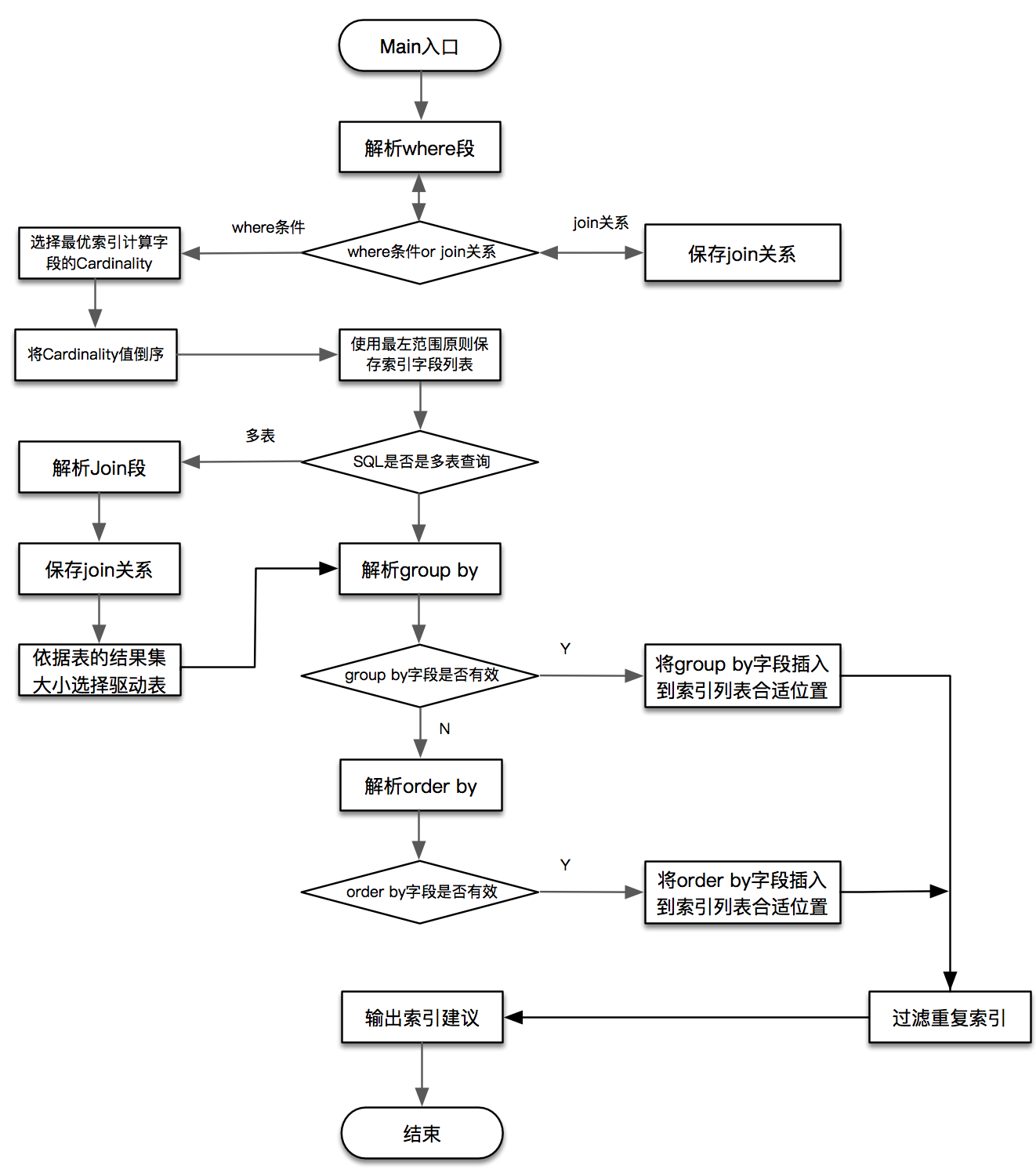
3. 环境
* os version
|
1
2
3
4
5
6
7
8
9
10
11
|
[root@SQLAdvisor ~]# cat /etc/redhat-release CentOS release 6.8 (Final)[root@SQLAdvisor ~]# uname -r2.6.32-642.3.1.el6.x86_64[root@SQLAdvisor ~]# uname -nSQLAdvisor[root@SQLAdvisor ~]# getenforce Disabled |
* mysql version
|
1
2
3
4
5
6
7
|
mysql> show variables like 'version';+---------------+--------+| Variable_name | Value |+---------------+--------+| version | 5.7.18 |+---------------+--------+1 row in set (0.00 sec) |
4. 安装SQLAdvisor
* 获取最新代码
|
1
2
3
4
5
6
|
[root@SQLAdvisor ~]# git clone https://github.com/Meituan-Dianping/SQLAdvisor.gitInitialized empty Git repository in /root/SQLAdvisor/.git/remote: Counting objects: 1460, done.remote: Total 1460 (delta 0), reused 0 (delta 0), pack-reused 1460Receiving objects: 100% (1460/1460), 19.92 MiB | 209 KiB/s, done.Resolving deltas: 100% (368/368), done. |
* 安装依赖项
|
1
2
3
4
5
6
7
|
[root@SQLAdvisor ~]# yum -y install cmake libaio-devel libffi-devel glib2 glib2-devel[root@SQLAdvisor ~]# yum -y install [root@SQLAdvisor ~]# yum -y install Percona-Server-shared-56 [root@SQLAdvisor ~]# ln -s /usr/lib64/libperconaserverclient_r.so.18 /usr/lib64/libperconaserverclient_r.so |
* 编译依赖项sqlparser
|
1
2
3
4
5
|
[root@SQLAdvisor ~]# cd SQLAdvisor/[root@SQLAdvisor SQLAdvisor]# cmake -DBUILD_CONFIG=mysql_release -DCMAKE_BUILD_TYPE=debug -DCMAKE_INSTALL_PREFIX=/usr/local/sqlparser ./[root@SQLAdvisor SQLAdvisor]# make && make install |
* 安装SQLAdvisor
|
1
2
3
4
5
|
[root@SQLAdvisor SQLAdvisor]# cd sqladvisor/[root@SQLAdvisor sqladvisor]# cmake -DCMAKE_BUILD_TYPE=debug ./[root@SQLAdvisor sqladvisor]# make |
* SQLAdvisor Info
|
1
2
3
4
5
6
7
8
9
10
11
12
13
14
15
16
17
18
|
[root@SQLAdvisor sqladvisor]# ./sqladvisor --helpUsage: sqladvisor [OPTION...] sqladvisorSQL Advisor SummaryHelp Options: -?, --help Show help optionsApplication Options: -f, --defaults-file sqls file -u, --username username -p, --password password -P, --port port -h, --host host -d, --dbname database name -q, --sqls sqls -v, --verbose 1:output logs 0:output nothing |
5. 测试
* 生成测试数据表
|
1
2
3
4
5
6
7
8
9
10
11
12
13
14
15
16
17
18
19
20
21
|
mysql> create database test1 character set utf8mb4;Query OK, 1 row affected (0.00 sec)mysql> create table user( -> id INT PRIMARY KEY AUTO_INCREMENT, -> name VARCHAR(64) NOT NULL, -> age int, -> sex int -> )ENGINE=INNODB DEFAULT CHARSET=utf8mb4;Query OK, 0 rows affected (0.13 sec)mysql> desc user;+-------+-------------+------+-----+---------+----------------+| Field | Type | Null | Key | Default | Extra |+-------+-------------+------+-----+---------+----------------+| id | int(11) | NO | PRI | NULL | auto_increment || name | varchar(64) | NO | | NULL | || age | int(11) | YES | | NULL | || sex | int(11) | YES | | NULL | |+-------+-------------+------+-----+---------+----------------+4 rows in set (0.01 sec) |
* 生成测试数据
|
1
2
3
4
5
6
7
8
9
10
11
12
13
14
15
16
17
18
19
20
21
22
23
24
25
26
27
28
29
30
31
32
33
34
35
36
37
38
|
mysql> insert into user(name,age, sex) select 'lisea', 25, 1;Query OK, 1 row affected (0.01 sec)Records: 1 Duplicates: 0 Warnings: 0mysql> insert into user(name,age, sex) select concat(name, '1'), age+1, sex+1 from user;Query OK, 1 row affected (0.02 sec)Records: 1 Duplicates: 0 Warnings: 0mysql> insert into user(name,age, sex) select concat(name, '2'), age+2, sex from user;Query OK, 2 rows affected (0.02 sec)Records: 2 Duplicates: 0 Warnings: 0mysql> insert into user(name,age, sex) select concat(name, '3'), age+2, sex from user;Query OK, 4 rows affected (0.18 sec)Records: 4 Duplicates: 0 Warnings: 0......mysql> insert into user(name,age, sex) select concat(name, '10'), age+2, sex from user;Query OK, 512 rows affected (0.24 sec)Records: 512 Duplicates: 0 Warnings: 0mysql> insert into user(name,age, sex) select concat(name, '11'), age+4, sex from user;Query OK, 1024 rows affected (0.79 sec)Records: 1024 Duplicates: 0 Warnings: 0mysql> select count(1) from user;+----------+| count(1) |+----------+| 2048 |+----------+1 row in set (0.01 sec) |
* 命令行传参调用测试SQLAdvisor [查找非索引行]
|
1
2
3
4
5
6
7
8
9
10
11
12
13
14
15
16
17
18
19
20
21
22
23
24
25
26
27
28
29
30
31
32
33
34
|
[root@SQLAdvisor sqladvisor]# ./sqladvisor -h 127.0.0.1 -P 3306 -u root -p '123' -d test1 -q "select * from user where name = 'lisea'" -v 12017-10-27 05:35:49 34059 [Note] 第1步: 对SQL解析优化之后得到的SQL:select `*` AS `*` from `test1`.`user` where (`name` = 'lisea') 2017-10-27 05:35:49 34059 [Note] 第2步:开始解析where中的条件:(`name` = 'lisea') 2017-10-27 05:35:49 34059 [Note] show index from user 2017-10-27 05:35:49 34059 [Note] show table status like 'user' 2017-10-27 05:35:49 34059 [Note] select count(*) from ( select `name` from `user` FORCE INDEX( PRIMARY ) order by id DESC limit 1024) `user` where (`name` = 'lisea') 2017-10-27 05:35:49 34059 [Note] 第3步:表user的行数:2048,limit行数:1024,得到where条件中(`name` = 'lisea')的选择度:1024 2017-10-27 05:35:49 34059 [Note] 第4步:开始验证 字段name是不是主键。表名:user 2017-10-27 05:35:49 34059 [Note] show index from user where Key_name = 'PRIMARY' and Column_name ='name' and Seq_in_index = 1 2017-10-27 05:35:49 34059 [Note] 第5步:字段name不是主键。表名:user 2017-10-27 05:35:49 34059 [Note] 第6步:开始验证 字段name是不是主键。表名:user 2017-10-27 05:35:49 34059 [Note] show index from user where Key_name = 'PRIMARY' and Column_name ='name' and Seq_in_index = 1 2017-10-27 05:35:49 34059 [Note] 第7步:字段name不是主键。表名:user 2017-10-27 05:35:49 34059 [Note] 第8步:开始验证表中是否已存在相关索引。表名:user, 字段名:name, 在索引中的位置:1 2017-10-27 05:35:49 34059 [Note] show index from user where Column_name ='name' and Seq_in_index =1 2017-10-27 05:35:49 34059 [Note] 第9步:开始输出表user索引优化建议: 2017-10-27 05:35:49 34059 [Note] Create_Index_SQL:alter table user add index idx_name(name) 2017-10-27 05:35:49 34059 [Note] 第10步: SQLAdvisor结束! |
* 命令行传参调用测试SQLAdvisor [查找索引行]
|
1
2
3
4
5
6
7
8
9
10
11
12
13
14
15
16
17
18
19
20
21
22
|
[root@SQLAdvisor sqladvisor]# ./sqladvisor -h 127.0.0.1 -P 3306 -u root -p '123' -d test1 -q "select * from user where id = 1" -v 12017-10-27 05:36:46 34062 [Note] 第1步: 对SQL解析优化之后得到的SQL:select `*` AS `*` from `test1`.`user` where (`id` = 1) 2017-10-27 05:36:46 34062 [Note] 第2步:开始解析where中的条件:(`id` = 1) 2017-10-27 05:36:46 34062 [Note] show index from user 2017-10-27 05:36:46 34062 [Note] show table status like 'user' 2017-10-27 05:36:46 34062 [Note] select count(*) from ( select `id` from `user` FORCE INDEX( PRIMARY ) order by id DESC limit 1024) `user` where (`id` = 1) 2017-10-27 05:36:46 34062 [Note] 第3步:表user的行数:2048,limit行数:1024,得到where条件中(`id` = 1)的选择度:1024 2017-10-27 05:36:46 34062 [Note] 第4步:开始验证 字段id是不是主键。表名:user 2017-10-27 05:36:46 34062 [Note] show index from user where Key_name = 'PRIMARY' and Column_name ='id' and Seq_in_index = 1 2017-10-27 05:36:46 34062 [Note] 第5步:字段id是主键。表名:user 2017-10-27 05:36:46 34062 [Note] 第6步:表user 经过运算得到的索引列首列是主键,直接放弃,没有优化建议 2017-10-27 05:36:46 34062 [Note] 第7步: SQLAdvisor结束! |
* 配置文件传参调用
|
1
2
3
4
5
6
7
8
9
10
11
12
13
14
15
16
17
18
19
20
21
22
23
24
25
26
27
28
29
30
31
32
33
34
35
36
37
38
39
40
41
42
43
|
[root@SQLAdvisor sqladvisor]# cat sql.cnf [sqladvisor]username=rootpassword=123host=127.0.0.1port=3306dbname=test1sqls=select * from user where name = 'lisea'[root@SQLAdvisor sqladvisor]# ./sqladvisor -f sql.cnf -v 12017-10-27 05:40:14 34070 [Note] 第1步: 对SQL解析优化之后得到的SQL:select `*` AS `*` from `test1`.`user` where (`name` = 'lisea') 2017-10-27 05:40:14 34070 [Note] 第2步:开始解析where中的条件:(`name` = 'lisea') 2017-10-27 05:40:14 34070 [Note] show index from user 2017-10-27 05:40:14 34070 [Note] show table status like 'user' 2017-10-27 05:40:14 34070 [Note] select count(*) from ( select `name` from `user` FORCE INDEX( PRIMARY ) order by id DESC limit 1024) `user` where (`name` = 'lisea') 2017-10-27 05:40:14 34070 [Note] 第3步:表user的行数:2048,limit行数:1024,得到where条件中(`name` = 'lisea')的选择度:1024 2017-10-27 05:40:14 34070 [Note] 第4步:开始验证 字段name是不是主键。表名:user 2017-10-27 05:40:14 34070 [Note] show index from user where Key_name = 'PRIMARY' and Column_name ='name' and Seq_in_index = 1 2017-10-27 05:40:14 34070 [Note] 第5步:字段name不是主键。表名:user 2017-10-27 05:40:14 34070 [Note] 第6步:开始验证 字段name是不是主键。表名:user 2017-10-27 05:40:14 34070 [Note] show index from user where Key_name = 'PRIMARY' and Column_name ='name' and Seq_in_index = 1 2017-10-27 05:40:14 34070 [Note] 第7步:字段name不是主键。表名:user 2017-10-27 05:40:14 34070 [Note] 第8步:开始验证表中是否已存在相关索引。表名:user, 字段名:name, 在索引中的位置:1 2017-10-27 05:40:14 34070 [Note] show index from user where Column_name ='name' and Seq_in_index =1 2017-10-27 05:40:14 34070 [Note] 第9步:开始输出表user索引优化建议: 2017-10-27 05:40:14 34070 [Note] Create_Index_SQL:alter table user add index idx_name(name) 2017-10-27 05:40:14 34070 [Note] 第10步: SQLAdvisor结束! |
MySQL--------SQL优化审核工具实战的更多相关文章
- mysql sql优化实例
mysql sql优化实例 优化前: pt-query-degist分析结果: # Query 3: 0.00 QPS, 0.00x concurrency, ID 0xDC6E62FA021C85B ...
- sql自动审核工具-inception
[inception使用规范及说明文档](http://mysql-inception.github.io/inception-document/usage/)[代码仓库](https://githu ...
- Mysql SQL优化&执行计划
SQL优化准则 禁用select * 使用select count(*) 统计行数 尽量少运算 尽量避免全表扫描,如果可以,在过滤列建立索引 尽量避免在where子句对字段进行null判断 尽量避免在 ...
- 18.Mysql SQL优化
18.SQL优化18.1 优化SQL语句的一般步骤 18.1.1 通过show status命令了解各种SQL的执行频率show [session|global] status; -- 查看服务器状态 ...
- mysql sql优化及注意事项
sql优化分析 通过slow_log等方式可以捕获慢查询sql,然后就是减少其对io和cpu的使用(不合理的索引.不必要的数据访问和排序)当我们面对具体的sql时,首先查看其执行计划A.看其是否使用索 ...
- MySQL sql优化(摘抄自文档)
前言 有人反馈之前几篇文章过于理论缺少实际操作细节,这篇文章就多一些可操作性的内容吧. 注:这篇文章是以 MySQL 为背景,很多内容同时适用于其他关系型数据库,需要有一些索引知识为基础. 优化目标 ...
- MySQL SQL优化
一.优化数据库的一般步骤: (A) 通过 show status 命令了解各种SQL的执行频率. (B) 定位执行效率较低的SQL语句,方法两种: 事后查询定位:慢查询日志:--log-slow-qu ...
- MySQL SQL优化之in与range查询【转】
本文来自:http://myrock.github.io/ 首先我们来说下in()这种方式的查询.在<高性能MySQL>里面提及用in这种方式可以有效的替代一定的range查询,提升查询效 ...
- MySql Sql 优化技巧分享
有天发现一个带inner join的sql 执行速度虽然不是很慢(0.1-0.2),但是没有达到理想速度.两个表关联,且关联的字段都是主键,查询的字段是唯一索引. sql如下: SELECT p_it ...
随机推荐
- c++学习笔记_2
前言:本笔记所对应的课程为中国大学mooc中北京大学的程序设计与算法(三)C++面向对象程序设计,主要供自己复习使用,且本笔记建立在会使用c和java的基础上,只针对与c和java的不同来写 第二章 ...
- 生成SSH秘钥连接github(详细教程)
第一步.首先,检查下自己之前有没有已经生成: 在开始菜单中打开git下的git bash(当然,在其他目录下打开git bash也是一样的): 然后执行 cd ~/.ssh 第二步.如果能进入到.ss ...
- [OpenCV] sift demo
运行环境:vs2012+opencv320 sift 需要的头文件为 <opencv2/xfeatures2d.hpp> #include <opencv2/opencv.hpp&g ...
- SpringBoot起步
1.SpringBoot依赖包导入 方式一:将spring-boot的依赖为父pom出现 <parent> <groupId>org.springframework.boot& ...
- Spring实例化Bean三种方法:构造器、静态工厂、实例工厂
Spring中Bean相当于java中的类,可以通过xml文件对bean进行配置和管理. 一.Bean的实例化: 构造器实例化.静态工厂实例化.实例工厂方式实例化. 目录: 构造器实例化: xml配置 ...
- Python实现二叉树的非递归先序遍历
思路: 1. 使用列表保存结果: 2. 使用栈(列表实现)存储结点: 3. 当根结点存在,保存结果,根结点入栈: 4. 将根结点指向左子树: 5. 根结点不存在,栈顶元素出栈,并将根结点指向栈顶元素的 ...
- Python基础学习路径
1. Python数据结构 1. 基本数据类型(整数.小数.字符) 1.基本数据类型有5种:int bool float complex long 2.每一种数据类型该如何定义 3.数据类型之间可以强 ...
- 剑指offer42:数组和一个数字S,输出两个数的乘积最小的
1 题目描述 输入一个递增排序的数组和一个数字S,在数组中查找两个数,使得他们的和正好是S,如果有多对数字的和等于S,输出两个数的乘积最小的. 输出描述: 对应每个测试案例,输出两个数,小的先输出. ...
- 第6章:使用Python监控Linux系统
1.Python编写的监控工具 1).多功能系统资源统计工具dstat dstat是一个用Python编写的多功能系统资源统计工具,用来取代Linux下的vmstat,iostat,netstat和i ...
- 少儿编程Scratch第三讲:宇宙大战.枪战游戏
小朋友这周的表现还算不错.周末多数时间都由我陪(bi)着(zhe)做课本上的数学题,后来还学了英语.任重道远啊,语数外都还得加强,还远不到自己就能取得好成绩的阶段. 上周说好这周要做一个发射炮弹的游戏 ...