
(十八)SpringBoot之发送QQ邮件
一、引入maven依赖
    <dependencies>

        <dependency>

            <groupId>org.springframework.boot</groupId>

            <artifactId>spring-boot-starter-mail</artifactId>

        </dependency>

        <dependency>

            <groupId>org.springframework.boot</groupId>

            <artifactId>spring-boot-starter-web</artifactId>

        </dependency>

        <dependency>

            <groupId>org.springframework.boot</groupId>

            <artifactId>spring-boot-starter-tomcat</artifactId>

            <scope>provided</scope>

        </dependency>

        <dependency>

            <groupId>org.springframework.boot</groupId>

            <artifactId>spring-boot-starter-test</artifactId>

            <scope>test</scope>

        </dependency>

    </dependencies>
二、配置application.properties
spring.mail.host=smtp.qq.com

spring.mail.username=邮箱名

spring.mail.password=这里填邮箱的授权码

spring.mail.default-encoding=UTF-8

spring.mail.port=465

spring.mail.properties.mail.smtp.socketFactory.class=javax.net.ssl.SSLSocketFactory

spring.mail.properties.mail.debug=true
- 注意:
- PO3/SMTP服务必须开启
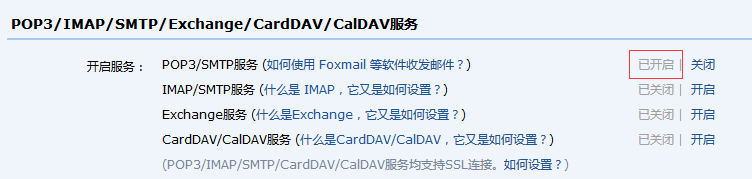
2.QQ邮箱发送邮件服务器主机名为:smtp.qq.com,必须使用使用SSL(spring.mail.properties.mail.smtp.socketFactory.class=javax.net.ssl.SSLSocketFactory),端口号465或587(spring.mail.port=465)
3. 发送邮件
package com.shyroke.controller;

import javax.mail.internet.MimeMessage;

import org.springframework.beans.factory.annotation.Autowired;

import org.springframework.mail.javamail.JavaMailSender;

import org.springframework.mail.javamail.MimeMessageHelper;

import org.springframework.web.bind.annotation.RequestMapping;

import org.springframework.web.bind.annotation.ResponseBody;

import org.springframework.web.bind.annotation.RestController;

@RestController

@RequestMapping("/mail")

public class MailController {

    @Autowired

    JavaMailSender mailSender;

    @ResponseBody

    @RequestMapping("/send")

    public Object sendEmail() {

        try {

            final MimeMessage mimeMessage = this.mailSender.createMimeMessage();

            final MimeMessageHelper message = new MimeMessageHelper(mimeMessage);

            message.setFrom("qweyhj@qq.com");

            message.setTo("865386512@qq.com");

            message.setSubject("测试邮件主题");

            message.setText("测试邮件内容");

            this.mailSender.send(mimeMessage);

            return "sucesss";

        } catch (Exception ex) {

            ex.printStackTrace();

            return "error";

        }

    }

}
4. 结果
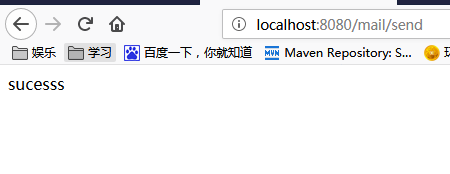

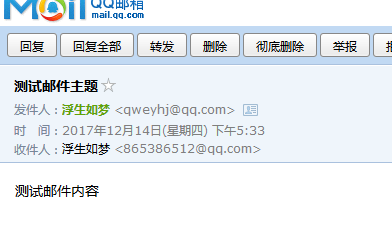
(十八)SpringBoot之发送QQ邮件的更多相关文章
- springBoot实现发送QQ邮件
一.导依赖 <!-- mail依赖--> <dependency> <groupId>org.springframework.boot</groupId> ...
- CI框架使用PHPmail插件发送QQ邮件:
有助请顶,不好请评.0:33 2016/3/12CI框架使用PHPmail插件发送QQ邮件:发送成功,不过修改了主机参数,还包含了一个phpmail中的一个另外的文件,详见下方:参见:http://c ...
- 5分钟 wamp下php phpmaile发送qq邮件 2015最新方法说明
13:40 2015/11/20 5分钟 wamp下php phpmaile发送qq邮件 2015最新方法说明 关键点:现在qq邮箱开通smtp服务后会给你一个很长的独立新密码,发邮件配置中的密码需要 ...
- 【python】脚本连续发送QQ邮件
今天习得用python写一个连续发送QQ邮件的脚本,经过测试,成功给国内外的服务器发送邮件,包括QQ邮箱.163邮箱.google邮箱,香港科技大学的邮箱和爱丁堡大学的邮箱.一下逐步解答相关技巧. 首 ...
- Java发送QQ邮件
面试的时候被问到这个问题,别人问我用Java发过邮件没有,被问得一脸懵逼.然后就研究了一下,不是很难,按照网上的方法折腾了几天就搞出来了. 首先,使用QQ邮箱发送邮件之前需要在邮箱里面配置,开启pop ...
- python3:利用SMTP协议发送QQ邮件+附件
转载请表明出处:https://www.cnblogs.com/shapeL/p/9115887.html 1.发送QQ邮件,首先必须知道QQ邮箱的SMTP服务器 http://service.mai ...
- java mail Received fatal alert: handshake_failure java 无法发送邮件问题 java 发送qq邮件(含源码)
java 无法发送邮件问题 java 发送qq邮件 报错:java mail Received fatal alert: handshake_failure (使用ssl) javax.mail.M ...
- Quartz.NET浅谈一 : 简单Job使用(定时发送QQ邮件)
Quartz.NET是一个全功能的开源作业调度系统,可用于从最小的应用程序到大型企业系统. 直接上代码吧... 一.新建一个控制台项目 略过 二.安装Nuget包 三.创建发送邮箱辅助工具类 stat ...
- 电子邮件协议及GO发送QQ邮件
目录 一.电子邮件的工作机制 1.1 SMTP 1.2 POP3 1.3 IMAP 二.邮件地址 三.MIME信息 四.使用golang发送qq邮件 一.电子邮件的工作机制 提供电子邮件服务的协议叫做 ...
随机推荐
- [ERR] 2006 - MySQL server has gone away如何解决
解决方案: max_allowed_packet = 16M 改大点! 文章来源:外星人来地球 欢迎关注,有问题一起学习欢迎留言.评论
- [Oracle] Oracle中和MySql的limit对应的方法
MySql很贴心,有个限制范围查询的limit函数,用起来也很方便,SQL不用嵌套.如下: select id,name,age,cdate as ctime from emp order by id ...
- opencv 检测人脸、人眼
This tutorial code’s is shown lines below. You can also download it from here . The second version ( ...
- 如何十倍提高你的webpack构建效率
前言 http://jafeney.com/2016/07/10/2016-07-10-webpack/ webpack 是个好东西,和 NPM 搭配起来使用管理模块实在非常方便.而 Babe ...
- memcache安装与简单介绍
本文参考自菜鸟教程中的内容. 安装 安装memcache的时候,请切换为root用户 root@centos # wget http://www.memcached.org/files/memcach ...
- 【420】链表实现Quack
quack.h // quack.h: an interface definition for a queue/stack #include <stdio.h> #include < ...
- java nio Files.newDirectoryStream用法
try(DirectoryStream<Path> dirStream = Files.newDirectoryStream(Paths.get(directory,"*.ts& ...
- Redis高级功能 - 慢查询日志
转自 https://segmentfault.com/a/1190000009915519
- jQuery BlockUI Plugin Demo 5(Simple Modal Dialog Example)
Simple Modal Dialog Example This page demonstrates how to display a simple modal dialog. The button ...
- Paper reading: High-Fidelity Pose and Expression Normalization for Face Recognition in the Wild(HPEN)
1. Introduction 人脸识别受到各种因素影响,其中最重要的两个影响是 pose 和 expression, 这两个因素会对 intra-person 变化产生极大的影响, 有时候甚至会超过 ...